Week 5: Electronics design
This week I want to try something new: instead of typing out everything, I want to see if I can dictate my thoughts and therefore communicate them more extensively.
This week is about PCB design. I want to use this week to make the PCB for the sinker EDM machine I want to build as my final project.
In the beginning I was very unsure if I want to use KiCad or Fusion for building the PCB. In the end I settled for KiCad because I already know that software, I kind of like to keep software separated and I also like the open source aspect of KiCad: it is free and it is continuously developed by the community for the community, so in the end I will probably stay with KiCad. What I have not done so far is working with the RP2350. I think the RP2350 is a good choice for this project because of the PIOs, which can generate very precise pulses independent of the main code. I actually use the Pico 2 W, I don’t think I need the Wi-Fi right now but it might become useful in the future. The Pico 2 W comes with enough pins for the project and can run everything we need.
With the CAD software and the Pico 2 W decided, the question was how do I design it overall.
My first overall idea for the design was: we probably have a power stage to power everything with 12 V, and we will have a high voltage side for the sparks. We probably need some sort of adjustment for the sparks, so that we have control over the overall power, the voltage of the spark, the duration of the spark and so on. So maybe that will include a bank of resistors and capacitors we can turn on and off to control that. We obviously have our microcontroller, which will need some caps and resistors around it. We probably have some ports and points for the oscilloscope to test and especially also measure the sparks and the spark curves, maybe we add some gap sensing, and we need something to drive the linear stage that moves the sinking tool up and down.
So instead of overthinking all the details I figured I start and start actually with the power inputs and then work our way through the microcontroller maybe some interlocks then we will see where it ends up.
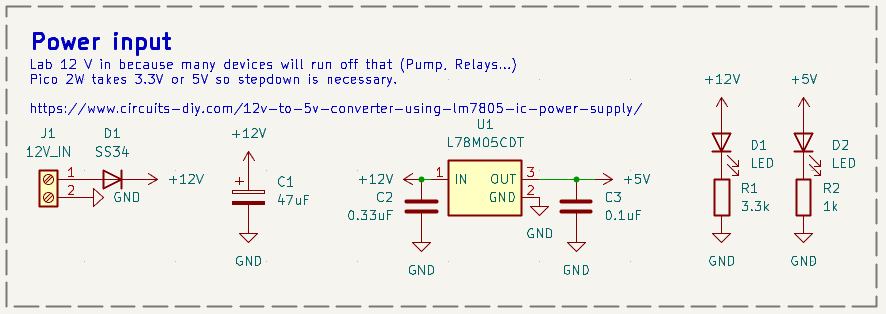
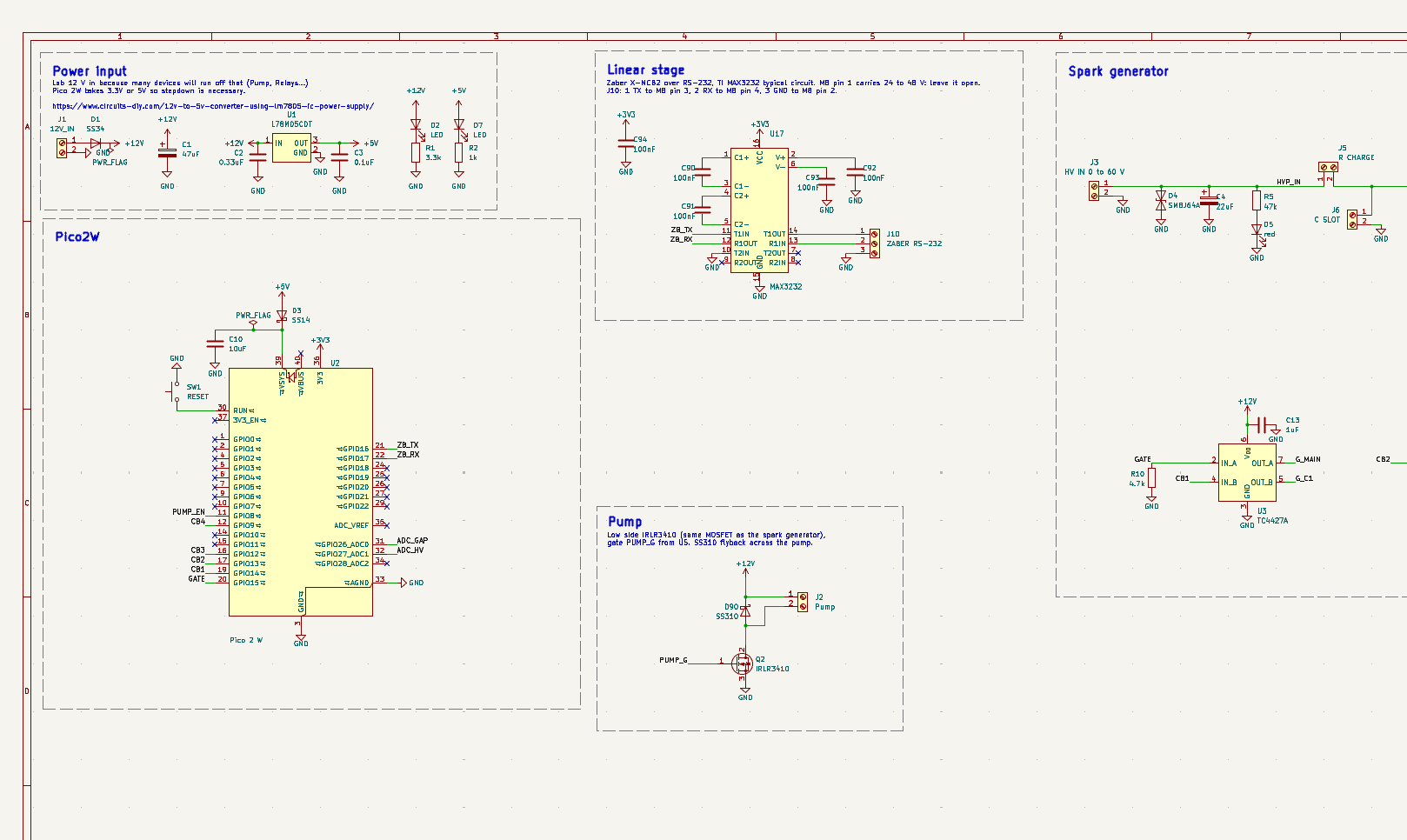
I started with the power input. I used a reference design. Overall power in will be 12 V from a lab supply to drive the pump and the gate drivers, and I want a 5 V regulator (LM7805 type, L78M05 in SMD) to power the Pico 2 W.
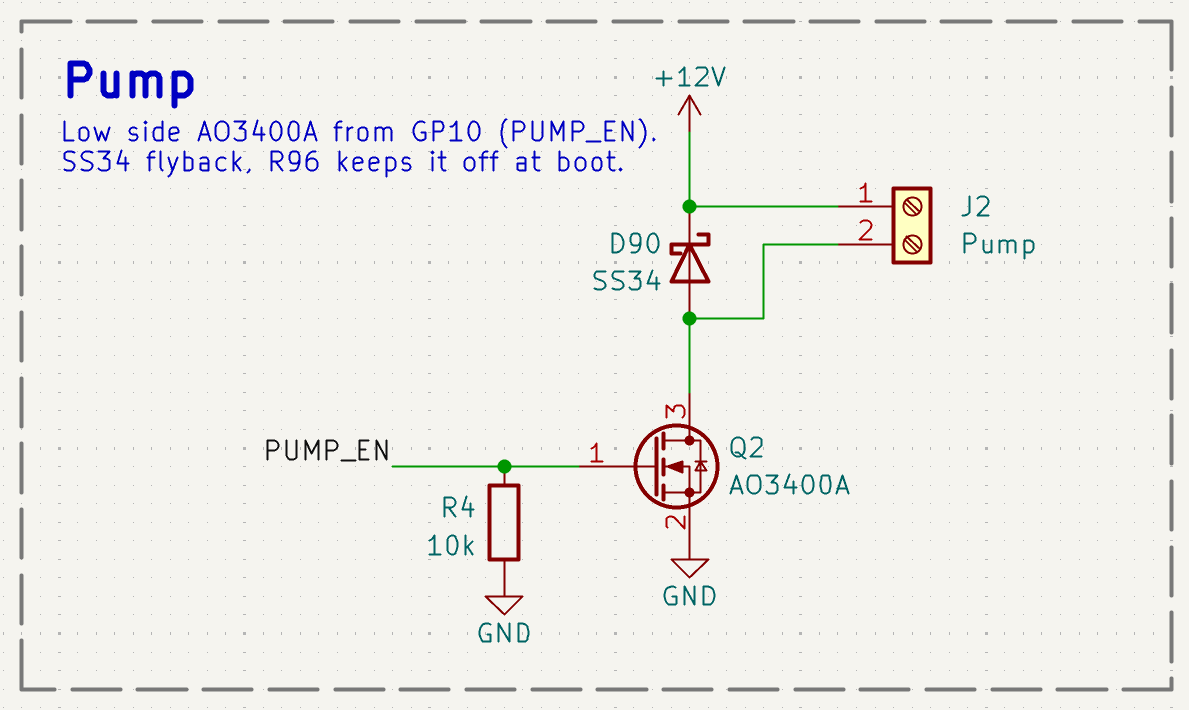
I continued with the pump. We need to filter and keep the liquid in motion, for that we will be using a simple 12 V plunger pump, so we just need some sort of switch capable of switching the 12 V. I decided for a simple MOSFET capable of switching many amps, plus a flyback diode across the pump, because the pump is a coil and would kill the MOSFET when switching off.
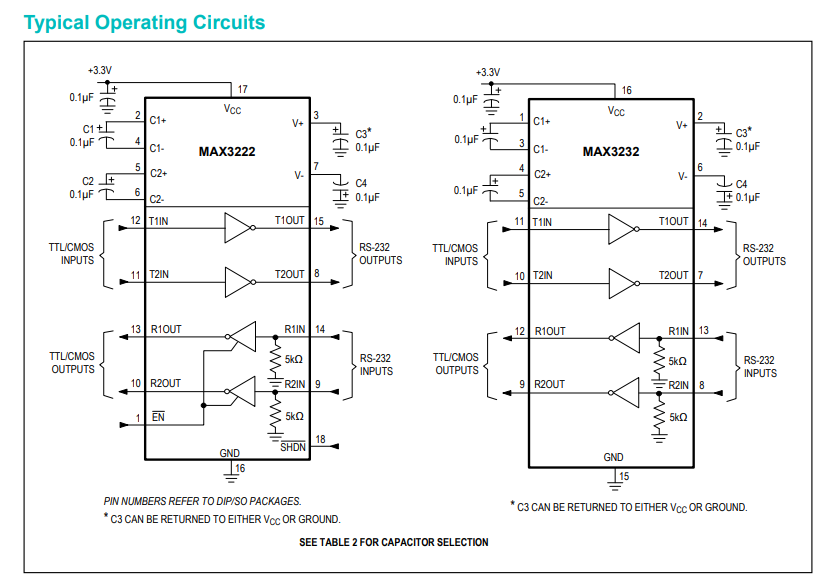
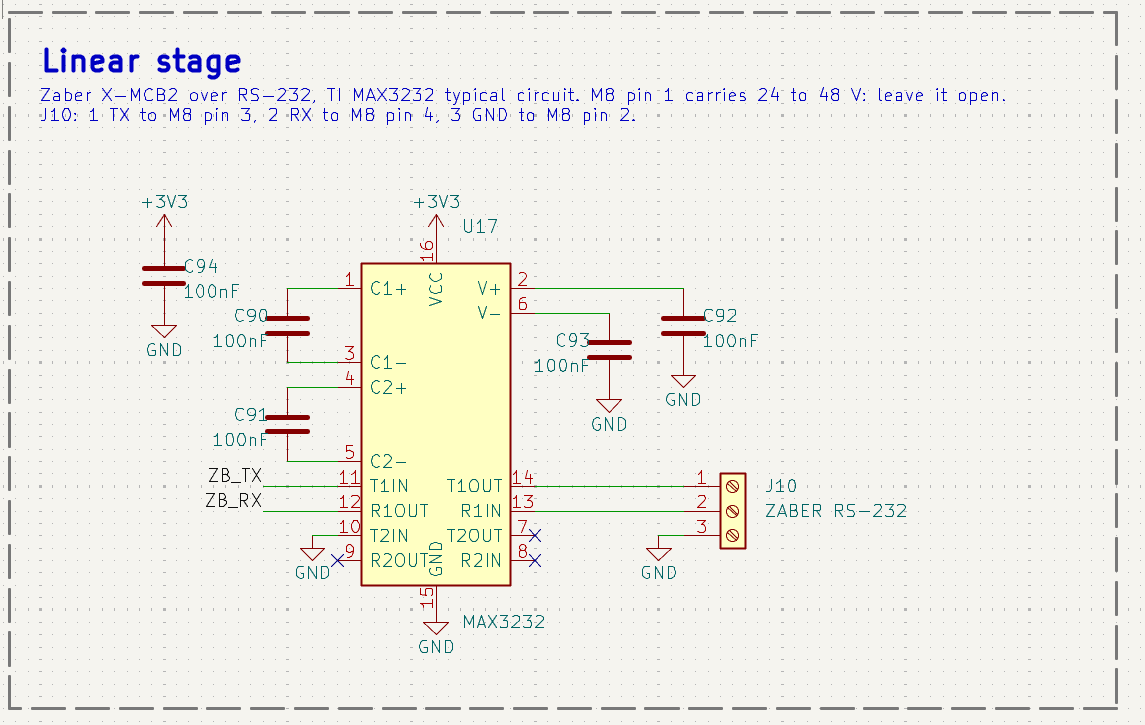
Then the linear stage, we only need one linear stage to move the tool up and down. The movement should be fast and precise, we luckily have a Zaber linear stage (https://photonics.laser2000.co.uk/wp-content/uploads/2020/06/LRM-Series-Datasheet.pdf) with a controller (https://www.zaber.com/manuals/X-MCB2) . By looking up the interface I found out it is a RS-232 interface. So we need a way that the Pico can talk RS-232, a great way I found is the MAX3232. It seems to be a simple to interface circuit enabling exactly what I need. And the Typical Operating Circuit is not too complicated, which I like, especially I like the fact that we don’t need another voltage level (the MAX3232 creates the plus and minus 5.5 V required for the protocol internally from the 3.3 V) which is very convenient:
So I integrated it into the KiCad and assigned it to Labels which we can connect to the Pico.
The last major part we need to look at is the spark generator. For the spark generator I want to be able to pulse individual sparks, and by using capacitors and resistors which we can mix and match, together with the lab power supply where we set the voltage we can control many relevant aspects of the spark pulse including overall pulse energy, voltage and pulse duration.
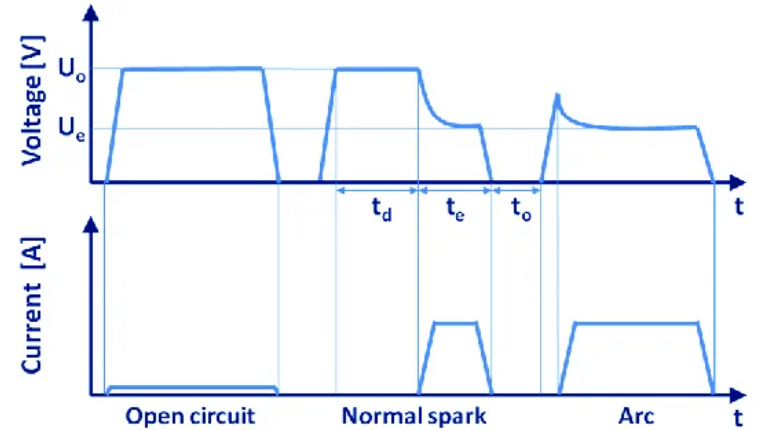

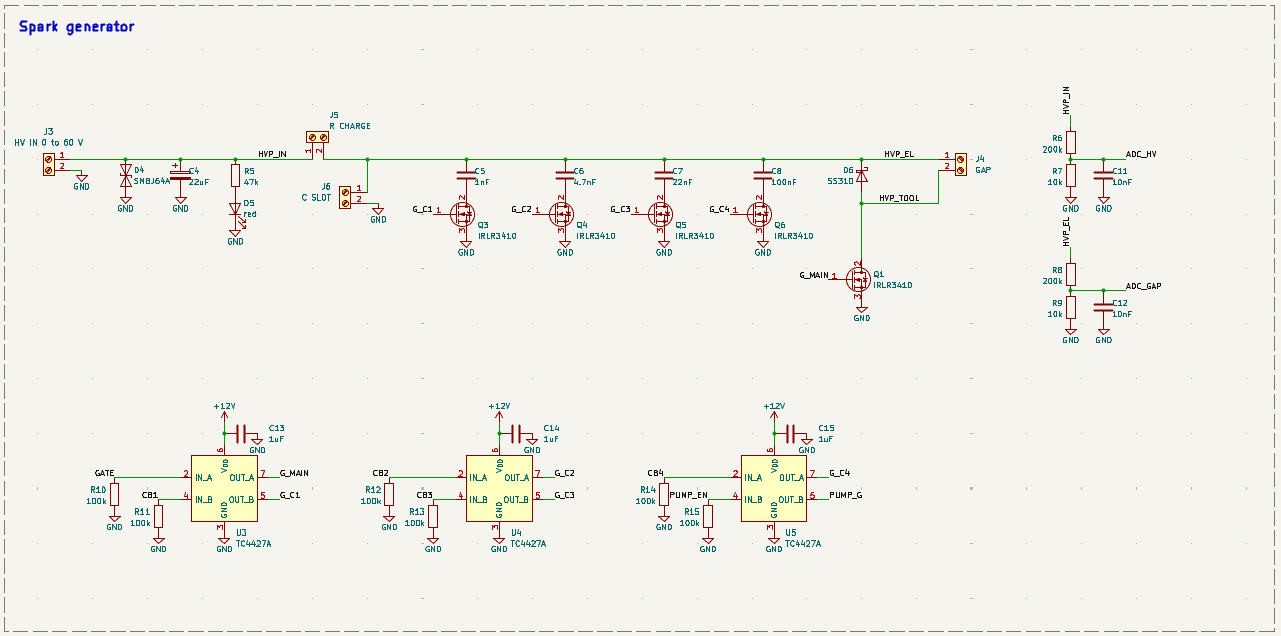
I decided to stay simple in terms of selectable Capacitors and use a screw terminal for the charging resistor for now, I hope that in the next version I can add more caps and resistor selection to the board, but for testing out if everything works this should be good enough.
To keep it simple I use only one type of MOSFET for the whole board, the IRLR3410 (100 V, logic level, DPAK). The HV lab supply is floating, so its minus becomes the board ground and all switches sit on the low side, that way I don’t need an isolated gate driver. Q1 switches the tool return: on means sparks, off means stop. The four capacitors (1 nF, 4.7 nF, 22 nF and 100 nF) can be switched in and out by their own MOSFETs, and there is an extra screw terminal for my own capacitor. Because 3.3 V from the Pico is not enough to fully turn on a 100 V MOSFET, I added three small TC4427A gate drivers that switch the gates with 12 V. Two voltage dividers (21:1) go to the ADC of the Pico, one measures the supply and one the gap voltage, which I can later use to control the feed of the linear stage.
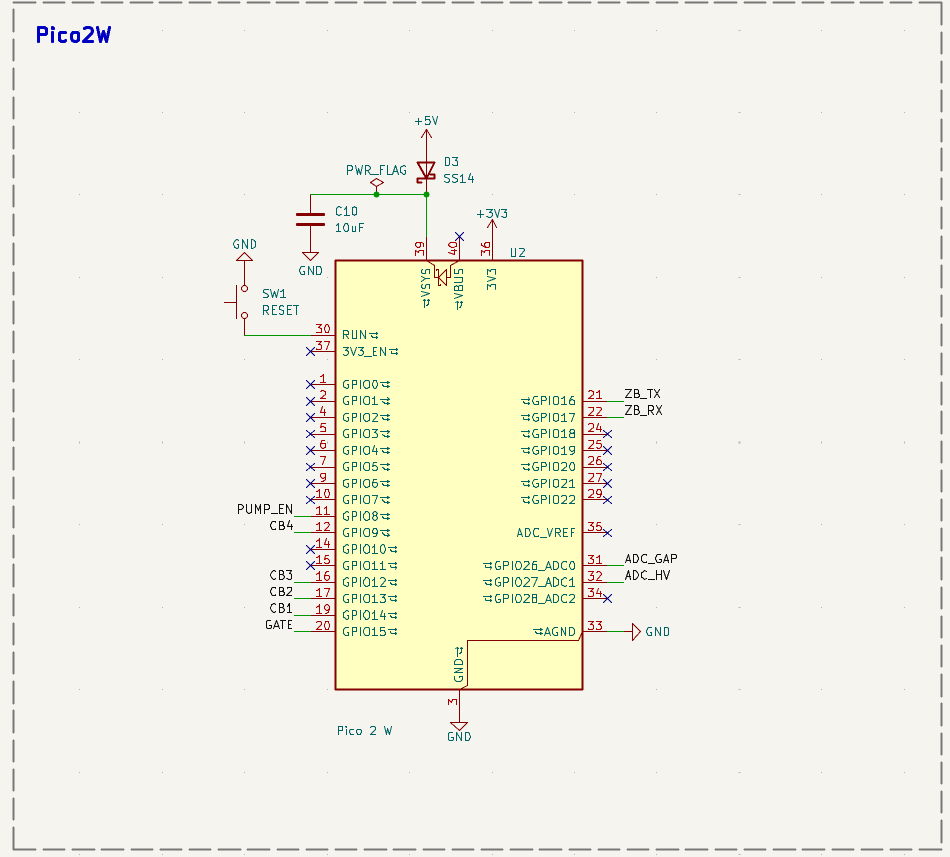
In the last step I came back to the Pico 2 W to connect all the labels we generated and double checked that everything is connected.
An overview of the design as it is:
Moving towards the PCB layout. I assigned all the elements the right footprints (I used KiCad footprints, 1206 with larger hand solder pads for all resistors and capacitors, and for the Pico I used one I found online). I first placed all the screw terminals and the Pico at the edges of my preliminary sized PCB and grouped the elements.
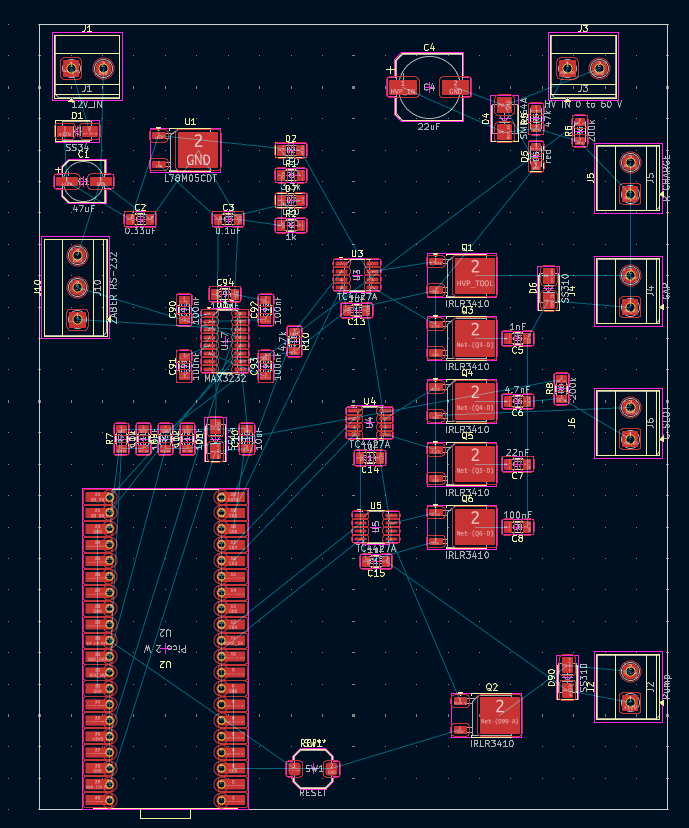
I connected the pads as they need to be connected, however there are still some pads not fully connected but that will be fixed with a second layer and a lot of them are also ground plane connections:
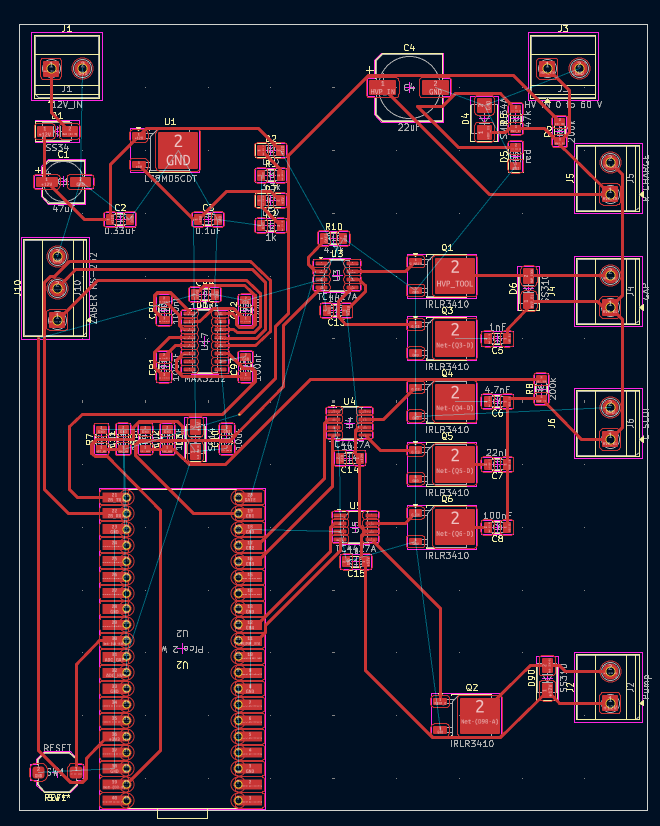
Design files
- sparky_v1_kicad.zip: KiCad project of the Sparky v1 board (schematic, PCB and custom symbols)
The Pico 2 W footprint (RaspberryPi_PicoW_Combined, SMD castellated and THT combined) is not my own, it comes from the Fab Academy KiCad library (FabLib) and is licensed under CC BY 4.0. A copy is included in the zip.
AI use
Grammar check of the text with Claude Opus 5.5.