Post 3: Embedded Programming
I happen to have a bunch of microcontrollers lying around in my room, how much nonsense can I make with them? And what if I find an FPGA?
group assignment:
- demonstrate and compare the toolchains and development workflows for available embedded architectures
individual assignment:
- browse through the data sheet for a microcontroller
- write and test a program for an embedded system using a microcontroller to interact (with input &/or output devices) and communicate (with wired or wireless connections)
- extra credit: assemble the system
- extra credit: try different languages &/or development
I intend to use two microcontrollers for my Blade of Cognition project, one for each of the two blades. I might also need motors or other mechanical components to secure the two halves together.
Some thoughts I have about the electronics design include
- Microcontrollers with some form of wireless capabilities: I would like the two controllers (let’s call them the blade controllers) to be able to communicate with each other and also communicate with an external device such as a phone.
- Small form factor: There isn’t a lot of space in the handle of the blade
- Battery control and charging: The LED strips are fairly power hungry (most WS2812B LEDs at 5V can consume 100mW per LED) and so we need both a battery and a charging circuit to charge those batteries as needed.
I happen to have some ESP32-WROOM-32 microcontrollers lying around from other projects that I have worked on. The datasheet for that controller can be found here. Some important capabilities of this controller include
- 32-bit Xtensa dual core LX6 microprocessor up to 240MHz
- Wireless connection via Wifi (802.11b/g/n) and Bluetooth LE
- 32 GPIO Pins (definitions here), with UART, SPI, I2C, I2S and other protocols whose details can be found in the digital peripheral section of the datasheet and in even greater detail in Section 19 of the ESP32 technical reference.
- Operates at 3.0-3.6V
- Relatively compact form factor (18mm by 25.5mm by 3.1mm, details in the module dimensions)
I wanted to try my hand at developing in different programming languages. There are 3 languages that I am most familiar with: C, Python and Rust. For this post, I will be working in mostly Python and Rust.
Post-week note: I wrote all of the above before starting the week’s work. It turns out that I had a lot to work on last week as I was catching up on everything else after Wildfire.
There are two main projects I wanted to work on this week: The QPAD using the Seeed Studio XIAO RP2040 using embedded Rust and a WS2812B LED strip with an ESP32 using MicroPython. I did not end up having enough time to work on the ESP32 as its own project, so I’ll have to make up for it in other weeks.
Devlopment Environment
WSL Setup
lsusb displays information about USB buses is a Linux system and any devices connected to the USB interfaces. When run in WSL2, lsusb will not be able to find any devices as connecting USB devices is not natively available in WSL. Thus, we will need to install USBIPD-WIN. USBIPD needs to be run as administrator in Powershell.
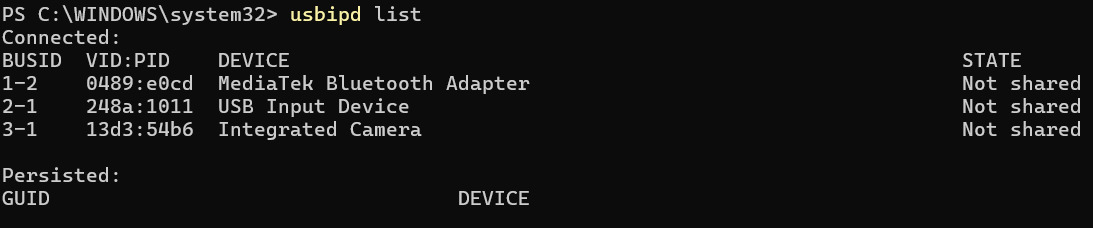
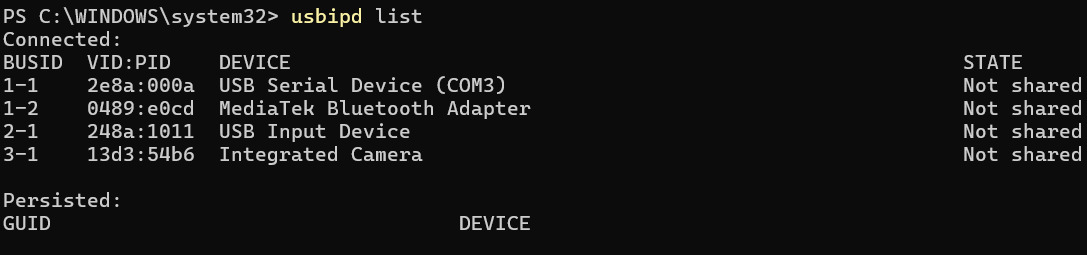
After installing usbipd, we can now see the XIAO on BUSID 1-1. We can then bind it with usbipd bind --busid 1-1 followed by usbipd attach --wsl --busid 1-1 to give it to WSL. Notably, usbipd attach --wsl --auto-attach --busid 1-1 will keep it attached upon reconnecting.

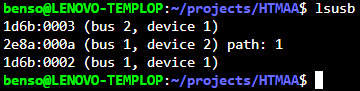
We can now see the XIAO as /dev/ttyACM0.

Packages
uv: Managing Python packages
uv is a Python package manager that is much faster than pip. I prefer using it, and it can be installed by following these installation instructions.
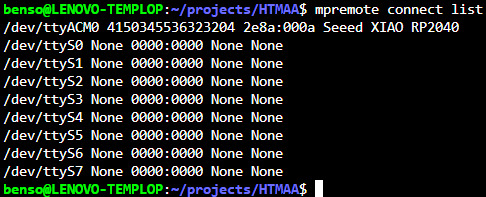
MicroPython support is enabled though the mpremote package. Running mpremote connect list should show the list of MicroPython peripehrals connected to the computer
Rust:
In order to use an RP2040 with Rust, one needs to target the processor architecture of the processor as well as package the software in the uf2 file format.
The RP2040 on the XIAO has a Dual Cortex M0+ processor, so we need to compile for the thumbv6m-none-eabi architecture. We can get rust to compile to this architecture by adding it as a target with rustup target add thumbv6m-none-eabi, but I already had it installed.

One can then use the elf2uf2-rs crate to convert the executable built into the uf2 format that can be uploaded to the XIAO. This upload can be done by pressing BOOTSEL on the XIAO and plugging it into my laptop. A removable drive will appear in the File Explorer and the uf2 file can be copied to the XIAO.
To start, I grabbed a RP2040 project template from the rp-rs repository and followed the instructions on their README. The flashing method we will be using is picotool. The template uses the Raspberry Pi Pico by default, so I need to use the seeeduino-xiao-rp2040 crate instead of the rp-pico crate.
To sanity check that my tool chain worked and that I had the right pins, I modified the starter project code to blink the red, green, and blue LEDs on the XIAO in that order.
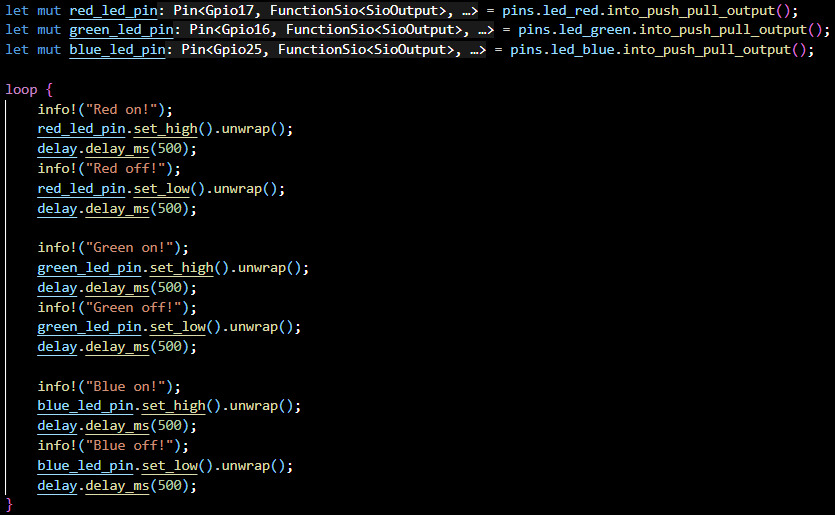
To load the program onto the XIAO, I had to build with cargo build --release and convert the executable into uf2 via elf2uf2-rs target/thumbv6m-none-eabi/release/qpad-project qpad-project.uf2. Then, I copied the uf2 file into the RP2040.
Turns out I didn’t read the datasheet carefully and these LEDs were active LOW, which meant that they blinked off for 500ms before turning back on instead of blinking on for 500ms.
Compiling for Rust initially takes a very long time, sometimes in on the order of minutes. However, cargo does cache compiled crates so only the code that changed needs to be recompiled.
Programming the XIAO
I’m in too deep with the Rust so I might as well continue in Rust for the rest of the project, Python be damned.
Based on the QPAD documentation and the XIAO documentation, we have the following pin mappings
- TOUCH0 : GPIO3
- TOUCH1 : GPIO4
- TOUCH2 : GPIO2
- TOUCH3 : GPIO27
- TOUCH4 : GPIO1
- TOUCH5 : GPIO26
- SDA : GPIO6 / I2C0-SDA
- SCL : GPIO7 / I2C0-SCL
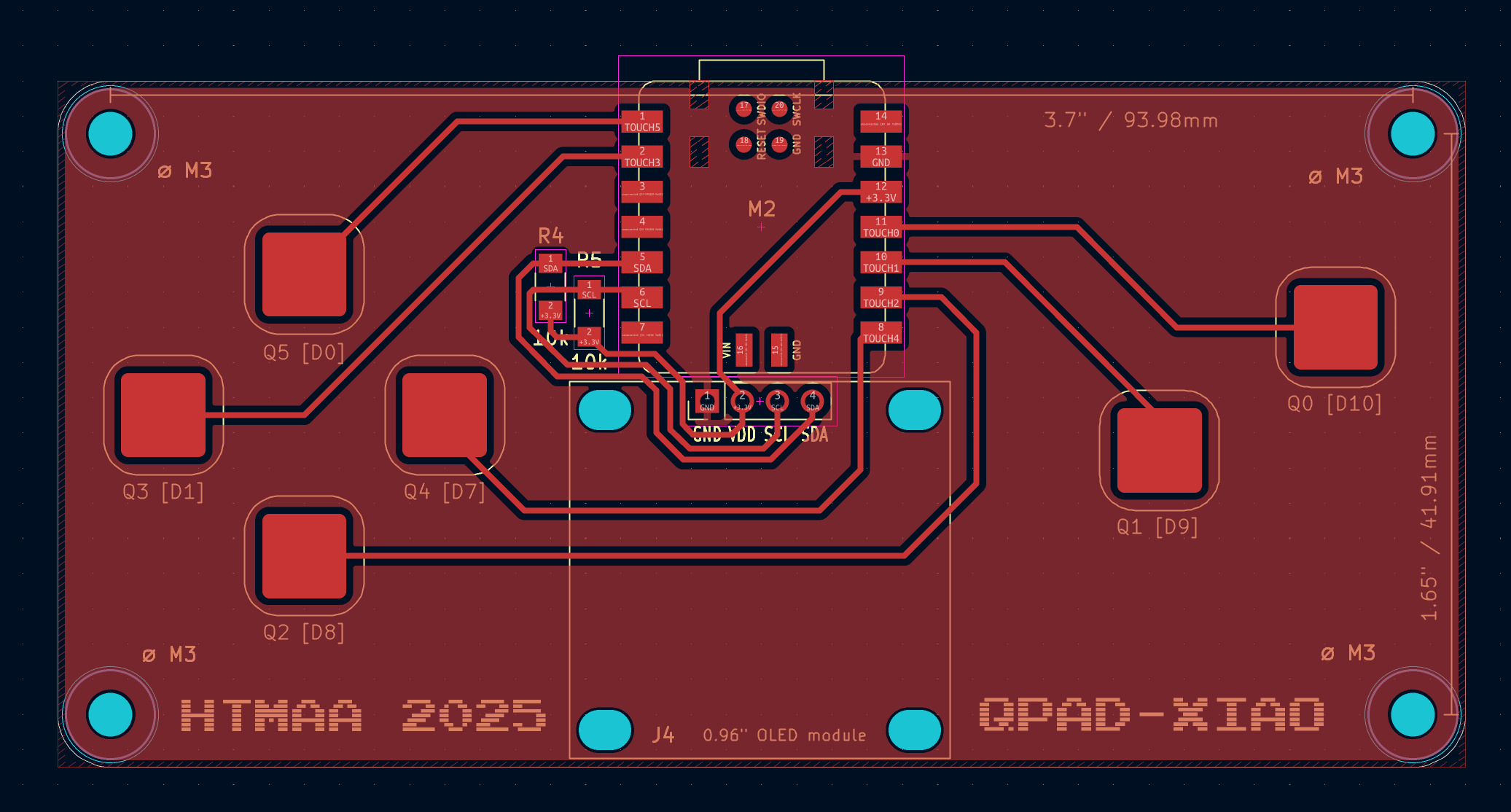
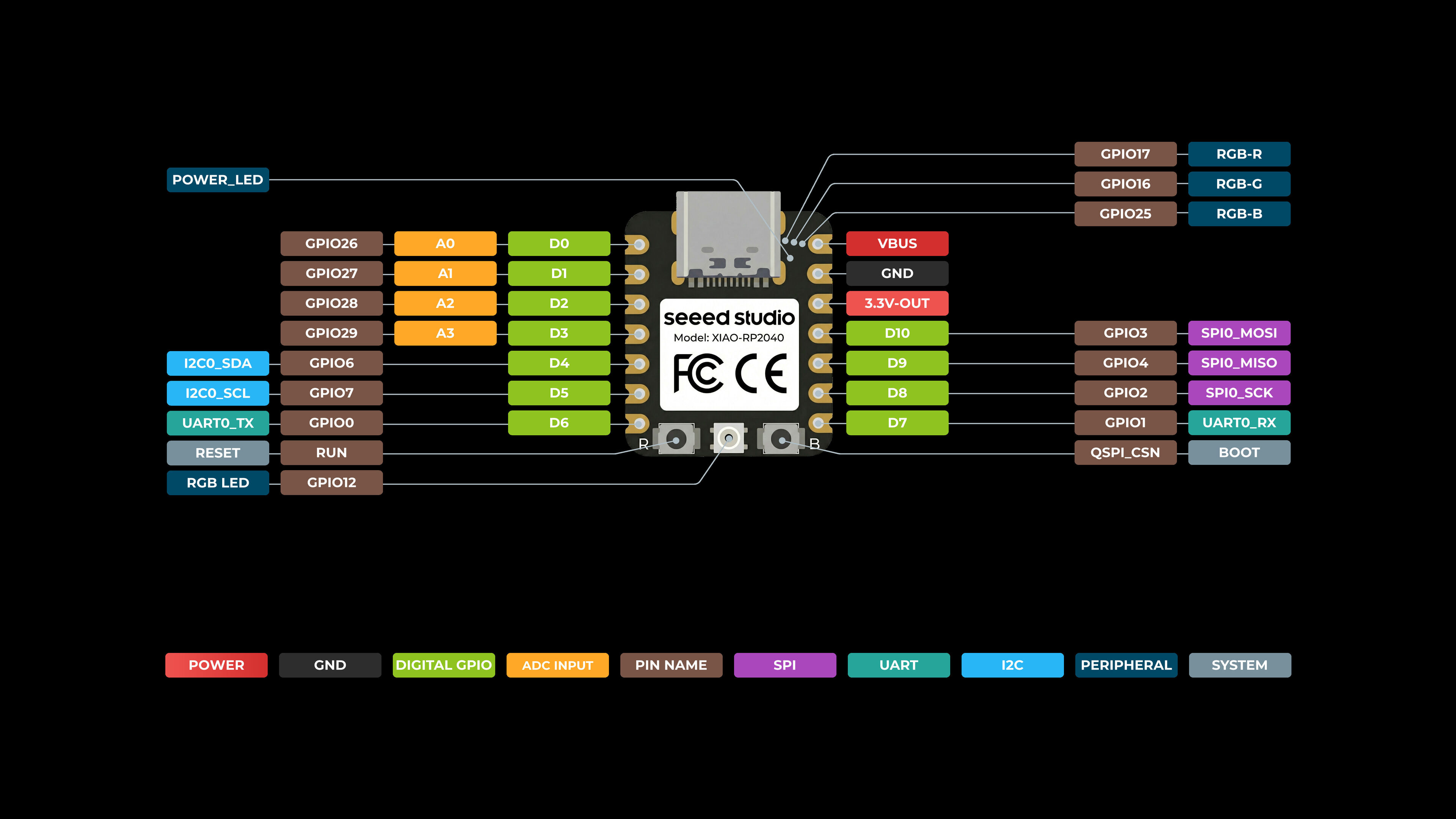
In order to communicate via I2C, we need to connect the I2C pins to an I2C peripheral. The RP2040 Hardware Abstraction Layer (HAL) documentation contains some examples on how to use I2C.
Strangely enough, Rust complains that the trait `ValidPinIdSda<I2C0>` is not implemented for `Gpio6` but trait `ValidPinIdSda<I2C1>` is implemented for it yet the XIAO pinout indicates that GPIO6 and GPIO7 are under I2C0. I suspect that the Seeed Studio documentation indicates I2C0 to say that its the only I2C interface that is exposed to external pins, but internally its probably connected to the I2C1 controller (see other RP2040 boards).
To mirror the touch sensing used by the Micropython code provided for the QPAD, I got Claude to transcribe the Python PIO into a .pio file and write some boilerplate to install the PIO program onto the PIO controllers. As a sanity check, I hooked the touch sensing to the LED so that the XIAO would power on the red LED when the pad was touched.
Next peripheral to support is the SS1306. The Rust embedded community supports a number of peripherals including the SSD1306. I based the next prototype of the example in the repository. The example given prints two lines of text, so I combined this with the touch functionality in order to change the text being displayed on the screen.
With both peripherals connected to the controller, I can start implementing more complex logic in the XIAO itself.
osu!
The code for this part of the project can be found in the /QPAD folder in the repo for this page.
osu! (specifically osu!std) is a rhythm game based on clicking circles to the beat. One has to move the cursor to the circle and click / tap at the right time. I used to play osu!std in middle school in 2017-2018 and still occasionally play it. Here’s a video of me playing it!
Each note is a circle, and a “approach circle” closes in onto the note and coincides with the note at the correct time to hit the note. I want to try making a rhythm game that maybe resembled osu! It would be difficult to mimic the cursor with touch pads, so I decided to get the tapping-to-the-beat working first.
To start, I used the embedded-graphics crate to abstract away the details of drawing primitive shapes like Circles.
The RP2040 module also contains a timer which counts the number of microseconds that have elapsed. This timer is accurate enough for our purposes for figuring out how to render incoming notes.
We can use the micromath crate to support floating point approximation on embedded hardware. The RP2040 supports an FPU, but I think its fine to use approximations given that we have the imprecision of the render time anyway.
The first prototype was to get circles to converge onto a spot at a periodic rate, which didn’t take too long. It only required a bit of math to linearly interpolate the size of approach circle so that it shrinks to a point at the right time.
To make it more interactive, I had the circle flash as it was about to approach the center to give a visual indicator of when I should tap. I also added two other means of feedback:
- The green LED flashes upon hitting, and the red LED flashes upon missing
- Text indicating whether you hit within 150ms before the circle shrinks to a point
At this point the vision I had in mind was to have the left touch pads choose a direction to hit notes in, and the right touch pad control the hit input. This means that notes could come from any of 4 directions, and I had to figure out how to differentiate them for the user.
I realised that the screen resolution was too small to reasonably render 4 sets of circles with approach circles and multiple notes as the monochrome screen clutters extremeley quickly. Thus, I switched to a visual style most similar to osu!mania and Undyne’s boss fight from Undertale. Here, the notes are bars that approach a central square.
To represent the beatmap, I created some additional structures (the code for which can be found in osu.rs in the source of this project) to store vectors of notes and hits. Note that embedded Rust does not have access to the Rust standard collection library, so I used heapless for vectors that are static in size on the stack.
Each note is scored based on the accuracy of the hit (how close the touch input was to the correct note timing) and the combo up to that point (increasing combo increases the score given for that note, which encourages long combos). Combo can be increased by hitting consecutive notes without missing, and is lost upon missing a note.
Osu has 4 intervals for perfect, good, okay and misses. Misses can occur if the note was not hit in time, or if it is hit too early. The other scoring intervals decrease in length with increasing accuracy. These are parameters that can be modified in the scoring; my defaults are +-50ms for perfect, +-100ms for good, +- 150ms for okay and +- 250ms for miss.
As a first test, I had the notes approach from the right side in 3-note bursts. Note that there are a few sources of latency here
- rendering delay between the timer on the XIAO and the position of the bar on screen
- polling delay between when my finger taps the touch pad and when the XIAO determines that I have touched the touch pad
As such, I usually have to tap much earlier than when the note is about to hit the side of the square (which in an ideal world, is when the correct time to hit the note is).
Reading the change in score was too difficult to use as a good gauge of accuracy, so I also added text to indicate the accuracy of the last hit (though it didn’t say if it was late or early).
By doubling the rate at which notes arrive, I am forced to use both touch pads. One finger isn’t fast enough to hit the 3 note burst at this speed. I also made the beatmap swap between the left and right tracks.
Lastly, I made a beatmap that consists of just 200 notes of continuous tapping. In theory the maximum possible score for this (with all perfects) is 259000 but I do not have nearly enough consistency to maintain combo for that long.
AI Use
Asking Claude about how to setup workflows for embedded C, Python and Rust. Specifically, I asked it to walk me through the steps needed to check that my WSL installation can see connected devices. Each step is documented as above and verified as I ran them myself.
I also used to Claude to help debug some of the Rust compiler errors while working on porting the steptime from Python to Rust. It helps to deal with a package configuration issue where the seeeduino_xiao_rp2040 crate pinned a different version of pio than the latest which caused a compiler error due to mismatched Program types.
I did a lot Googling to find relevant crates and used the Google AI overview to briefly check what the options were before going into the documentation pages myself.
Claude was also used to help with some of the plumbing involved for the osu section of the XIAO. I wrote the internal game logic for scoring and beatmaps, while Claude helped with writing the boilerplate for rendering the notes. I later had to fix the rendering by reducing the amount of time that the notes were rendered. The notes were staying on screen for so long that they were exiting on the opposite side of the square which made it very difficult to read the oncoming notes.