First things first#
In addition to finding out I was one of the lucky few among those selected for the HTMAA 2026 mission, the first week of the consisted of familiarizing oneself with the weekly rhythm and the weekly assignments, which will be evaluated on not just the outputs produced but also documenting well enough the process.
Neil transmitted the first weekly debrief and introduced the TA mission support team. He shared project management advice on approaching the semester and the final fabrication project.
Based on the debrief and in discussion with TAs, I made a list of principles I am keeping in mind as I move forward:
- Documenting as I go, rather than at the end
- Decide on days/times to block off consistently every week
- Decide on a final project early and work towards that goal through the assignments
- Work in spirals, start simple and incrementally rather than trying to do everything and doing it perfectly
- Look at previous years and projects as examples to learn and build upon (while giving them credit!)
Visual GenAI as CAD#
In addition to thinking about my potential final project (see The ChronoType in the final project page), the first mission was to model and render it using computer-aided design (CAD).
I am relatively new to traditional CAD software, and it took 2 days to get the hang of using Fusion to simply draw an interlocking box (see week two — the pain was real), so I wanted to start visualizing what I had in mind using visual GenAI as my CAD of choice.
I'm a big proponent of visualizing ideas quickly and making them engaging using widely accessible visual GenAI tools. Last spring, building on my visual GenAI research on computational empowerment, I designed and facilitated a five-day workshop with nine Alain Locke middle schoolers, aged 11 to 14, in West Philadelphia, a community facing displacement and homelessness. By helping them think through and draw storyboards and descriptions of their ideas, I guided them to create informational GenAI videos and posters pointing their neighbors to displacement resources.
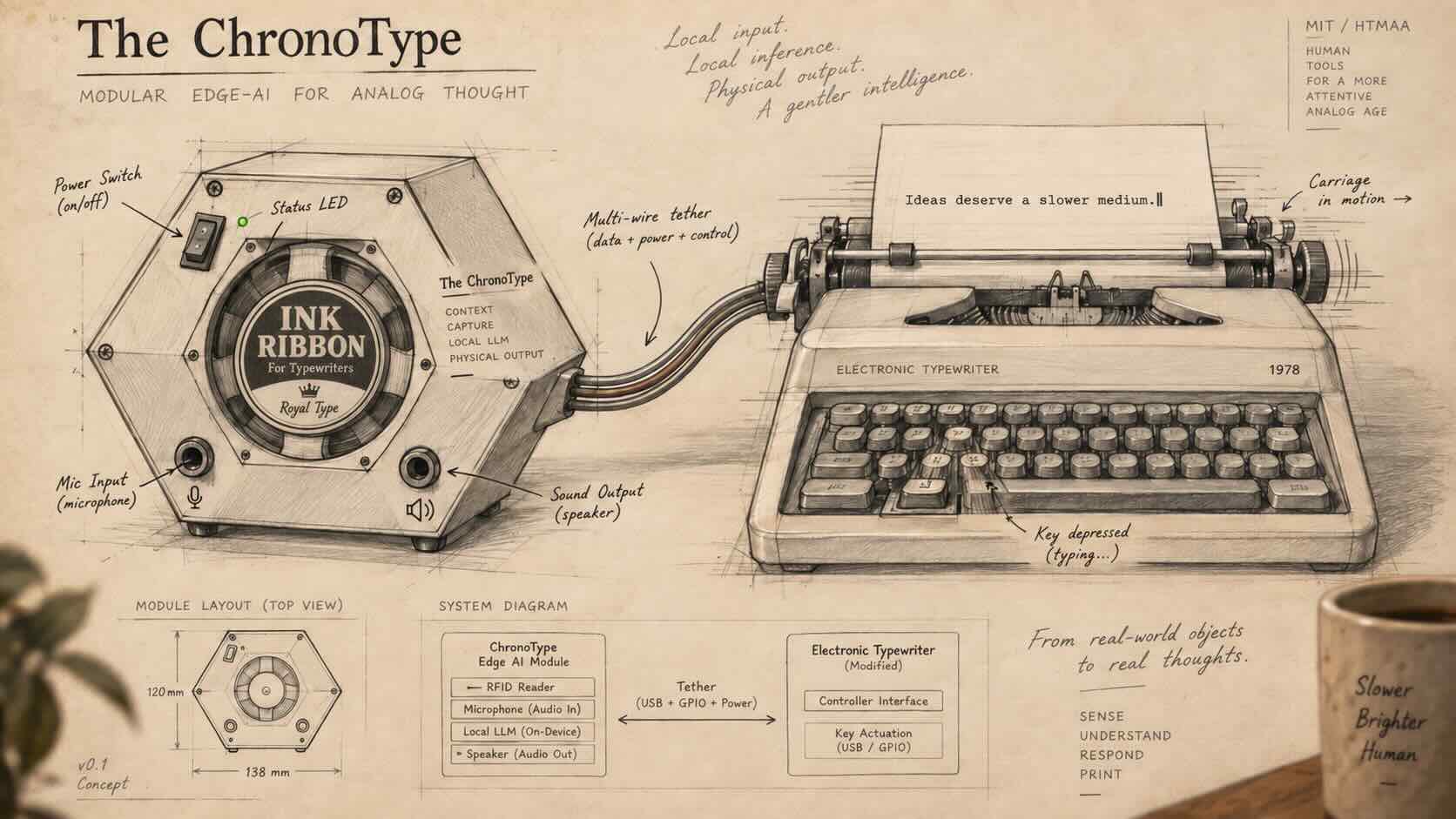
Similarly, I did a rough sketch of my idea showing the functionalities of the module, and then used ChatGPT image to turn it into one that is neat and organized, along with a photorealistic representation.
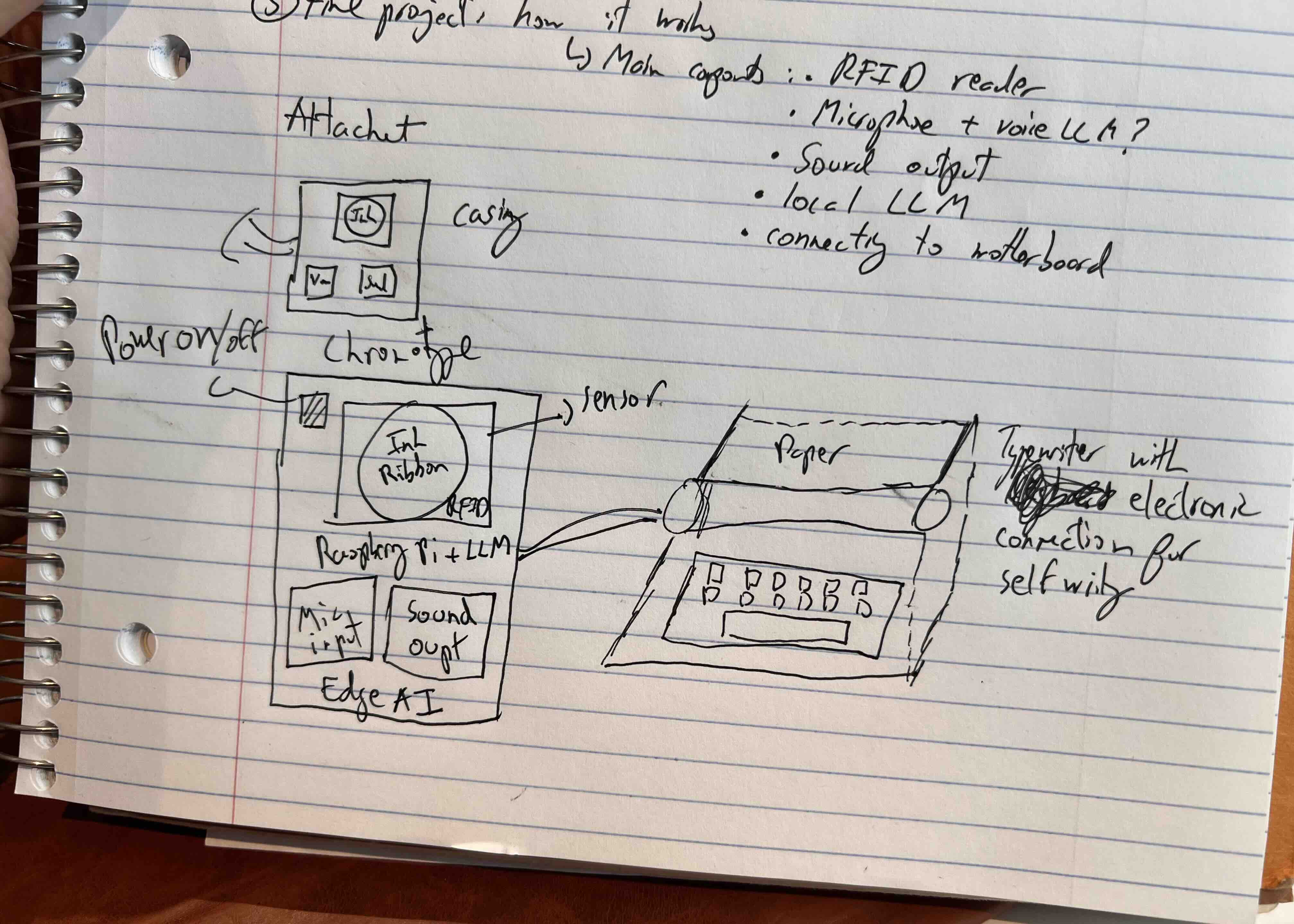
For the module connected to the typewriter, I imagine it having an ink ribbon case sensor where the RFID tag attached to the case would be placed, and in the bottom left there is a sound recording function while on the right is a speaker that would play the soothing melody. A power button on/off light is also on the top left.
I personally use ChatGPT image for precision since over the last year they added affordances that allows one to select and make changes on the images. I sometimes alternate with Google Gemini along with Google Flow if I am creating videos.
The output turned out better than expected, and even provided more technical details and functionalities of the device (I still remember experimenting with DALL-E 3 in 2023 and it was so difficult to get coherent text and precise images...I'm amazed (and often find myself overwhelmed) by how much we can do today.
I also used ChatGPT to provide me with a detailed storyboard prompt that I could use for using Google's Veo through Flow, to generate a 10 second concept video:
A high-detail cinematic product visualization of "The ChronoType," a modular
edge-AI voice journaling device inspired by the Resident Evil save-room
aesthetic.

On the left side of the scene sits a sleek, modern custom hexagonal
hardware enclosure resting horizontally on a wooden desk. The enclosure has a
matte black finish, softly rounded edges, subtle industrial detailing, and a
clean contemporary design language that feels high-tech rather than vintage.

At the center of the module is a circular recessed bay designed to hold a
metal ink ribbon tin can. The tin can has a black-and-white vintage-style
"INK RIBBON / For Typewriters / Royal Type" label on the top, and it functions
as the physical RFID trigger. Around the bay is a subtle illuminated
activation ring, suggesting that placing the tin activates the system.

The module layout is clearly legible: a power button with a small status LED
is placed at the top left; a microphone input is positioned at the bottom
left; a speaker output grille is positioned at the bottom right; and small
interface labels or icons indicate RFID activation, local LLM processing, and
edge AI functionality.

A multi-wire tether or cable harness exits the right
side of the module and connects to a vintage electronic typewriter positioned
on the right side of the composition. The typewriter is beige-gray and
slightly retro, with a sheet of paper inserted showing a typed message such
as: "Date: September 20, 2026" and "Status: Checkpoint reached."

The overall atmosphere should evoke a Resident Evil save room: warm ambient
lighting, moody shadows, a sense of refuge and contemplation, and a desk
environment that feels cozy, immersive, and slightly nostalgic.

The scene should include cinematic studio-style lighting, soft highlights on the
enclosure, visible materials, and clear hardware readability. Emphasize the
contrast between the modern sleek AI module and the retro typewriter.

Composition should be clean and balanced, showing the entire module clearly
on the left and the connected typewriter on the right. Photorealistic, highly
detailed, premium industrial design rendering, sharp focus, 4K.
After a few tries, I chose the best video from the bunch and then imported it onto Google Vids to create a title page for the video (it was Audrey, a bright 11-year-old I met during my time at the Alain Locke School who actually introduced me to it!).
I think the video looks great and enables me to see the end goal early on, even if it may still evolve or change. It took a total of 2-3 hours of work, prompting, iterating and landing on something that I was happy with...the same amount of time it took to sketch a well-dimensioned rectangle or square with Fusion!