Group assignment: multimeter and oscilloscope#
The week started with our TA Gert walking us through the basics of electronics design and the tools for testing circuits.
A key takeaway for me was to break the project into small pieces and validate the microcontroller components, which I had begun to detail and understand for the RP2040 in week 3 based on the device datasheet .
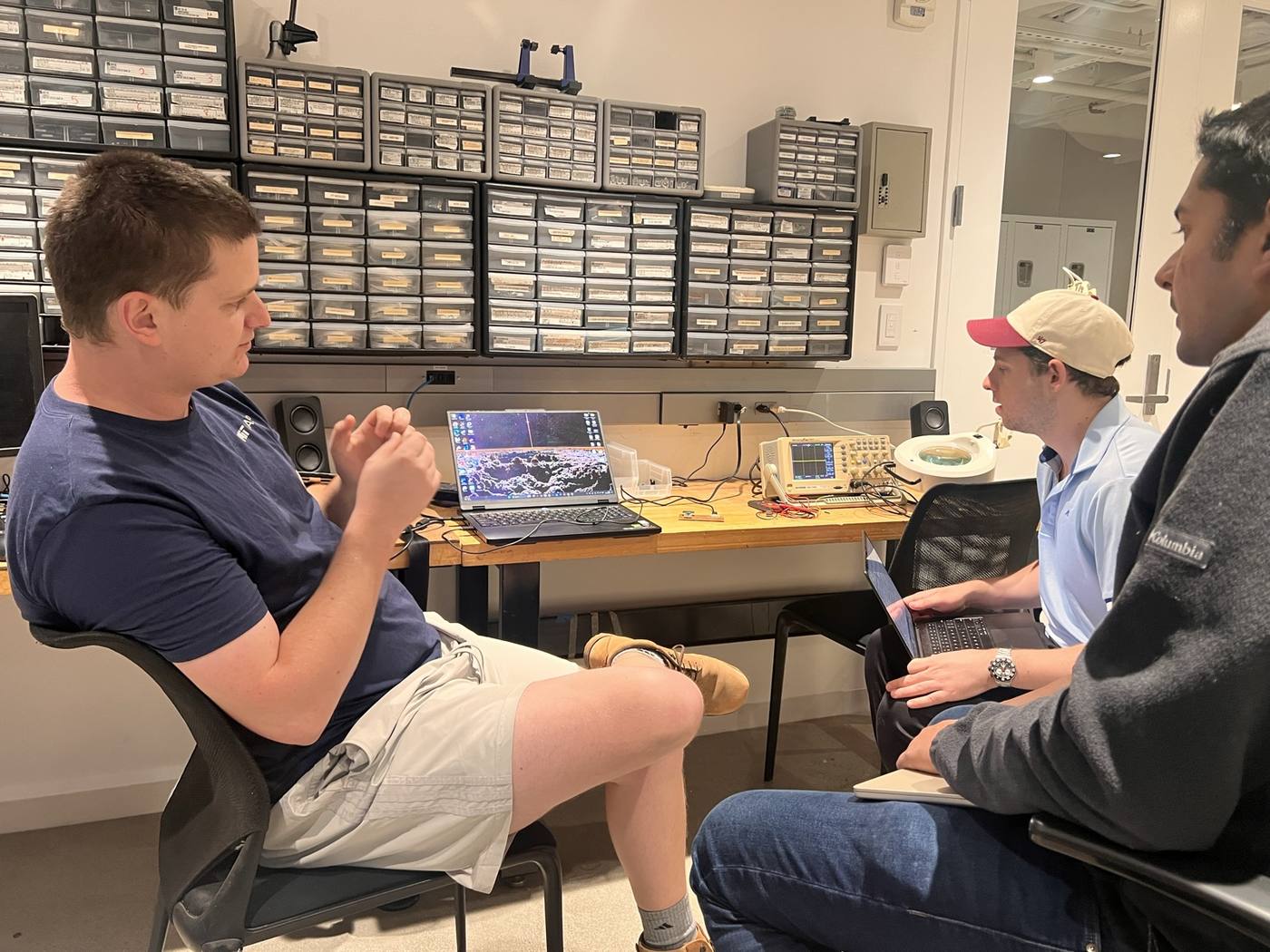
With the multimeter we tested the continuity on a working board: whether traces and solder joints were actually connected, and also to be wary of two neighbouring traces being bridged by accident which can also be validated.
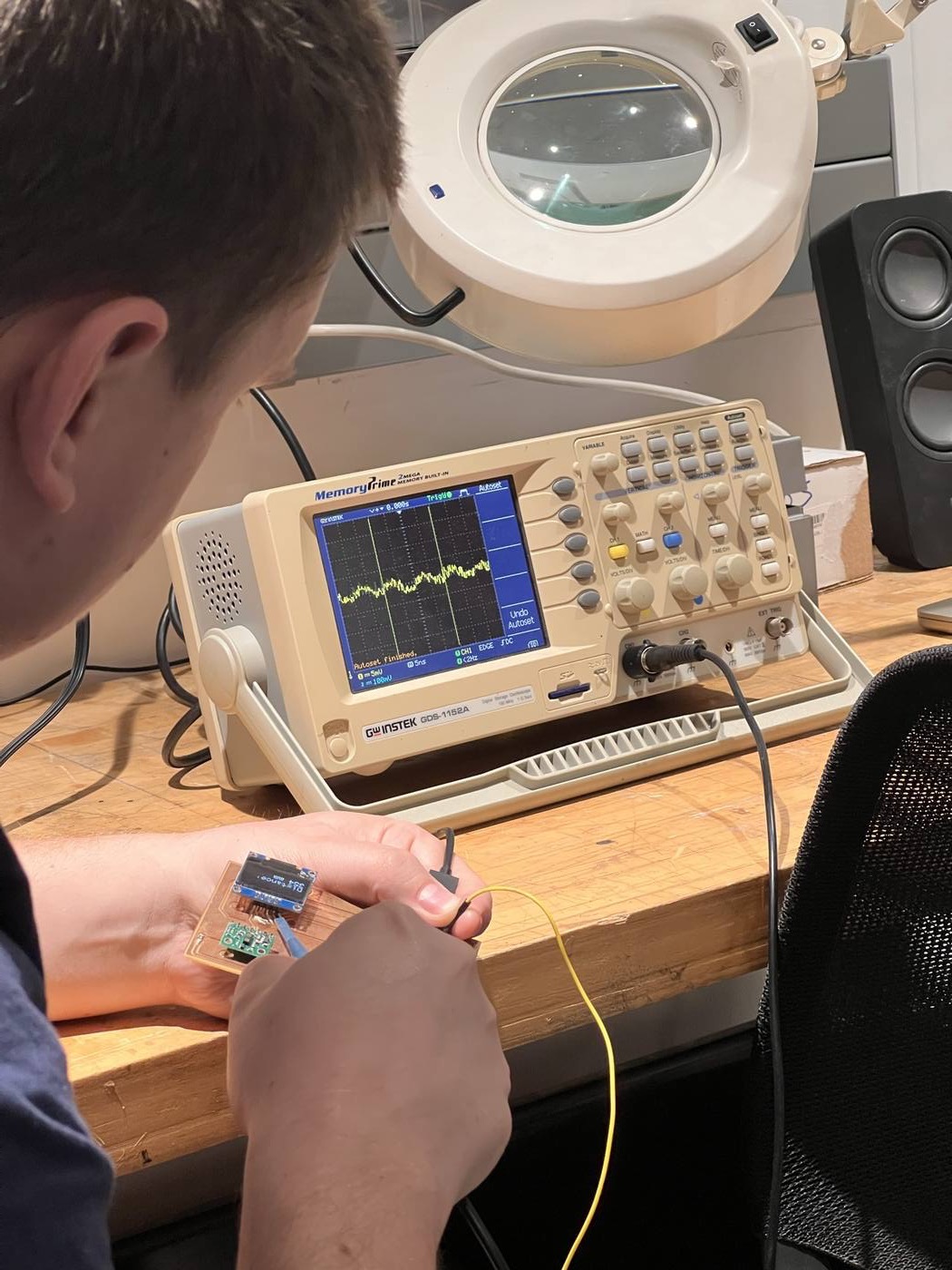
With the oscilloscope we looked at voltage signals pins are producing. Having the ground clip on ground, Gert’s demo showed a roughly 5 V supply with small fluctuations and spikes associated with the distance sensor’s activity, followed by pulses on the SCL clock line.
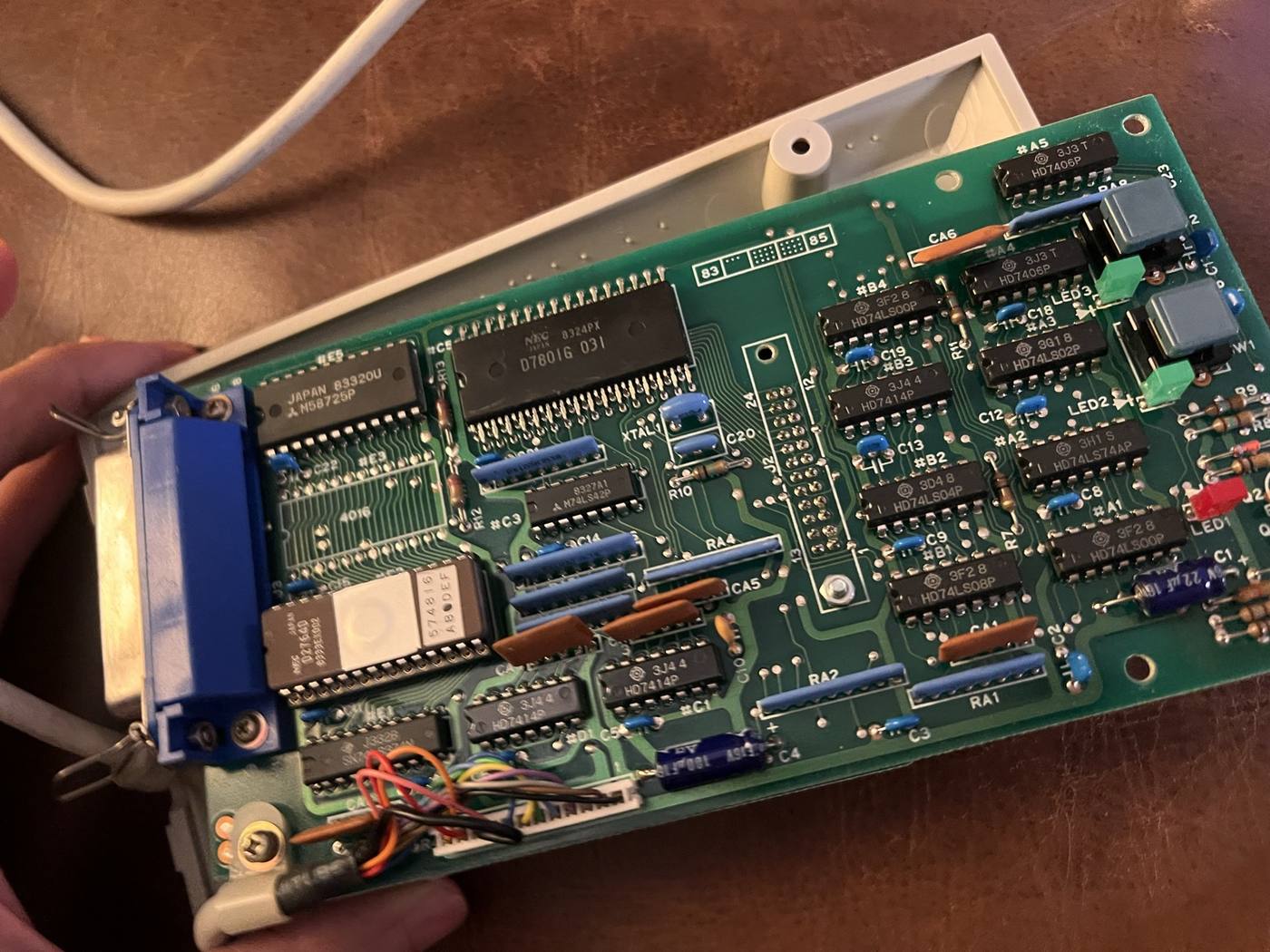
By comparing the observed signal with the expected one, it helps spot miswired pins (or in what I will realize for my final project, a 40-year old device where old capacitors could have aged and became out of sync with the typewriter’s bus).
(How to) design a board that speaks to a 40-year old typewriter#
This week's assignment was to use an EDA tool like KiCAD to design an embedded microcontroller system with parts from the fab inventory , and check its design rules for fabrication.
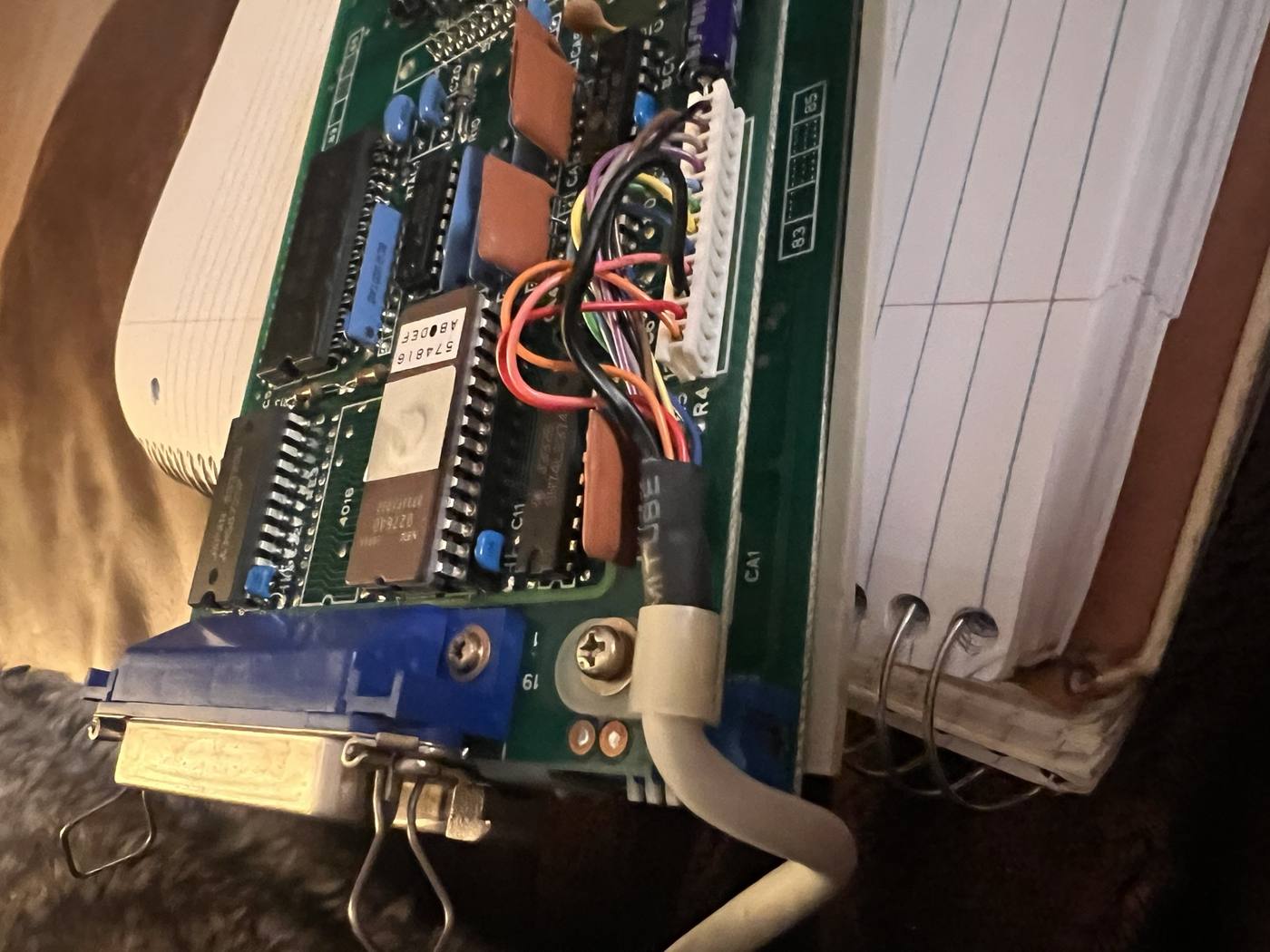
I spent a good chunk of the week seeing if I could get my IF-50 to connect to the typewriter (see log x in final project). Having purchased a serial connector cable, reading the instruction manual and then testing whether I could send a command to the typewriter to print.
Unfortunately, after (many, many) hours of troubleshooting, I could not get it to type more than a few letters.
I couldn't figure out whether the IF-50 was defective or just not reverse compatible with my CX-90 typewriter. And the later IF-60 model is almost impossible to find.
Doing research online, I stumbled on a reddit post , and in particular where just a month prior someone posted a comment that they had reverse engineered the IF-60 for their thesis.
Alas, the typewriter gods are smiling upon me!
So I decided this week's board will be the IF-60 replacement for The ChronoType. Essentially, the module that lets a Raspberry Pi connect to and type on the typewriter.
Board schematic#
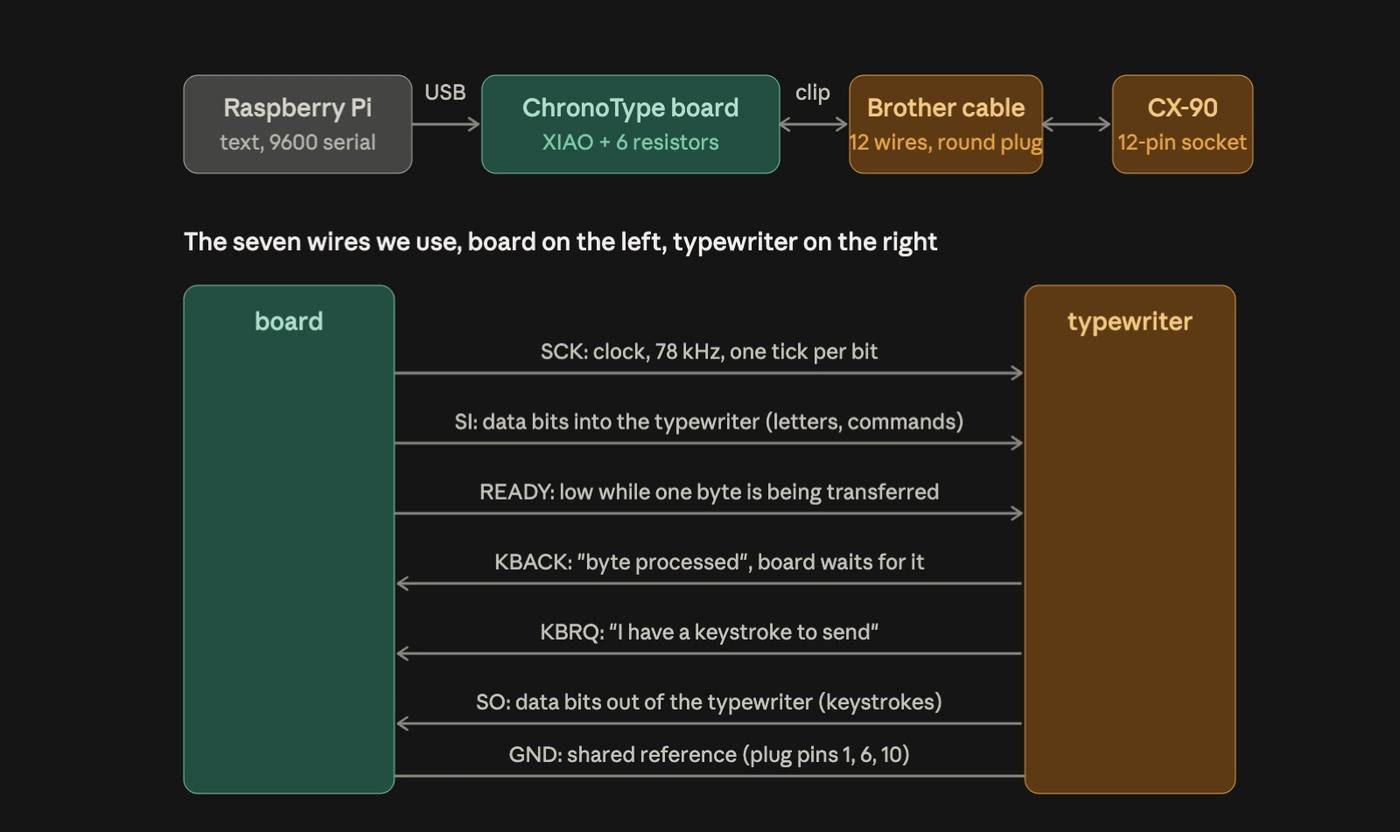
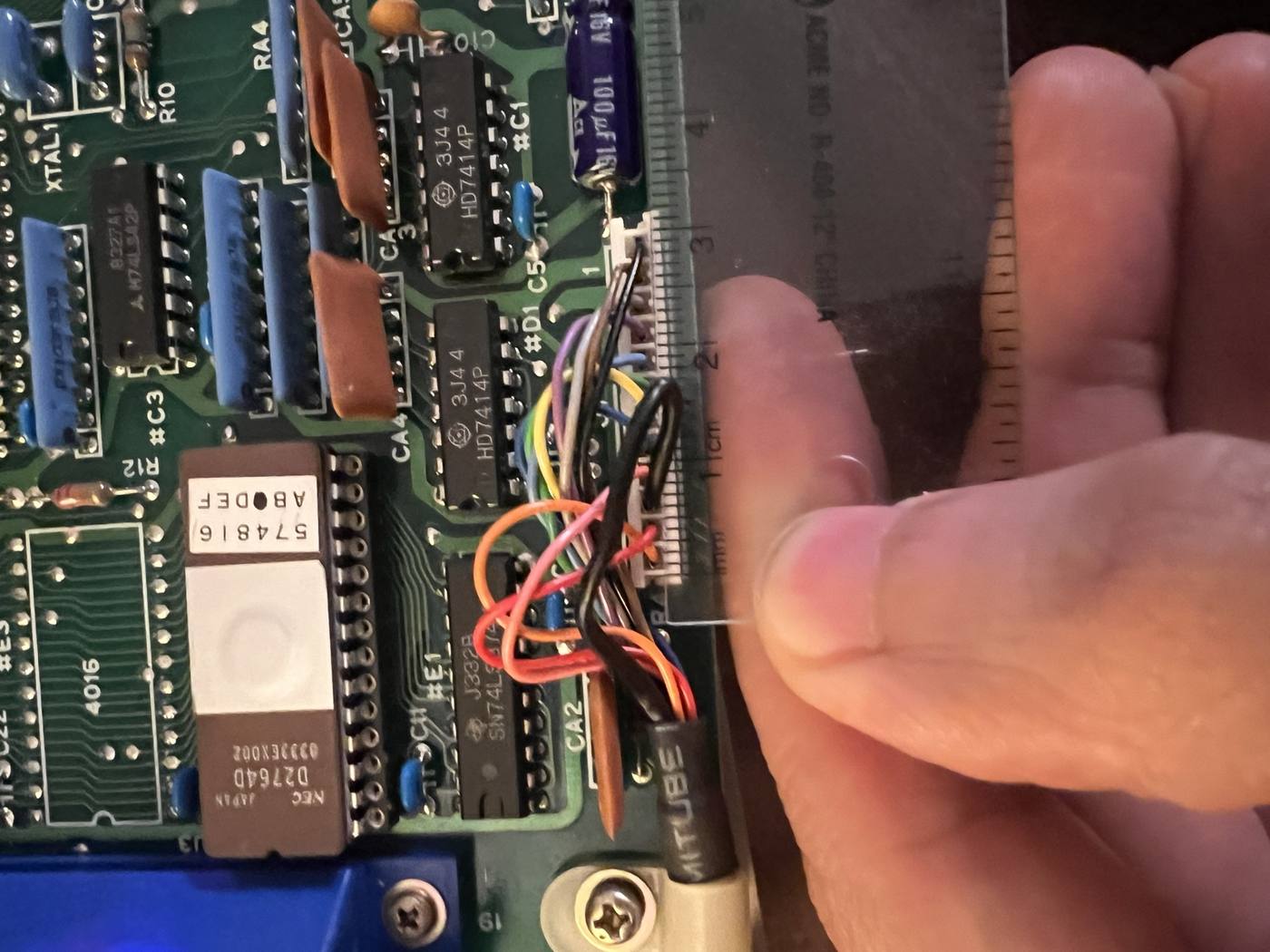
Based on Brother Serial Interface Adapter readme, the typewriter's 12-pin socket carries ground, 5 V, a clock, two data lines, three handshake lines, and 30 V for the print motors.
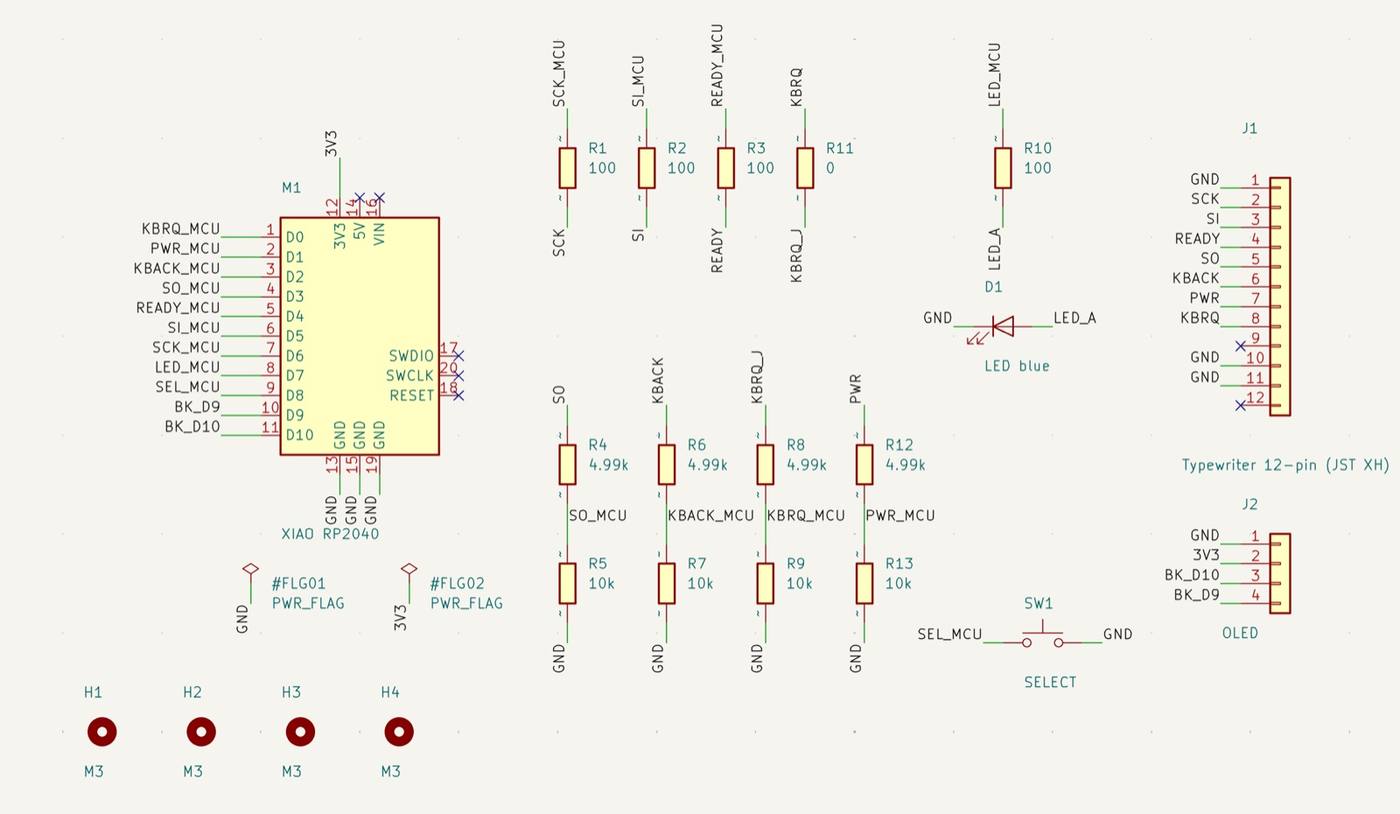
My board will need the microcontroller that can drive a signal at the right clock to the typewriter and talk USB to the Pi. This includes a way to plug three output connections to the typewriter with four inputs coming back at 5 V. An LED for the status of the select button and an optional attachment to an OLED Neopixel screen.
I installed KiCad 10 and the fablab library , so every component comes from parts the fablab shop stocks.
Based on IF-50 functionalities and for my schematic:
The XIAO RP2040 I can program to generate the 78 kHz clock with the exact timing that my IF-50 may not be transmitting to my typewriter.
Resistors since the four lines coming from the typewriter are 5V while the XIAO runs at 3.3 V. Those lines gets a pair of resistors (4.99 kΩ and 10 kΩ) that splits the voltage down to 3.3 V before it reaches a pin, which is eight resistors for four lines.
Three additional 100 Ω resistors are included on the lines going the other way, from the XIAO to the typewriter (clock, data and ready) as cheap insurance in case of a short.
One more resistor limits the current through the blue LED, and the last one, a 0 Ω wire in a resistor costume that lets one trace hop over the ground copper on a single-sided board.
The SELECT button is the online/offline switch the original interface had. The blue LED next to it is the ONLINE lamp, with a 100 Ω resistor.
Connectors Finally, I will use the 12-pin JST header from the IF-50 and connect it to the board a a 4-pin socket can take a 0.96" OLED through wire plugins.
| Part | Role | Inventory part |
|---|---|---|
| XIAO RP2040 | microcontroller, USB-C to the Pi | class XIAO |
| 3 × 100 Ω | series protection on the three outputs | RC1206FR-07100RL |
| 4 × 4.99 kΩ + 4 × 10 kΩ | 5 V to 3.3 V dividers on the four inputs | RC1206FR-074K99L, RC1206FR-0710KL |
| 0 Ω jumper | trace crossing on a single-sided board | RC1206FR-070RL |
| tactile switch | SELECT, online/offline | PTS636 |
| blue LED + 100 Ω | ONLINE lamp | 150120BS75000 |
| 4-pin socket | OLED screen | NPTC041KFXC-RC |
| 12-pin JST XH header | typewriter bus, takes the IF-50 harness | to order |
Board design#
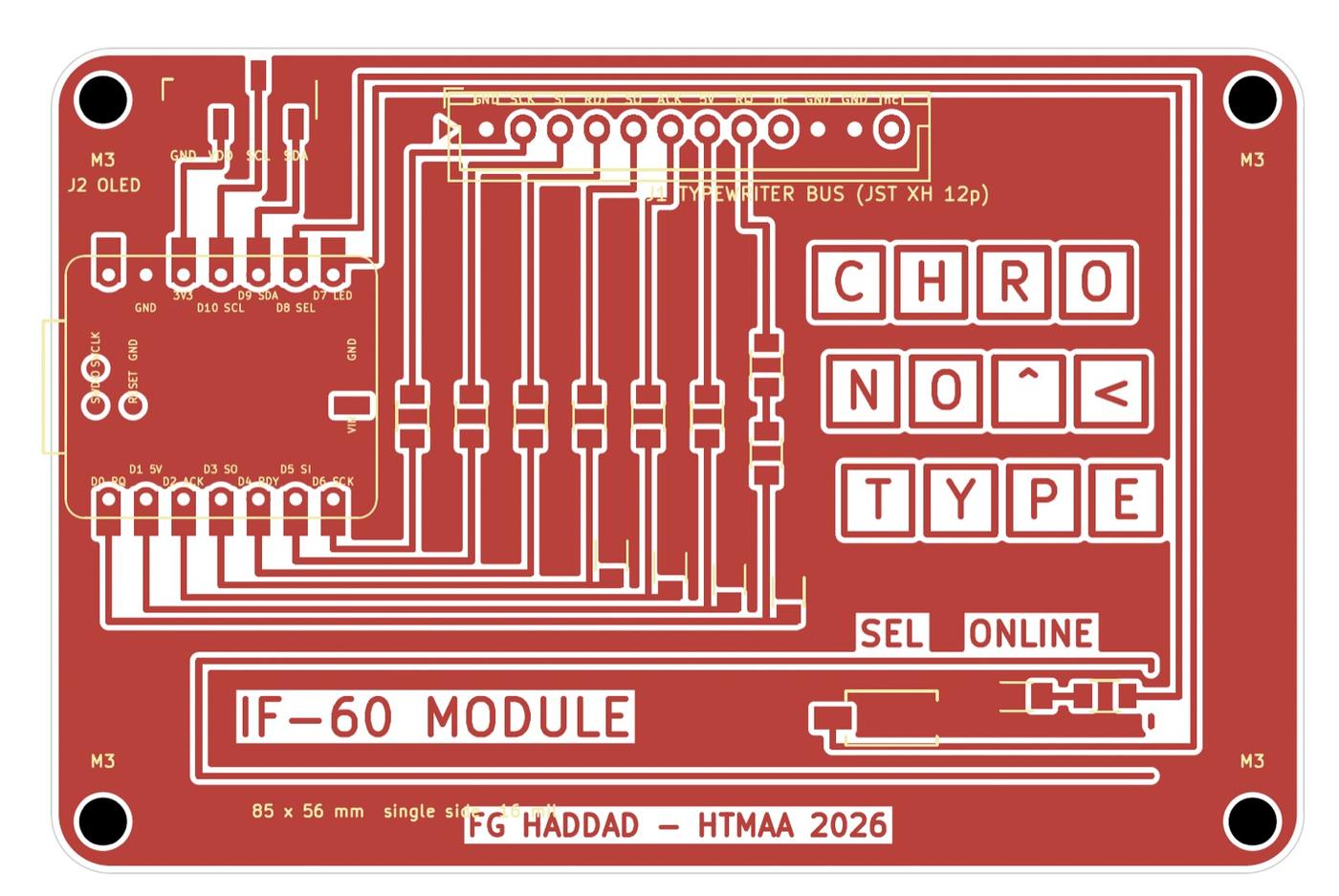
The fablib KiCad repository included design rules that relied on a single-sided board milled with a 1/64" (0.4 mm) end mill:
- minimum trace width and clearance 16 mil (0.4064 mm)
- copper to board edge 0.5 mm
- one copper layer, no vias
- engraved text at least 0.4 mm stroke
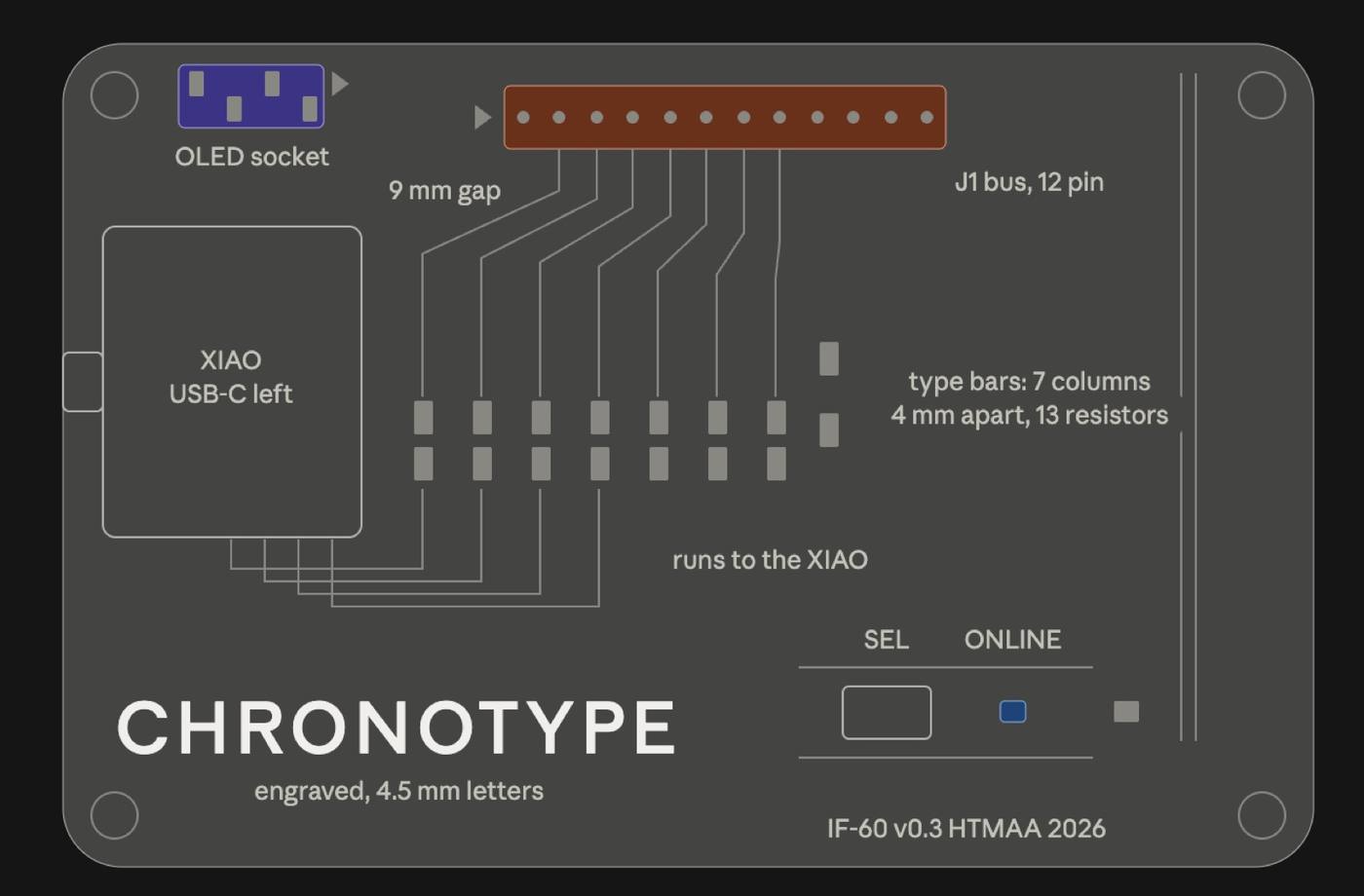
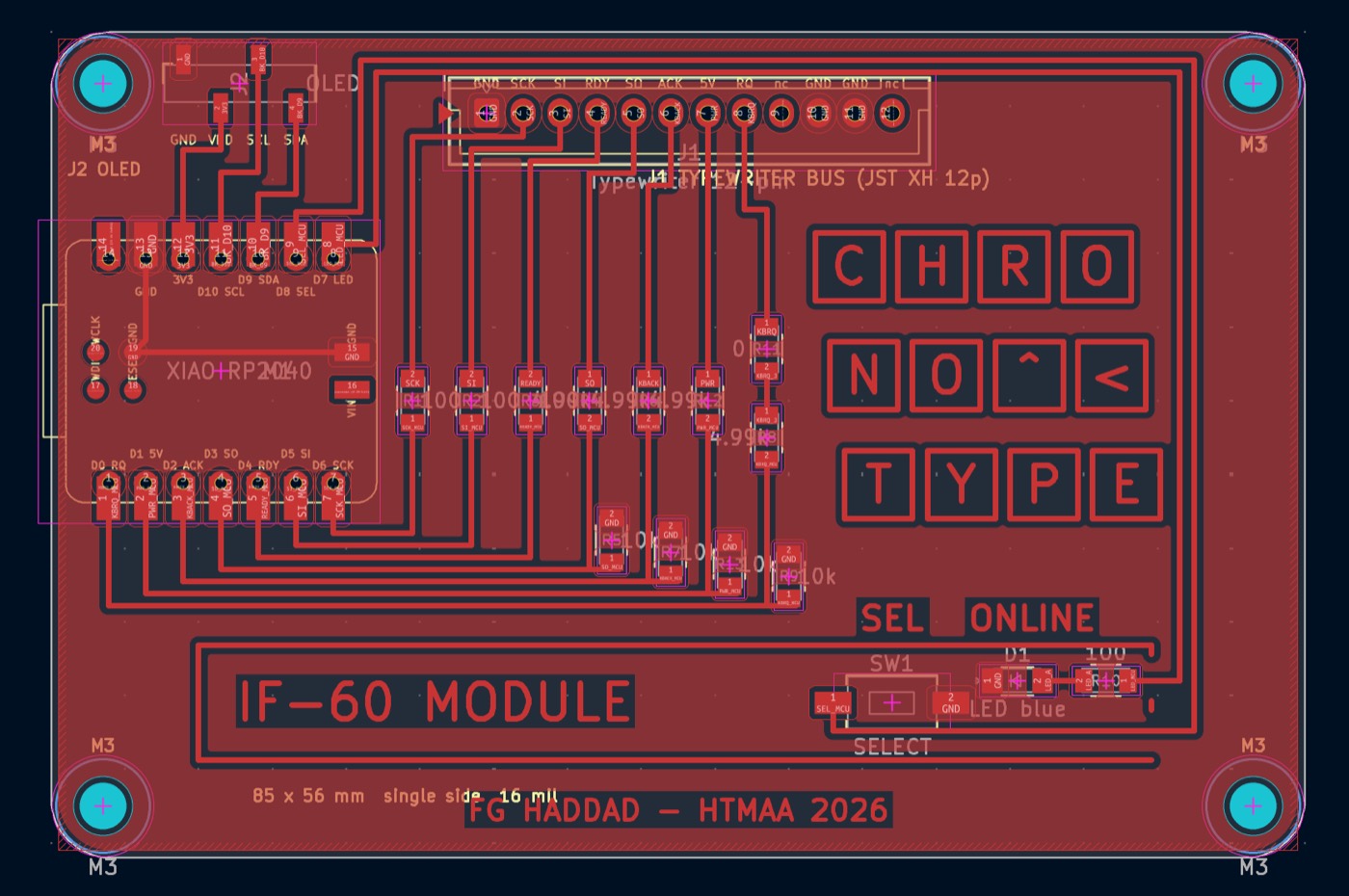
Respecting those rules, I wanted the board itself to say what it does: a typewriter. Using Claude, I prompted through seven iterations to first visualize it on sketch before landing on the final layout touching KiCad.
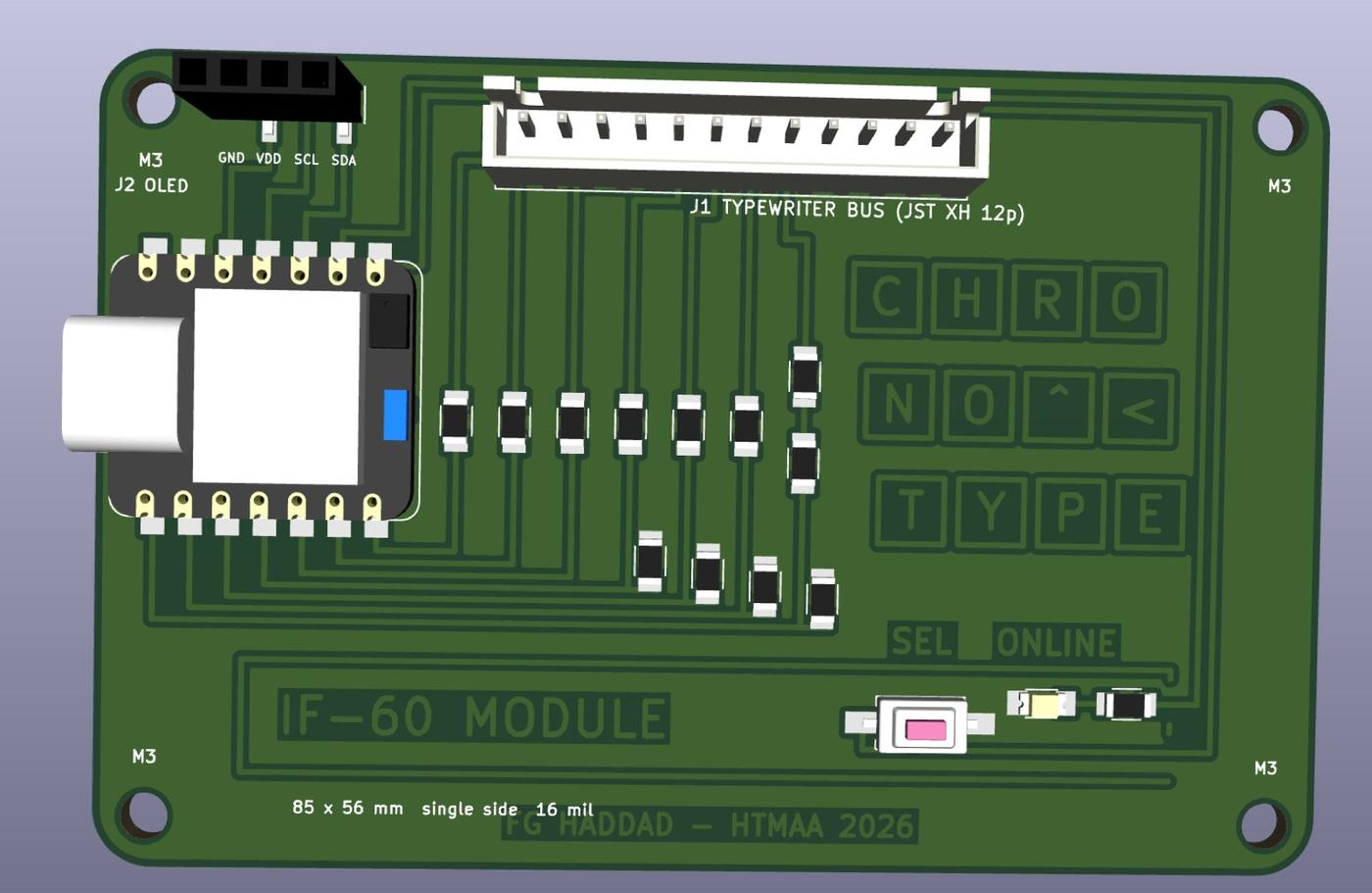
GenAI'ing KiCad files from a script#
The extra workflow I tried is one I had not seen in the tutorials: instead of drawing the board in the editor, the schematic and the PCB are generated by two Python scripts using Claude that write the KiCad files directly, and the checks are run from the command line with kicad-cli
.
In Python, the scripts take advantage of the KiCad files which are in text, written in S-expressions (parenthesized lists), which i learned consist of nested code borrowed from Lisp, one of the oldest high-level programming language developed at MIT back in 1958.
Each list contains a list of the parts with their positions out of the fab library file using the place() function, while stub() connects the wires to pins and includes the labels.
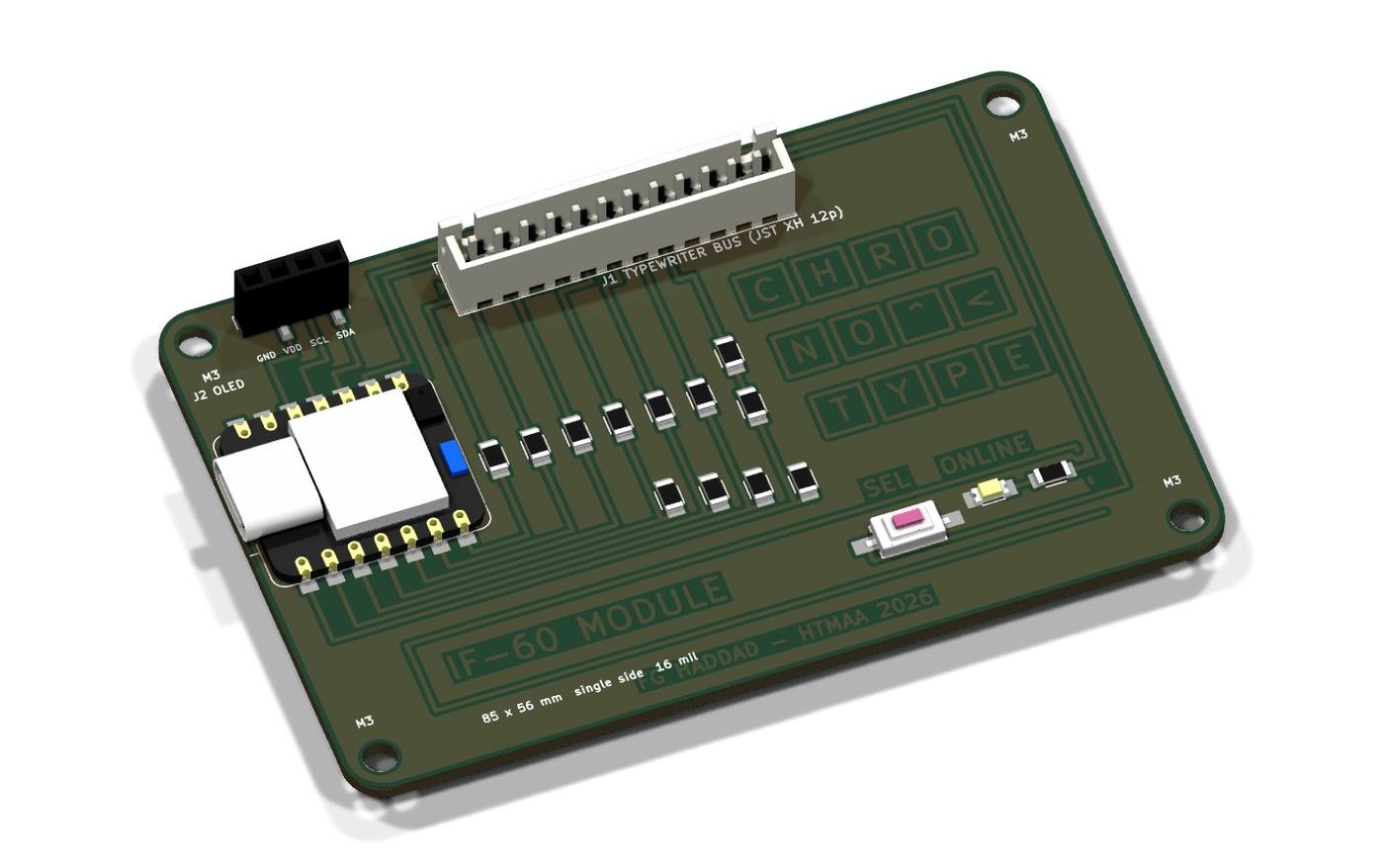
Every layout iteration above was a few lines changed in the script, then ERC, DRC, a PDF export and a 3D render, all without opening the GUI (that I look at the result and iterate upon).
The KiCad codes are provided below:
Show source (153 lines)
import uuid, re, sys
OUT = sys.argv[1]; PROJECT = "chronotype_typewriter"
ROOT = "7a1c2e5e-0c44-4d4e-9f1a-typewriter0001"
ROOT = "7a1c2e5e-0c44-4d4e-9f1a-000000000001"
FAB = "/Users/fhaddad/Documents/KiCad/10.0/3rdparty/fab/symbols/fab.kicad_sym"
KS = "/Applications/KiCad/KiCad.app/Contents/SharedSupport/symbols/"
U = lambda: str(uuid.uuid4())
pinre = re.compile(r'\(pin (\w+) \w+\s*\(at ([-\d.]+) ([-\d.]+) (\d+)\)\s*\(length ([\d.]+)\)\s*(?:\(hide yes\)\s*)?\(name "([^"]*)"\s*\(effects.*?\)\s*\)\s*\(number "([^"]*)"', re.S)
def block(src, name):
    i = src.find(f'(symbol "{name}"'); d = 0; j = i
    while True:
        c = src[j]
        if c == "(": d += 1
        elif c == ")":
            d -= 1
            if d == 0: return src[i:j+1]
        j += 1
SYMS = {}
def load(libfile, libnick, name, fp_override=None):
    src = open(libfile).read(); b = block(src, name)
    fp = re.search(r'\(property "Footprint" "([^"]*)"', b); fp = fp.group(1) if fp else ""
    if fp_override is not None: fp = fp_override
    SYMS[name] = {"lib": libnick, "text": b.replace(f'(symbol "{name}"', f'(symbol "{libnick}:{name}"', 1),
                  "pins": {m.group(7): (float(m.group(2)), float(m.group(3)), int(m.group(4))) for m in pinre.finditer(b)}, "fp": fp}
load(FAB, "PCM_fab", "Module_XIAO-RP2040")
load(FAB, "PCM_fab", "R_1206")
load(FAB, "PCM_fab", "LED_1206")
load(FAB, "PCM_fab", "Switch_Tactile_CnK")
load(KS+"Connector_Generic.kicad_sym", "Connector_Generic", "Conn_01x12", "Connector_JST:JST_XH_B12B-XH-A_1x12_P2.50mm_Vertical")
load(KS+"Connector_Generic.kicad_sym", "Connector_Generic", "Conn_01x04", "PCM_fab:PinSocket_01x04_P2.54mm_Vertical_SMD")
load(KS+"Mechanical.kicad_sym", "Mechanical", "MountingHole", "MountingHole:MountingHole_3.2mm_M3")
load(KS+"power.kicad_sym", "power", "PWR_FLAG")

out = []; wires = []; labels = []; ncs = []
def place(name, ref, value, x, y, ref_off=(2.54,-2.54), val_off=(2.54,0)):
    s = SYMS[name]; pins = s["pins"]
    pin_uuids = "".join(f'\n\t\t(pin "{p}"\n\t\t\t(uuid "{U()}")\n\t\t)' for p in pins)
    out.append(f'''\t(symbol
\t\t(lib_id "{s['lib']}:{name}")
\t\t(at {x} {y} 0)
\t\t(unit 1)
\t\t(exclude_from_sim no)
\t\t(in_bom yes)
\t\t(on_board yes)
\t\t(dnp no)
\t\t(uuid "{U()}")
\t\t(property "Reference" "{ref}"
\t\t\t(at {x+ref_off[0]} {y+ref_off[1]} 0)
\t\t\t(effects (font (size 1.27 1.27)) (justify left))
\t\t)
\t\t(property "Value" "{value}"
\t\t\t(at {x+val_off[0]} {y+val_off[1]} 0)
\t\t\t(effects (font (size 1.27 1.27)) (justify left))
\t\t)
\t\t(property "Footprint" "{s['fp']}"
\t\t\t(at {x} {y} 0)
\t\t\t(effects (font (size 1.27 1.27)) (hide yes))
\t\t)
\t\t(property "Datasheet" ""
\t\t\t(at {x} {y} 0)
\t\t\t(effects (font (size 1.27 1.27)) (hide yes))
\t\t){pin_uuids}
\t\t(instances
\t\t\t(project "{PROJECT}"
\t\t\t\t(path "/{ROOT}"
\t\t\t\t\t(reference "{ref}")
\t\t\t\t\t(unit 1)
\t\t\t\t)
\t\t\t)
\t\t)
\t)''')
    return {p: (round(x+px,2), round(y-py,2), prot) for p,(px,py,prot) in pins.items()}
def stub(pt, net, length=5.08):
    x, y, prot = pt
    dx, dy = {0:(-1,0), 180:(1,0), 90:(0,1), 270:(0,-1)}[prot]
    x2, y2 = round(x+dx*length,2), round(y+dy*length,2)
    wires.append(f'\t(wire\n\t\t(pts\n\t\t\t(xy {x} {y}) (xy {x2} {y2})\n\t\t)\n\t\t(stroke (width 0) (type default))\n\t\t(uuid "{U()}")\n\t)')
    lrot = {0:180, 180:0, 90:270, 270:90}[prot]
    just = {0:"right bottom", 180:"left bottom", 90:"right bottom", 270:"left bottom"}[prot]
    labels.append(f'\t(label "{net}"\n\t\t(at {x2} {y2} {lrot})\n\t\t(effects (font (size 1.27 1.27)) (justify {just}))\n\t\t(uuid "{U()}")\n\t)')
def nc(pt): ncs.append(f'\t(no_connect\n\t\t(at {pt[0]} {pt[1]})\n\t\t(uuid "{U()}")\n\t)')

# XIAO: SO D0, SCK D1, SI D2, READY D3, D4 spare->breakout, PWR_MCU D5, KBACK D6, KBRQ D7, LED D8, SEL D9, D10 spare->breakout
m = place("Module_XIAO-RP2040", "M1", "XIAO RP2040", 63.5, 76.2, ref_off=(-10.16,-19.05), val_off=(-10.16,25.4))
for pin, net in [("1","KBRQ_MCU"),("2","PWR_MCU"),("3","KBACK_MCU"),("4","SO_MCU"),("5","READY_MCU"),("6","SI_MCU"),("7","SCK_MCU"),("8","LED_MCU"),("9","SEL_MCU"),("10","BK_D9"),("11","BK_D10"),("12","3V3")]:
    stub(m[pin], net)
for pin in ["14","16","17","20","18"]: nc(m[pin])
for pin in ["13","15","19"]: stub(m[pin], "GND", 2.54)
# outputs
for i,(a,b) in enumerate([("SCK_MCU","SCK"),("SI_MCU","SI"),("READY_MCU","READY")]):
    r = place("R_1206", f"R{i+1}", "100", 121.92+i*10.16, 48.26); stub(r["1"], a, 2.54); stub(r["2"], b, 2.54)
# dividers: SO (R4/R5), KBACK (R6/R7), KBRQ (R8/R9), PWR (R12/R13)
for i,(bus, mcu, rt, rb) in enumerate([("SO","SO_MCU","R4","R5"),("KBACK","KBACK_MCU","R6","R7"),("KBRQ_J","KBRQ_MCU","R8","R9"),("PWR","PWR_MCU","R12","R13")]):
    x = 121.92+i*12.7; y = 86.36
    a = place("R_1206", rt, "4.99k", x, y); b = place("R_1206", rb, "10k", x, y+15.24)
    stub(a["1"], bus, 2.54)
    wires.append(f'\t(wire\n\t\t(pts\n\t\t\t(xy {a["2"][0]} {a["2"][1]}) (xy {b["1"][0]} {b["1"][1]})\n\t\t)\n\t\t(stroke (width 0) (type default))\n\t\t(uuid "{U()}")\n\t)')
    labels.append(f'\t(label "{mcu}"\n\t\t(at {x} {y+7.62} 0)\n\t\t(effects (font (size 1.27 1.27)) (justify left bottom))\n\t\t(uuid "{U()}")\n\t)')
    stub(b["2"], "GND", 2.54)
r11 = place("R_1206", "R11", "0", 152.4, 48.26); stub(r11["1"], "KBRQ", 2.54); stub(r11["2"], "KBRQ_J", 2.54)
r10 = place("R_1206", "R10", "100", 177.8, 48.26); stub(r10["1"], "LED_MCU", 2.54); stub(r10["2"], "LED_A", 2.54)
d1 = place("LED_1206", "D1", "LED blue", 177.8, 68.58, ref_off=(-2.54,-5.08), val_off=(-2.54,5.08)); stub(d1["2"], "LED_A", 2.54); stub(d1["1"], "GND", 2.54)
sw = place("Switch_Tactile_CnK", "SW1", "SELECT", 177.8, 109.22, ref_off=(-2.54,-5.08), val_off=(-2.54,5.08)); stub(sw["1"], "SEL_MCU", 2.54); stub(sw["2"], "GND", 2.54)
pf = place("PWR_FLAG", "#FLG01", "PWR_FLAG", 63.5, 109.22, ref_off=(2.54,0), val_off=(2.54,2.54)); stub(pf["1"], "GND", 2.54)
pf2 = place("PWR_FLAG", "#FLG02", "PWR_FLAG", 83.82, 109.22, ref_off=(2.54,0), val_off=(2.54,2.54)); stub(pf2["1"], "3V3", 2.54)
# typewriter bus connector: provisional 1:1 with the Brother plug numbering
j = place("Conn_01x12", "J1", "Typewriter 12-pin (JST XH)", 210.82, 73.66, ref_off=(-5.08,-20.32), val_off=(-12.7,22.86))
for pin, net in [("1","GND"),("2","SCK"),("3","SI"),("4","READY"),("5","SO"),("6","KBACK"),("7","PWR"),("8","KBRQ"),("10","GND"),("11","GND")]:
    stub(j[pin], net, 2.54)
for pin in ["9","12"]: nc(j[pin])
j2 = place("Conn_01x04", "J2", "OLED", 210.82, 109.22, ref_off=(-5.08,-7.62), val_off=(-7.62,8.89))
for pin, net in [("1","GND"),("2","3V3"),("3","BK_D10"),("4","BK_D9")]: stub(j2[pin], net, 2.54)
for i in range(4): place("MountingHole", f"H{i+1}", "M3", 30.48+i*12.7, 127.0, ref_off=(-2.54,-5.08), val_off=(-2.54,5.08))

notes = [
 (121.92, 17.78, "Outputs XIAO -> typewriter: SCK (D6), SI (D5), READY (D4) through 100 R. 3.3 V is a valid high for the typewriter's 7407 inputs."),
 (121.92, 21.59, "Inputs typewriter -> XIAO: SO (D3), KBACK (D2), KBRQ (D0), +5 V power sense (D1), each through a 4.99k/10k divider (5 V -> 3.34 V)."),
 (121.92, 25.4, "R11 = 0 R jumper (lets KBRQ cross the ground trace on the single-sided board). LED D7 = ONLINE lamp, SW1 D8 = SELECT (space bar)."),
 (121.92, 127.0, "J1 pin order is PROVISIONAL (chosen for routing): 1 GND  2 SCK  3 SI  4 READY  5 SO  6 KBACK  7 +5V sense  8 KBRQ  9 nc  10-11 GND  12 nc."),
 (121.92, 130.81, "Plug pins 11/12 carry +30 V and are never wired. Re-pin the harness housing to match after the continuity map."),
 (121.92, 134.62, "J2 = OLED socket in the standard 0.96in order GND VDD SCL(D10) SDA(D9): a module plugs in directly, or 4 wires to the case lid."),
 (121.92, 138.43, "ChronoType IF-60 replacement, HTMAA 2026 week 5. Bus spec: Brother CE-650 service manual ch. 9 + LooksLikeThomas/brother-serial-interface-adapter."),
]
texts = "".join(f'\n\t(text "{t}"\n\t\t(exclude_from_sim no)\n\t\t(at {x} {y} 0)\n\t\t(effects (font (size 1.27 1.27)) (justify left bottom))\n\t\t(uuid "{U()}")\n\t)' for x,y,t in notes)
sch = f'''(kicad_sch
\t(version 20260306)
\t(generator "eeschema")
\t(generator_version "10.0")
\t(uuid "{ROOT}")
\t(paper "A4")
\t(title_block
\t\t(title "ChronoType IF-60 replacement (typewriter board)")
\t\t(date "2026-10-13")
\t\t(rev "0.3")
\t\t(company "Fadi G. Haddad, MIT HTMAA 2026")
\t)
\t(lib_symbols
{chr(10).join(s["text"] for s in SYMS.values())}
\t)
{chr(10).join(wires)}
{chr(10).join(labels)}
{chr(10).join(ncs)}
{texts}
{chr(10).join(out)}
\t(sheet_instances
\t\t(path "/"
\t\t\t(page "1")
\t\t)
\t)
\t(embedded_fonts no)
)
'''
open(OUT, "w").write(sch); print("schematic written:", len(out), "symbols")
Show source (208 lines)
import re, uuid, sys, json, math
FAB = "/Users/fhaddad/Documents/KiCad/10.0/3rdparty/fab/footprints/fab.pretty/"
KF  = "/Applications/KiCad/KiCad.app/Contents/SharedSupport/footprints/"
D = sys.argv[1]; NET = sys.argv[2]; PROJECT = "chronotype_typewriter"
ROOT = "7a1c2e5e-0c44-4d4e-9f1a-000000000001"
U = lambda: str(uuid.uuid4())
sch = open(D + f"/{PROJECT}.kicad_sch").read()
sym_uuid = {}
for m in re.finditer(r'\(symbol\s*\(lib_id "[^"]+"\)\s*\(at [^)]*\)\s*\(unit 1\)(?:\s*\([a-z_]+ \w+\))*\s*\(uuid "([^"]+)"\)\s*\(property "Reference" "([^"]+)"', sch):
    sym_uuid[m.group(2)] = m.group(1)
x = open(NET).read()
nets = {}; padnet = {}
for m in re.finditer(r'<net code="(\d+)" name="([^"]+)"[^>]*>(.*?)</net>', x, re.S):
    name = m.group(2).lstrip("/"); code = int(m.group(1)); nets[code] = name
    for r, p in re.findall(r'<node ref="([^"]+)" pin="([^"]+)"', m.group(3)): padnet[(r, p)] = (code, name)
name2code = {n: c for c, n in nets.items()}

# ---------------- geometry plan (mm) ----------------
# board 20..116 x 20..76 ; XIAO rot 90 at (31.5, 37): USB out the left edge
# columns (bus verticals) x: SCK 43, SI 46, READY 49, SO 52, KBACK 55, PWR 58, KBRQ 61 ; platen lanes y 27.1 + 0.82k
# bottom-row runs y: 48.0 + 0.82k ; divider 10k resistors hang above their run at column+1.5
COL = {"SCK":44.5,"SI":48.5,"READY":52.5,"SO":56.5,"KBACK":60.5,"PWR":64.5,"KBRQ":68.5}
LANE = {"SCK":27.1,"SI":27.92,"READY":28.74,"SO":29.56,"KBACK":30.38,"PWR":31.2,"KBRQ":32.02}
PADX = {"SCK":52.0,"SI":54.5,"READY":57.0,"SO":59.5,"KBACK":62.0,"PWR":64.5,"KBRQ":67.0}   # J1 pins 2..8
RUN  = {"SCK":54.0,"SI":54.82,"READY":55.64,"SO":56.46,"KBACK":57.28,"PWR":58.1,"KBRQ":58.92}
XPAD = {"SCK":39.12,"SI":36.58,"READY":34.04,"SO":31.5,"KBACK":28.96,"PWR":26.42,"KBRQ":23.88}  # XIAO bottom row D6..D0
PLACE = [
 ("M1","fab:SeeedStudio_XIAO_RP2040","XIAO RP2040", 31.5, 43.0, 90),
 ("J1","kicad:Connector_JST.pretty/JST_XH_B12B-XH-A_1x12_P2.50mm_Vertical","Typewriter 12-pin", 49.5, 25.5, 0),
 ("J2","fab:PinSocket_01x04_P2.54mm_Vertical_SMD","OLED", 32.77, 23.5, 90),
 ("R1","fab:R_1206","100", COL["SCK"], 45.0, 90), ("R2","fab:R_1206","100", COL["SI"], 45.0, 90), ("R3","fab:R_1206","100", COL["READY"], 45.0, 90),
 ("R4","fab:R_1206","4.99k", COL["SO"], 45.0, 270), ("R6","fab:R_1206","4.99k", COL["KBACK"], 45.0, 270), ("R12","fab:R_1206","4.99k", COL["PWR"], 45.0, 270),
 ("R11","fab:R_1206","0", COL["KBRQ"], 41.5, 270), ("R8","fab:R_1206","4.99k", COL["KBRQ"], 47.5, 270),
 ("R5","fab:R_1206","10k", COL["SO"]+1.5, RUN["SO"]-2.0, 90), ("R7","fab:R_1206","10k", COL["KBACK"]+1.5, RUN["KBACK"]-2.0, 90),
 ("R13","fab:R_1206","10k", COL["PWR"]+1.5, RUN["PWR"]-2.0, 90), ("R9","fab:R_1206","10k", COL["KBRQ"]+1.5, RUN["KBRQ"]-2.0, 90),
 ("R10","fab:R_1206","100", 91.5, 64.0, 180), ("D1","fab:LED_1206","LED blue", 85.5, 64.0, 0),
 ("SW1","fab:Button_CnK_PTS636.0_6x3.5mm","SELECT", 77.0, 65.5, 0),
 ("H1","kicad:MountingHole.pretty/MountingHole_3.2mm_M3","M3", 23.5, 23.5, 0), ("H2","kicad:MountingHole.pretty/MountingHole_3.2mm_M3","M3", 101.5, 23.5, 0),
 ("H3","kicad:MountingHole.pretty/MountingHole_3.2mm_M3","M3", 23.5, 72.5, 0), ("H4","kicad:MountingHole.pretty/MountingHole_3.2mm_M3","M3", 101.5, 72.5, 0),
]
W = 0.4064
ROUTES = []
def seg(net, pts): ROUTES.append((net, pts))
for s in COL:
    px, ly, cx, ry, xp = PADX[s], LANE[s], COL[s], RUN[s], XPAD[s]
    seg(s, [(px, 25.5), (px, ly), (cx, ly)])                         # platen pad -> lane -> column top
    if s in ("SCK","SI","READY"):
        seg(s, [(cx, ly), (cx, 43.5)])                                 # column down to 100 R top pad (pad2, bus)
        seg(s+"_MCU", [(cx, 46.5), (cx, ry), (xp, ry), (xp, 52.5)])    # 100 R bottom pad -> run -> XIAO pad
    elif s == "KBRQ":
        seg("KBRQ", [(cx, ly), (cx, 40.0)])                            # -> R11 top (pad1)
        seg("KBRQ_J", [(cx, 43.0), (cx, 46.0)])                        # R11 bottom -> R8 top
        seg("KBRQ_MCU", [(cx+2.0, ry), (cx, ry)]); seg("KBRQ_MCU", [(cx, 49.0), (cx, ry), (xp, ry), (xp, 52.5)])  # R8 bottom (node) -> run -> XIAO
    else:
        seg(s, [(cx, ly), (cx, 43.5)])                                 # -> 4.99k top (pad1, bus)
        seg(s+"_MCU", [(cx+2.0, ry), (cx, ry)]); seg(s+"_MCU", [(cx, 46.5), (cx, ry), (xp, ry), (xp, 52.5)])    # node -> run (+stub under the 10k pad) -> XIAO
# LED: D7 (top row, x 39.12) -> right -> up -> across the top -> down the right side -> R10
seg("LED_MCU", [(39.6, 34.4), (42.0, 34.4), (42.0, 22.74), (96.5, 22.74), (96.5, 64.0), (93.0, 64.0)])
seg("LED_A", [(90.0, 64.0), (87.2, 64.0)])
# SELECT: D8 (36.58) -> lane above the top row -> up at 41 -> across -> down the right side -> under the button -> pad1
seg("SEL_MCU", [(36.58, 33.1), (36.58, 32.2), (41.0, 32.2), (41.0, 21.92), (97.5, 21.92), (97.5, 67.4), (73.0, 67.4), (73.0, 65.5)])
# breakout: D9 (34.04), D10 (31.5), 3V3 (28.96) straight up into J2 pads (x 34.06, 31.52, 28.98 at y 23.5)
seg("3V3", [(28.96, 33.1), (28.96, 28.0), (31.5, 28.0), (31.5, 25.15)]); seg("BK_D10", [(31.5, 33.1), (31.5, 29.5), (34.04, 29.5), (34.04, 21.85)]); seg("BK_D9", [(34.04, 33.1), (34.04, 31.0), (36.58, 31.0), (36.58, 25.15)])
# GND stitches: XIAO pin13 (26.42 top) -> pad19 (25.54, 38.73 under module) ; pad19 -> pad15 (40.39, 38.7)
seg("GND", [(26.42, 34.0), (26.42, 40.9), (25.54, 41.73), (40.39, 41.73)])

fps = []
for ref, fpspec, value, px, py, rot in PLACE:
    kind, name = fpspec.split(":", 1)
    path = (FAB + name + ".kicad_mod") if kind == "fab" else (KF + name + ".kicad_mod")
    libnick = "PCM_fab" if kind == "fab" else name.split(".pretty/")[0]
    fpname = name.split("/")[-1]
    t = open(path).read()
    t = re.sub(r'^\(footprint "[^"]+"\s*\(version \d+\)\s*\(generator "[^"]+"\)\s*(?:\(generator_version "[^"]+"\)\s*)?\(layer "F.Cu"\)',
               f'(footprint "{libnick}:{fpname}"\n\t(layer "F.Cu")\n\t(uuid "{U()}")\n\t(at {px} {py} {rot})\n\t(path "/{ROOT}/{sym_uuid.get(ref, U())}")', t, count=1)
    assert t.startswith('(footprint "' + libnick), fpname
    if rot:  # KiCad stores pad and text angles as absolute: add the footprint rotation
        def rot_at(m):
            a = float(m.group(3)) if m.group(3) else 0.0
            return f'(at {m.group(1)} {m.group(2)} {(a + rot) % 360:g})'
        t = re.sub(r'\(pad "[^"]*"[^\n]*\n\s*\(at ([-\d.]+) ([-\d.]+)(?: ([-\d.]+))?\)', lambda m: m.group(0)[:m.group(0).rfind("(at")] + rot_at(m), t)
    t = re.sub(r'\(property "Reference" "[^"]*"', f'(property "Reference" "{ref}"', t, count=1)
    t = t.replace('${KICAD9_3RD_PARTY}/3dmodels/org_fabcloud_gitlab_electronics_kicad/fab.3dshapes/', '/Users/fhaddad/Documents/KiCad/10.0/3rdparty/fab/3dmodels/fab.3dshapes/')
    t = re.sub(r'(\(property "Reference" "[^"]*"\s*\(at [^)]*\)\s*(?:\(unlocked yes\)\s*)?\(layer "F\.SilkS"\))', r'\1 (hide yes)', t, count=1)
    t = re.sub(r'\(property "Value" "[^"]*"', f'(property "Value" "{value}"', t, count=1)
    pos = 0; outp = []
    while True:
        i = t.find('(pad "', pos)
        if i < 0: outp.append(t[pos:]); break
        j = t.find('(layers ', i); k = t.find(')', j) + 1
        num = re.match(r'\(pad "([^"]*)"', t[i:]).group(1); n = padnet.get((ref, num))
        outp.append(t[pos:k] + (f'\n\t\t(net {n[0]} "{n[1]}")' if n else "")); pos = k
    fps.append("".join(outp))

segs = []
for net, pts in ROUTES:
    code = name2code[net]
    for (x1,y1),(x2,y2) in zip(pts, pts[1:]):
        if (x1,y1)==(x2,y2): continue
        segs.append(f'\t(segment (start {x1} {y1}) (end {x2} {y2}) (width {W}) (layer "F.Cu") (net {code}) (uuid "{U()}"))')
netdecl = "\n".join(f'\t(net {c} "{n}")' for c, n in sorted(nets.items()))

# ---------------- outline: rounded rectangle ----------------
ox, oy, BW, BH, R = 20.0, 20.0, 85.0, 56.0, 4.0
def gl(x1,y1,x2,y2,layer="Edge.Cuts",w=0.1): return f'\t(gr_line (start {x1} {y1}) (end {x2} {y2}) (stroke (width {w}) (type default)) (layer "{layer}") (uuid "{U()}"))\n'
def garc(sx,sy,mx,my,ex,ey,layer="Edge.Cuts",w=0.1): return f'\t(gr_arc (start {sx} {sy}) (mid {mx} {my}) (end {ex} {ey}) (stroke (width {w}) (type default)) (layer "{layer}") (uuid "{U()}"))\n'
c = math.sqrt(0.5)*R
outline = (gl(ox+R, oy, ox+BW-R, oy) + gl(ox+BW, oy+R, ox+BW, oy+BH-R) + gl(ox+BW-R, oy+BH, ox+R, oy+BH) + gl(ox, oy+BH-R, ox, oy+R)
 + garc(ox+BW-R, oy, ox+BW-R+c, oy+R-c, ox+BW, oy+R) + garc(ox+BW, oy+BH-R, ox+BW-R+c, oy+BH-R+c, ox+BW-R, oy+BH)
 + garc(ox+R, oy+BH, ox+R-c, oy+BH-R+c, ox, oy+BH-R) + garc(ox, oy+R, ox+R-c, oy+R-c, ox+R, oy))

# ---------------- copper art: keys, space bar, text ----------------
art = ""
def grect(x1,y1,x2,y2,w=W): return f'\t(gr_rect (start {x1} {y1}) (end {x2} {y2}) (stroke (width {w}) (type default)) (fill no) (layer "F.Cu") (uuid "{U()}"))\n'
def stext(t,x,y,size=0.8,th=0.15):
    return f'\t(gr_text "{t}" (at {x} {y} 0) (layer "F.SilkS") (uuid "{U()}") (effects (font (size {size} {size}) (thickness {th}))))\n'
def gtext(t,x,y,size=2.0,th=0.4,just="center"):
    return f'\t(gr_text "{t}" (at {x} {y} 0) (layer "F.Cu") (uuid "{U()}") (effects (font (size {size} {size}) (thickness {th})) {"" if just=="center" else "(justify "+just+")"}))\n'


# space bar: top and bottom lines, left end closed, right end open for the LED/SELECT traces
# space bar: one closed key-cap outline, 30..94.6 x 61.6..69.4, with two breaks on the right edge for the LED and SELECT traces
art += gl(30.0, 61.6, 94.6, 61.6, "F.Cu", W) + gl(30.0, 69.4, 94.6, 69.4, "F.Cu", W) + gl(30.0, 61.6, 30.0, 69.4, "F.Cu", W)
art += gl(94.6, 61.6, 94.6, 62.2, "F.Cu", W) + gl(94.6, 65.4, 94.6, 66.0, "F.Cu", W)
art += gtext("IF-60 MODULE", 46.0, 65.5, 2.4, 0.4)
art += gtext("SEL", 77.0, 59.8, 1.6, 0.35)
art += gtext("ONLINE", 86.5, 59.8, 1.6, 0.35)
art += gtext("FG HADDAD - HTMAA 2026", 62.5, 72.8, 1.4, 0.3)
art += f'\t(gr_poly (pts (xy 46.3 24.8) (xy 47.3 25.5) (xy 46.3 26.2)) (stroke (width 0) (type default)) (fill yes) (layer "F.Cu") (uuid "{U()}"))\n'


# ---------------- silkscreen documentation (not fabricated on a milled board) ----------------
for i,(nm) in enumerate(["GND","SCK","SI","RDY","SO","ACK","5V","RQ","nc","GND","GND","nc"]): art += stext(nm, 49.5+2.5*i, 23.5, 0.6, 0.12)
art += stext("J1 TYPEWRITER BUS (JST XH 12p)", 72.0, 29.9, 0.9, 0.15)
for x,nm in [(28.96,"GND"),(31.5,"VDD"),(34.04,"SCL"),(36.58,"SDA")]: art += stext(nm, x, 27.3, 0.6, 0.12)
art += stext("J2 OLED", 23.6, 29.3, 0.8, 0.15)
for i,(x,nm) in enumerate([(39.12,"D6 SCK"),(36.58,"D5 SI"),(34.04,"D4 RDY"),(31.5,"D3 SO"),(28.96,"D2 ACK"),(26.42,"D1 5V"),(23.88,"D0 RQ")]): art += stext(nm, x, 49.4 - 0.8*(i%2), 0.5, 0.1)
for i,(x,nm) in enumerate([(39.12,"D7 LED"),(36.58,"D8 SEL"),(34.04,"D9 SDA"),(31.5,"D10 SCL"),(28.96,"3V3"),(26.42,"GND")]): art += stext(nm, x, 36.8 + 0.8*(i%2), 0.5, 0.1)
for x,y,dy in [(23.5,23.5,4.1),(101.5,23.5,4.1),(23.5,72.5,-4.1),(101.5,72.5,-4.1)]: art += stext("M3", x, y+dy, 0.8, 0.15)
art += stext("85 x 56 mm  single side  16 mil", 44.0, 71.8, 0.8, 0.15)


# ---------------- typewriter keys (copper outlines + letters), right patch ----------------
KW, KP = 4.6, 5.6
for row, (x0, y0, keys) in enumerate([(71.8, 33.6, "CHRO"), (72.8, 41.0, "NO^<"), (73.8, 48.4, "TYPE")]):
    for i, ch in enumerate(keys):
        kx = x0 + i*KP
        art += grect(kx, y0, kx+KW, y0+KW)
        art += gtext(ch, kx+KW/2, y0+KW/2, 2.4, 0.4)

# ---------------- ground pour ----------------
zone = f'''\t(zone (net {name2code["GND"]}) (net_name "GND") (layer "F.Cu") (uuid "{U()}") (hatch edge 0.5)
\t\t(connect_pads yes (clearance {W}))
\t\t(min_thickness {W}) (filled_areas_thickness no)
\t\t(fill yes (thermal_gap 0.5) (thermal_bridge_width 0.5) (island_removal_mode 0) (island_area_min 10))
\t\t(polygon (pts (xy {ox+0.5} {oy+0.5}) (xy {ox+BW-0.5} {oy+0.5}) (xy {ox+BW-0.5} {oy+BH-0.5}) (xy {ox+0.5} {oy+BH-0.5})))
\t)
'''
layers = "\n".join(f"\t\t({n} \"{name}\" {kind}{(' \"'+alias+'\"') if alias else ''})" for n,name,kind,alias in [
 (0,"F.Cu","signal",""),(31,"B.Cu","signal",""),(32,"B.Adhes","user","B.Adhesive"),(33,"F.Adhes","user","F.Adhesive"),(34,"B.Paste","user",""),(35,"F.Paste","user",""),
 (36,"B.SilkS","user","B.Silkscreen"),(37,"F.SilkS","user","F.Silkscreen"),(38,"B.Mask","user",""),(39,"F.Mask","user",""),(40,"Dwgs.User","user","User.Drawings"),
 (41,"Cmts.User","user","User.Comments"),(44,"Edge.Cuts","user",""),(45,"Margin","user",""),(46,"B.CrtYd","user","B.Courtyard"),(47,"F.CrtYd","user","F.Courtyard"),(48,"B.Fab","user",""),(49,"F.Fab","user","")])
pcb = f'''(kicad_pcb
\t(version 20240108)
\t(generator "pcbnew")
\t(generator_version "8.0")
\t(general
\t\t(thickness 1.6)
\t\t(legacy_teardrops no)
\t)
\t(paper "A4")
\t(layers
{layers}
\t)
\t(setup
\t\t(pad_to_mask_clearance 0)
\t\t(allow_soldermask_bridges_in_footprints no)
\t\t(pcbplotparams (layerselection 0x00010fc_ffffffff) (plot_on_all_layers_selection 0x0000000_00000000) (disableapertmacros no) (usegerberextensions no) (usegerberattributes yes) (usegerberadvancedattributes yes) (creategerberjobfile yes) (dashed_line_dash_ratio 12.000000) (dashed_line_gap_ratio 3.000000) (svgprecision 4) (plotframeref no) (mode 1) (useauxorigin no) (hpglpennumber 1) (hpglpenspeed 20) (hpglpendiameter 15.000000) (pdf_front_fp_property_popups yes) (pdf_back_fp_property_popups yes) (dxfpolygonmode no) (dxfimperialunits yes) (dxfusepcbnewfont yes) (psnegative no) (psa4output no) (plot_black_and_white yes) (sketchpadsonfab no) (plotpadnumbers no) (hidednponfab no) (subtractmaskfromsilk no) (outputformat 1) (mirror no) (drillshape 1) (scaleselection 1) (outputdirectory ""))
\t)
\t(net 0 "")
{netdecl}
{chr(10).join(fps)}
{chr(10).join(segs)}
{outline}{art}{zone})
'''
open(D + f"/{PROJECT}.kicad_pcb", "w").write(pcb)
pro = {
 "board": {"design_settings": {"rules": {
    "min_clearance": W, "min_track_width": W, "min_copper_edge_clearance": 0.5,
    "min_hole_clearance": 0.4, "min_via_diameter": 0.8, "min_via_annular_width": 0.3,
    "solder_mask_clearance": 0.0, "min_connection": 0.0, "min_text_height": 0.5, "min_text_thickness": 0.08},
   "rule_severities": {"solder_mask_bridge": "ignore", "silk_over_copper": "ignore", "silk_overlap": "warning", "lib_footprint_mismatch": "ignore"},
   "defaults": {"board_outline_line_width": 0.1, "silk_line_width": 0.15, "silk_text_size_h": 1.0, "silk_text_size_v": 1.0, "silk_text_thickness": 0.15}}},
 "meta": {"filename": f"{PROJECT}.kicad_pro", "version": 3},
 "net_settings": {"classes": [{"name": "Default", "clearance": W, "track_width": W, "via_diameter": 0.8, "via_drill": 0.4,
                               "diff_pair_gap": 0.25, "diff_pair_via_gap": 0.25, "diff_pair_width": 0.2, "microvia_diameter": 0.3, "microvia_drill": 0.1,
                               "bus_width": 12, "line_style": 0, "wire_width": 6, "pcb_color": "rgba(0, 0, 0, 0.000)", "schematic_color": "rgba(0, 0, 0, 0.000)", "priority": 2147483647}],
                  "meta": {"version": 4}},
 "pcbnew": {"last_paths": {"gencad": "", "idf": "", "netlist": "", "plot": "", "pos_files": "", "specctra_dsn": "", "step": "", "svg": "", "vrml": ""}, "page_layout_descr_file": ""},
 "schematic": {"legacy_lib_dir": "", "legacy_lib_list": []},
 "sheets": [[ROOT, "Root"]], "text_variables": {}
}
json.dump(pro, open(D + f"/{PROJECT}.kicad_pro", "w"), indent=2)
print("pcb written:", len(fps), "footprints,", len(nets), "nets,", len(segs), "segments")
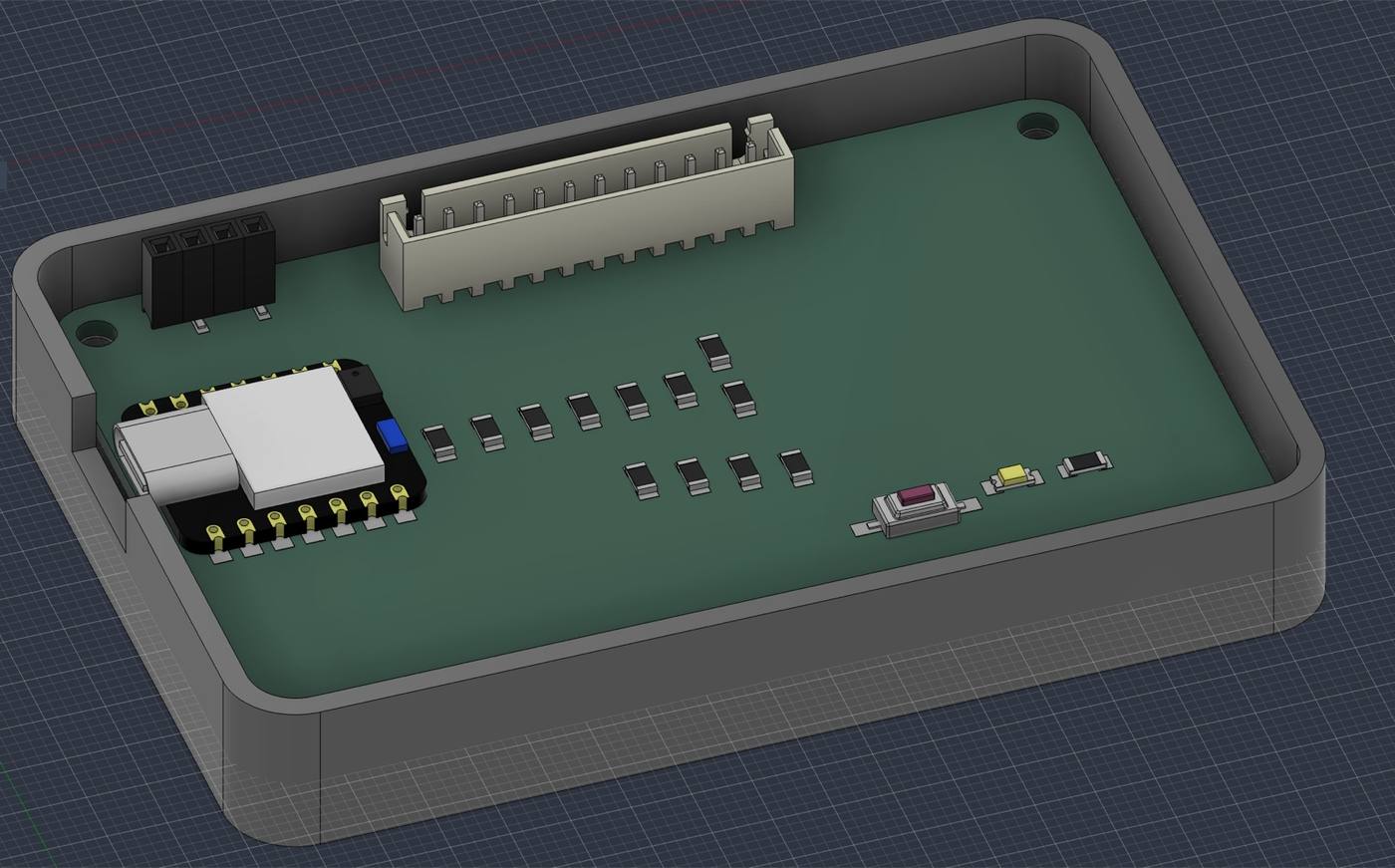
Also implemeting the same MCP workflow with Fusion as I did in week 4 , the board was exported from KiCad as a STEP file with all its components before importing into Fusion to design an open tray that could be inserted in the main module of my final project.