Week 3: Embedded Programming
Intro
Our assignment this week was to
- browse through the data sheet for a microcontroller
- write and test a program for an embedded system using a microcontroller to interact (with input &/or output devices) and communicate (with wired or wireless connections)
- extra credit: assemble the system
- extra credit: try different languages &/or development environments I’ve done a bit of embedded programming before, but this is my first time working with a Raspberry Pi product!
Soldering
Training
Before programming, we had to attach the OLED, the RP2040 Xiao module, and 2 10k resistors to the board. I attended a training with Quentin to learn how to solder safely and not inhale too many fumes. Here were my takeaways on how to solder:
- Turn on soldering iron
- Turn on vent fan and aim it at the board
- Place the board on the jig
- Angle soldering iron to touch the connector and component to heat both up, and feed solder + flux in
- If the board is messy, clean it with isopropyl alcohol + toothbrush because flux is acidic
- Wear gloves for this
- Wipe with tissue
- TURN OFF SOLDERING IRON, and make sure the other soldering irons in the room are off while you’re at it
- Turn off vent fan
Assembly
Then, I followed this helpful guide to solder the QPAD. The videos were helpful for recognizing the exact moment the flux attaches to a pad.
I used a 3D printed jig to hold the board down, soldered the resistors first.
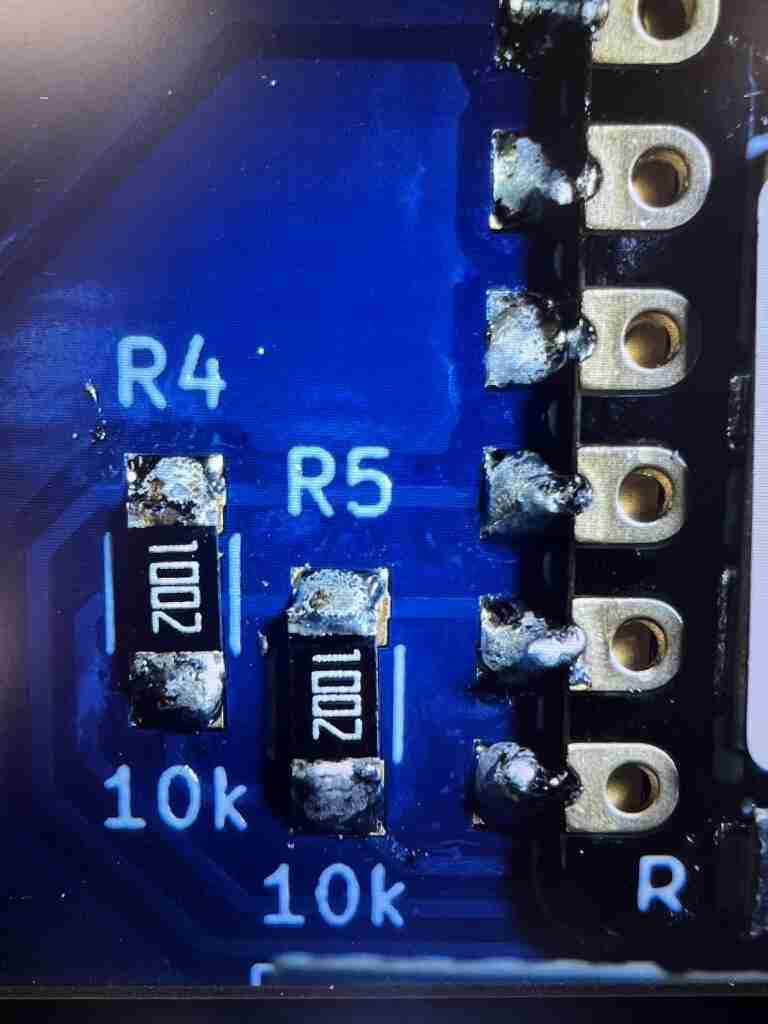
Then, I soldered the Xiao, and finally the OLED screen.
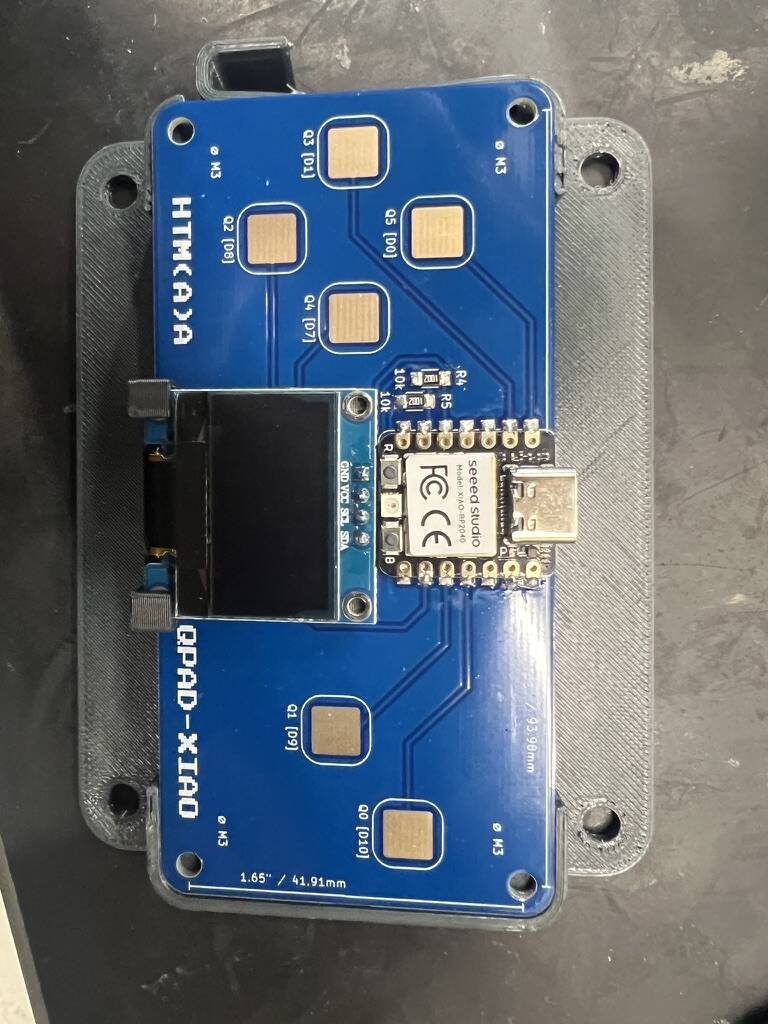
Setup
Reading documentation
After assembling the board, the rest of the assignment was on the software side. It was helpful to read through the documentation before attempting to program the board. I found Quentin’s repo for the QPAD and noted the board pinout
- P03: touch pad 0
- P04: touch pad 1
- P02: touch pad 2
- P27: touch pad 3
- P01: touch pad 4
- P26: touch pad 5
- P06: display SDA
- P07: display SCL
Then, I found the RP2040 datasheet online, and started scanning through it. The entire datasheet was >600 pages, so I tried to only read through the relevant sections.
I thought this overview of the chip was helpful, showing the available peripherals, IOs, and memory layout. The SRAM was partitioned into 6 banks to allow for parallel processing.
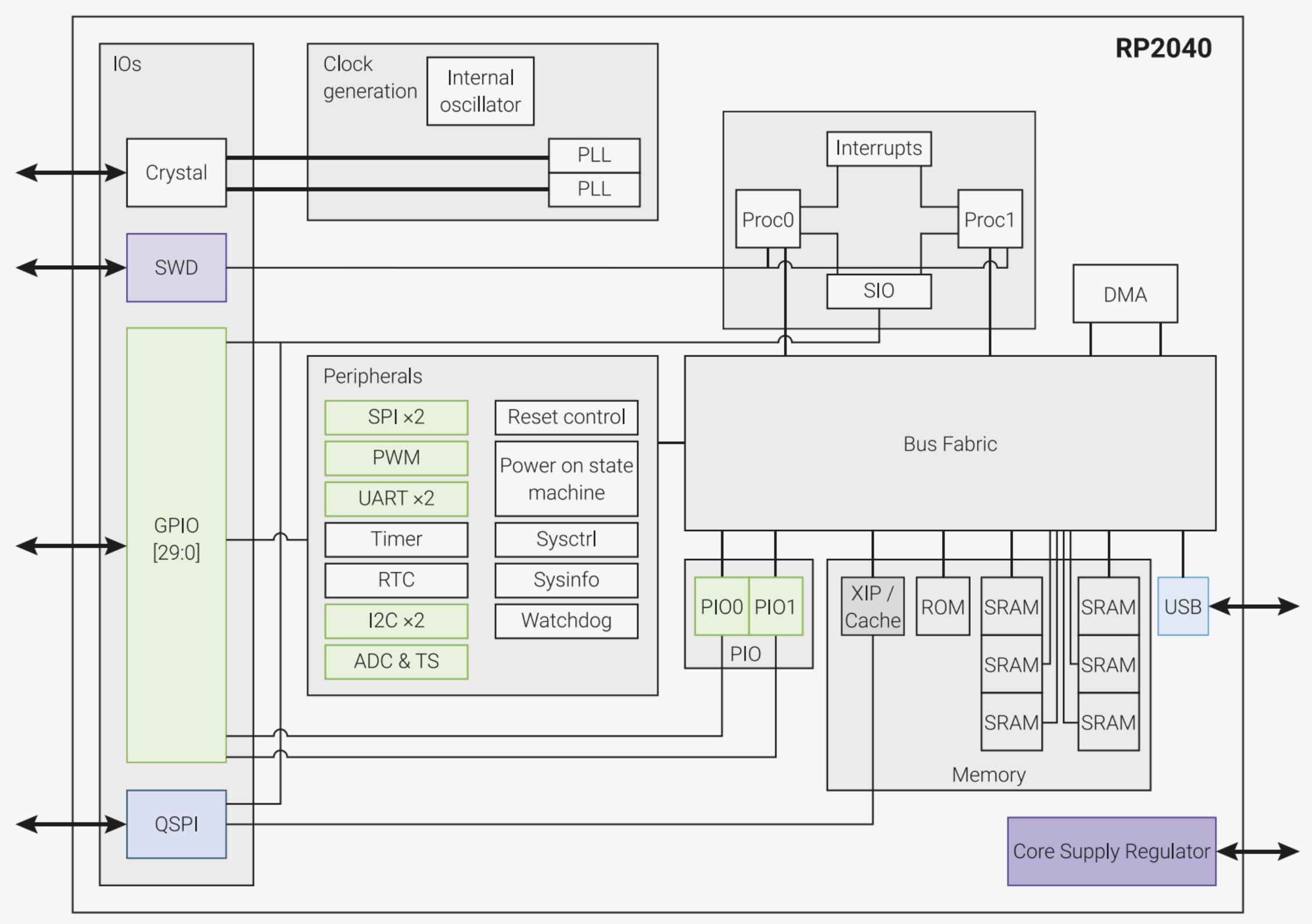
The other sections that I skimmed through were: 2.5 DMA, 2.6 Memory, 2.19 GPIO, 2.19.3 Interrupts, and 3 PIO (supports I2C, SPI, DSPI, QSPI, UART, SDIO).
Toolchain, workflow
I decided to use an Arduino workflow because it seemed pretty common, which would hopefully make it easier to find documentation online. I also wanted to practice using C/C++. I installed the Arduino IDE and set up the Arduino core, which is an API to communicate with a specific set of chips, in this case, the Raspberry Pi Pico. I followed these instructions to set up the Arduino Board Manager.
Testing examples
To validate that my soldering/board assembly actually worked, I wanted to flash Quentin’s touch and screen examples to check the behavior. The steps are generally:
Download the example file and open it in Arduino
On the first time connecting, press BOOT while plugging the Xiao in to put the board in boot mode
In Tools -> Board, select the Raspberry Pi and UF2 board
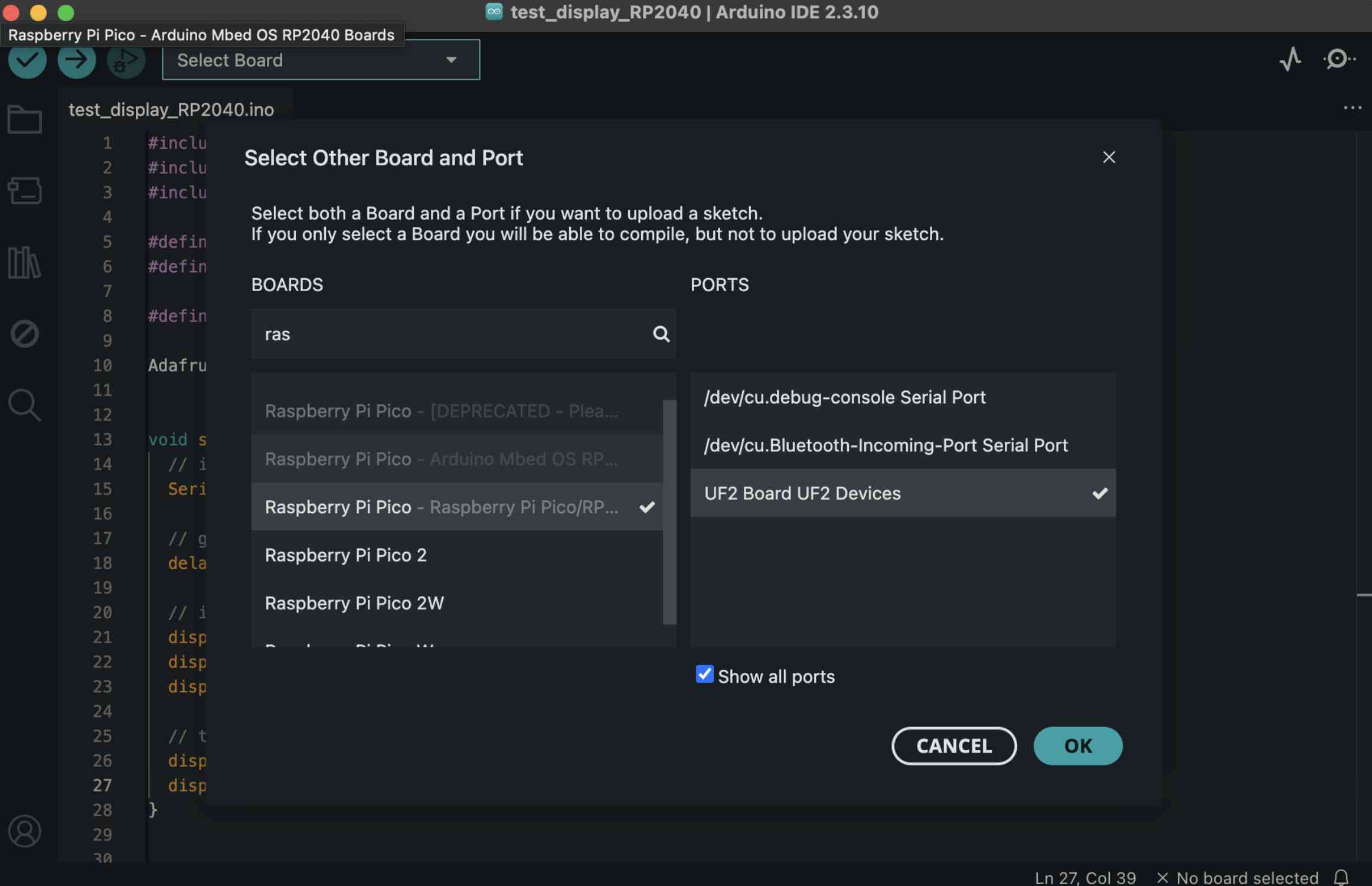
In Tools -> Port, select the correct port
Press upload to flash the board
The first time that I tried this, I encountered an error saying “Adafruit_GFX.h: No such file or directory”. This meant that I didn’t have the necessary libraries installed. To fix this, go to Tools -> Manage Libraries, and install Adafruit GFX and Adafruit SSD1306 OLED library.
After doing this, the code successfully compiled and uploaded, but nothing happened on the screen. After checking, the UF2/RPI-RP2 port had disappeared, and I saw /dev/cu.usbmodem3101. It turns out that when the RP2040 is plugged in while in bootloader mode, the laptop sees it as a mass storage drive so that the .uf2 firmware file can be copied to it. When it’s flashed for the first time, the RP2040 exits bootloader mode, reboots, starts running the firmware, and exposes itself as a normal serial device (/dev/cu.usbmodem3101).
I selected the new port, tried uploading again, and received another error: “Timeout. The IDE has not received the ‘success’ message from the monitor after successfully connecting to it. Could not connect to /dev/cu.usbmodem3101 serial port”. In case there was an issue with Quentin’s example, I tried flashing a default blink example, and still nothing happened. Then, I referenced the Seeed Studio Xiao Arduino documentation, and noticed that after selecting the Raspberry Pi board, I had to open an additional menu and select the specific Seeed XiAO RP2040 module.
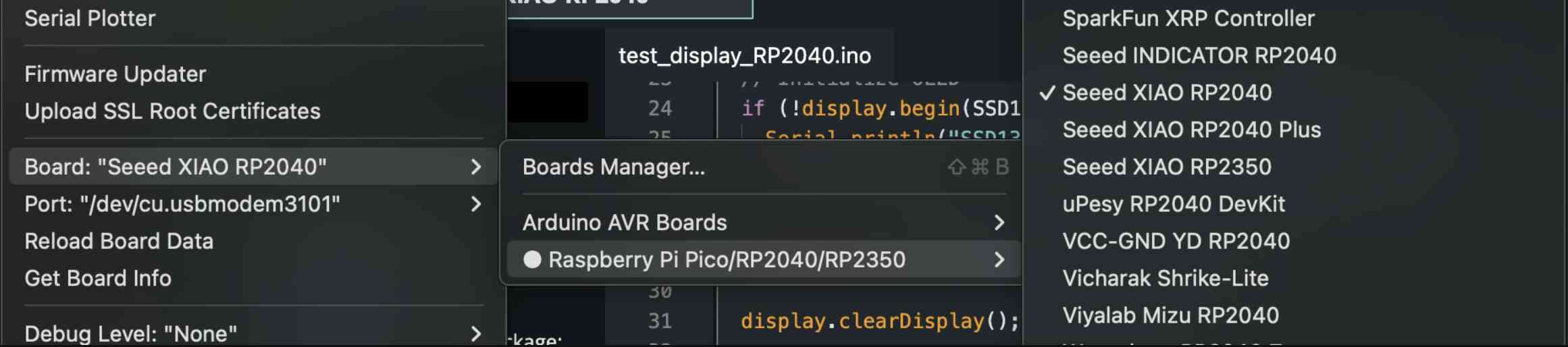
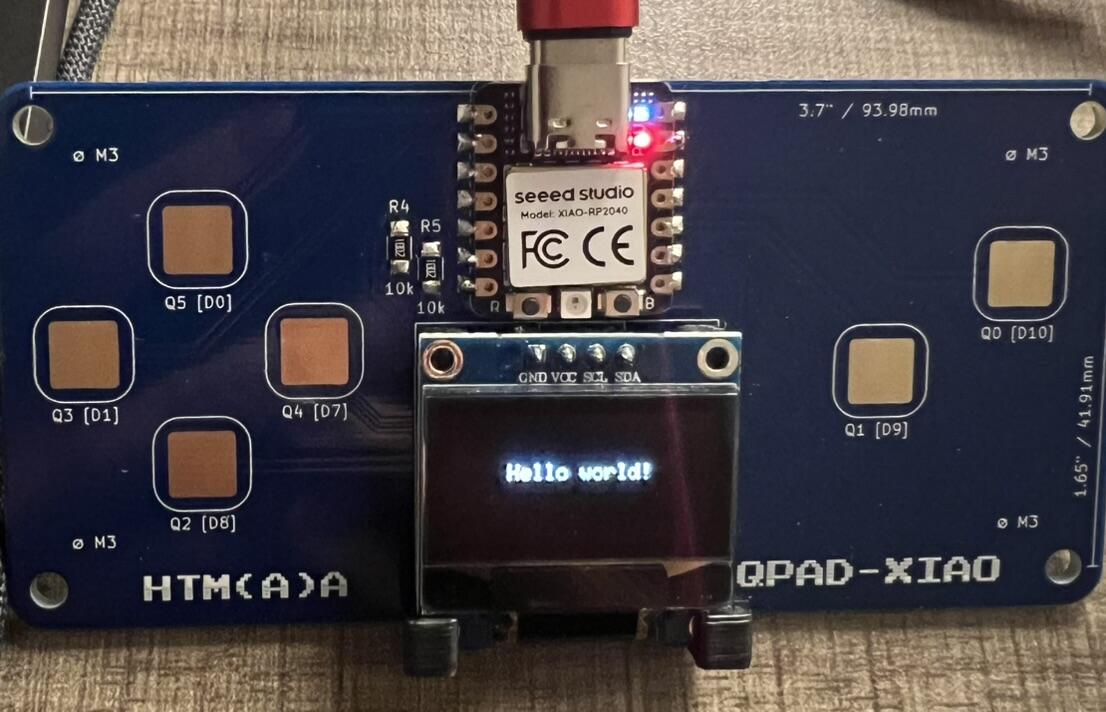
After doing this, flashing the examples worked! I first flashed the display test, which displays “Hello world!” on the OLED.
Then, I flashed the touch test, which prints out values to the serial monitor when each pad is touched.
Sugar, Sugar
For my project, I tried to think of games which a simple movement mechanism (like WASD), to use the 4 touch pads. I also thought it would be fun to let the user draw lines using the pads. I thought back to some of my favorite games as a kid, and landed on Sugar, Sugar. The basic premise is that sugar is falling from the top of the screen, and you have to draw lines to guide the sugar into cups. The levels progressively get more difficult, and new mechanisms, like flipping the gravity so the sugar falls up, instead of down, become available.ffmpeg -i single.mov -vcodec libx265 -crf 28 -acodec aac -b:a 128k comp/single.mp4
Coding
I used ChatGPT to write the embedded code for the game, and edited it manually after the base code was generated. I added Quentin’s display and touch examples to the prompt, and also input the pinout of the board. I also input a basic description of the game, well as data structures that I thought would be helpful (list of structs for each Sugar molecule, list of structs for Cups), and the behavior for each touch pad.
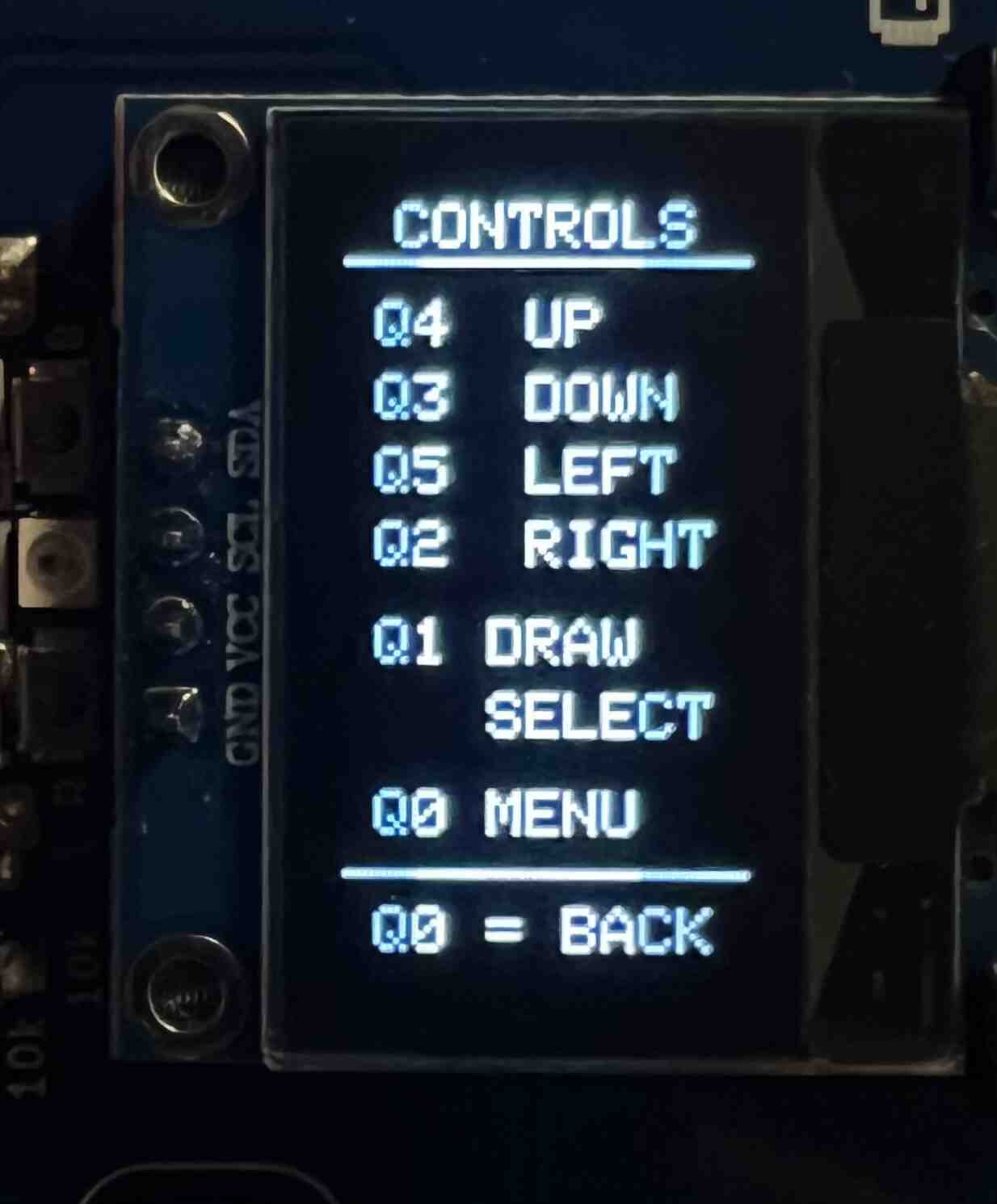
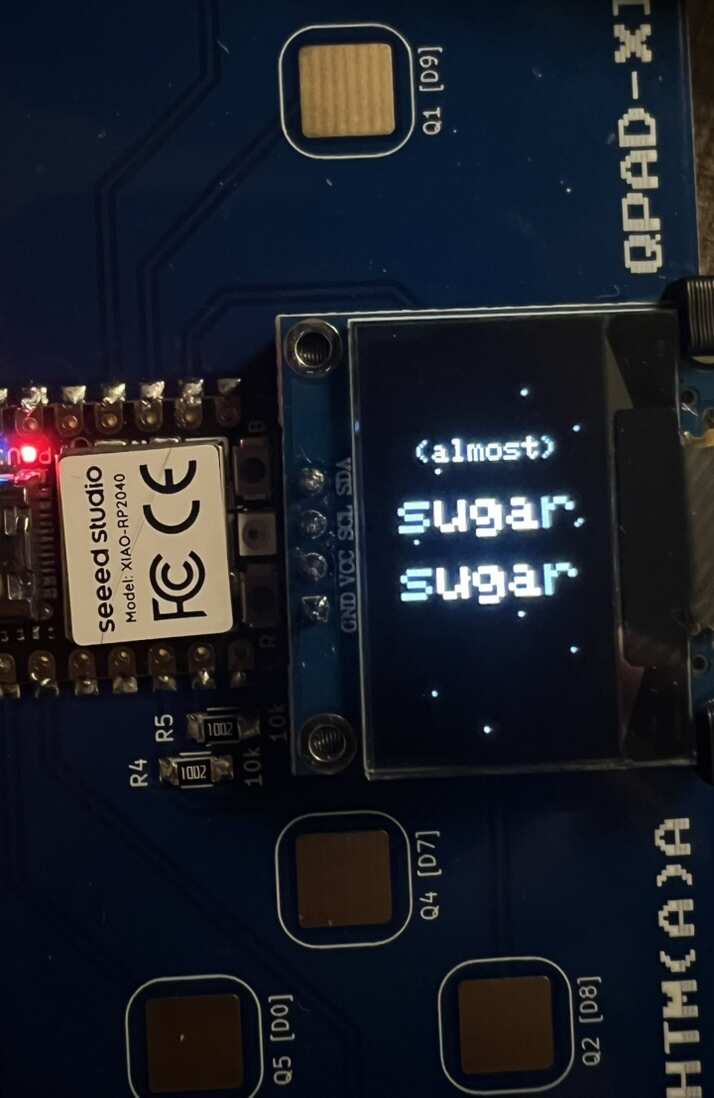
After testing that the base game worked, I used ChatGPT to make a v2 with more functionality, including adding more levels, inverted gravity, a menu screen, a reset button, and a controls screen. I also thought it would be cute to add a little loading screen, in the style of the original Sugar, Sugar game.
Memory limitations
Since there is a limited amount of dynamic memory, I had to recycle the sugar particles instead of creating new ones. When the sugar particle leaves the screen or is stationary for >2 seconds (meaning it is stuck on a drawn line), the position is reset to the origin location.
Finished game
The final code is below. Much of the screen/touch portion is referenced from Quentin’s examples. The main parts of the behavior are:
- Sugar: struct for each sugar grain that keeps track of the molecule’s position and velocity
- Cup: struct for each cup that keeps track of the height/width, total capacity, current fullness, and whether it’s upside down or not
- Levels: utilizes helper functions to place cups and set the sugar origin location for each level
- Touch: reads which pads are currently touched and updates the pin_touched_now array
- Setup: wire the pins, set a random seed for the sugar, and initialize the OLED
- Main loop: check if pins are touched, draw the menu or control screen if it’s currently open, handle behavior if any of the pads are touched, update the game drawing (sugar), check if level is complete
- Game controls: handle behavior if any of the pads are touched (moving the cursor up/down, drawing lines, clicking the gravity button)
- Menu controls: draw the menu and show the currently selected item. The menu consists of Reset, Controls, and Levels 1-10
- Control screen: shows what the behavior of each pad is
- Sugar behavior: move the sugar based on current position and velocity, handles collisions with lines that are drawn, recycles sugar particles that leave the screen or are stuck for too long
- Drawing: draws a line between two points, since the cursor position is sample on an interval
#include <Wire.h>
#include <Adafruit_GFX.h>
#include <Adafruit_SSD1306.h>

// DISPLAY ============================================================

// from test_display example
#define SCREEN_WIDTH 128
#define SCREEN_HEIGHT 64
#define SCREEN_ADDRESS 0x3C

#define SDA_PIN 6
#define SCL_PIN 7

Adafruit_SSD1306 display(
  SCREEN_WIDTH,
  SCREEN_HEIGHT,
  &Wire,
  -1
);

// Screen is rotated vertically.
#define GAME_W 64
#define GAME_H 128


// ============================================================
// TOUCH PADS
// ============================================================
//
// Q0 -> GP3  -> menu
// Q1 -> GP4  -> draw toggle / select / gravity button
//
// UPDATED DIRECTION MAPPING:
//
// Q2 -> GP2  -> RIGHT
// Q3 -> GP27 -> DOWN
// Q4 -> GP1  -> UP
// Q5 -> GP26 -> LEFT
//

#define N_TOUCH 6
#define THRESHOLD 6

int touch_pins[N_TOUCH] = {
  3,   // Q0
  4,   // Q1
  2,   // Q2
  27,  // Q3
  1,   // Q4
  26   // Q5
};
int touch_values[N_TOUCH] = {0, 0, 0, 0, 0, 0};

bool pin_touched_now[N_TOUCH] = {false, false, false, false, false, false};
bool pin_touched_past[N_TOUCH] = {false, false, false, false, false, false};


// ============================================================
// DRAWING
// ============================================================

bool drawingMask[GAME_W][GAME_H];

int cursorX = GAME_W / 2;
int cursorY = 45;

bool drawingEnabled = false;

unsigned long lastMove = 0;

const unsigned long MOVE_INTERVAL = 40; // controls how quickly the cursor moves when you hold one of the directional touch buttons


// ============================================================
// SUGAR
// ============================================================

#define MAX_SUGAR 100

// struct to keep track of one sugar
struct Sugar {
  float x;
  float y;

  float vx;
  float vy;

  bool active;

  // used to recycle particles that get stuck
  unsigned long lastMovedTime;
};

Sugar sugar[MAX_SUGAR];

unsigned long lastSpawn = 0;

const unsigned long SPAWN_INTERVAL = 75;

const float GRAVITY = 0.075;
const float MAX_FALL_SPEED = 1.35;

// recycle a particle if it has not moved for this long
const unsigned long STUCK_TIMEOUT = 2000;

// +1 = gravity down
// -1 = gravity up
int gravityDirection = 1;


// SUGAR SOURCE ============================================================
// where the sugar falls from
int sugarSourceX = GAME_W / 2;
int sugarSourceY = 13;

// CUPS ============================================================
#define MAX_CUPS 4

struct Cup { // keep track of each cup
  int x;
  int y;

  int width;
  int height;

  int amount;
  int target;

  bool upsideDown;
};

Cup cups[MAX_CUPS];
int numCups = 0;

// GRAVITY BUTTON ============================================================
bool hasGravityButton = false;
// init position and size for gravity button
const int GRAV_BUTTON_X = 49;
const int GRAV_BUTTON_Y = 50;
const int GRAV_BUTTON_W = 12;
const int GRAV_BUTTON_H = 18;


// LEVEL / MENU ============================================================
int level = 1; // starting menu
// menu state
bool menuOpen = false;
int menuIndex = 0;
bool controlsOpen = false;

// Reset + Controls + Levels 1-10
const int MENU_ITEMS = 12;

// TOUCH READING ============================================================
void update_touch() { // from quentin's example
  int t;
  int t_max = 200;
  int p;

  for (int i = 0; i < N_TOUCH; i++) {

    p = touch_pins[i];

    // set to low
    pinMode(p, OUTPUT);
    digitalWriteFast(p, LOW);

    // settle
    delayMicroseconds(25);

    // enable pull-up
    pinMode(p, INPUT_PULLUP);

    // measure time to rise
    t = 0;
    while (!digitalReadFast(p) && t < t_max) {
      t++;
    }
    touch_values[i] = t;

    // update state
    pin_touched_past[i] = pin_touched_now[i];
    pin_touched_now[i] = touch_values[i] > THRESHOLD;
  }
}

// HELPERS ============================================================
bool justTouched(int index) { // returns if pin just started to be touched
  return (pin_touched_now[index] && !pin_touched_past[index]
  );
}

// SETUP ============================================================
// basically from the test_display_RP2040 example
// https://forge.cba.mit.edu/quentin.bolsee/qpad-xiao/src/branch/main/code/Arduino/test_display_RP2040
void setup() {
  Serial.begin(115200);
  delay(100);

  // Tell RP2040 which pins the display uses
  Wire.setSDA(SDA_PIN);
  Wire.setSCL(SCL_PIN);
  Wire.begin();


  // Initialize OLED
  if (!display.begin(SSD1306_SWITCHCAPVCC, SCREEN_ADDRESS)) {
    Serial.println("SSD1306 initialization failed");
    while (true);
  }

  Serial.println("SSD1306 initialized");

  display.setRotation(1); // vertical instead of horizontal
  display.clearDisplay();
  display.display();

  randomSeed(micros()); // diff seed for random sugar behavior

  showSplashScreen(); // starting screen for 2 sec

  startLevel(1);
}


// MAIN LOOP ============================================================
void loop() {
  // update the touch sensors
  update_touch();

  // CONTROLS SCREEN
  if (controlsOpen) {
    handleControlsScreen();
    drawControlsScreen();
    delay(16);
    return;
  }

  // MENU
  if (menuOpen) { // menu previously open
    handleMenuControls();
    drawMenu();
    delay(16);
    return;
  }


  // GAME CONTROLS
  handleGameControls();

  // if Q0 opened the menu
  if (menuOpen) {
    drawMenu();
    delay(16);
    return;
  }

  // GAME
  spawnSugar();
  updateSugar();
  drawGame();

  if (levelComplete()) {
    advanceLevel();
  }

  delay(16);
}


// SPLASH SCREEN ============================================================
// shows on start

void showSplashScreen() {

  // small animation lasting 2 sec
  for (int frame = 0; frame < 40; frame++) {

    display.clearDisplay();
    display.setTextColor(SSD1306_WHITE);

    // "(almost)"
    display.setTextSize(1);
    display.setCursor(8, 28);
    display.print("(almost)");

    // sugar
    display.setTextSize(2);
    display.setCursor(2, 45);
    display.print("sugar");

    // comma
    display.drawPixel(62, 57, SSD1306_WHITE);
    display.drawPixel(61, 58, SSD1306_WHITE);

    // sugar
    display.setTextSize(2);
    display.setCursor(2, 68);
    display.print("sugar");

    // Falling sugar dots
    for (int i = 0; i < 10; i++) {
      int x = (i * 17 + 7) % GAME_W; //*17 is for spacing, +7 shifts the particle
      int y = (frame * 2 + i * 13) % GAME_H; // frame * 2 moves particles down
      display.drawPixel(x, y, SSD1306_WHITE);
    }

    display.display();
    delay(50);
  }
}


// GAME CONTROLS ============================================================
// handles pad touching behavior
void handleGameControls() {
  // Q0 = OPEN MENU
  if (justTouched(0)) {
    menuOpen = true;
    menuIndex = 0;
    drawingEnabled = false;
    return;
  }

  // Q1 = DRAW TOGGLE OR GRAVITY BUTTON
  if (justTouched(1)) {
    // if cursor is on gravity button,
    // activate that instead of drawing
    if (hasGravityButton &&cursorOverGravityButton()) {
      reverseGravity();
    } else {
      drawingEnabled = !drawingEnabled;
      if (drawingEnabled) {
        setDrawPixel(cursorX, cursorY);
      }
    }
  }

  // CURSOR MOVEMENT
  if (millis() - lastMove < MOVE_INTERVAL) { // dont move if 40 millisec hasnt passed yet
    return;
  }

  lastMove = millis();

  int oldX = cursorX;
  int oldY = cursorY;

  // Q4 = UP
  if (pin_touched_now[4]) {
    cursorY--;
  }

  // Q3 = DOWN
  if (pin_touched_now[3]) {
    cursorY++;
  }

  // Q5 = LEFT
  if (pin_touched_now[5]) {
    cursorX--;
  }

  // Q2 = RIGHT
  if (pin_touched_now[2]) {
    cursorX++;
  }

  cursorX = constrain(cursorX, 1, GAME_W - 2); // dont let cursor leave borders
  cursorY = constrain(cursorY, 13, GAME_H - 2);

  // DRAW LINE
  if (drawingEnabled && (oldX != cursorX || oldY != cursorY)
  ) {
    drawIntoMask(oldX, oldY, cursorX, cursorY);
  }
}


// MENU CONTROLS ============================================================
// Handles touch input while the menu is open
void handleMenuControls() {
  // Q0 = close menu
  if (justTouched(0)) {
    menuOpen = false;
    return;
  }

  // Q4 = move selection up
  if (justTouched(4)) {
    menuIndex--;
    if (menuIndex < 0) { // wrap around
      menuIndex = MENU_ITEMS - 1;
    }
  }

  // Q3 = move selection down
  if (justTouched(3)) {
    menuIndex++;
    if (menuIndex >= MENU_ITEMS) {
      menuIndex = 0;
    }
  }

  // Q1 = select
  if (justTouched(1)) {
    if (menuIndex == 0) {
      // reset current level
      startLevel(level);
      menuOpen = false;
    } else if (menuIndex == 1) {
      // Open controls screen
      controlsOpen = true;
      menuOpen = false;
    } else {
      // select level
      int selectedLevel = menuIndex - 1;
      startLevel(selectedLevel);
      menuOpen = false;
    }
  }
}


// DRAW MENU ============================================================
// Draws the menu and highlights the currently selected item
void drawMenu() {
  display.clearDisplay();
  display.setTextColor(SSD1306_WHITE);
  display.setTextSize(1);

  // Title
  display.setCursor(18, 1);
  display.print("MENU");
  display.drawLine(0, 10, GAME_W - 1, 10, SSD1306_WHITE);

  const int VISIBLE_ITEMS = 10;
  // Keep the selected item near the middle of the visible menu.
  int firstItem = menuIndex - 4;

  if (firstItem < 0) {
    firstItem = 0;
  }

  if (firstItem > MENU_ITEMS - VISIBLE_ITEMS) {
    firstItem = MENU_ITEMS - VISIBLE_ITEMS;
  }

  // Draw visible menu items
  for (int row = 0; row < VISIBLE_ITEMS; row++) {
    int item = firstItem + row;

    if (item >= MENU_ITEMS) {
      break;
    }

    int y = 14 + row * 11;

    // Selection arrow
    if (item == menuIndex) {
      display.setCursor(0, y);
      display.print(">");
    }

    display.setCursor(8, y);

    if (item == 0) {
      display.print("Reset");
    } else if (item == 1) {
      display.print("Controls");
    } else {
      display.print("Level ");
      display.print(item - 1);
    }
  }

  display.display();
}


// Handles touch input while the controls screen is open
void handleControlsScreen() {
  if (justTouched(0)) {
    controlsOpen = false;
    menuOpen = true;
  }
}

// Draws the controls screen with the game's touch-button mappings
void drawControlsScreen() {
  display.clearDisplay();
  display.setTextColor(SSD1306_WHITE);
  display.setTextSize(1);

  // Title
  display.setCursor(8, 1);
  display.print("CONTROLS");
  display.drawLine(0, 10, GAME_W - 1, 10, SSD1306_WHITE);

  // Directions
  display.setCursor(5, 17);
  display.print("Q4  UP");

  display.setCursor(5, 29);
  display.print("Q3  DOWN");

  display.setCursor(5, 41);
  display.print("Q5  LEFT");

  display.setCursor(5, 53);
  display.print("Q2  RIGHT");

  // Actions
  display.setCursor(5, 69);
  display.print("Q1 DRAW");

  display.setCursor(5, 81);
  display.print("   SELECT");

  display.setCursor(5, 97);
  display.print("Q0 MENU");

  // Back instruction
  display.drawLine(0, 110, GAME_W - 1, 110, SSD1306_WHITE);

  display.setCursor(5, 116);
  display.print("Q0 = BACK");

  display.display();
}

// LEVEL SETUP ============================================================

// Initializes a level and resets all level-specific game state
void startLevel(int newLevel) {
  level = newLevel;

  // lears existing drawings and sugar particles
  clearDrawing();
  clearSugar();

  // resets gravity and cursor state
  drawingEnabled = false;
  gravityDirection = 1;
  hasGravityButton = false;
  numCups = 0;

  cursorX = GAME_W / 2;
  cursorY = 45;

  lastSpawn = millis();

  // Level 1: sugar from center, one cup slightly left
  if (level == 1) {
    sugarSourceX = 32;
    sugarSourceY = 14;

    addCup(8, 107, 18, 15, 20, false);
  }

  // Level 2: two normal cups, one upper-left and one lower-right
  else if (level == 2) {
    sugarSourceX = 32;
    sugarSourceY = 14;

    addCup(3, 72, 18, 15, 12, false);
    addCup(41, 108, 18, 15, 12, false);
  }

  // Level 3: one upside-down cup with gravity reversal
  else if (level == 3) {
    sugarSourceX = 32;
    sugarSourceY = 63;
    hasGravityButton = true;

    addCup(4, 15, 18, 15, 18, true);
  }

  // Level 4: one normal and one upside-down cup
  else if (level == 4) {
    sugarSourceX = 32;
    sugarSourceY = 63;
    hasGravityButton = true;

    addCup(4, 15, 18, 15, 12, true);
    addCup(40, 108, 18, 15, 12, false);
  }

  // Level 5: three normal cups
  else if (level == 5) {
    sugarSourceX = 15;
    sugarSourceY = 14;

    addCup(39, 61, 18, 15, 10, false);
    addCup(3, 86, 18, 15, 10, false);
    addCup(39, 108, 18, 15, 10, false);
  }

  // Level 6: two upside-down cups
  else if (level == 6) {
    sugarSourceX = 32;
    sugarSourceY = 65;
    hasGravityButton = true;

    addCup(3, 15, 18, 15, 12, true);
    addCup(41, 30, 18, 15, 12, true);
  }

  // Level 7: one upside-down cup and two normal cups
  else if (level == 7) {
    sugarSourceX = 16;
    sugarSourceY = 61;
    hasGravityButton = true;

    addCup(39, 15, 18, 15, 10, true);
    addCup(3, 91, 18, 15, 10, false);
    addCup(39, 108, 18, 15, 10, false);
  }

  // Level 8: two upside-down cups and one normal cup
  else if (level == 8) {
    sugarSourceX = 48;
    sugarSourceY = 65;
    hasGravityButton = true;

    addCup(3, 15, 18, 15, 10, true);
    addCup(39, 34, 18, 15, 10, true);
    addCup(5, 108, 18, 15, 10, false);
  }

  // Level 9: two upside-down cups and two normal cups
  else if (level == 9) {
    sugarSourceX = 32;
    sugarSourceY = 64;
    hasGravityButton = true;

    addCup(2, 15, 17, 14, 8, true);
    addCup(43, 15, 17, 14, 8, true);
    addCup(2, 109, 17, 14, 8, false);
    addCup(43, 109, 17, 14, 8, false);
  }

  // Level 10: four staggered cups
  else {
    sugarSourceX = 32;
    sugarSourceY = 63;
    hasGravityButton = true;

    addCup(3, 15, 17, 14, 10, true);
    addCup(42, 32, 17, 14, 10, true);
    addCup(3, 82, 17, 14, 10, false);
    addCup(42, 109, 17, 14, 10, false);
  }
}

// Adds a cup to the current level, target is the number of sugar particles needed to fill it
void addCup(int x, int y, int w, int h, int target, bool upsideDown) {
  if (numCups >= MAX_CUPS) {
    return;
  }

  cups[numCups].x = x;
  cups[numCups].y = y;
  cups[numCups].width = w;
  cups[numCups].height = h;
  cups[numCups].amount = 0;
  cups[numCups].target = target;
  cups[numCups].upsideDown = upsideDown;

  numCups++;
}

// NEXT LEVEL ============================================================

// what happens when user clears a level
void advanceLevel() {
  display.clearDisplay();

  display.setTextColor(SSD1306_WHITE);
  display.setTextSize(1);

  // victory message and move onto next level
  if (level < 10) {
    display.setCursor(12, 52);
    display.print("LEVEL");
    display.setCursor(10, 65);
    display.print("CLEAR!");
    display.display();
    delay(1000);
    startLevel(level + 1);
  }
  else { // finish entire game
    display.setCursor(9, 48);
    display.print("YOU");
    display.setCursor(8, 61);
    display.print("WIN!");

    display.display();
    delay(2000);
    startLevel(1);
  }
}

// LEVEL COMPLETE ============================================================

// return true if level is finished
bool levelComplete() {
  for (int i = 0; i < numCups; i++) {
    if (cups[i].amount < cups[i].target) {
      return false;
    }
  }
  return true;
}

// TOTAL PROGRESS ============================================================
// total amount of sugar currently in all cups
int totalCupAmount() {
  int total = 0;
  for (int i = 0; i < numCups; i++) {
    total += cups[i].amount;
  }
  return total;
}

// total amount needed to fill all of the cups
int totalCupTarget() {
  int total = 0;
  for (int i = 0; i < numCups; i++) {
    total += cups[i].target;
  }
  return total;
}

// GRAVITY ============================================================
void reverseGravity() {
  gravityDirection *= -1;
  // Immediately reverse particles already moving.
  for (int i = 0; i < MAX_SUGAR; i++) {
    if (!sugar[i].active) {
      continue;
    }

    sugar[i].vy *= -1;
    sugar[i].lastMovedTime =  millis(); // give particle fresh stuck timer
  }
}

// if cursor is hovering over the gravity button
bool cursorOverGravityButton() {
  return (
    cursorX >= GRAV_BUTTON_X && cursorX <= GRAV_BUTTON_X + GRAV_BUTTON_W &&
    cursorY >= GRAV_BUTTON_Y && cursorY <= GRAV_BUTTON_Y + GRAV_BUTTON_H);
}

// CLEAR DRAWING ============================================================
void clearDrawing() {
  for (int x = 0; x < GAME_W; x++) {
    for (int y = 0; y < GAME_H; y++) {
      drawingMask[x][y] = false;
    }
  }
}

// DRAW MASK PIXEL ============================================================
// Adds a pixel to the player's drawing mask
void setDrawPixel(int x, int y) {
  // dont draw outside the game area
  if (x < 0 || x >= GAME_W || y < 0 || y >= GAME_H) {
    return;
  }

  // dont draw over the top status area
  if (y < 12) {
    return;
  }

  // dont draw over the gravity button
  if (hasGravityButton &&
      x >= GRAV_BUTTON_X &&
      x <= GRAV_BUTTON_X + GRAV_BUTTON_W &&
      y >= GRAV_BUTTON_Y &&
      y <= GRAV_BUTTON_Y + GRAV_BUTTON_H) {
    return;
  }

  drawingMask[x][y] = true;
}

// BRESENHAM LINE DRAWING ============================================================
// darws a line from (x0, y0) to (x1, y1) into the drawing mask
// Uses Bresenham's line algorithm to fill in every pixel between
// the two points, preventing gaps when the cursor moves
void drawIntoMask(int x0, int y0, int x1, int y1) {
  int dx = abs(x1 - x0);
  int sx = x0 < x1 ? 1 : -1;

  int dy = -abs(y1 - y0);
  int sy = y0 < y1 ? 1 : -1;

  int error = dx + dy;

  while (true) {
    setDrawPixel(x0, y0);

    if (x0 == x1 && y0 == y1) {
      break;
    }

    int e2 = 2 * error;

    if (e2 >= dy) {
      error += dy;
      x0 += sx;
    }

    if (e2 <= dx) {
      error += dx;
      y0 += sy;
    }
  }
}


// SUGAR ============================================================
void clearSugar() {
  for (int i = 0; i < MAX_SUGAR; i++) {
    sugar[i].active = false;
  }
}

// Spawns a new sugar particle at a fixed time interval
void spawnSugar() {
  if (millis() - lastSpawn < SPAWN_INTERVAL) {
    return;
  }

  lastSpawn = millis();

  for (int i = 0; i < MAX_SUGAR; i++) {
    if (!sugar[i].active) {
      sugar[i].active = true;

      // init sugar source with small random horizontal and vertical velocity
      sugar[i].x = sugarSourceX + random(-1, 2);
      sugar[i].y = sugarSourceY;

      sugar[i].vx = random(-12, 13) / 100.0;
      sugar[i].vy = gravityDirection * (random(2, 10) / 100.0);

      sugar[i].lastMovedTime = millis();

      return;
    }
  }
}

// Updates the position and state of every active sugar particle
// Applies gravity, handles collisions with cups and drawn lines,
// and recycles particles that become stuck or leave the screen
void updateSugar() {
  for (int i = 0; i < MAX_SUGAR; i++) {
    if (!sugar[i].active) {
      continue;
    }

    Sugar &p = sugar[i];

    float oldX = p.x;
    float oldY = p.y;

    // Apply gravity and limit vertical speed
    p.vy += gravityDirection * GRAVITY; // accerlate

    if (p.vy > MAX_FALL_SPEED) {
      p.vy = MAX_FALL_SPEED;
    }

    if (p.vy < -MAX_FALL_SPEED) {
      p.vy = -MAX_FALL_SPEED;
    }

    float nextX = p.x + p.vx;
    float nextY = p.y + p.vy;

    // capture particles that enter a cup
    if (checkCupCapture(p.x, p.y, nextX, nextY, p.vy)) {
      p.active = false;
      continue;
    }

    // handle collisions with drawn lines
    if (hitsDrawing(nextX, nextY)) {
      float checkY = p.y + gravityDirection;

      // make sugar slide left or right when it hits one
      // of your drawn lines, rather than just stopping
      bool leftFree = !hitsDrawing(p.x - 1, checkY);
      bool rightFree = !hitsDrawing(p.x + 1, checkY);

      if (leftFree && rightFree) {
        p.vx = (random(2) == 0) ? -0.65 : 0.65;
        p.vy = gravityDirection * 0.12;

      } else if (leftFree) {
        p.vx = -0.65;
        p.vy = gravityDirection * 0.12;

      } else if (rightFree) {
        p.vx = 0.65;
        p.vy = gravityDirection * 0.12;

      } else {
        // Stop particles that are trapped
        p.vy = 0;
        p.vx *= 0.5;
      }

      p.x += p.vx;

    } else { // freefall, move normally
      p.x = nextX;
      p.y = nextY;
      p.vx *= 0.995;
    }

    // reset the stuck timer whenever the particle moves
    float movement = fabsf(p.x - oldX) + fabsf(p.y - oldY);
    if (movement > 0.05) {
      p.lastMovedTime = millis();
    }

    // recycle particles that are stuck
    if (millis() - p.lastMovedTime > STUCK_TIMEOUT) {
      p.active = false;
      continue;
    }

    // recylce particles that leave the screen
    if (p.x < 0 || p.x >= GAME_W || p.y < 0 || p.y >= GAME_H) {
      p.active = false;
    }
  }
}

// Checks whether a sugar particle overlaps the player's drawing
bool hitsDrawing(float fx, float fy) {
  int x = round(fx);
  int y = round(fy);

  if (x < 0 || x >= GAME_W || y < 0 || y >= GAME_H) {
    return false;
  }

  // Check the 3x3 area surrounding the particle to stop overalapping thin lines
  for (int dx = -1; dx <= 1; dx++) {
    for (int dy = -1; dy <= 1; dy++) {
      int xx = x + dx;
      int yy = y + dy;

      if (xx >= 0 && xx < GAME_W && yy >= 0 && yy < GAME_H) {
        if (drawingMask[xx][yy]) {
          return true;
        }
      }
    }
  }

  return false;
}


// Checks whether a sugar particle enters one of the cups
bool checkCupCapture(float oldX, float oldY, float newX, float newY, float velocityY) {
  for (int i = 0; i < numCups; i++) {
    Cup &c = cups[i];

    // ignore cups that are already full
    if (c.amount >= c.target) {
      continue;
    }

    // check whether the particle is horizontally inside the cup opening
    bool insideX = newX > c.x + 2 && newX < c.x + c.width - 2;

    if (!insideX) {
      continue;
    }

    if (!c.upsideDown) {
      // nromal cup: particle must cross the opening while moving down
      float mouthY = c.y;

      if (velocityY > 0 && oldY < mouthY && newY >= mouthY) {
        c.amount++;
        return true;
      }

    } else {
      // upside-down cup: particle must cross the opening while moving up
      float mouthY = c.y + c.height;

      if (velocityY < 0 && oldY > mouthY && newY <= mouthY) {
        c.amount++;
        return true;
      }
    }
  }
  return false;
}

// DRAW GAME ============================================================
// Draws the current game state to the OLED display.
void drawGame() {
  display.clearDisplay();
  display.setTextColor(SSD1306_WHITE);
  display.setTextSize(1);

  // Level and total progress
  display.setCursor(1, 0);
  display.print("L");
  display.print(level);

  display.setCursor(25, 0);
  display.print(totalCupAmount());
  display.print("/");
  display.print(totalCupTarget());

  // Sugar source
  display.drawPixel(sugarSourceX, sugarSourceY, SSD1306_WHITE);
  display.drawPixel(sugarSourceX - 1, sugarSourceY, SSD1306_WHITE);
  display.drawPixel(sugarSourceX + 1, sugarSourceY, SSD1306_WHITE);

  // Player-drawn lines
  for (int x = 0; x < GAME_W; x++) {
    for (int y = 12; y < GAME_H; y++) {
      if (drawingMask[x][y]) {
        display.drawPixel(x, y, SSD1306_WHITE);
      }
    }
  }

  // Gravity button
  if (hasGravityButton) {
    drawGravityButton();
  }

  // Cups
  for (int i = 0; i < numCups; i++) {
    drawCup(cups[i]);
  }

  // Sugar particles
  for (int i = 0; i < MAX_SUGAR; i++) {
    if (!sugar[i].active) {
      continue;
    }

    int x = round(sugar[i].x);
    int y = round(sugar[i].y);

    if (x >= 0 && x < GAME_W && y >= 0 && y < GAME_H) {
      display.drawPixel(x, y, SSD1306_WHITE);
    }
  }

  // Drawing cursor
  display.drawCircle(cursorX, cursorY, 2, SSD1306_WHITE);

  // Center dot indicates that drawing is enabled.
  if (drawingEnabled) {
    display.drawPixel(cursorX, cursorY, SSD1306_WHITE);
  }

  display.display();
}


// Draws a cup and visually represents how full it is.
void drawCup(Cup &c) {
  int x = c.x;
  int y = c.y;
  int w = c.width;
  int h = c.height;

  if (!c.upsideDown) {
    // Normal cup: two sides and a bottom
    display.drawLine(x, y, x + 2, y + h, SSD1306_WHITE);
    display.drawLine(x + w, y, x + w - 2, y + h, SSD1306_WHITE);
    display.drawLine(x + 2, y + h, x + w - 2, y + h, SSD1306_WHITE);

  } else {
    // Upside-down cup: two sides and a top
    display.drawLine(x + 2, y, x + w - 2, y, SSD1306_WHITE);
    display.drawLine(x + 2, y, x, y + h, SSD1306_WHITE);
    display.drawLine(x + w - 2, y, x + w, y + h, SSD1306_WHITE);
  }

  // Calculate how much of the cup should appear filled
  float percentage = (float)c.amount / (float)c.target;
  percentage = constrain(percentage, 0.0, 1.0);
  int fillHeight = percentage * (h - 3);

  if (fillHeight <= 0) {
    return;
  }

  if (!c.upsideDown) {
    // Normal cup fills from the bottom upward
    display.fillRect(
      x + 3,
      y + h - fillHeight,
      w - 5,
      fillHeight,
      SSD1306_WHITE
    );

  } else {
    // Upside-down cup fills from the top downward.
    display.fillRect(
      x + 3,
      y + 2,
      w - 5,
      fillHeight,
      SSD1306_WHITE
    );
  }
}

void drawGravityButton() {
  display.drawRect(
    GRAV_BUTTON_X,
    GRAV_BUTTON_Y,
    GRAV_BUTTON_W,
    GRAV_BUTTON_H,
    SSD1306_WHITE
  );

  int cx =
    GRAV_BUTTON_X +
    GRAV_BUTTON_W / 2;


  // If gravity currently points DOWN, button shows UP
  if (gravityDirection > 0) {
    display.drawLine(
      cx,
      GRAV_BUTTON_Y + 14,
      cx,
      GRAV_BUTTON_Y + 5,
      SSD1306_WHITE
    );

    display.fillTriangle(
      cx,
      GRAV_BUTTON_Y + 3,
      cx - 3,
      GRAV_BUTTON_Y + 7,
      cx + 3,
      GRAV_BUTTON_Y + 7,
      SSD1306_WHITE
    );
  }
  // Gravity currently DOWN, button shows UP
  else {
    display.drawLine(
      cx,
      GRAV_BUTTON_Y + 4,
      cx,
      GRAV_BUTTON_Y + 13,
      SSD1306_WHITE
    );

    display.fillTriangle(
      cx,
      GRAV_BUTTON_Y + 15,
      cx - 3,
      GRAV_BUTTON_Y + 11,
      cx + 3,
      GRAV_BUTTON_Y + 11,
      SSD1306_WHITE
    );
  }
}
Group assignment
This week’s group assignment was to demonstrate and compare the toolchains and development workflows for available embedded architectures. Our group assignment page is here. My contribution this week was organizing a weekly group assignment times so we can keep our schedules free (yay!). During our meeting, I helped think of different toolchains/workflows we could test with and tested the LED echo and LED count examples for Micropython using Thonny. I also helped with the Micropython/VSCode workflow.