Week 6: Electronics Production
Intro
Our assignment this week was to “make and test an embedded microcontroller system that you designed”. I’ll be using the microcontroller that I designed last week, which will act as a central controller for my final project.
Feedback and edits
Before starting the milling process, I wanted to get some feedback on my design since it hadn’t been reviewed yet. Dimitar and Alan gave me some helpful tips:
- The J4 connector was blocking the USB port -> moved it under the XIAO
- “The through holes are a good idea for connectors in general, but when we mill boards in-house, it’s much easier to do SMD.”
- I kept them for this week since I didn’t want to reroute traces, but I’ll change them for later designs
- In modsproject, some of the holes were shortcircuiting, with only small bits showing in the path. This was because the ground plane clearance was too small, and the holes ended up getting ignored by the gcode calculator.
- Some other traces were weird and not showing up, so I also increased the minimum clearance.
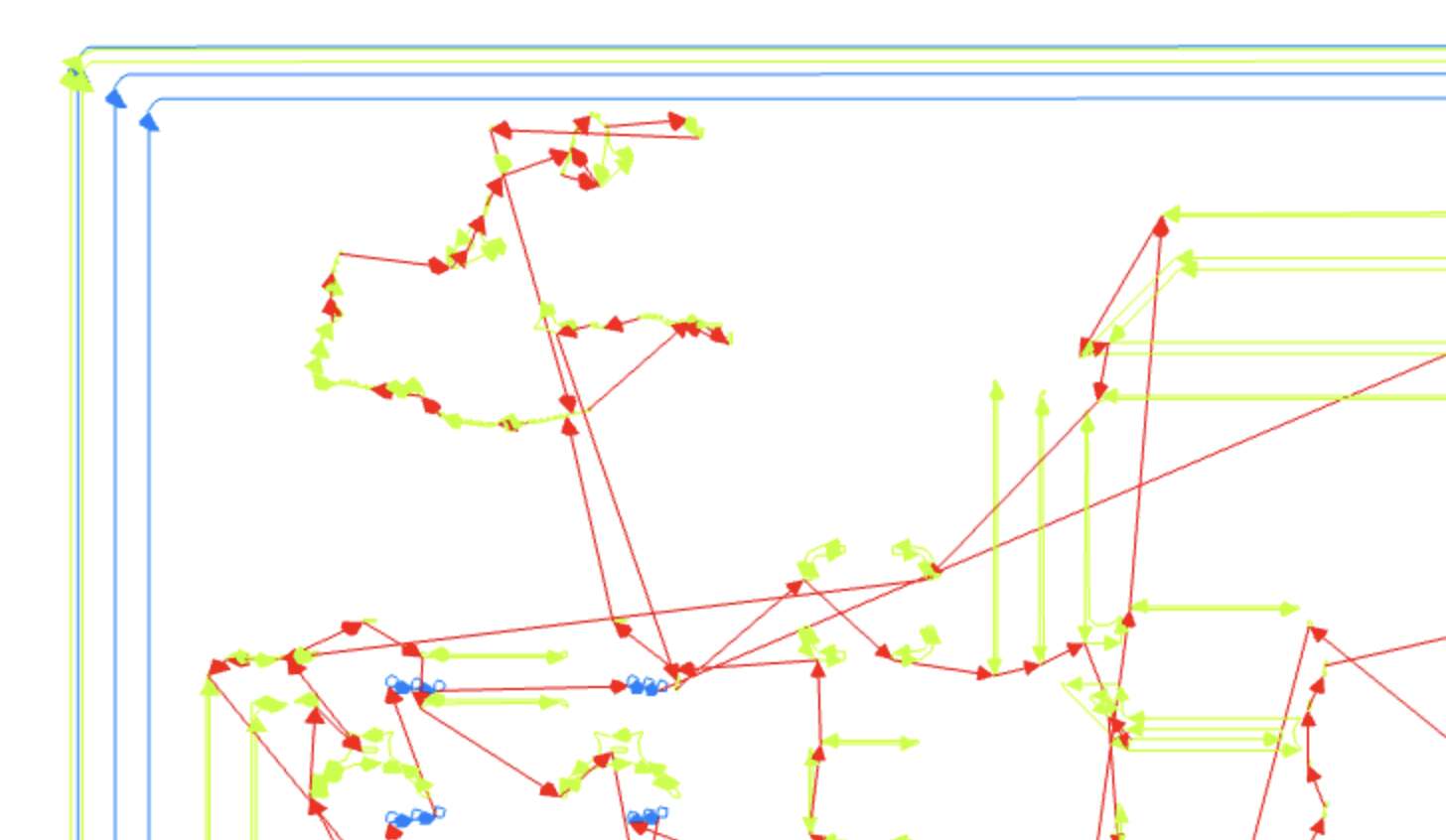
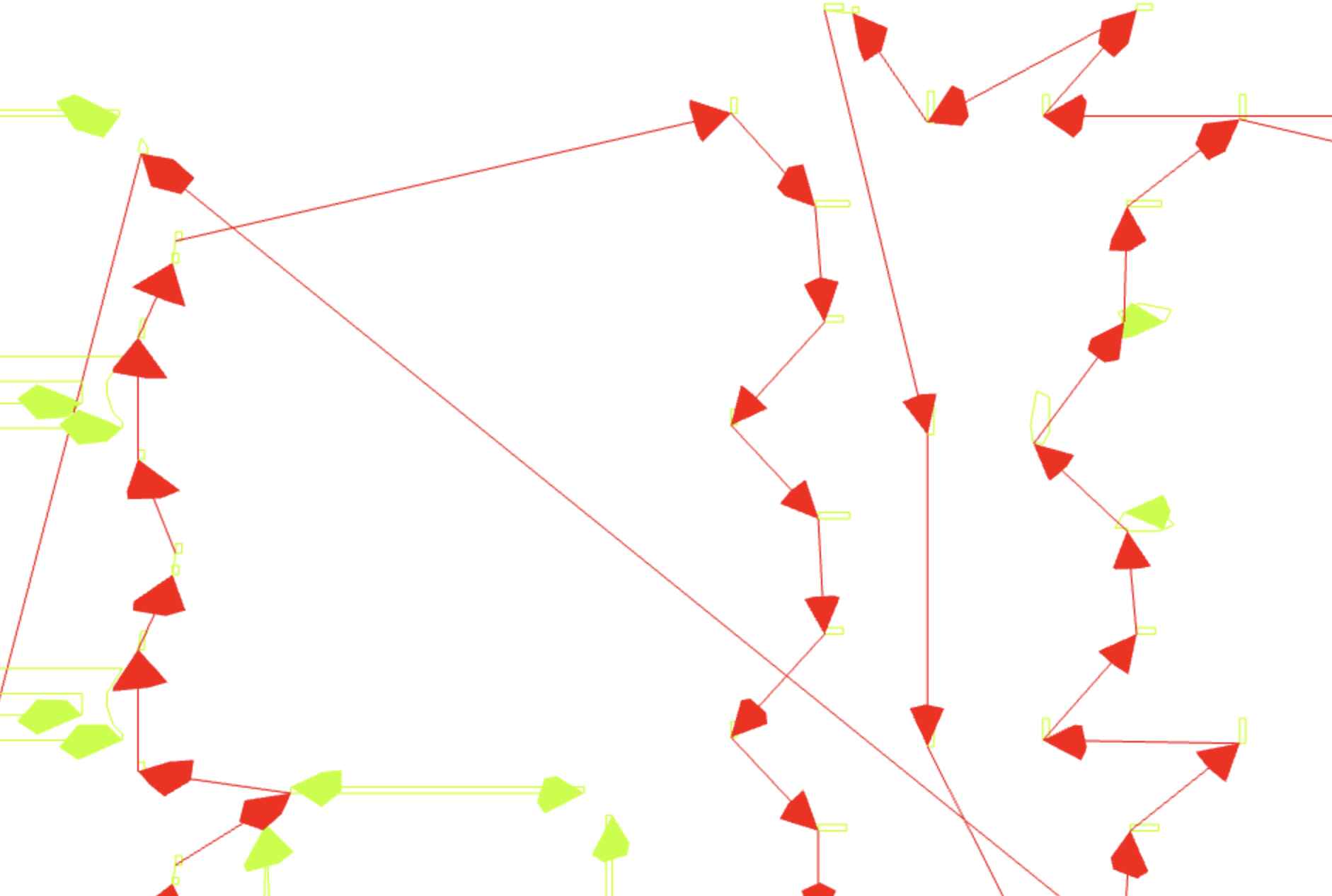
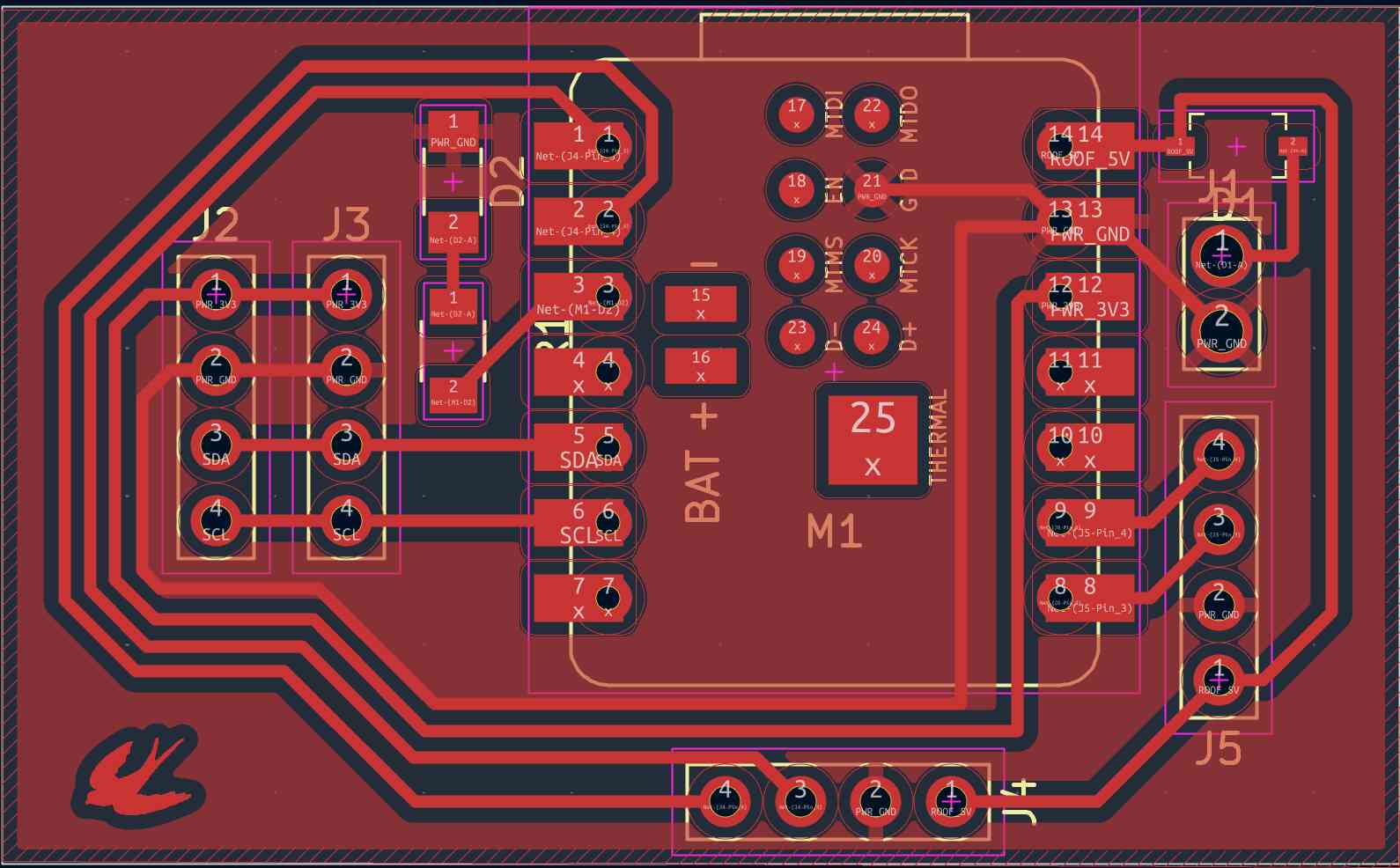
Since I moved components around, I also had to redo some traces. After the changes, my PCB looked like this:
Milling
Uploading gcode to CarveraController
I’m using the Carvera milling machine, which runs a gcode that is uploaded to CarveraController. To create the gcode, I followed Quentin’s guide
- Generated drill files from KiCad
- Plot
- -> Plot
- Generate drill files
- Generate
- Use gerber2img to get PNGs of the PCB design
- Upload the edge cut and associated files first

- Lock origin and download render
- Upload the copper layer (F.Cu) and download render
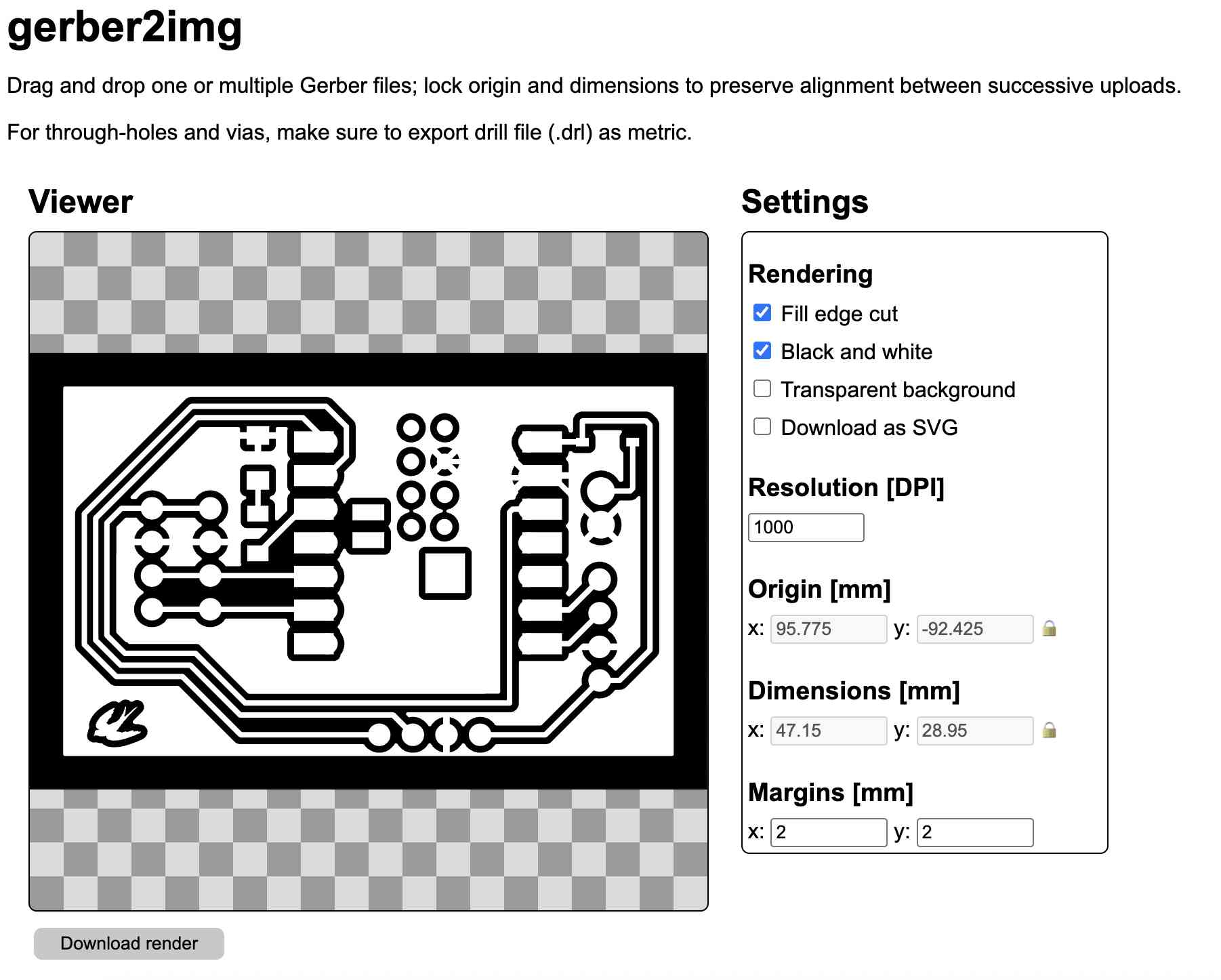
- Upload both to modsproject to generate gcode for the Carvera
- Verify that the toolpath is correct
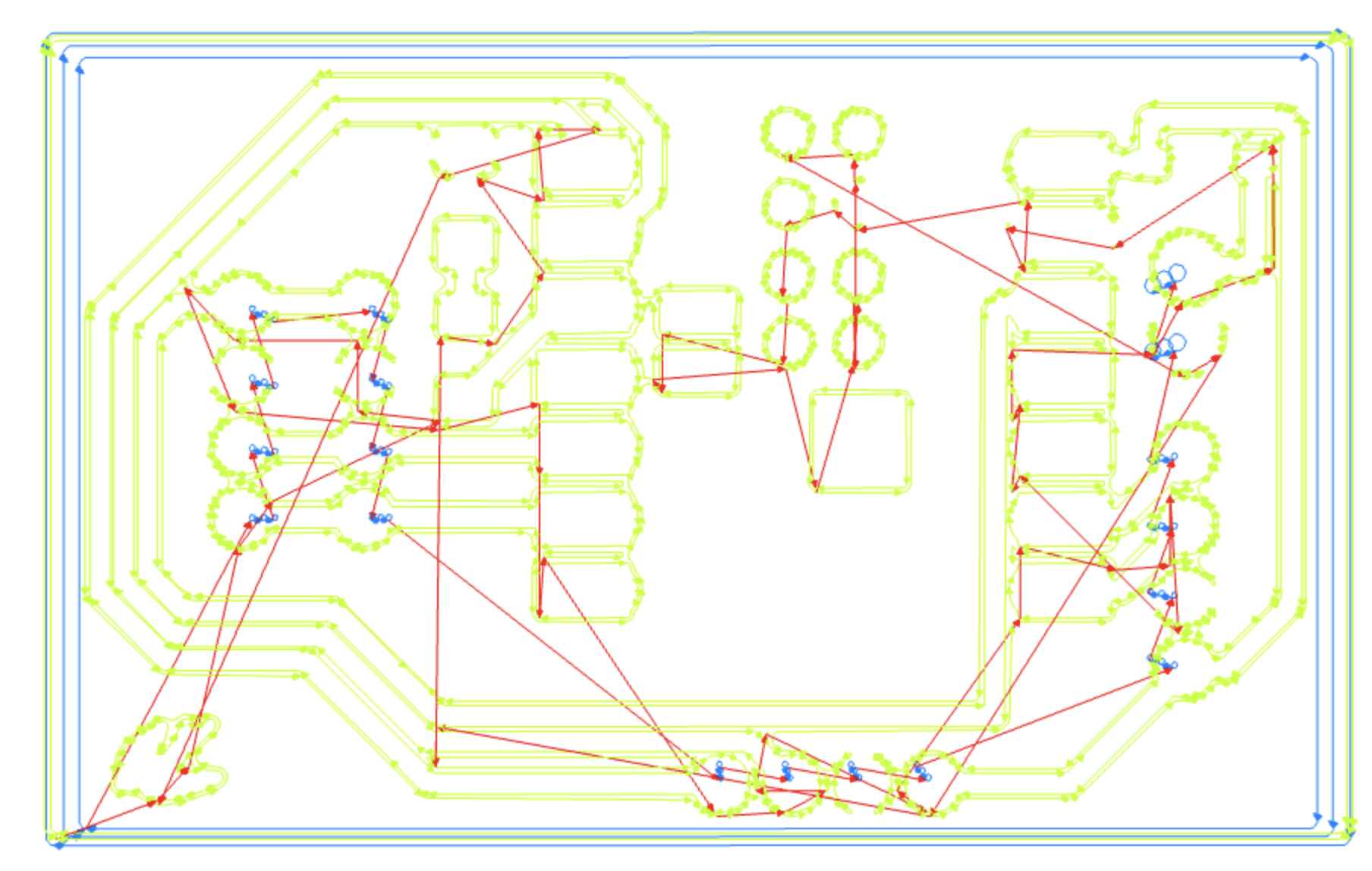
- Paths look reasonable and complete, without excessive toolpath traveling
Configuring Carvera
I uploaded the job.nc file from modsproject and configured the following before running the job
- Measured the origin offset using calipers
- There was already a previous run on the copper plate, so I kept the X-offset (5 mm) and adjusted the Y-offset (43 mm)
- Changed the probe to 2mm height and 3x3 spots
Milling
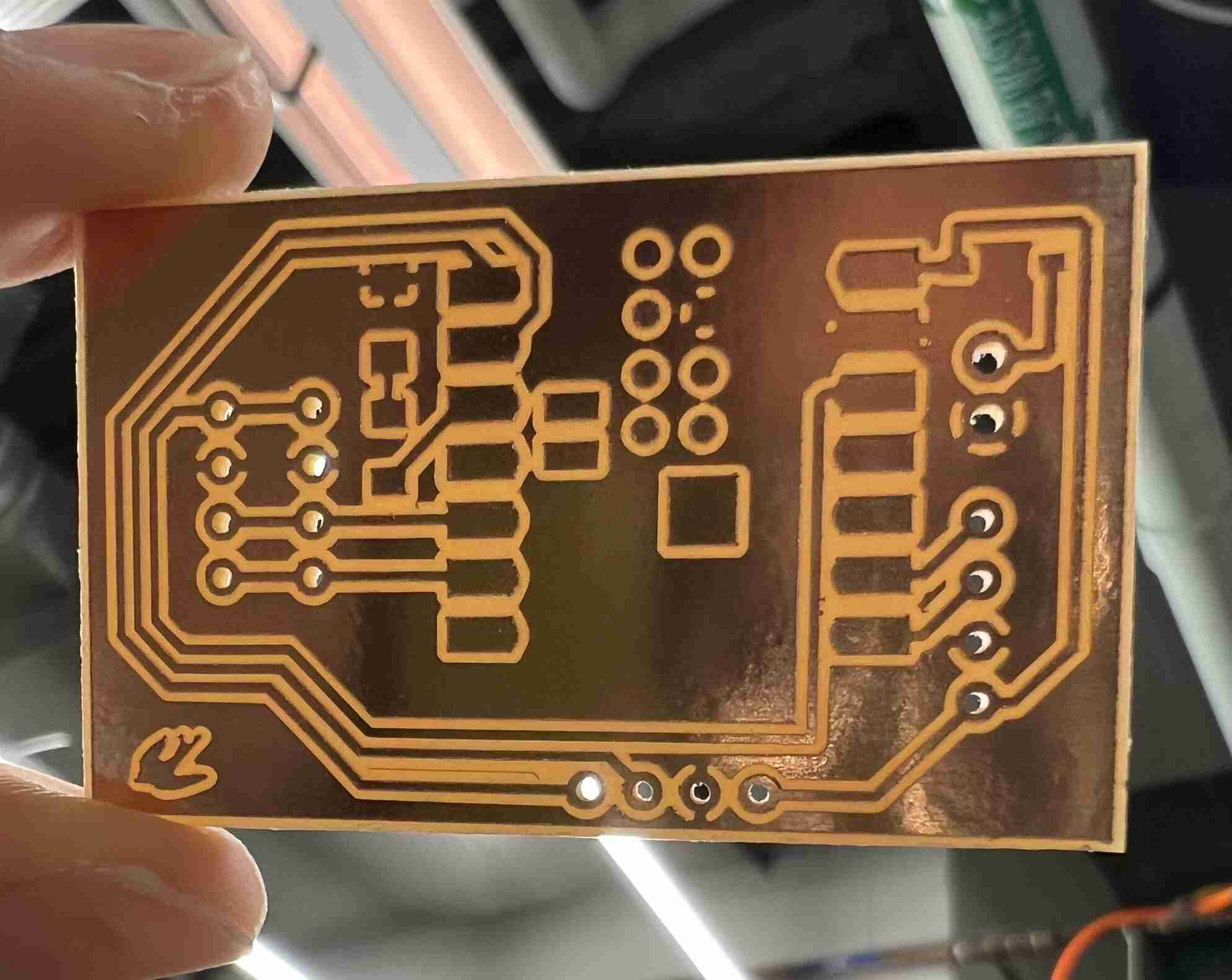
The entire board took ~11 minutes to mill. I vacuumed the residual powder, removed the tape from the back, and lightly sanded the baord to remove burrs. I held the board up to the light and verified that there weren’t any shorts (copper connecting traces).
Soldering
Before soldering, I had to collect the necessary components:
- Seeed Studio XIAO ESP32-S3 Sense
- Two 1x4 2.54mm vertical connectors
- One 1x2 2.53mm vertical connector
- 1kOhm resistor
- 1206 LED
- 1 diode schottky
- VL53L5CX ToF (time of flight) sensor
Soldering troubles
I tried to solder the XIAO onto the board first, and was having trouble melting the solder wire. The iron didn’t seem to get hot enough, and I had to touch the solder a few mm up the tip to get it to melt at all. This made tinning the pads (before adding the XIAO) really difficult, as I couldn’t get the solder to flow onto the pads. The iron temperature was originally set to 350C, and after checking the temperatures of othe rirons, I decided to set mine to 420C. This still wasn’t enough to melt the solder.
I was also accidentally creating shorts because the solder connected 2 XIAO pads together, but the iron wasn’t getting hot enough to melt the solder and push it around to fix it. I rerouted some traces in KiCad to space the components further apart, and remilled with the intention of starting over.
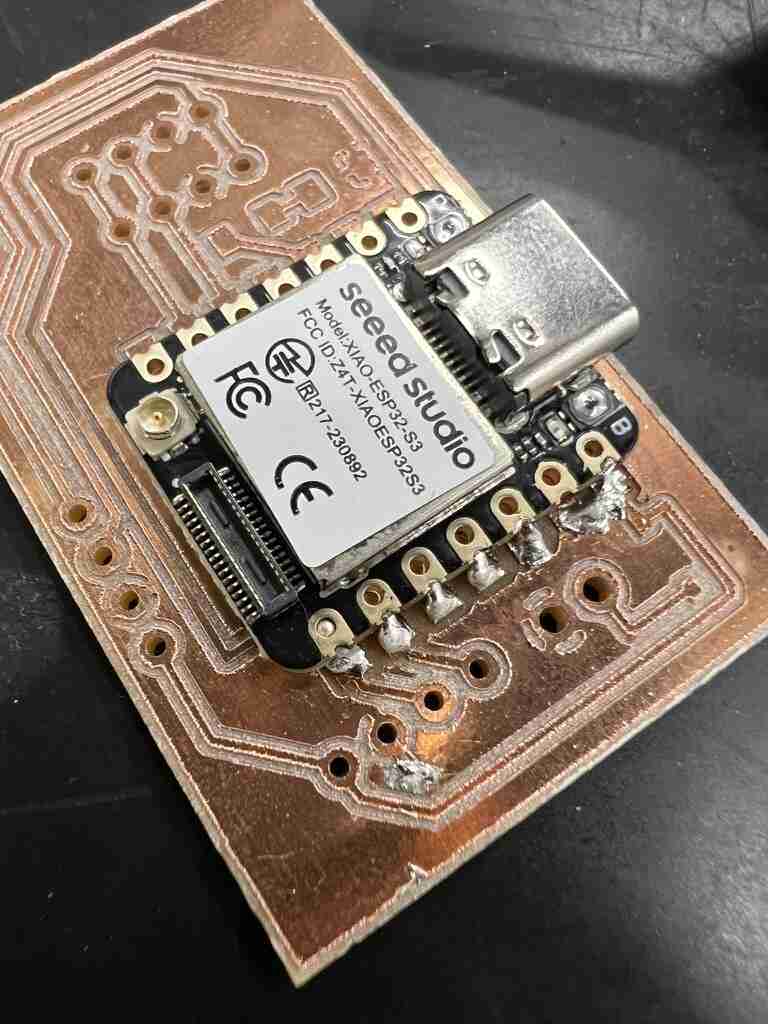
I went to the EECS lab to consult Anthony, who said that I actually didn’t have to restart. I could just guide the solder to the pads, and it would naturally move away from the cut parts. The EECS solder iron melted the solder a lot easier than the CBA ones, so I still suspected an iron issue. When I went back to the CBA lab, I mostly only used the flat/broad tip iron to solder, since it was the only one that heated up the solder enough.
I then continued to solder on the components, one-by-one.
LED
The GND is the tip of triangle (cathode) and the anode is the base of triangle. The orientation is printed on the bottom of the LED, so make sure the orientation is correct before soldering. I was scared that I fried the LED while soldering because I heard a popping noise, so I tested it with a multimeter on continuity mode. I probed the two endpoints, and it lit up blue!
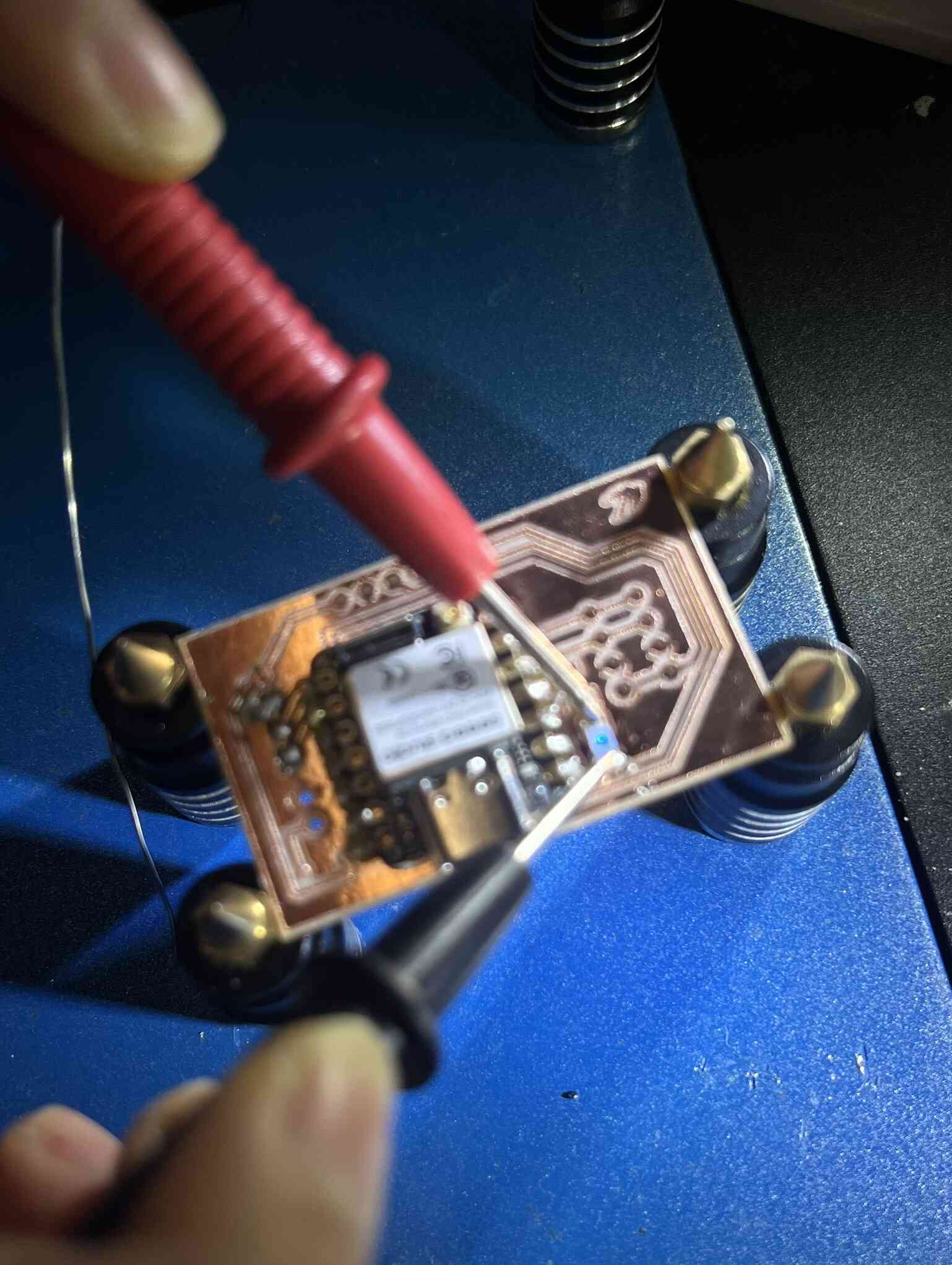
The LED and resistor were hard to solder since they were so small, but tinning one pad first and holding the component with tweezers helped.
Schottky diode
The white strip is cathode side, which should go towards the 5V rail. The anode is on the battery input side. I ended up using a 1A Schottky diode, which might not be enough for the 3 batteries that I’m eventually using.
Connectors
I was a little unclear on how to solder the throughhole connectors on. Since the board is single-sided, I can’t solder from the plastic side and expect the connection to be made, since the through-holes might not be plated. My solution was to place the plastic base of the connect on the other side of the board (plastic), opposite of the components, and connect the other necessary components through the back of the board. This meant the long ends would stick out from the back of the board.
I soldered the first connector on wrong, with the long ends on top of the board and the plastic base on the other side. Anthony showed me that this doesn’t work for female jumper wires. The connector won’t go all the way down if the solder joint climbs up the pole. One solution is to solder wire directly to the pin.
The GND pin for one of the 1x04 headers sunk down slightly while soldering since the plastic base started melting, but I checked with multimeter that end of pin still connects to GND.
The holes for the 1x02 connector is slightly bigger than the holes for the 1x04 connectors. I suspect the footprint was wrong, but I tried soldering it anyways and just filling the hole with solder.
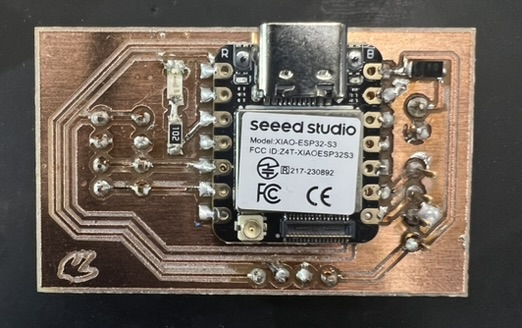
This is the board with all of the components soldered on:
ToF Sensor
I also decided to test the VL53L5CX ToF sensor by connecting it to the XIAO. I soldered a 1x04 header in a similar manner as the PCB. The connector was harder to solder because the board was too small to hold in place. Siddharth taught me this technique:
- Lay the board on the table first and solder the connector on one pin, just to hold it in place (ok if not 90 degree angle)
- Hold the connector under the board (from a different pin than the one you’re soldering so you don’t burn yourself), rewet the joint, and bend the board so the connector is perpendicular to the board
Wires
Since I didn’t use a connector footprint that would fit an IDC crimp thing (should probably switch to 2x2), I had to solder the wire directly to the connectors to connect the ToF sensor and the XIAO. The lab also didn’t have jumper wires. I followed this tutorial to solder the wire onto the connectors. The steps are:
- Strip 1/8 inch from wire
- Touch iron to wire and feed solder until solder coats wire. I used 2 pillars
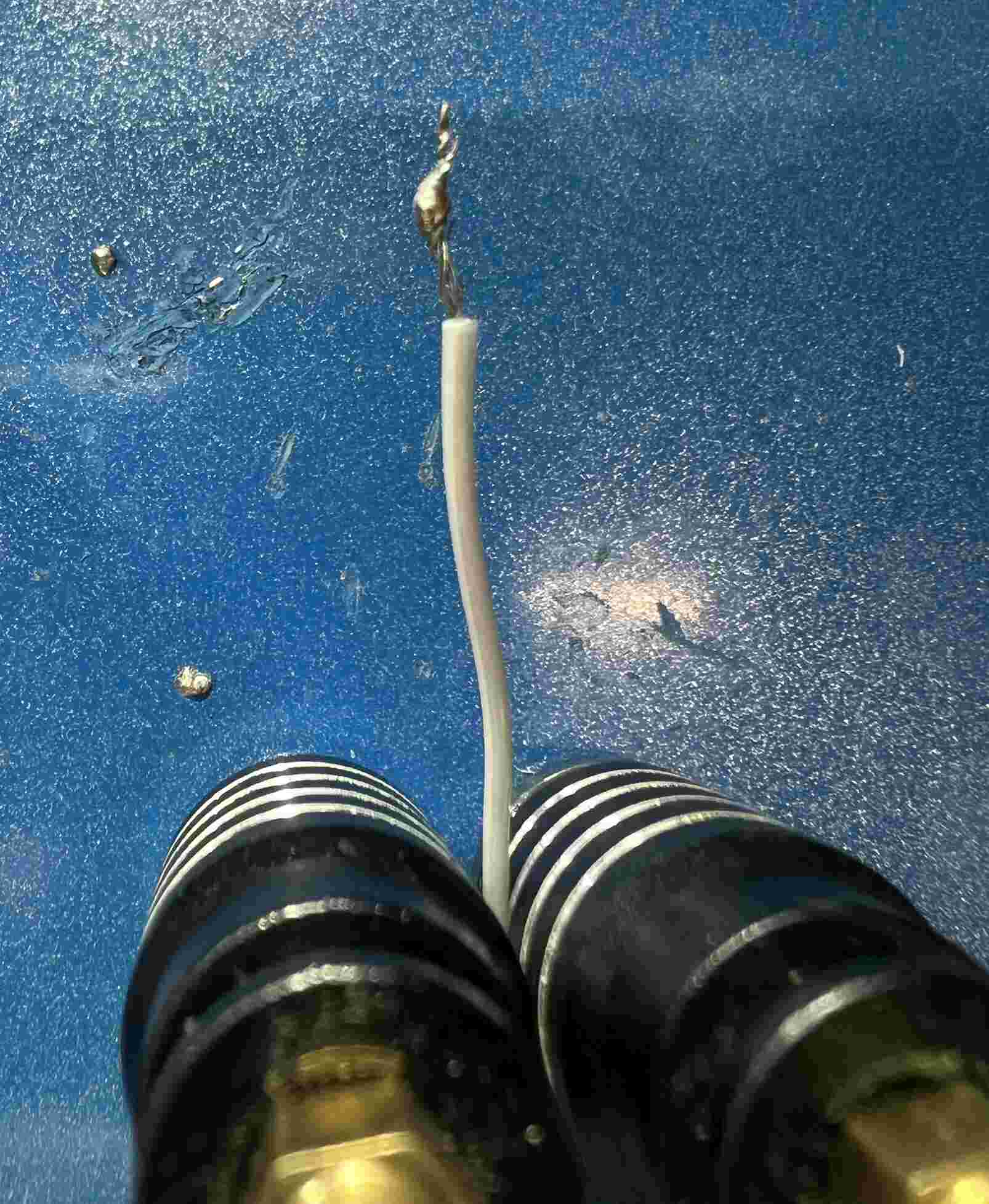
- Also tin the connector pin
- Touch both together and put iron on, solder should flow and connect the two
To test that the wire -> connector soldering was successful, I used a multimeter to probe the connector prong and the end of the wire.
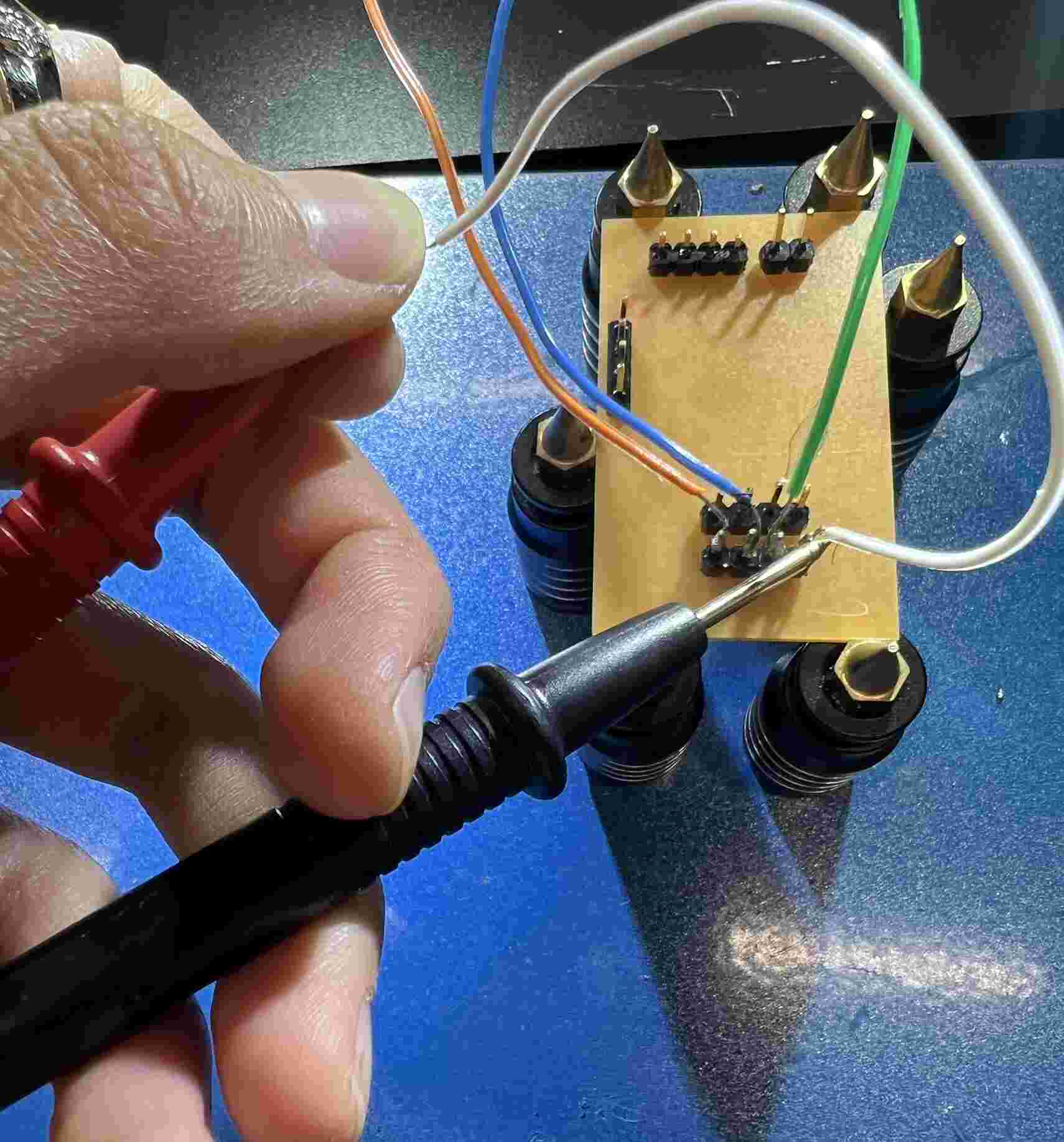
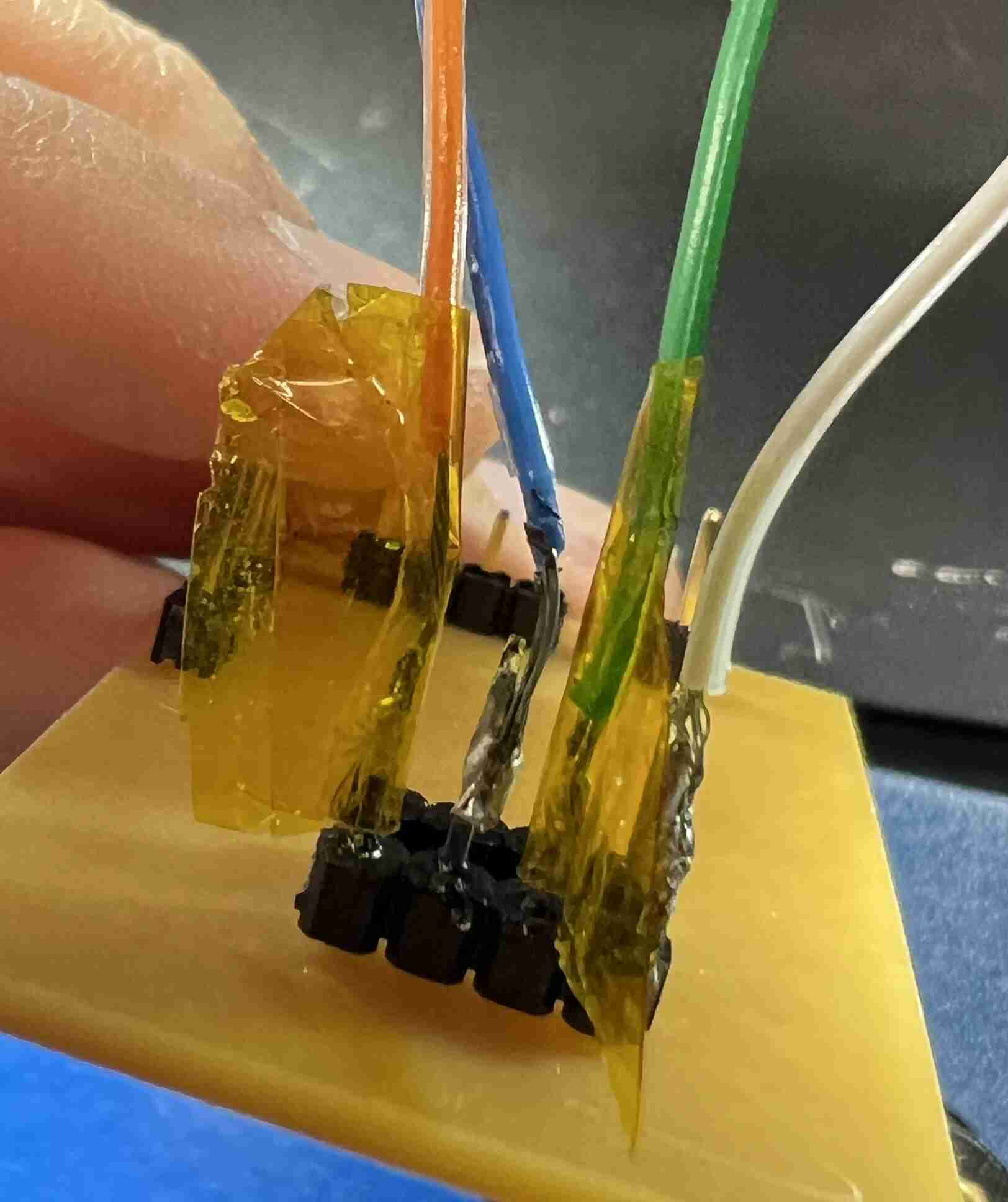
After soldering I wrapped kapton tape around the wires to isolate then and prevent them from touching each other. I wrapped alternating pins, then wrapped the entire 4-wire connecting in kapton tape since I doubted how securely the wires were connected to the connectors. I did this on both ends.
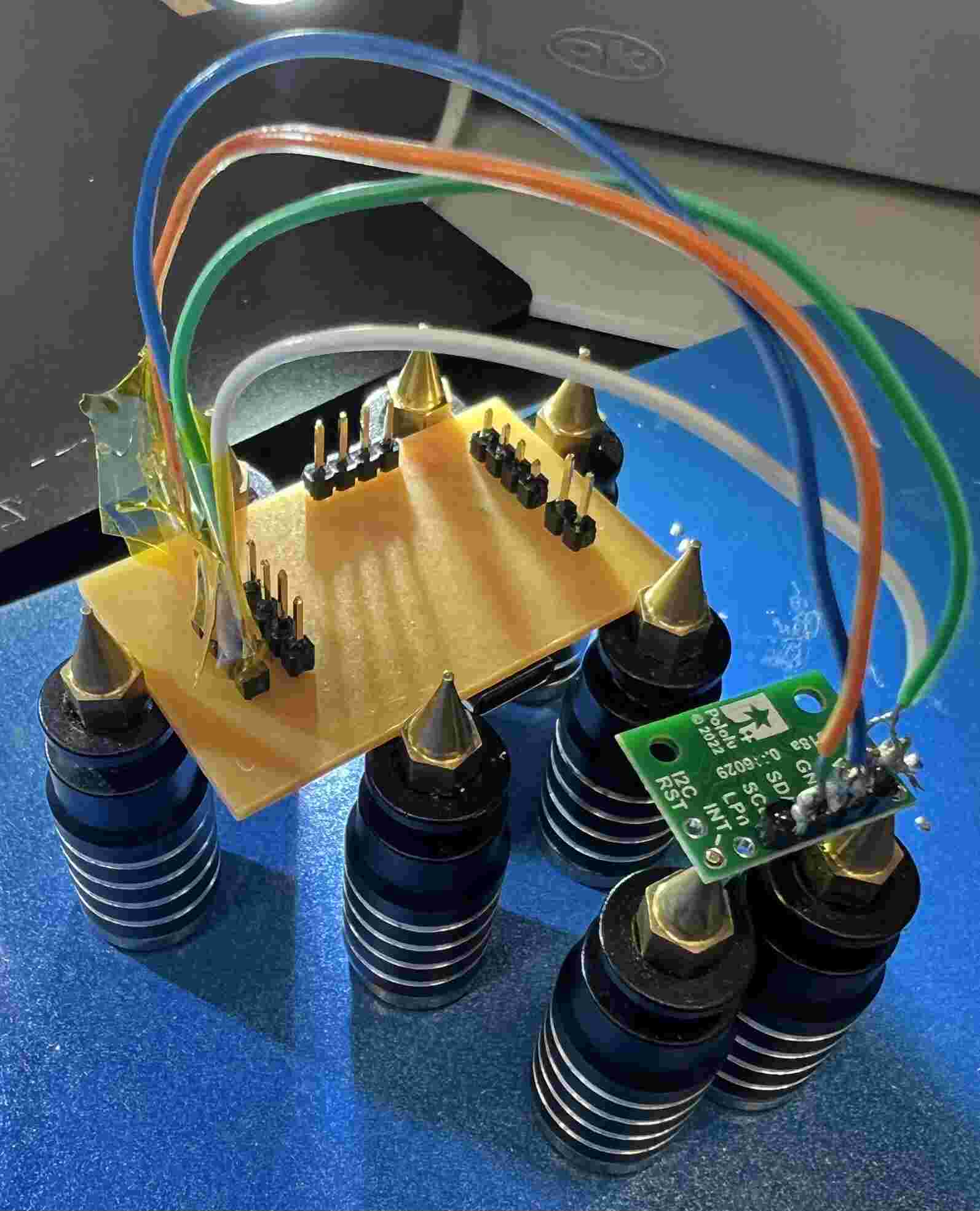
Soldering challenges
- It was hard to tin the wire, then get it to stick to the header. I may have inhaled a lot of melted plastic fumes while doing this
- Sometimes, it was difficult to tell what was causing a short. It could be the tiniest solder connection between 2 pads
- Working around the lack of certain components. I assumed we would have jumper wires, and instead had to solder wires
- Solder iron heating troubles
- The iron stations were configured incorrectly and they weren’t reaching the heat needed to melt the solder, even after turning it up to 420C.
- It was hard to fix solder too, since I couldn’t get it to melt enough to move it around
- The only one that worked well was the flat-tip iron, since the surface area at the end was bigger. This was trickier to work with for smaller components like resistors and LEDs, since they would easily be pushed around. It was also harder to work the tip around components that were already on the board, and I was worried about breaking/melting them.
- Removing excess solder
- Using the tape was challenging and I definitely burned my fingers a few times
- Keeping the board in place while soldering
- Since I had through-hole components, I couldn’t place the board flat while soldering
- Had to hold it using a bunch of magnetic pillars/pin fixtures, but since the board was elevated, soldering vertical connectors was difficult since the connectors would fall
Testing
I tested connections using a multimeter between each main stage of soldering, following spiral development. This allowed me to compartmentalize where issues, like shorts, could be coming from.
Multimeter validation
- Confirmed the direction of the LED after soldering it on the PCB
- Probed every pin on the XIAO to GND using the multimeter, and expected only beeps on GND pins
- I realized that the 3v3 pin/pad had too much solder and it was shorting to ground, so I used the copper cleaning wire to clean off the excess solder
- Heat up the tape on top of the solder and drag to remove solder
- After doing this, verified that the short was fixed with the multimeter
- I realized that the 3v3 pin/pad had too much solder and it was shorting to ground, so I used the copper cleaning wire to clean off the excess solder
- Checked the wires that I soldered to the ToF sensor and the XIAO
- Checked that the connector PCB and sensor pins connected
- Check that none of the pins connected to each other/short circuited
Checking power
I wanted to check that the power input and power rails had the same voltage as expected:
- I hooked up the PCB to power supply, set to a 5V output
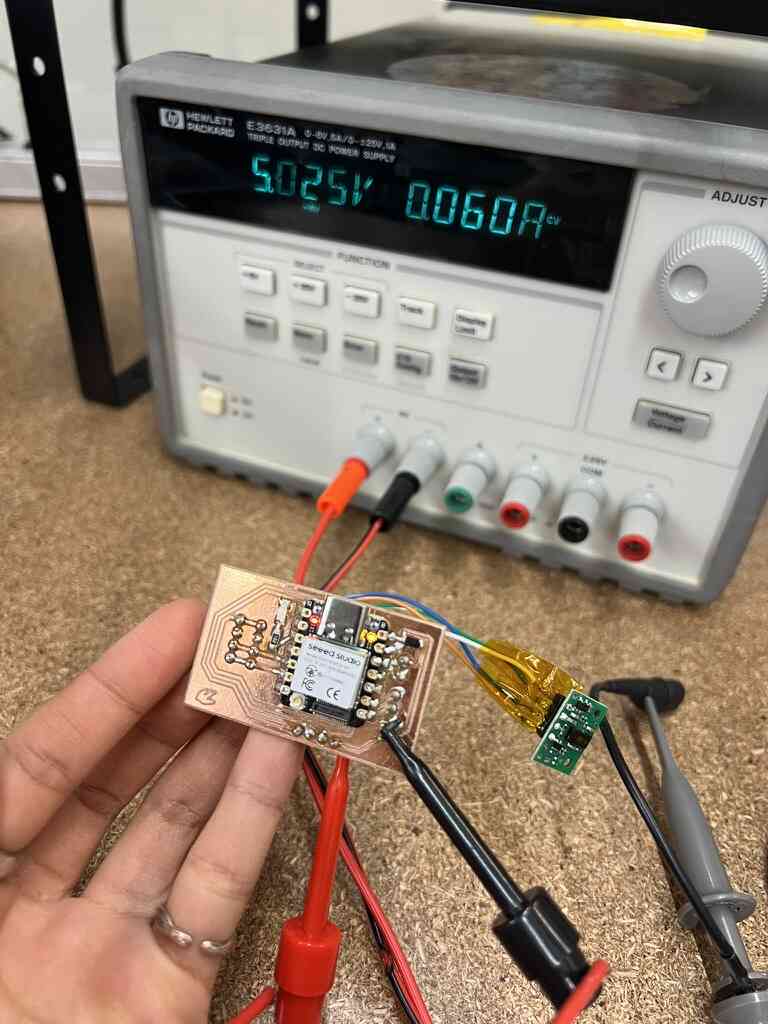
- The 5V pin on the XIAO wasn’t compatible with the hook/grab end of the power output lead, so I connected the GND to one of the connector GND pins, and 5V to another connector’s 5V pin
- -> 5V pin reads 5V!
- -> Other connector also reads 5V
- Check that the ToF flight sensor was actually getting 3.3V -> Sensor v_in reads 3.3V! Thanks Yui for taking so many photos for me :,)
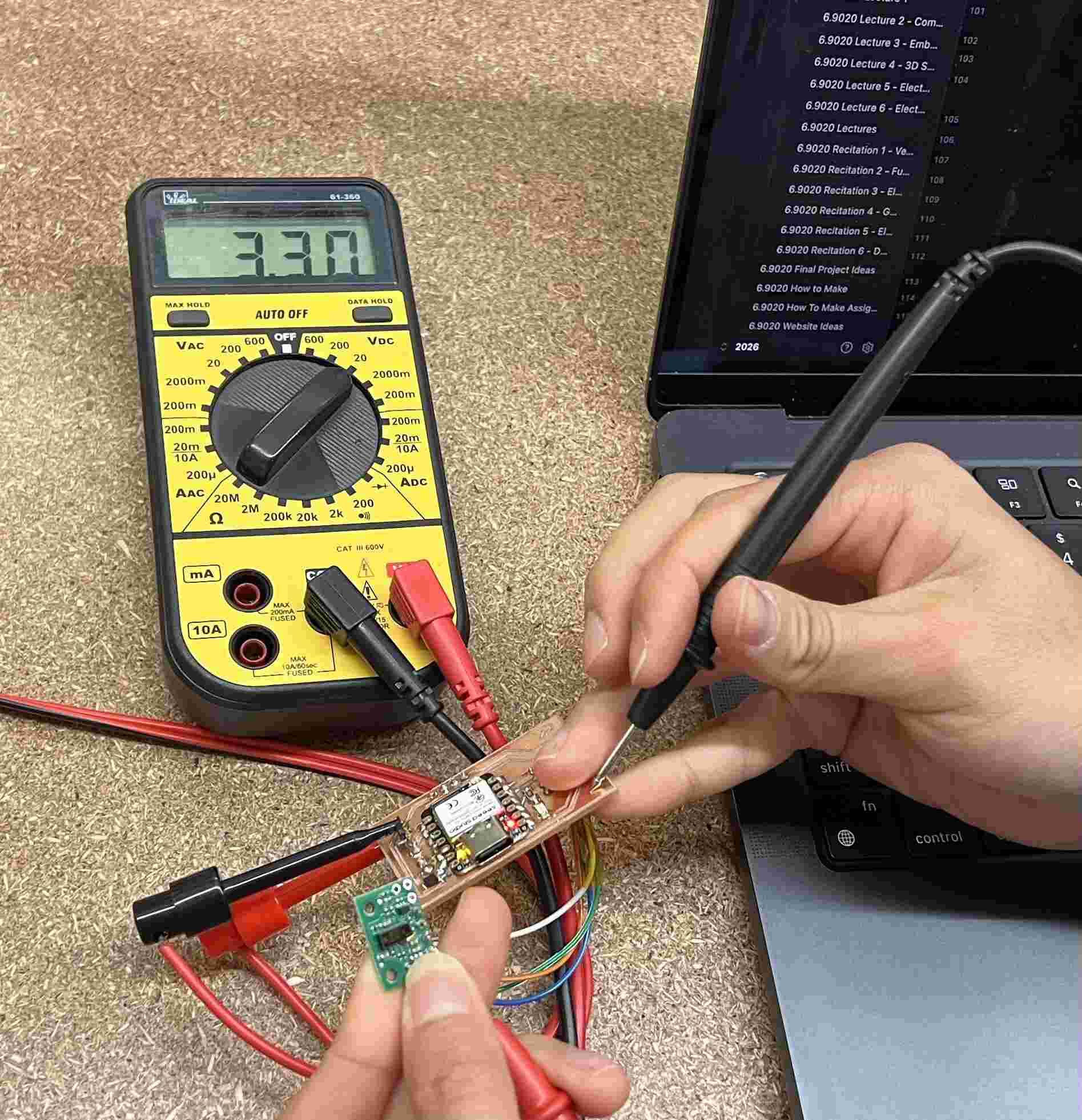
One test that I didn’t get to is measuring voltage during power-intensive operations, like during camera streaming.
Embedded code
I ran a few tests to check that the XIAO could communicate with and coordinate all of the components. Following spiral development, I tested the functionaltiy of individual components before doing an integrated test.
Setting up the XIAO
To connect to the XIAO ESP32S3 Sense for the first time:
- Connect XIAO to laptop using USB-C
- In Arduino IDE
- Tools → Board → Boards Manager
- install esp32 by Espressif Systems
- Tools → Board → esp32 → XIAO_ESP32S3
- Tools -> Port (select port)
LED Test
I asked ChatGPT to write a blink example code, where the LED connected to the D2 pin blinks after 0.5s.
void setup() {
  pinMode(D2, OUTPUT);
}

void loop() {
  digitalWrite(D2, HIGH);
  delay(500);
  digitalWrite(D2, LOW);
  delay(500);
}
When trying to run this, I got an error: “A fatal error occurred: Failed to connect to ESP32-S3: No serial data received. For troubleshooting steps visit: https://docs.espressif.com/projects/esptool/en/latest/troubleshooting.html Failed uploading: uploading error: exit status 2”
To debug this:
- Tried using BOOT mode when connecting the XIAO
- Unplug the XIAO and replug in while holding BOOT
- Run code again
- Nothing happened…
- Reset -> now it blinks!!
Sensor test
I wanted to print the distance to an object to the serial monitor whenever something was detected in front of the TOF sensor, and turn on LED when something is within 30 cm of the sensor.
To set the sensor up in Arduino IDE:
- Library Manager -> SparkFun VL53L5CX
- Gives you the API to communicate with the sensor instead of having to process raw I2C register bytes
I asked ChatGPT to reference the ToF sensor code to generate a loop that continuously probes the sensor, printing out the value of the nearest object sensed. If there is an object within 30 cm of the sensor, the LED is pulled high.
#include <Wire.h>
#include <SparkFun_VL53L5CX_Library.h>

#define LED_PIN D2
#define DETECT_DISTANCE_MM 300  // 30 cm

SparkFun_VL53L5CX tof;
VL53L5CX_ResultsData results;

void setup() {
  Serial.begin(115200);
  delay(2000);

  pinMode(LED_PIN, OUTPUT);
  digitalWrite(LED_PIN, LOW);

  // XIAO ESP32S3 I2C pins
  Wire.begin(D4, D5);
  Wire.setClock(400000);

  Serial.println("Initializing VL53L5CX...");

  if (!tof.begin()) {
    Serial.println("ERROR: ToF sensor not found!");
    while (true) {
      digitalWrite(LED_PIN, LOW);
      delay(1000);
    }
  }

  Serial.println("Sensor connected!");

  // Use 4x4 grid (16 distance zones)
  tof.setResolution(4 * 4);
  tof.setRangingFrequency(5); // fps

  if (!tof.startRanging()) {
    Serial.println("ERROR: Could not start ranging!");
    while (true) delay(1000);
  }

  Serial.println("Ready!");
}

void loop() {
  if (tof.isDataReady()) {
    if (tof.getRangingData(&results)) {

      bool objectDetected = false;
      int closestDistance = 9999; // temp var

      // Check all 16 zones
      for (int i = 0; i < 16; i++) {
        int distance = results.distance_mm[i];
        int status = results.target_status[i];

        // Status 5 indicates a valid measurement
        if (status == 5 && distance > 0) {

          if (distance < closestDistance) { // update min
            closestDistance = distance;
          }

          if (distance < DETECT_DISTANCE_MM) {
            objectDetected = true;
          }
        }
      }

      if (objectDetected) {
        digitalWrite(LED_PIN, HIGH);
        Serial.print("OBJECT DETECTED! ");
      } else {
        digitalWrite(LED_PIN, LOW);
        Serial.print("No object. ");
      }

      if (closestDistance == 9999) {
        Serial.println("No valid distance readings");
      } else {
        Serial.print("Closest: ");
        Serial.print(closestDistance);
        Serial.println(" mm");
      }
    }
  }

  delay(20); // wait 20 ms
}
It works pretty well, and the LED turns on whenever I wave my hand in front of the sensor!
Camera test
The next test was to integrate the camera with the ToF sensor, so that the sensor triggers a camera frame capture. I attached the camera module to the top of the XIAO.
Viewing images
The board will eventually use WiFi to send images, but for a test, I just sent images through the USB-C cable. I wanted to test the CameraWebServer example, which lets you view images through an HTTP server: - Open File → Examples → ESP32 → Camera → CameraWebServer - In board_config.h, set the camera model to CAMERA_MODEL_XIAO_ESP32S3 - Add WiFi credentials to CameraWebServer.ino so the board and my laptop are on the same network
When running the CameraWebServer example, the WiFi wasn’t connecting. I realized that I didn’t have the antenna on the board yet, and the WiFi connection was successful.
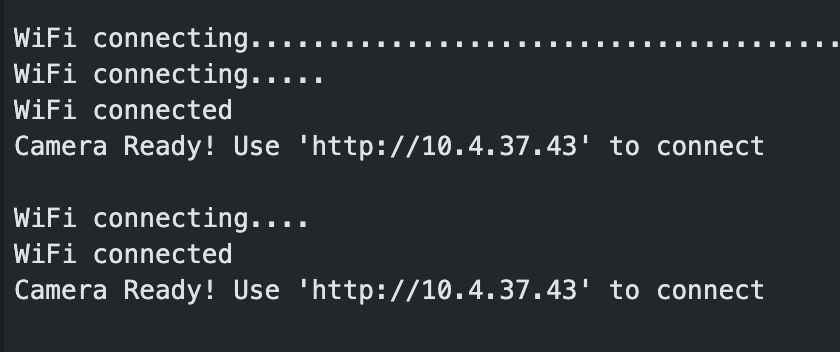
It was interesting that I could see blinking from my phone’s flashlight. The camera might be picking up on the infrared probing that the iPhone does.
I navigated to the link in the serial monitor, and was able to view the camera stream. There were also adjustable parameters on the side for quality, exposure, saturation, contrast, etc. The camera did get pretty hot… I will have to add a heatsink later.
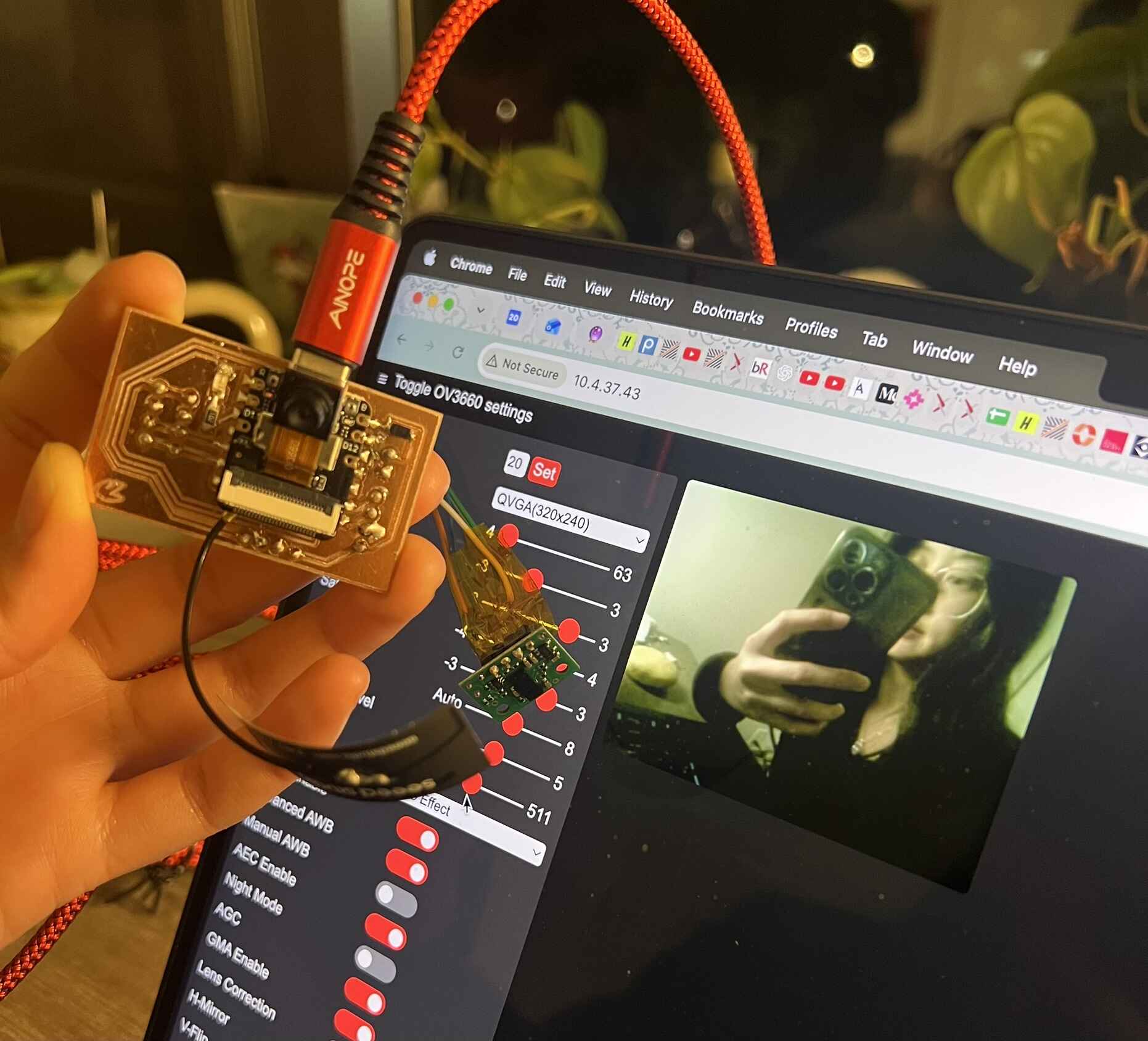
Integrating with the sensor
My final integration test was using the sensor to trigger streaming on the camera. The stream stops if nothing is detected with 30cm of the sensor. I needed to create a custom HTTPS server for this, so I gave the app_httpd.cpp code to ChatGPT and asked it to generate a streaming page that starts and stops based on the ToF sensor. The example code contained several streaming API calls that I needed to use.
- stream_handler(): Continuously captures and sends JPEG frames
- stream_uri (/stream) endpoint: Lets a browser connect to the video stream
- startCameraServer(): Registers HTTP endpoints and starts the servers
The pipeline is then as follows:
- Global detected variable that changes to true when VL53L5CX detects motion
- Browser automatically connects to the camera stream when detection occurs (checking the /detected endpoint)
- Disconnects after 1 second without detection
I also had to register two new HTTP endpoints:
- /detected: 1 when the ToF detects something and 0 o/w
- /auto: checks /detected every 250 ms and starts or stops the video stream depending on the value
I also copied in the sensor code from the blink example. Now, the camera starts streaming and the LED turns on when something is within 30 mm of it.
The completed code is here. Most of it comes from the CameraWebServer example.
CameraWebServer.ino
#include <Arduino.h>
#include "esp_camera.h"
#include <WiFi.h>

// ===========================
// Select camera model in board_config.h
// ===========================
#include "board_config.h"

// ===========================
// Enter your WiFi credentials
// ===========================
const char *ssid = "Velocity Wi-Fi";
const char *password = "jqeabvss";

void startCameraServer();
void setupLedFlash();

// from tof_sensor.ino
void setupToF();
void updateToF();

volatile bool detected = false; // global detection var for VL53L5CX to flip

void setup() {
  Serial.begin(115200);
  delay(2000);
  setupToF();

  Serial.setDebugOutput(true);
  Serial.println();

  camera_config_t config;
  config.ledc_channel = LEDC_CHANNEL_0;
  config.ledc_timer = LEDC_TIMER_0;
  config.pin_d0 = Y2_GPIO_NUM;
  config.pin_d1 = Y3_GPIO_NUM;
  config.pin_d2 = Y4_GPIO_NUM;
  config.pin_d3 = Y5_GPIO_NUM;
  config.pin_d4 = Y6_GPIO_NUM;
  config.pin_d5 = Y7_GPIO_NUM;
  config.pin_d6 = Y8_GPIO_NUM;
  config.pin_d7 = Y9_GPIO_NUM;
  config.pin_xclk = XCLK_GPIO_NUM;
  config.pin_pclk = PCLK_GPIO_NUM;
  config.pin_vsync = VSYNC_GPIO_NUM;
  config.pin_href = HREF_GPIO_NUM;
  config.pin_sccb_sda = SIOD_GPIO_NUM;
  config.pin_sccb_scl = SIOC_GPIO_NUM;
  config.pin_pwdn = PWDN_GPIO_NUM;
  config.pin_reset = RESET_GPIO_NUM;
  config.xclk_freq_hz = 20000000;
  config.frame_size = FRAMESIZE_UXGA;
  config.pixel_format = PIXFORMAT_JPEG;  // for streaming
  //config.pixel_format = PIXFORMAT_RGB565; // for face detection/recognition
  config.grab_mode = CAMERA_GRAB_WHEN_EMPTY;
  config.fb_location = CAMERA_FB_IN_PSRAM;
  config.jpeg_quality = 12;
  config.fb_count = 1;

  // if PSRAM IC present, init with UXGA resolution and higher JPEG quality
  //                      for larger pre-allocated frame buffer.
  if (config.pixel_format == PIXFORMAT_JPEG) {
    if (psramFound()) {
      config.jpeg_quality = 10;
      config.fb_count = 2;
      config.grab_mode = CAMERA_GRAB_LATEST;
    } else {
      // Limit the frame size when PSRAM is not available
      config.frame_size = FRAMESIZE_SVGA;
      config.fb_location = CAMERA_FB_IN_DRAM;
    }
  } else {
    // Best option for face detection/recognition
    config.frame_size = FRAMESIZE_240X240;
#if CONFIG_IDF_TARGET_ESP32S3
    config.fb_count = 2;
#endif
  }

#if defined(CAMERA_MODEL_ESP_EYE)
  pinMode(13, INPUT_PULLUP);
  pinMode(14, INPUT_PULLUP);
#endif

  // camera init
  esp_err_t err = esp_camera_init(&config);
  if (err != ESP_OK) {
    Serial.printf("Camera init failed with error 0x%x", err);
    return;
  }

  sensor_t *s = esp_camera_sensor_get();
  // initial sensors are flipped vertically and colors are a bit saturated
  if (s->id.PID == OV3660_PID) {
    s->set_vflip(s, 1);        // flip it back
    s->set_brightness(s, 1);   // up the brightness just a bit
    s->set_saturation(s, -2);  // lower the saturation
  }
  // drop down frame size for higher initial frame rate
  if (config.pixel_format == PIXFORMAT_JPEG) {
    s->set_framesize(s, FRAMESIZE_QVGA);
  }

#if defined(CAMERA_MODEL_M5STACK_WIDE) || defined(CAMERA_MODEL_M5STACK_ESP32CAM)
  s->set_vflip(s, 1);
  s->set_hmirror(s, 1);
#endif

#if defined(CAMERA_MODEL_ESP32S3_EYE)
  s->set_vflip(s, 1);
#endif

// Setup LED FLash if LED pin is defined in camera_pins.h
#if defined(LED_GPIO_NUM)
  setupLedFlash();
#endif

  WiFi.begin(ssid, password);
  WiFi.setSleep(false);

  Serial.print("WiFi connecting");
  while (WiFi.status() != WL_CONNECTED) {
    delay(500);
    Serial.print(".");
  }
  Serial.println("");
  Serial.println("WiFi connected");

  startCameraServer();

  Serial.print("Camera Ready! Use 'http://");
  Serial.print(WiFi.localIP());
  Serial.println("' to connect");
}

void loop() {
  updateToF();
  delay(20);
}
app_httpd.cpp
// Copyright 2015-2016 Espressif Systems (Shanghai) PTE LTD
//
// Licensed under the Apache License, Version 2.0 (the "License");
// you may not use this file except in compliance with the License.
// You may obtain a copy of the License at
//
// http://www.apache.org/licenses/LICENSE-2.0
//
// Unless required by applicable law or agreed to in writing, software
// distributed under the License is distributed on an "AS IS" BASIS,
// WITHOUT WARRANTIES OR CONDITIONS OF ANY KIND, either express or implied.
// See the License for the specific language governing permissions and
// limitations under the License.
#include "Arduino.h"
#include "esp_http_server.h"
#include "esp_timer.h"
#include "esp_camera.h"
#include "img_converters.h"
#include "fb_gfx.h"
#include "esp32-hal-ledc.h"
#include "sdkconfig.h"
#include "camera_index.h"
#include "board_config.h"
#if defined(ARDUINO_ARCH_ESP32) && defined(CONFIG_ARDUHAL_ESP_LOG)
#include "esp32-hal-log.h"
#endif
// LED FLASH setup
#if defined(LED_GPIO_NUM)
#define CONFIG_LED_MAX_INTENSITY 255
int led_duty = 0;
bool isStreaming = false;
#endif
extern volatile bool detected;
typedef struct {
httpd_req_t *req;
size_t len;
} jpg_chunking_t;
#define PART_BOUNDARY "123456789000000000000987654321"
static const char *_STREAM_CONTENT_TYPE = "multipart/x-mixed-replace;boundary=" PART_BOUNDARY;
static const char *_STREAM_BOUNDARY = "\r\n--" PART_BOUNDARY "\r\n";
static const char *_STREAM_PART = "Content-Type: image/jpeg\r\nContent-Length: %u\r\nX-Timestamp: %d.%06d\r\n\r\n";
httpd_handle_t stream_httpd = NULL;
httpd_handle_t camera_httpd = NULL;
typedef struct {
size_t size; //number of values used for filtering
size_t index; //current value index
size_t count; //value count
int sum;
int *values; //array to be filled with values
} ra_filter_t;
static ra_filter_t ra_filter;
static ra_filter_t *ra_filter_init(ra_filter_t *filter, size_t sample_size) {
memset(filter, 0, sizeof(ra_filter_t));
filter->values = (int *)malloc(sample_size * sizeof(int));
if (!filter->values) {
return NULL;
}
memset(filter->values, 0, sample_size * sizeof(int));
filter->size = sample_size;
return filter;
}
#if ARDUHAL_LOG_LEVEL >= ARDUHAL_LOG_LEVEL_INFO
static int ra_filter_run(ra_filter_t *filter, int value) {
if (!filter->values) {
return value;
}
filter->sum -= filter->values[filter->index];
filter->values[filter->index] = value;
filter->sum += filter->values[filter->index];
filter->index++;
filter->index = filter->index % filter->size;
if (filter->count < filter->size) {
filter->count++;
}
return filter->sum / filter->count;
}
#endif
#if defined(LED_GPIO_NUM)
void enable_led(bool en) { // Turn LED On or Off
int duty = en ? led_duty : 0;
if (en && isStreaming && (led_duty > CONFIG_LED_MAX_INTENSITY)) {
duty = CONFIG_LED_MAX_INTENSITY;
}
ledcWrite(LED_GPIO_NUM, duty);
//ledc_set_duty(CONFIG_LED_LEDC_SPEED_MODE, CONFIG_LED_LEDC_CHANNEL, duty);
//ledc_update_duty(CONFIG_LED_LEDC_SPEED_MODE, CONFIG_LED_LEDC_CHANNEL);
log_i("Set LED intensity to %d", duty);
}
#endif
static esp_err_t bmp_handler(httpd_req_t *req) {
camera_fb_t *fb = NULL;
esp_err_t res = ESP_OK;
#if ARDUHAL_LOG_LEVEL >= ARDUHAL_LOG_LEVEL_INFO
int64_t fr_start = esp_timer_get_time();
#endif
fb = esp_camera_fb_get();
if (!fb) {
log_e("Camera capture failed");
httpd_resp_send_500(req);
return ESP_FAIL;
}
httpd_resp_set_type(req, "image/x-windows-bmp");
httpd_resp_set_hdr(req, "Content-Disposition", "inline; filename=capture.bmp");
httpd_resp_set_hdr(req, "Access-Control-Allow-Origin", "*");
char ts[32];
// Cast to uint32_t is safe until year 2106.
snprintf(ts, 32, "%" PRIu32 ".%06" PRIu32, (uint32_t)fb->timestamp.tv_sec, (uint32_t)fb->timestamp.tv_usec);
httpd_resp_set_hdr(req, "X-Timestamp", (const char *)ts);
uint8_t *buf = NULL;
size_t buf_len = 0;
bool converted = frame2bmp(fb, &buf, &buf_len);
esp_camera_fb_return(fb);
if (!converted) {
log_e("BMP Conversion failed");
httpd_resp_send_500(req);
return ESP_FAIL;
}
res = httpd_resp_send(req, (const char *)buf, buf_len);
free(buf);
#if ARDUHAL_LOG_LEVEL >= ARDUHAL_LOG_LEVEL_INFO
int64_t fr_end = esp_timer_get_time();
#endif
log_i("BMP: %" PRId32 "ms, %" PRIu32 "B", (int32_t)((fr_end - fr_start) / 1000), (uint32_t)buf_len);
return res;
}
static size_t jpg_encode_stream(void *arg, size_t index, const void *data, size_t len) {
jpg_chunking_t *j = (jpg_chunking_t *)arg;
if (!index) {
j->len = 0;
}
if (httpd_resp_send_chunk(j->req, (const char *)data, len) != ESP_OK) {
return 0;
}
j->len += len;
return len;
}
static esp_err_t capture_handler(httpd_req_t *req) {
camera_fb_t *fb = NULL;
esp_err_t res = ESP_OK;
#if ARDUHAL_LOG_LEVEL >= ARDUHAL_LOG_LEVEL_INFO
int64_t fr_start = esp_timer_get_time();
#endif
#if defined(LED_GPIO_NUM)
enable_led(true);
vTaskDelay(150 / portTICK_PERIOD_MS); // The LED needs to be turned on ~150ms before the call to esp_camera_fb_get()
fb = esp_camera_fb_get(); // or it won't be visible in the frame. A better way to do this is needed.
enable_led(false);
#else
fb = esp_camera_fb_get();
#endif
if (!fb) {
log_e("Camera capture failed");
httpd_resp_send_500(req);
return ESP_FAIL;
}
httpd_resp_set_type(req, "image/jpeg");
httpd_resp_set_hdr(req, "Content-Disposition", "inline; filename=capture.jpg");
httpd_resp_set_hdr(req, "Access-Control-Allow-Origin", "*");
char ts[32];
// Cast to uint32_t is safe until year 2106.
snprintf(ts, 32, "%" PRIu32 ".%06" PRIu32, (uint32_t)fb->timestamp.tv_sec, (uint32_t)fb->timestamp.tv_usec);
httpd_resp_set_hdr(req, "X-Timestamp", (const char *)ts);
#if ARDUHAL_LOG_LEVEL >= ARDUHAL_LOG_LEVEL_INFO
size_t fb_len = 0;
#endif
if (fb->format == PIXFORMAT_JPEG) {
#if ARDUHAL_LOG_LEVEL >= ARDUHAL_LOG_LEVEL_INFO
fb_len = fb->len;
#endif
res = httpd_resp_send(req, (const char *)fb->buf, fb->len);
} else {
jpg_chunking_t jchunk = {req, 0};
res = frame2jpg_cb(fb, 80, jpg_encode_stream, &jchunk) ? ESP_OK : ESP_FAIL;
httpd_resp_send_chunk(req, NULL, 0);
#if ARDUHAL_LOG_LEVEL >= ARDUHAL_LOG_LEVEL_INFO
fb_len = jchunk.len;
#endif
}
esp_camera_fb_return(fb);
#if ARDUHAL_LOG_LEVEL >= ARDUHAL_LOG_LEVEL_INFO
int64_t fr_end = esp_timer_get_time();
#endif
log_i("JPG: %" PRIu32 "B %" PRId32 " ms", (uint32_t)fb_len, (int32_t)((fr_end - fr_start) / 1000));
return res;
}
static esp_err_t stream_handler(httpd_req_t *req) {
camera_fb_t *fb = NULL;
struct timeval _timestamp;
esp_err_t res = ESP_OK;
size_t _jpg_buf_len = 0;
uint8_t *_jpg_buf = NULL;
char *part_buf[128];
static int64_t last_frame = 0;
if (!last_frame) {
last_frame = esp_timer_get_time();
}
res = httpd_resp_set_type(req, _STREAM_CONTENT_TYPE);
if (res != ESP_OK) {
return res;
}
httpd_resp_set_hdr(req, "Access-Control-Allow-Origin", "*");
httpd_resp_set_hdr(req, "X-Framerate", "60");
#if defined(LED_GPIO_NUM)
isStreaming = true;
enable_led(true);
#endif
while (true) {
fb = esp_camera_fb_get();
if (!fb) {
log_e("Camera capture failed");
res = ESP_FAIL;
} else {
_timestamp.tv_sec = fb->timestamp.tv_sec;
_timestamp.tv_usec = fb->timestamp.tv_usec;
if (fb->format != PIXFORMAT_JPEG) {
bool jpeg_converted = frame2jpg(fb, 80, &_jpg_buf, &_jpg_buf_len);
esp_camera_fb_return(fb);
fb = NULL;
if (!jpeg_converted) {
log_e("JPEG compression failed");
res = ESP_FAIL;
}
} else {
_jpg_buf_len = fb->len;
_jpg_buf = fb->buf;
}
}
if (res == ESP_OK) {
res = httpd_resp_send_chunk(req, _STREAM_BOUNDARY, strlen(_STREAM_BOUNDARY));
}
if (res == ESP_OK) {
size_t hlen = snprintf((char *)part_buf, 128, _STREAM_PART, _jpg_buf_len, _timestamp.tv_sec, _timestamp.tv_usec);
res = httpd_resp_send_chunk(req, (const char *)part_buf, hlen);
}
if (res == ESP_OK) {
res = httpd_resp_send_chunk(req, (const char *)_jpg_buf, _jpg_buf_len);
}
if (fb) {
esp_camera_fb_return(fb);
fb = NULL;
_jpg_buf = NULL;
} else if (_jpg_buf) {
free(_jpg_buf);
_jpg_buf = NULL;
}
if (res != ESP_OK) {
log_e("Send frame failed");
break;
}
int64_t fr_end = esp_timer_get_time();
int64_t frame_time = fr_end - last_frame;
last_frame = fr_end;
frame_time /= 1000;
#if ARDUHAL_LOG_LEVEL >= ARDUHAL_LOG_LEVEL_INFO
uint32_t avg_frame_time = ra_filter_run(&ra_filter, frame_time);
#endif
log_i(
"MJPG: %" PRIu32 "B %" PRId32 "ms (%.1ffps), AVG: %" PRIu32 "ms (%.1ffps)", (uint32_t)_jpg_buf_len, (int32_t)frame_time, 1000.0 / frame_time,
avg_frame_time, 1000.0 / avg_frame_time
);
}
#if defined(LED_GPIO_NUM)
isStreaming = false;
enable_led(false);
#endif
return res;
}
static esp_err_t parse_get(httpd_req_t *req, char **obuf) {
char *buf = NULL;
size_t buf_len = 0;
buf_len = httpd_req_get_url_query_len(req) + 1;
if (buf_len > 1) {
buf = (char *)malloc(buf_len);
if (!buf) {
httpd_resp_send_500(req);
return ESP_FAIL;
}
if (httpd_req_get_url_query_str(req, buf, buf_len) == ESP_OK) {
*obuf = buf;
return ESP_OK;
}
free(buf);
}
httpd_resp_send_404(req);
return ESP_FAIL;
}
static esp_err_t cmd_handler(httpd_req_t *req) {
char *buf = NULL;
char variable[32];
char value[32];
if (parse_get(req, &buf) != ESP_OK) {
return ESP_FAIL;
}
if (httpd_query_key_value(buf, "var", variable, sizeof(variable)) != ESP_OK || httpd_query_key_value(buf, "val", value, sizeof(value)) != ESP_OK) {
free(buf);
httpd_resp_send_404(req);
return ESP_FAIL;
}
free(buf);
int val = atoi(value);
log_i("%s = %d", variable, val);
sensor_t *s = esp_camera_sensor_get();
int res = 0;
if (!strcmp(variable, "framesize")) {
if (s->pixformat == PIXFORMAT_JPEG) {
res = s->set_framesize(s, (framesize_t)val);
}
} else if (!strcmp(variable, "quality")) {
res = s->set_quality(s, val);
} else if (!strcmp(variable, "contrast")) {
res = s->set_contrast(s, val);
} else if (!strcmp(variable, "brightness")) {
res = s->set_brightness(s, val);
} else if (!strcmp(variable, "saturation")) {
res = s->set_saturation(s, val);
} else if (!strcmp(variable, "gainceiling")) {
res = s->set_gainceiling(s, (gainceiling_t)val);
} else if (!strcmp(variable, "colorbar")) {
res = s->set_colorbar(s, val);
} else if (!strcmp(variable, "awb")) {
res = s->set_whitebal(s, val);
} else if (!strcmp(variable, "agc")) {
res = s->set_gain_ctrl(s, val);
} else if (!strcmp(variable, "aec")) {
res = s->set_exposure_ctrl(s, val);
} else if (!strcmp(variable, "hmirror")) {
res = s->set_hmirror(s, val);
} else if (!strcmp(variable, "vflip")) {
res = s->set_vflip(s, val);
} else if (!strcmp(variable, "awb_gain")) {
res = s->set_awb_gain(s, val);
} else if (!strcmp(variable, "agc_gain")) {
res = s->set_agc_gain(s, val);
} else if (!strcmp(variable, "aec_value")) {
res = s->set_aec_value(s, val);
} else if (!strcmp(variable, "aec2")) {
res = s->set_aec2(s, val);
} else if (!strcmp(variable, "dcw")) {
res = s->set_dcw(s, val);
} else if (!strcmp(variable, "bpc")) {
res = s->set_bpc(s, val);
} else if (!strcmp(variable, "wpc")) {
res = s->set_wpc(s, val);
} else if (!strcmp(variable, "raw_gma")) {
res = s->set_raw_gma(s, val);
} else if (!strcmp(variable, "lenc")) {
res = s->set_lenc(s, val);
} else if (!strcmp(variable, "special_effect")) {
res = s->set_special_effect(s, val);
} else if (!strcmp(variable, "wb_mode")) {
res = s->set_wb_mode(s, val);
} else if (!strcmp(variable, "ae_level")) {
res = s->set_ae_level(s, val);
}
#if defined(LED_GPIO_NUM)
else if (!strcmp(variable, "led_intensity")) {
led_duty = val;
if (isStreaming) {
enable_led(true);
}
}
#endif
else {
log_i("Unknown command: %s", variable);
res = -1;
}
if (res < 0) {
return httpd_resp_send_500(req);
}
httpd_resp_set_hdr(req, "Access-Control-Allow-Origin", "*");
return httpd_resp_send(req, NULL, 0);
}
static int print_reg(char *p, char *end, sensor_t *s, uint16_t reg, uint32_t mask) {
return snprintf(p, end - p, "\"0x%04x\":%d,", reg, s->get_reg(s, reg, mask));
}
static esp_err_t status_handler(httpd_req_t *req) {
static char json_response[1024];
sensor_t *s = esp_camera_sensor_get();
char *p = json_response;
char *end = json_response + sizeof(json_response);
*p++ = '{';
if (s->id.PID == OV5640_PID || s->id.PID == OV3660_PID) {
for (int reg = 0x3400; reg < 0x3406; reg += 2) {
p += print_reg(p, end, s, reg, 0xFFF); //12 bit
}
p += print_reg(p, end, s, 0x3406, 0xFF);
p += print_reg(p, end, s, 0x3500, 0xFFFF0); //16 bit
p += print_reg(p, end, s, 0x3503, 0xFF);
p += print_reg(p, end, s, 0x350a, 0x3FF); //10 bit
p += print_reg(p, end, s, 0x350c, 0xFFFF); //16 bit
for (int reg = 0x5480; reg <= 0x5490; reg++) {
p += print_reg(p, end, s, reg, 0xFF);
}
for (int reg = 0x5380; reg <= 0x538b; reg++) {
p += print_reg(p, end, s, reg, 0xFF);
}
for (int reg = 0x5580; reg < 0x558a; reg++) {
p += print_reg(p, end, s, reg, 0xFF);
}
p += print_reg(p, end, s, 0x558a, 0x1FF); //9 bit
} else if (s->id.PID == OV2640_PID) {
p += print_reg(p, end, s, 0xd3, 0xFF);
p += print_reg(p, end, s, 0x111, 0xFF);
p += print_reg(p, end, s, 0x132, 0xFF);
}
p += snprintf(p, end - p, "\"xclk\":%u,", s->xclk_freq_hz / 1000000);
p += snprintf(p, end - p, "\"pixformat\":%u,", s->pixformat);
p += snprintf(p, end - p, "\"framesize\":%u,", s->status.framesize);
p += snprintf(p, end - p, "\"quality\":%u,", s->status.quality);
p += snprintf(p, end - p, "\"brightness\":%d,", s->status.brightness);
p += snprintf(p, end - p, "\"contrast\":%d,", s->status.contrast);
p += snprintf(p, end - p, "\"saturation\":%d,", s->status.saturation);
p += snprintf(p, end - p, "\"sharpness\":%d,", s->status.sharpness);
p += snprintf(p, end - p, "\"special_effect\":%u,", s->status.special_effect);
p += snprintf(p, end - p, "\"wb_mode\":%u,", s->status.wb_mode);
p += snprintf(p, end - p, "\"awb\":%u,", s->status.awb);
p += snprintf(p, end - p, "\"awb_gain\":%u,", s->status.awb_gain);
p += snprintf(p, end - p, "\"aec\":%u,", s->status.aec);
p += snprintf(p, end - p, "\"aec2\":%u,", s->status.aec2);
p += snprintf(p, end - p, "\"ae_level\":%d,", s->status.ae_level);
p += snprintf(p, end - p, "\"aec_value\":%u,", s->status.aec_value);
p += snprintf(p, end - p, "\"agc\":%u,", s->status.agc);
p += snprintf(p, end - p, "\"agc_gain\":%u,", s->status.agc_gain);
p += snprintf(p, end - p, "\"gainceiling\":%u,", s->status.gainceiling);
p += snprintf(p, end - p, "\"bpc\":%u,", s->status.bpc);
p += snprintf(p, end - p, "\"wpc\":%u,", s->status.wpc);
p += snprintf(p, end - p, "\"raw_gma\":%u,", s->status.raw_gma);
p += snprintf(p, end - p, "\"lenc\":%u,", s->status.lenc);
p += snprintf(p, end - p, "\"hmirror\":%u,", s->status.hmirror);
p += snprintf(p, end - p, "\"vflip\":%u,", s->status.vflip);
p += snprintf(p, end - p, "\"dcw\":%u,", s->status.dcw);
p += snprintf(p, end - p, "\"colorbar\":%u", s->status.colorbar);
#if defined(LED_GPIO_NUM)
p += snprintf(p, end - p, ",\"led_intensity\":%u", led_duty);
#else
p += snprintf(p, end - p, ",\"led_intensity\":%d", -1);
#endif
*p++ = '}';
*p++ = 0;
httpd_resp_set_type(req, "application/json");
httpd_resp_set_hdr(req, "Access-Control-Allow-Origin", "*");
return httpd_resp_send(req, json_response, strlen(json_response));
}
static esp_err_t xclk_handler(httpd_req_t *req) {
char *buf = NULL;
char _xclk[32];
if (parse_get(req, &buf) != ESP_OK) {
return ESP_FAIL;
}
if (httpd_query_key_value(buf, "xclk", _xclk, sizeof(_xclk)) != ESP_OK) {
free(buf);
httpd_resp_send_404(req);
return ESP_FAIL;
}
free(buf);
int xclk = atoi(_xclk);
log_i("Set XCLK: %d MHz", xclk);
sensor_t *s = esp_camera_sensor_get();
int res = s->set_xclk(s, LEDC_TIMER_0, xclk);
if (res) {
return httpd_resp_send_500(req);
}
httpd_resp_set_hdr(req, "Access-Control-Allow-Origin", "*");
return httpd_resp_send(req, NULL, 0);
}
static esp_err_t reg_handler(httpd_req_t *req) {
char *buf = NULL;
char _reg[32];
char _mask[32];
char _val[32];
if (parse_get(req, &buf) != ESP_OK) {
return ESP_FAIL;
}
if (httpd_query_key_value(buf, "reg", _reg, sizeof(_reg)) != ESP_OK || httpd_query_key_value(buf, "mask", _mask, sizeof(_mask)) != ESP_OK
|| httpd_query_key_value(buf, "val", _val, sizeof(_val)) != ESP_OK) {
free(buf);
httpd_resp_send_404(req);
return ESP_FAIL;
}
free(buf);
int reg = atoi(_reg);
int mask = atoi(_mask);
int val = atoi(_val);
log_i("Set Register: reg: 0x%02x, mask: 0x%02x, value: 0x%02x", reg, mask, val);
sensor_t *s = esp_camera_sensor_get();
int res = s->set_reg(s, reg, mask, val);
if (res) {
return httpd_resp_send_500(req);
}
httpd_resp_set_hdr(req, "Access-Control-Allow-Origin", "*");
return httpd_resp_send(req, NULL, 0);
}
static esp_err_t greg_handler(httpd_req_t *req) {
char *buf = NULL;
char _reg[32];
char _mask[32];
if (parse_get(req, &buf) != ESP_OK) {
return ESP_FAIL;
}
if (httpd_query_key_value(buf, "reg", _reg, sizeof(_reg)) != ESP_OK || httpd_query_key_value(buf, "mask", _mask, sizeof(_mask)) != ESP_OK) {
free(buf);
httpd_resp_send_404(req);
return ESP_FAIL;
}
free(buf);
int reg = atoi(_reg);
int mask = atoi(_mask);
sensor_t *s = esp_camera_sensor_get();
int res = s->get_reg(s, reg, mask);
if (res < 0) {
return httpd_resp_send_500(req);
}
log_i("Get Register: reg: 0x%02x, mask: 0x%02x, value: 0x%02x", reg, mask, res);
char buffer[20];
const char *val = itoa(res, buffer, 10);
httpd_resp_set_hdr(req, "Access-Control-Allow-Origin", "*");
return httpd_resp_send(req, val, strlen(val));
}
static int parse_get_var(char *buf, const char *key, int def) {
char _int[16];
if (httpd_query_key_value(buf, key, _int, sizeof(_int)) != ESP_OK) {
return def;
}
return atoi(_int);
}
static esp_err_t pll_handler(httpd_req_t *req) {
char *buf = NULL;
if (parse_get(req, &buf) != ESP_OK) {
return ESP_FAIL;
}
int bypass = parse_get_var(buf, "bypass", 0);
int mul = parse_get_var(buf, "mul", 0);
int sys = parse_get_var(buf, "sys", 0);
int root = parse_get_var(buf, "root", 0);
int pre = parse_get_var(buf, "pre", 0);
int seld5 = parse_get_var(buf, "seld5", 0);
int pclken = parse_get_var(buf, "pclken", 0);
int pclk = parse_get_var(buf, "pclk", 0);
free(buf);
log_i("Set Pll: bypass: %d, mul: %d, sys: %d, root: %d, pre: %d, seld5: %d, pclken: %d, pclk: %d", bypass, mul, sys, root, pre, seld5, pclken, pclk);
sensor_t *s = esp_camera_sensor_get();
int res = s->set_pll(s, bypass, mul, sys, root, pre, seld5, pclken, pclk);
if (res) {
return httpd_resp_send_500(req);
}
httpd_resp_set_hdr(req, "Access-Control-Allow-Origin", "*");
return httpd_resp_send(req, NULL, 0);
}
static esp_err_t win_handler(httpd_req_t *req) {
char *buf = NULL;
if (parse_get(req, &buf) != ESP_OK) {
return ESP_FAIL;
}
int startX = parse_get_var(buf, "sx", 0);
int startY = parse_get_var(buf, "sy", 0);
int endX = parse_get_var(buf, "ex", 0);
int endY = parse_get_var(buf, "ey", 0);
int offsetX = parse_get_var(buf, "offx", 0);
int offsetY = parse_get_var(buf, "offy", 0);
int totalX = parse_get_var(buf, "tx", 0);
int totalY = parse_get_var(buf, "ty", 0); // codespell:ignore totaly
int outputX = parse_get_var(buf, "ox", 0);
int outputY = parse_get_var(buf, "oy", 0);
bool scale = parse_get_var(buf, "scale", 0) == 1;
bool binning = parse_get_var(buf, "binning", 0) == 1;
free(buf);
log_i(
"Set Window: Start: %d %d, End: %d %d, Offset: %d %d, Total: %d %d, Output: %d %d, Scale: %u, Binning: %u", startX, startY, endX, endY, offsetX, offsetY,
totalX, totalY, outputX, outputY, scale, binning // codespell:ignore totaly
);
sensor_t *s = esp_camera_sensor_get();
int res = s->set_res_raw(s, startX, startY, endX, endY, offsetX, offsetY, totalX, totalY, outputX, outputY, scale, binning); // codespell:ignore totaly
if (res) {
return httpd_resp_send_500(req);
}
httpd_resp_set_hdr(req, "Access-Control-Allow-Origin", "*");
return httpd_resp_send(req, NULL, 0);
}
static esp_err_t index_handler(httpd_req_t *req) {
httpd_resp_set_type(req, "text/html");
httpd_resp_set_hdr(req, "Content-Encoding", "gzip");
sensor_t *s = esp_camera_sensor_get();
if (s != NULL) {
if (s->id.PID == OV3660_PID) {
return httpd_resp_send(req, (const char *)index_ov3660_html_gz, index_ov3660_html_gz_len);
} else if (s->id.PID == OV5640_PID) {
return httpd_resp_send(req, (const char *)index_ov5640_html_gz, index_ov5640_html_gz_len);
} else {
return httpd_resp_send(req, (const char *)index_ov2640_html_gz, index_ov2640_html_gz_len);
}
} else {
log_e("Camera sensor not found");
return httpd_resp_send_500(req);
}
}
extern volatile bool detected;
// Returns 1 when an object is detected, 0 otherwise
static esp_err_t detected_handler(httpd_req_t *req) {
httpd_resp_set_type(req, "text/plain");
return httpd_resp_send(req, detected ? "1" : "0", 1);
}
// Serves a simple webpage that controls the stream
static esp_err_t auto_handler(httpd_req_t *req) {
const char *html = R"rawliteral(
<!DOCTYPE html>
<html>
<head>
<meta name="viewport" content="width=device-width, initial-scale=1">
<title>Birdhouse Camera</title>
</head>
<body>
<h2>Birdhouse Camera</h2>
<p id="status">Waiting for detection...</p>
<img id="video" style="width:100%;max-width:640px;">
<script>
const video = document.getElementById("video");
const status = document.getElementById("status");
let streaming = false;
let lastDetected = 0;
async function update() {
try {
const response = await fetch("/detected");
const detected = (await response.text()).trim() === "1";
if (detected) {
lastDetected = Date.now();
if (!streaming) {
video.src = `http://${location.hostname}:81/stream`;
streaming = true;
}
}
if (streaming && Date.now() - lastDetected > 1000) {
video.removeAttribute("src");
streaming = false;
}
status.textContent = streaming
? "Streaming"
: "Waiting for detection...";
} catch (e) {
status.textContent = "Connection error";
}
}
setInterval(update, 250);
</script>
</body>
</html>
)rawliteral";
httpd_resp_set_type(req, "text/html");
return httpd_resp_send(req, html, HTTPD_RESP_USE_STRLEN);
}
void startCameraServer() {
httpd_config_t config = HTTPD_DEFAULT_CONFIG();
config.max_uri_handlers = 16;
httpd_uri_t index_uri = {
.uri = "/",
.method = HTTP_GET,
.handler = index_handler,
.user_ctx = NULL
#ifdef CONFIG_HTTPD_WS_SUPPORT
,
.is_websocket = true,
.handle_ws_control_frames = false,
.supported_subprotocol = NULL
#endif
};
httpd_uri_t status_uri = {
.uri = "/status",
.method = HTTP_GET,
.handler = status_handler,
.user_ctx = NULL
#ifdef CONFIG_HTTPD_WS_SUPPORT
,
.is_websocket = true,
.handle_ws_control_frames = false,
.supported_subprotocol = NULL
#endif
};
httpd_uri_t cmd_uri = {
.uri = "/control",
.method = HTTP_GET,
.handler = cmd_handler,
.user_ctx = NULL
#ifdef CONFIG_HTTPD_WS_SUPPORT
,
.is_websocket = true,
.handle_ws_control_frames = false,
.supported_subprotocol = NULL
#endif
};
httpd_uri_t capture_uri = {
.uri = "/capture",
.method = HTTP_GET,
.handler = capture_handler,
.user_ctx = NULL
#ifdef CONFIG_HTTPD_WS_SUPPORT
,
.is_websocket = true,
.handle_ws_control_frames = false,
.supported_subprotocol = NULL
#endif
};
httpd_uri_t stream_uri = {
.uri = "/stream",
.method = HTTP_GET,
.handler = stream_handler,
.user_ctx = NULL
#ifdef CONFIG_HTTPD_WS_SUPPORT
,
.is_websocket = true,
.handle_ws_control_frames = false,
.supported_subprotocol = NULL
#endif
};
httpd_uri_t bmp_uri = {
.uri = "/bmp",
.method = HTTP_GET,
.handler = bmp_handler,
.user_ctx = NULL
#ifdef CONFIG_HTTPD_WS_SUPPORT
,
.is_websocket = true,
.handle_ws_control_frames = false,
.supported_subprotocol = NULL
#endif
};
httpd_uri_t xclk_uri = {
.uri = "/xclk",
.method = HTTP_GET,
.handler = xclk_handler,
.user_ctx = NULL
#ifdef CONFIG_HTTPD_WS_SUPPORT
,
.is_websocket = true,
.handle_ws_control_frames = false,
.supported_subprotocol = NULL
#endif
};
httpd_uri_t reg_uri = {
.uri = "/reg",
.method = HTTP_GET,
.handler = reg_handler,
.user_ctx = NULL
#ifdef CONFIG_HTTPD_WS_SUPPORT
,
.is_websocket = true,
.handle_ws_control_frames = false,
.supported_subprotocol = NULL
#endif
};
httpd_uri_t greg_uri = {
.uri = "/greg",
.method = HTTP_GET,
.handler = greg_handler,
.user_ctx = NULL
#ifdef CONFIG_HTTPD_WS_SUPPORT
,
.is_websocket = true,
.handle_ws_control_frames = false,
.supported_subprotocol = NULL
#endif
};
httpd_uri_t pll_uri = {
.uri = "/pll",
.method = HTTP_GET,
.handler = pll_handler,
.user_ctx = NULL
#ifdef CONFIG_HTTPD_WS_SUPPORT
,
.is_websocket = true,
.handle_ws_control_frames = false,
.supported_subprotocol = NULL
#endif
};
httpd_uri_t win_uri = {
.uri = "/resolution",
.method = HTTP_GET,
.handler = win_handler,
.user_ctx = NULL
#ifdef CONFIG_HTTPD_WS_SUPPORT
,
.is_websocket = true,
.handle_ws_control_frames = false,
.supported_subprotocol = NULL
#endif
};
ra_filter_init(&ra_filter, 20);
log_i("Starting web server on port: '%u'", config.server_port);
if (httpd_start(&camera_httpd, &config) == ESP_OK) {
httpd_register_uri_handler(camera_httpd, &index_uri);
httpd_register_uri_handler(camera_httpd, &cmd_uri);
httpd_register_uri_handler(camera_httpd, &status_uri);
httpd_register_uri_handler(camera_httpd, &capture_uri);
httpd_register_uri_handler(camera_httpd, &bmp_uri);
httpd_register_uri_handler(camera_httpd, &xclk_uri);
httpd_register_uri_handler(camera_httpd, ®_uri);
httpd_register_uri_handler(camera_httpd, &greg_uri);
httpd_register_uri_handler(camera_httpd, &pll_uri);
httpd_register_uri_handler(camera_httpd, &win_uri);
httpd_uri_t detected_uri = {
.uri = "/detected",
.method = HTTP_GET,
.handler = detected_handler,
.user_ctx = NULL
};
httpd_uri_t auto_uri = {
.uri = "/auto",
.method = HTTP_GET,
.handler = auto_handler,
.user_ctx = NULL
};
httpd_register_uri_handler(camera_httpd, &detected_uri);
httpd_register_uri_handler(camera_httpd, &auto_uri);
}
config.server_port += 1;
config.ctrl_port += 1;
log_i("Starting stream server on port: '%u'", config.server_port);
if (httpd_start(&stream_httpd, &config) == ESP_OK) {
httpd_register_uri_handler(stream_httpd, &stream_uri);
}
}
void setupLedFlash() {
#if defined(LED_GPIO_NUM)
ledcAttach(LED_GPIO_NUM, 5000, 8);
#else
log_i("LED flash is disabled -> LED_GPIO_NUM undefined");
#endif
}
tof_sensor.ino
#include <Wire.h>
#include <SparkFun_VL53L5CX_Library.h>

#define LED_PIN D2
#define DETECT_DISTANCE_MM 300  // 30 cm

SparkFun_VL53L5CX tof;
VL53L5CX_ResultsData results;

void setupToF() {
  Serial.begin(115200);
  delay(2000);

  pinMode(LED_PIN, OUTPUT);
  digitalWrite(LED_PIN, LOW);

  // XIAO ESP32S3 I2C pins
  Wire.begin(D4, D5);
  Wire.setClock(400000);

  Serial.println("Initializing VL53L5CX...");

  if (!tof.begin()) {
    Serial.println("ERROR: ToF sensor not found!");
    while (true) {
      digitalWrite(LED_PIN, LOW);
      delay(1000);
    }
  }

  Serial.println("Sensor connected!");

  // Use 4x4 grid (16 distance zones)
  tof.setResolution(4 * 4);
  tof.setRangingFrequency(5); // fps

  if (!tof.startRanging()) {
    Serial.println("ERROR: Could not start ranging!");
    while (true) delay(1000);
  }

  Serial.println("Ready!");
}

void updateToF() {
  if (tof.isDataReady()) {
    if (tof.getRangingData(&results)) {

      bool objectDetected = false;
      int closestDistance = 9999; // temp var

      // Check all 16 zones
      for (int i = 0; i < 16; i++) {
        int distance = results.distance_mm[i];
        int status = results.target_status[i];

        // Status 5 indicates a valid measurement
        if (status == 5 && distance > 0) {

          if (distance < closestDistance) { // update min
            closestDistance = distance;
          }

          if (distance < DETECT_DISTANCE_MM) {
            objectDetected = true;
          }
        }
      }

      if (objectDetected) {
        digitalWrite(LED_PIN, HIGH);
        Serial.print("OBJECT DETECTED! ");
        detected = true;
      } else {
        digitalWrite(LED_PIN, LOW);
        Serial.print("No object. ");
        detected = false;
      }

      if (closestDistance == 9999) {
        Serial.println("No valid distance readings");
      } else {
        Serial.print("Closest: ");
        Serial.print(closestDistance);
        Serial.println(" mm");
      }
    }
  }

  delay(20); // wait 20 ms
}
Group Assignment
Our group assignment for this week can be found [here](insert link). My contributions this week were:
- Taking notes during the meeting, then writing the documentation for
- Carvera milling
- Uploading the board to the millhouse
- Milling the traces design rule example on the Carvera
- Creating the documentation file
- Taking photos during the meeting and uploading them to the doc
- Breaking then fixing the Carvera…