use an EDA tool to design an embedded microcontroller system using parts from the inventory, and check its design rules for fabrication
This week was EDA and first website reviews, and during my review I got wonderful advice from Gert that I should be looking to combine my final project checkpoints with the weekly assignments to follow. Although I haven't exactly finalized the details of my project, I know I want to do a project involving an audio input or output so for this week's assignment I wanted to connect a microcontroller to a speaker, amplifier, and a potentiometer to start.
I was comparing which microcontroller to use for my project and during my reviews Gert highly recommended the ESP32C3 over an RP2040 for my project area. Upon doing more research, I found that the ESP32C3 and ESP32S3 came with Wifi and Bluetooth. For this assignment I chose the less complex XIAO-ESP32C3, as it was my first time designing a PCB and I wanted to keep it as simple as possible.
I looked through the speaker and amplifier options in the inventory and upon consulting Gemini I settled on the PSR-57N08A01-AQ and Adafruit 3006 MAX98357A breakout board. I also wanted to add a 10k potentiometer to have a control for volume. After I downloaded the fab library into KiCad, I first tried to find all the components in KiCad.
here were my first components:
| Name | Datasheet | Kicad Symbol |
|---|---|---|
| speaker | datasheet | Device:speaker |
| amplifier | datasheet | fab:Amplifier_Analog_MAX98357AETE |
| microcontroller | datasheet | fab:Module_XIAO-ESP32C3 |
| potentiometer | datasheet | fab:R_POT_10K_Trimmer |
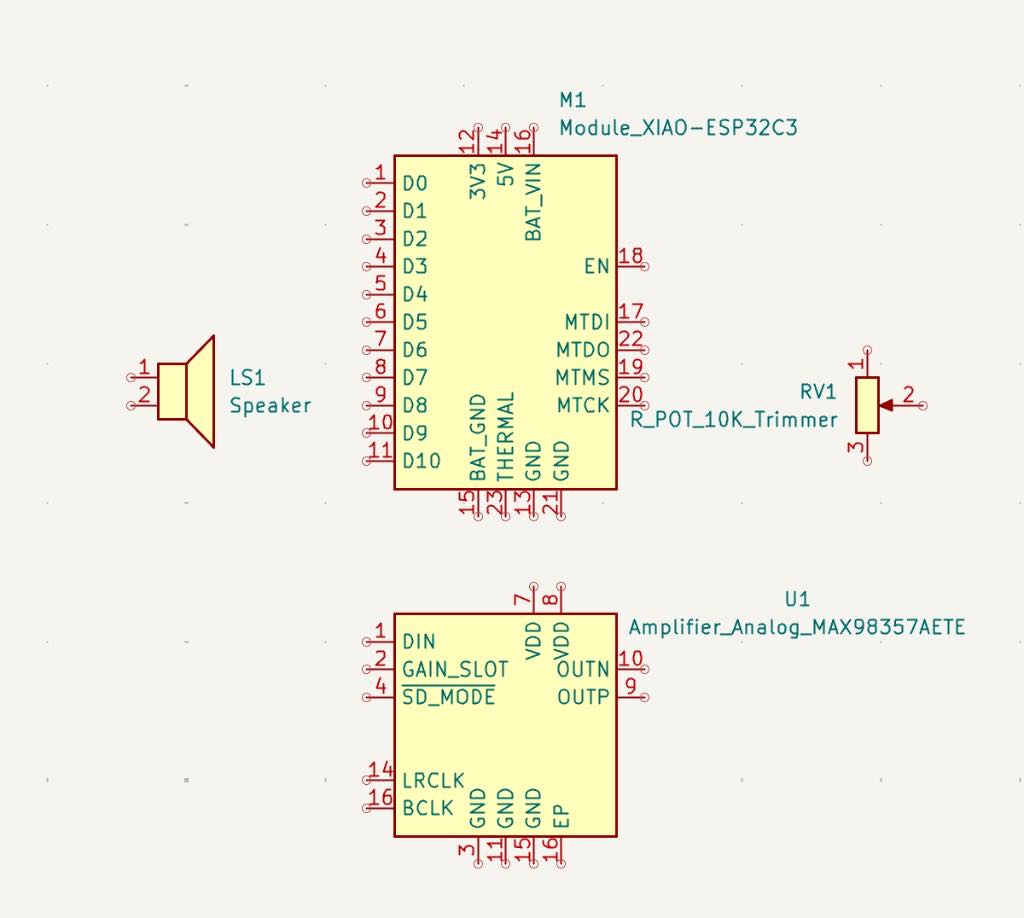
Because I'm a true beginner, I kept checking in with Youtube tutorials and Gemini between each step to make sure I was on the right track. Despite the datasheet for the amplifier matching the exact component name for the amplifier I picked in KiCad, I quickly learned that it was inaccurate to the component I was trying to use, and was instead advised to use a 1 x 7 pin connector to later connect the Adafruit 3006 onto my PCB. So, I switched it to that.
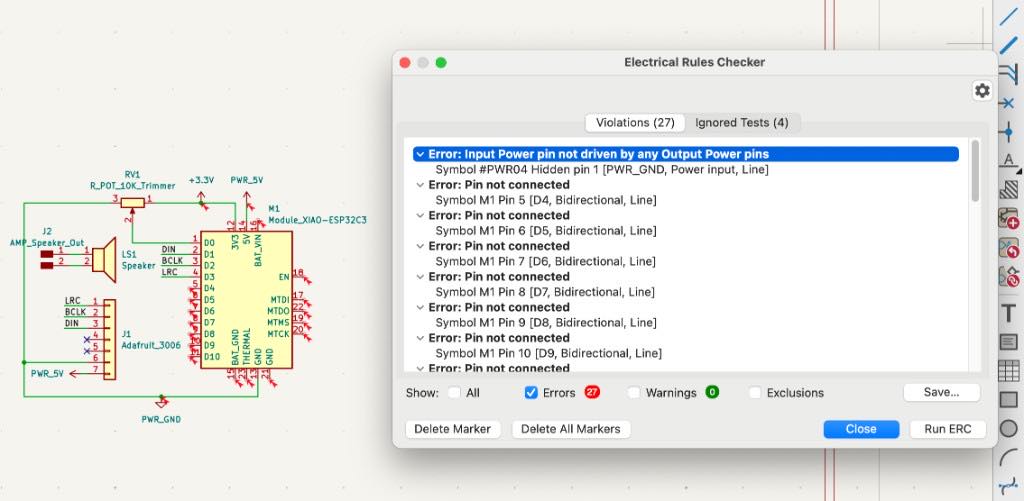
As I was connecting the amplifier using this datasheet, I realized I needed to use a 1x7 connector for its 7 pins:
(1-3: I2S pins) 1. LRC, 2. BCLK, 3. DIN
(4-5: I didn't use these) 4. GAIN, 5. SD
(6-7: ground and power) 6. GND, 7. VIN
I ran into quite some errors because I forgot two main things: 1. putting an X on all of the unconnected pins and 2. adding power flags. So I went back and made all my fixes until I was left with 2 warnings which quickly went away after I made some adjustments to the layouting of my power flags.
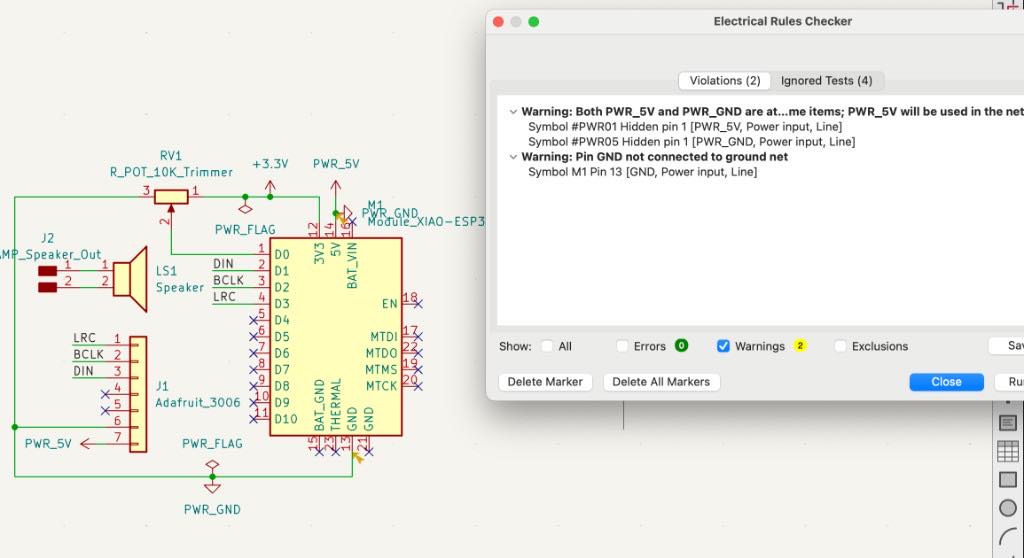
Then I moved onto my PCB design. After clicking update PCB with schematic, I played around with the layout to optimize all of the nets. I also realized while rearranging that I would have to be intentional about the positioning of the 1 x 7 connector because of the size of the amplifier. I left plenty of space on the left side of the connector for it.
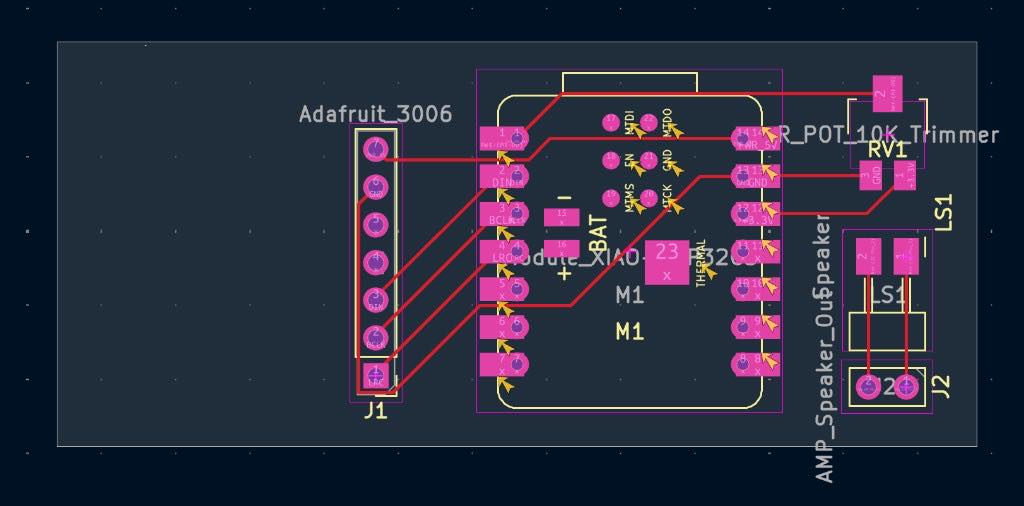
This was the first PCB design I landed on which passed with 0 errors, but there are a couple of things I need to fix/update:
- I was confused about the wiring of the speaker and I realized that the speaker I had in my schematic was unnecessary to keep in the PCB, as it was being attached externally. I also need to get rid of the 1x2 connector.
- I need to fill up the unused board space with a ground pour, eliminating the need to connect all of the GNDs.
- I set my width to 0.4mm but forgot to include any clearance rules so my wires are too thin. I probably will need to rearrange some of the components once I update my width size.
TAKEAWAYS watch a full tutorial before starting a new software
TAKEAWAYS consider how parts are being attached after before designing pcb (double sided, through holes, pads, connectors)
My second try:
At this point there were too many errors and I didn't like the design of my pcb so I just started from scratch. I also wanted to add an OLED screen to display audioreactive visuals, so I reconsidered the microcontroller I was using:
| Microcontroller | |
|---|---|
| ESP32-WROOM | bluetooth classic (can pair to devices like a normal bluetooth speaker) |
| ESP32-C3 | bluetooth low energy (better for midi control) |
| ESP32-S3 | bluetooth low energy and dual core architecture for smoother outputs |
I really wanted to use the ESP32-WROOM, as i want my final project to be a standalone bluetooth device, but because our shop only had the module, I decided to use the XIAO-ESP32-S3 because I was familiar with the XIAO architecture and wanted to be able to stream music from my laptop with the usb connection.
Here are the final components I landed on for my second try:
| Name | Datasheet | Kicad Symbol |
|---|---|---|
| speaker | datasheet | Device:speaker |
| amplifier | datasheet | fab:Amplifier_Analog_MAX98357AETE |
| microcontroller | datasheet | fab:Module_XIAO-ESP32S3 |
| potentiometer | datasheet | R_potentiometer |
| oled screen | datasheet | PinHeader_1x04 |
| 100uF capacitor | datasheet | Capacitor_SMD:CP_Elec_6.3x5.8 |