Week 2: Embedded Programming
Assignment Details
group assignment:
      • demonstrate and compare the toolchains and development workflows
         for available embedded architectures
individual assignment:
      • browse through the data sheet for a microcontroller
      • write and test a program for an embedded system using a microcontroller
         to interact (with input &/or output devices)
         and communicate (with wired or wireless connections)
      • extra credit: assemble the system
      • extra credit: try different languages &/or development environments
For the first part of the assignment, I decided to look through the datasheet for the RP2040, because that is the chip that we are using this week.
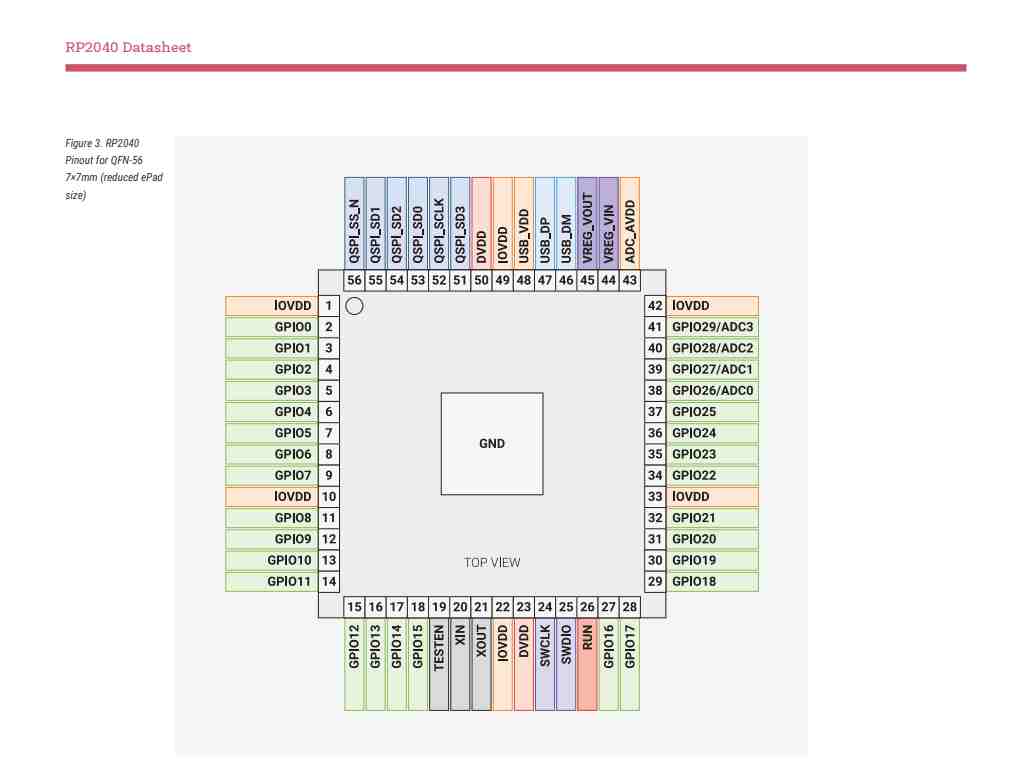
I learned a lot from reading through it! I had never looked at the datasheet for anything more complex than a 555 timer, so the information in this one was initially a little overwhelming. It was broken down really well though, so I felt like I could understand some of what I was looking at.
Then, I followed Quentin’s guide (link here!) to assemble the QPAD. I have soldered before, so the soldering went quickly and without any issues. Here’s some pictures of the assembled board:
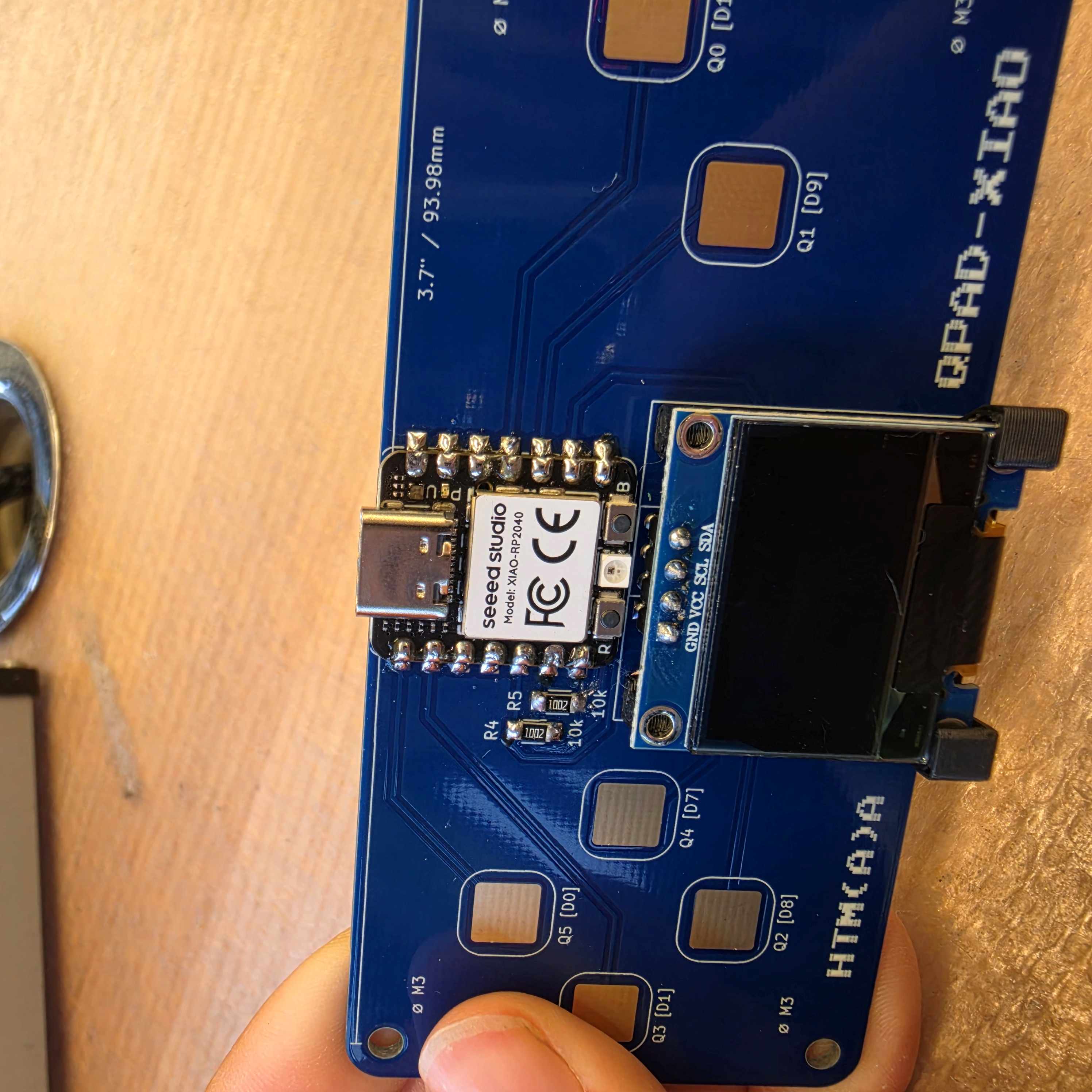
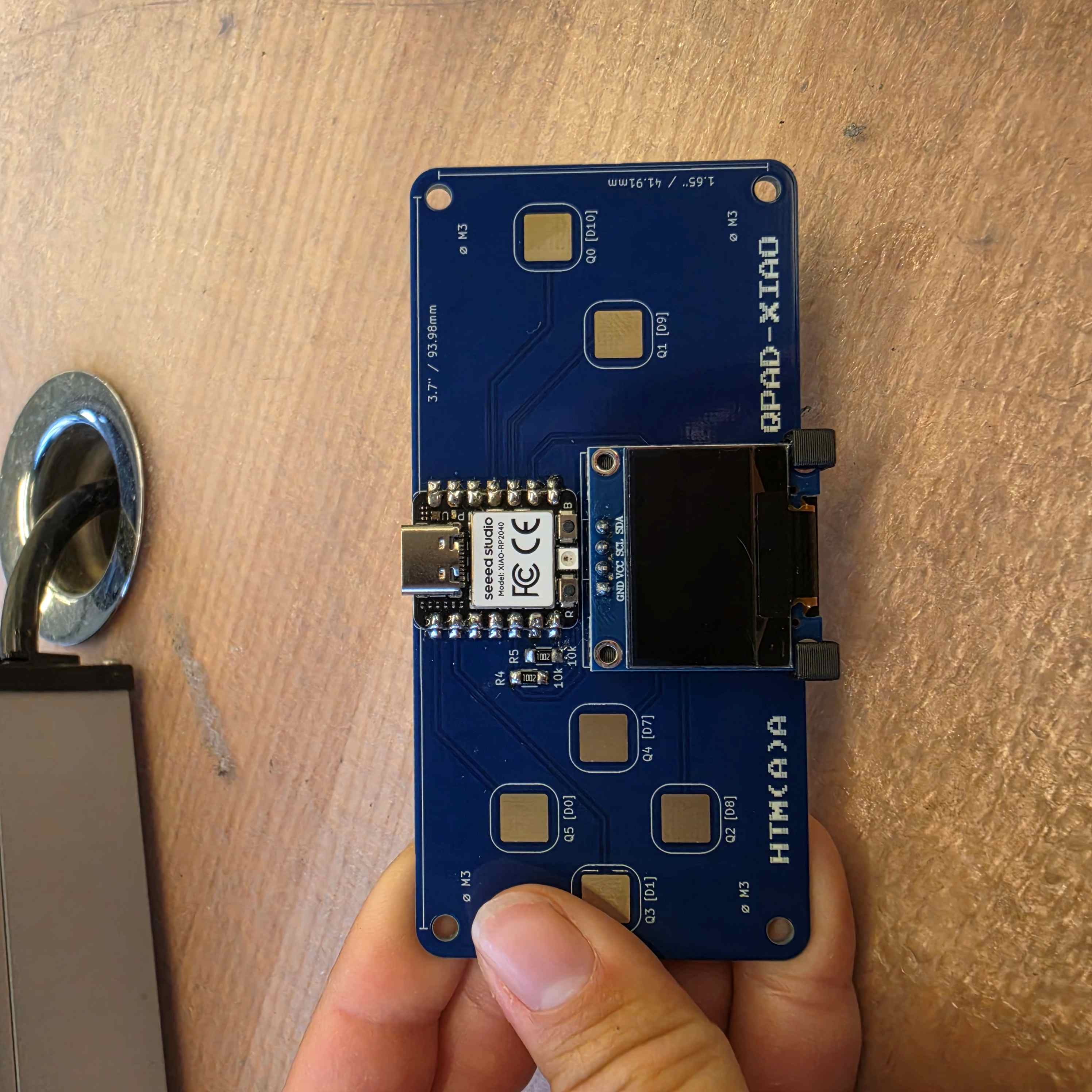
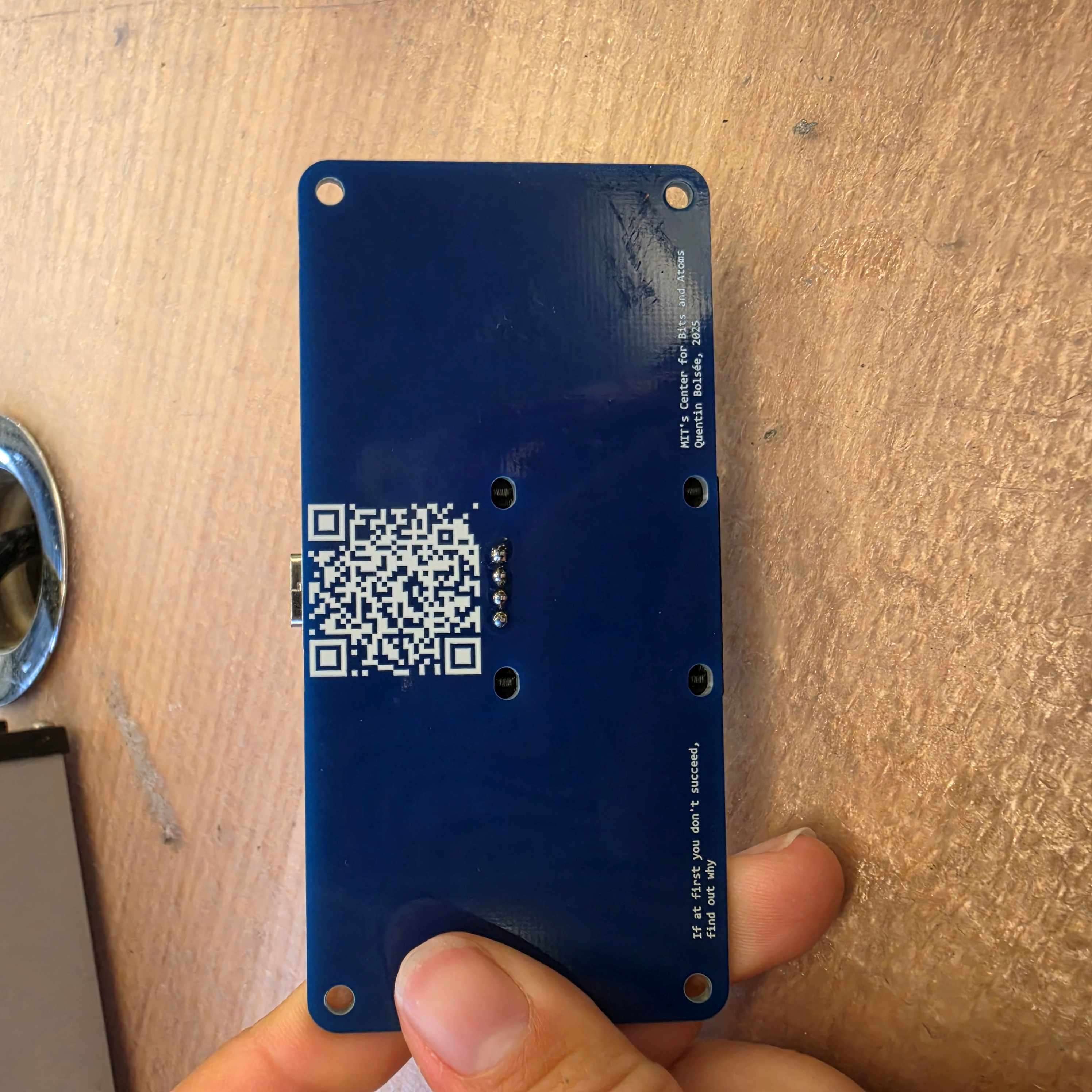
To test the board, I played around with all of the example programs in the guide. Each one worked, which was exciting! I appreciated being able to test with code that I knew would work so I could rule out hardware and software issues separately.
Because the board came with six buttons, I wanted to program a game for it. I spent a lot of time (too much time) trying to decide what kind of game to make. Finally, I landed on making a flappy bird game (which actually only requires one button oops).
To program the QPad, I decided to use Thonny and micropython. I chose this because I spent a good bit of time using the Arduino IDE this summer at my internship, and wanted to learn about something different.
I followed these instructions to get MicroPython setup on the Xiao. Then, I got to work programming! I started out by really reading the example code in-depth, to try to understand what we’re doing. Then, I worked up from the simplest parts of the game.
First, making a bird show up:
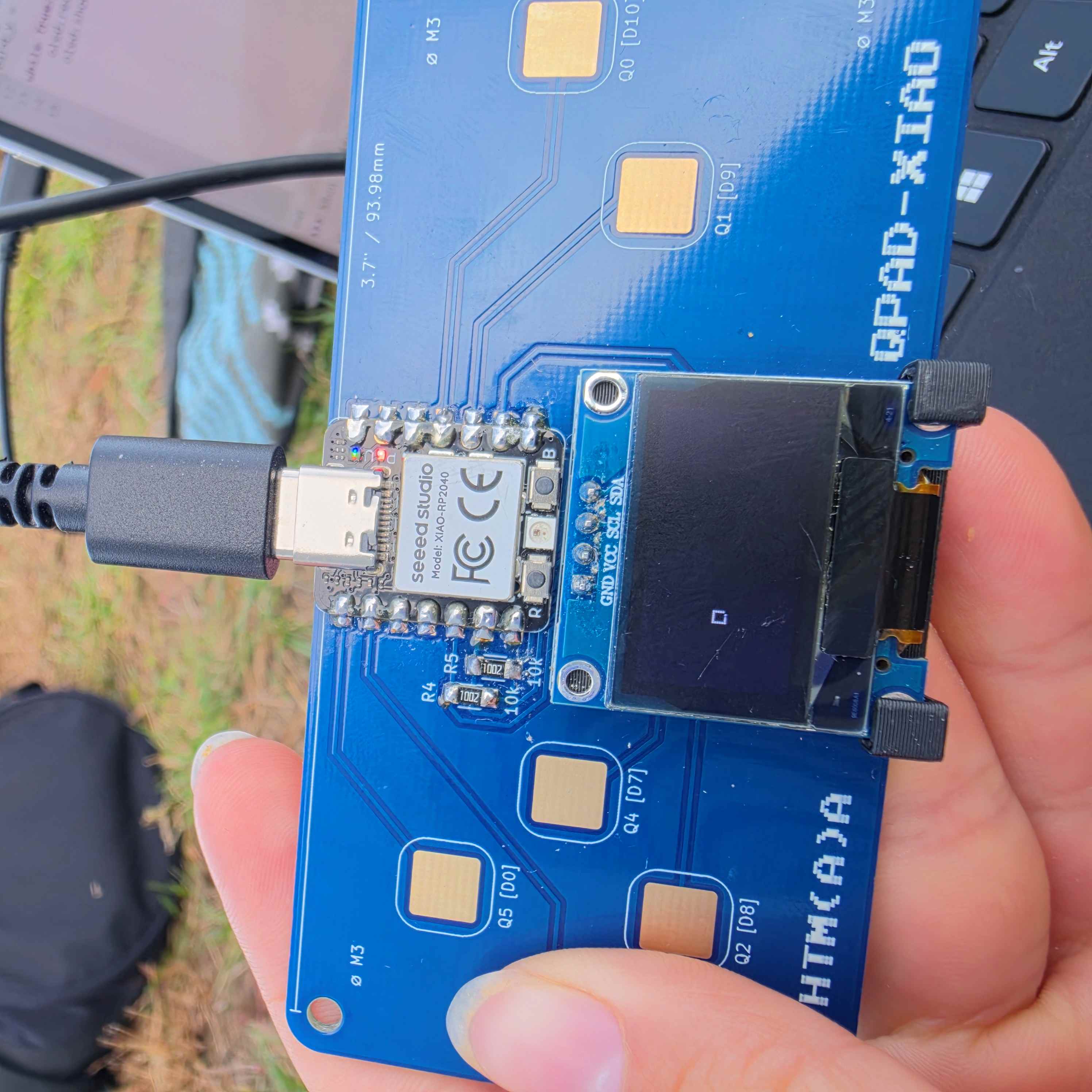
Then, making it fall and jump:
.gif)
Adding obstacles:
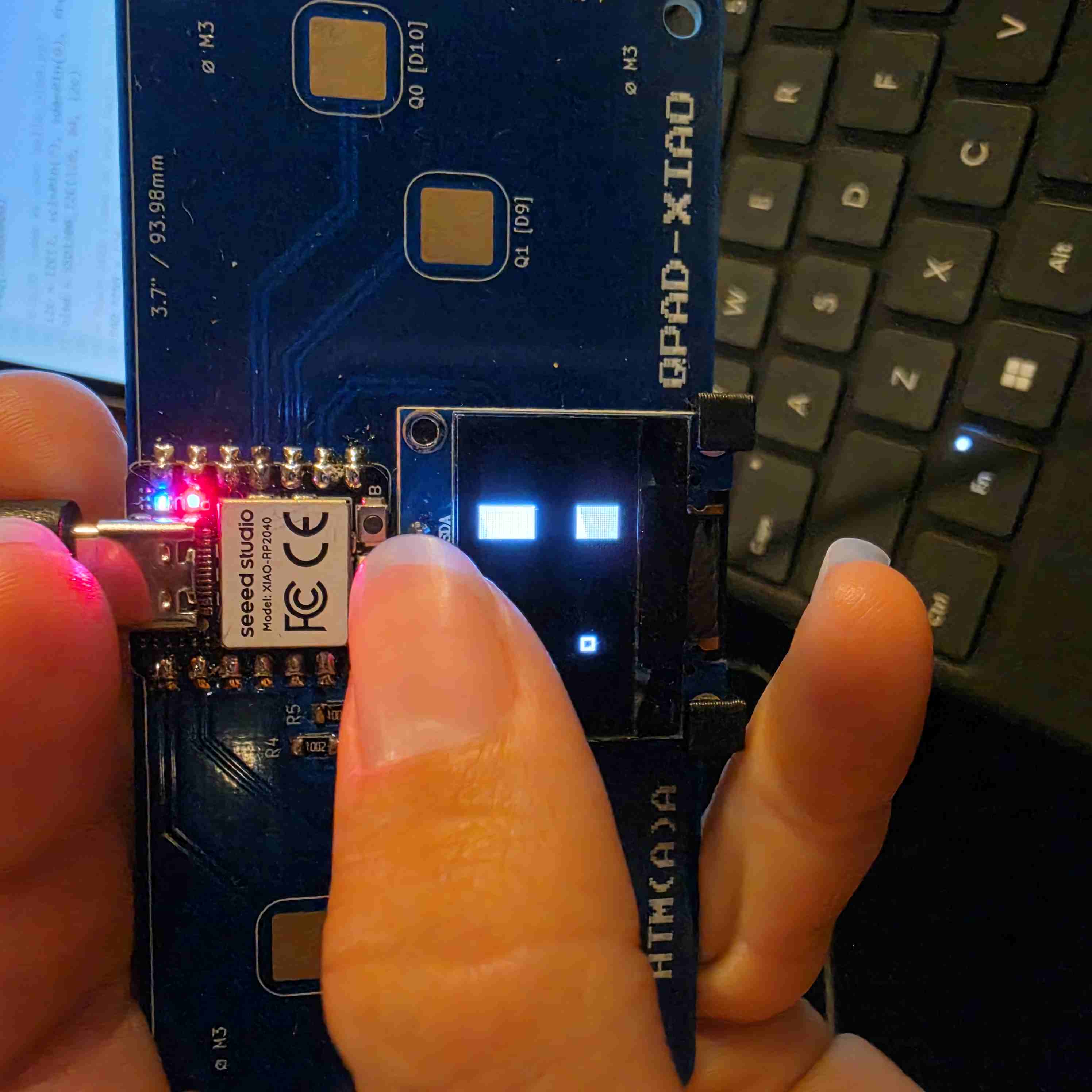
And a score counter:
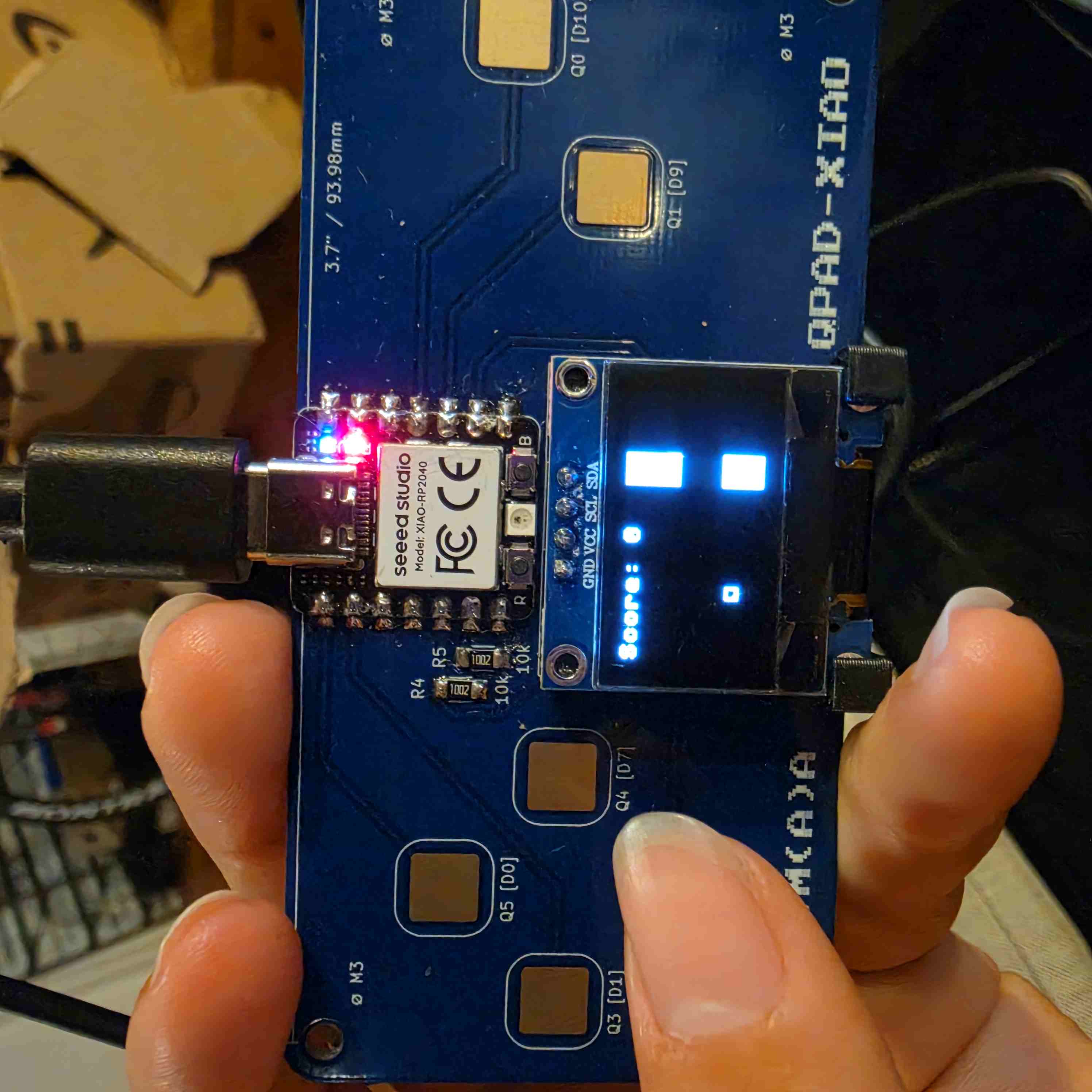
And finally, the game worked!
Then, I wanted to add some additional features. First, I added reset button, and variable width obstacles. At first when I was trying to decide what kind of game to make, I was considering recreating space invaders. So, I thought it would be fun to add some sort of shooting aspect to the game. I decided to make it so that the obstacles would disappear if the bird shot them a couple of times. I ended up asking ChatGPT to make the modifications, and then read through them.
Here is my code:
My Code
# Flappy Bird game by Sophia Woodbury

import random

####### copied from example hello_qed ########
from steptime import STEPTIME
from ssd1306 import SSD1306_I2C

from machine import Pin, I2C, freq
import utime

# Your steptime demo uses high clock
freq(250000000)

# OLED (same as your hello_oled.py)
i2c = I2C(1, scl=Pin(7), sda=Pin(6), freq=200000)
oled = SSD1306_I2C(128, 64, i2c)

# Touch pads (same as your hello_touch_neopixel.py)
PAD_PINS = [26, 27, 1, 2, 3, 4]  # pads 1..6
for p in PAD_PINS:
    Pin(p, Pin.IN, Pin.PULL_UP)

# Channels: one STEPTIME per pad (sm_id 0..5)
channels = []
for i, pin in enumerate(PAD_PINS):
    channels.append([STEPTIME(i, pin), [1e6], [0]])  # [sm, [min], [delta]]

# Steptime tuning (from your demo)
LOOP = 200
SETTLE = 20000
THRESH = 10000  # adjust if needed

# Debounce / tap detection
DEBOUNCE_MS = 180
tap_armed = [True] * 6
last_edge_ms = [0] * 6

def read_touch_deltas():
    deltas = [0] * 6
    for i, ch in enumerate(channels):
        sm, min_val, printable = ch
        sm.put(LOOP)
        sm.put(SETTLE)
        raw = 4294967296 - sm.get()   # same as your demo
        if raw < min_val[0]:
            min_val[0] = raw
        d = raw - min_val[0]
        printable[0] = d
        deltas[i] = d
    return deltas

def pad_pressed(deltas, i):
    return deltas[i] > THRESH

########## end copied from example #########
# game setup
game_over = False
score = 0

# bird setup
bird_x = 30
bird_y = 30

velocity_y = 0
jump_amt = -3

# obstacle setup
hit_x = 120
gap_y = 25
hit_width = 15
gap_height = 20
hit_speed = 2

def check_collisions():
    bird_r = bird_x + 6
    bird_b = bird_y + 6
    hit_r = hit_x + hit_width

    horiz_hit = ((bird_r > hit_x) and (bird_x < hit_r))
    vert_hit = ((bird_y < gap_y) or bird_b > gap_y + gap_height)

    return (horiz_hit and vert_hit)

was_pressed = False
while True:
     # clear the screen
     oled.fill(0)

     # move the bird
     velocity_y = velocity_y + 0.5
     bird_y = bird_y + velocity_y

     # constrain bird movement
     if bird_y < 0:
         bird_y = 0
         game_over = True

     if bird_y >= 60:
         bird_y = 60
         game_over = True

     # button stuff
     deltas = read_touch_deltas()
     pressed = [pad_pressed(deltas, i) for i in range(6)]

     # make bird jump
     is_pressed = any(pressed)

     if is_pressed and not was_pressed: # only on new taps (no hold)
         velocity_y = jump_amt
     was_pressed = is_pressed

     # move obstacles
     hit_x = hit_x - hit_speed
     if hit_x < -hit_width: # reset when on left side of screen
         hit_x = 128
         gap_y = random.randint(15, 30)
         score += 1
         hit_speed = 2 + (score // 10) # increase speed (difficulty)

     # collision
     if check_collisions():
         game_over = True

     # game over
     if game_over:
         oled.text("GAME OVER :(", 25, 20)
         oled.text(f"Score: {score}", 25, 32)
         oled.text("press to reset", 25, 44)
         oled.show()

         # look for button press
         deltas = read_touch_deltas()
         pressed = [pad_pressed(deltas, i) for i in range(6)]

         # reset the game if pressed
         if any(pressed):
             game_over = False
             bird_y = 30
             velocity_y = 0
             hit_x = 100
             gap_y = 25
             score = 0
             hit_speed = 2

         utime.sleep_ms(50)
         continue


     # draw the bird
     oled.rect(bird_x, int(bird_y), 6, 6, 1)

     # draw obstacles (hit)
     oled.fill_rect(hit_x, 0, hit_width, gap_y, 1) # top rect
     bottom_hit_y = gap_y + gap_height
     oled.fill_rect(hit_x, bottom_hit_y, hit_width, 64 - bottom_hit_y, 1)

     oled.text(f"Score: {score}", 0, 0)

     # show the new screen
     oled.show()

     # wait a lil
     utime.sleep_ms(50)
ChatGPT-modified code
import random

####### copied from example hello_qed ########
from steptime import STEPTIME
from ssd1306 import SSD1306_I2C

from machine import Pin, I2C, freq
import utime

# Your steptime demo uses high clock
freq(250000000)

# OLED (same as your hello_oled.py)
i2c = I2C(1, scl=Pin(7), sda=Pin(6), freq=200000)
oled = SSD1306_I2C(128, 64, i2c)

# Touch pads (same as your hello_touch_neopixel.py)
PAD_PINS = [26, 27, 1, 2, 3, 4]  # pads 1..6

for p in PAD_PINS:
    Pin(p, Pin.IN, Pin.PULL_UP)

# Channels: one STEPTIME per pad (sm_id 0..5)
channels = []

for i, pin in enumerate(PAD_PINS):
    channels.append([STEPTIME(i, pin), [1e6], [0]])

# Steptime tuning
LOOP = 200
SETTLE = 20000
THRESH = 10000

# Debounce / tap detection
DEBOUNCE_MS = 180
tap_armed = [True] * 6
last_edge_ms = [0] * 6


def read_touch_deltas():

    deltas = [0] * 6

    for i, ch in enumerate(channels):

        sm, min_val, printable = ch

        sm.put(LOOP)
        sm.put(SETTLE)

        raw = 4294967296 - sm.get()

        if raw < min_val[0]:
            min_val[0] = raw

        d = raw - min_val[0]

        printable[0] = d
        deltas[i] = d

    return deltas


def pad_pressed(deltas, i):
    return deltas[i] > THRESH


########## end copied from example #########


# ==================================================
# GAME SETUP
# ==================================================

game_over = False
score = 0


# ==================================================
# BIRD SETUP
# ==================================================

bird_x = 30
bird_y = 30

velocity_y = 0
jump_amt = -3


# ==================================================
# OBSTACLE SETUP
# ==================================================

hit_x = 120
gap_y = 25
hit_width = 15
gap_height = 20
hit_speed = 2

# Number of times the pipe has been hit
pipe_hits = 0

# Number of hits needed to destroy the pipe
hits_needed = 3


# ==================================================
# PROJECTILE SETUP
# ==================================================

bullet_active = False
bullet_x = 0
bullet_y = 0

# Projectile speed
bullet_speed = 7

bullet_width = 3
bullet_height = 2


# ==================================================
# COLLISION FUNCTIONS
# ==================================================

def check_collisions():

    bird_r = bird_x + 6
    bird_b = bird_y + 6

    hit_r = hit_x + hit_width

    horiz_hit = ((bird_r > hit_x) and
                 (bird_x < hit_r))

    vert_hit = ((bird_y < gap_y) or
                (bird_b > gap_y + gap_height))

    return (horiz_hit and vert_hit)


# Check whether projectile hits the pipe
def check_bullet_collision():

    bullet_r = bullet_x + bullet_width
    bullet_b = bullet_y + bullet_height

    hit_r = hit_x + hit_width

    # Check horizontal overlap
    horiz_hit = ((bullet_r > hit_x) and
                 (bullet_x < hit_r))

    if not horiz_hit:
        return False

    # Check whether bullet is in the
    # top or bottom part of the pipe
    top_hit = bullet_y < gap_y

    bottom_hit = bullet_b > gap_y + gap_height

    return top_hit or bottom_hit


# ==================================================
# BUTTON STATE
# ==================================================

# Used to detect a new jump tap
was_pressed = False

# Used to detect a new shooting tap
shoot_was_pressed = False


# ==================================================
# MAIN GAME LOOP
# ==================================================

while True:

    # ------------------------------------------------
    # CLEAR SCREEN
    # ------------------------------------------------

    oled.fill(0)


    # ------------------------------------------------
    # MOVE THE BIRD
    # ------------------------------------------------

    velocity_y = velocity_y + 0.5

    bird_y = bird_y + velocity_y


    # Keep bird on screen
    if bird_y < 0:

        bird_y = 0
        game_over = True


    if bird_y >= 60:

        bird_y = 60
        game_over = True


    # ------------------------------------------------
    # READ BUTTONS
    # ------------------------------------------------

    deltas = read_touch_deltas()

    pressed = [
        pad_pressed(deltas, i)
        for i in range(6)
    ]


    # ------------------------------------------------
    # JUMP
    # ------------------------------------------------

    # Pad 1 = jump

    jump_pressed = pressed[0]

    if jump_pressed and not was_pressed:

        velocity_y = jump_amt

    was_pressed = jump_pressed


    # ------------------------------------------------
    # SHOOTING
    # ------------------------------------------------

    # Pad 2 = shoot

    shoot_pressed = pressed[1]

    if shoot_pressed and not shoot_was_pressed:

        # Only shoot if there is not already
        # a projectile on the screen

        if not bullet_active:

            bullet_active = True

            # Start projectile at the front
            # of the bird

            bullet_x = bird_x + 6

            # Start projectile at the bird's
            # current vertical position

            bullet_y = int(bird_y) + 2

    shoot_was_pressed = shoot_pressed


    # ------------------------------------------------
    # MOVE PROJECTILE
    # ------------------------------------------------

    if bullet_active:

        bullet_x = bullet_x + bullet_speed


        # Check whether projectile hit pipe

        if check_bullet_collision():

            # Remove projectile

            bullet_active = False

            # Add one hit to the pipe

            pipe_hits = pipe_hits + 1


            # Destroy pipe after enough hits

            if pipe_hits >= hits_needed:

                # Move pipe off screen

                hit_x = -hit_width

                # Give player a point

                score = score + 1


        # Remove projectile if it
        # leaves the screen

        elif bullet_x > 128:

            bullet_active = False


    # ------------------------------------------------
    # MOVE OBSTACLE
    # ------------------------------------------------

    hit_x = hit_x - hit_speed


    # If pipe leaves screen,
    # create a new one

    if hit_x < -hit_width:

        hit_x = 128

        gap_y = random.randint(15, 30)

        # Reset pipe health

        pipe_hits = 0

        # Player successfully passed
        # the pipe

        score = score + 1

        # Increase speed every 10 points

        hit_speed = 2 + (score // 10)


    # ------------------------------------------------
    # COLLISION
    # ------------------------------------------------

    if check_collisions():

        # Only check collision if pipe
        # is actually on screen

        if hit_x >= 0:

            game_over = True


    # ------------------------------------------------
    # GAME OVER
    # ------------------------------------------------

    if game_over:

        oled.text("GAME OVER :(", 15, 20)

        oled.text(
            f"Score: {score}",
            15,
            32
        )

        oled.text(
            "press to reset",
            10,
            44
        )

        oled.show()


        # Check for button press

        deltas = read_touch_deltas()

        pressed = [
            pad_pressed(deltas, i)
            for i in range(6)
        ]


        # Reset game if a button is pressed

        if any(pressed):

            game_over = False

            bird_y = 30
            velocity_y = 0

            hit_x = 120
            gap_y = 25

            score = 0
            hit_speed = 2

            # Reset pipe health

            pipe_hits = 0

            # Reset projectile

            bullet_active = False

            bullet_x = 0
            bullet_y = 0


        utime.sleep_ms(50)

        continue


    # ------------------------------------------------
    # DRAW BIRD
    # ------------------------------------------------

    oled.rect(
        bird_x,
        int(bird_y),
        6,
        6,
        1
    )


    # ------------------------------------------------
    # DRAW OBSTACLES
    # ------------------------------------------------

    # Only draw pipe if it is on screen

    if hit_x >= 0:

        # Top pipe

        oled.fill_rect(
            hit_x,
            0,
            hit_width,
            gap_y,
            1
        )


        # Bottom pipe

        bottom_hit_y = gap_y + gap_height

        oled.fill_rect(
            hit_x,
            bottom_hit_y,
            hit_width,
            64 - bottom_hit_y,
            1
        )


        # Show pipe health

        oled.text(
            f"{pipe_hits}/{hits_needed}",
            hit_x,
            gap_y + 7
        )


    # ------------------------------------------------
    # DRAW PROJECTILE
    # ------------------------------------------------

    if bullet_active:

        oled.fill_rect(
            int(bullet_x),
            int(bullet_y),
            bullet_width,
            bullet_height,
            1
        )


    # ------------------------------------------------
    # DRAW SCORE
    # ------------------------------------------------

    oled.text(
        f"Score: {score}",
        0,
        0
    )


    # ------------------------------------------------
    # SHOW SCREEN
    # ------------------------------------------------

    oled.show()


    # Wait a little

    utime.sleep_ms(50)
Link to my conversation with ChatGPT: https://chatgpt.com/share/6acd534c-d1cc-83ea-b76a-db108dd70923