01 · Individual: design · Version 1
A servo board for the final project
This week is design only; the board is milled next week. I designed the smallest useful piece of my final project, Pixelize the Earth: a controller that pushes three pins up and down. Each pin is moved by one MG90S servo, and the same board will later be repeated for a larger grid.
What is on it
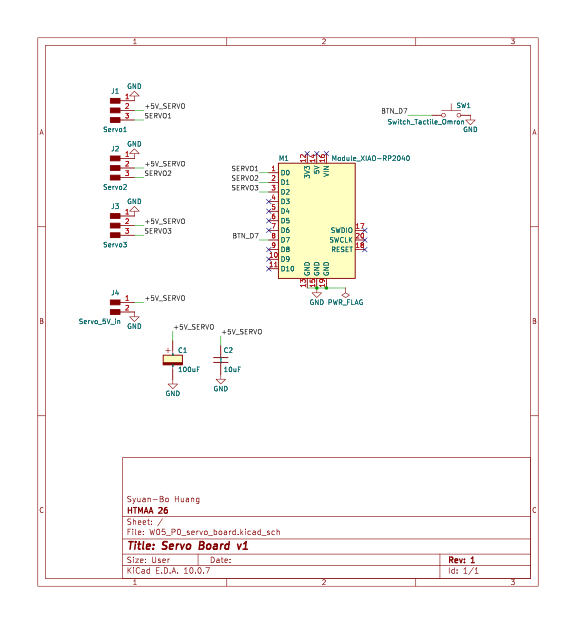
| Controller | Seeed XIAO RP2040 (M1). Servo signals on D0, D1, D2; one button on D7. |
| Servos | Three 3-pin headers (J1–J3): GND, +5V, signal. |
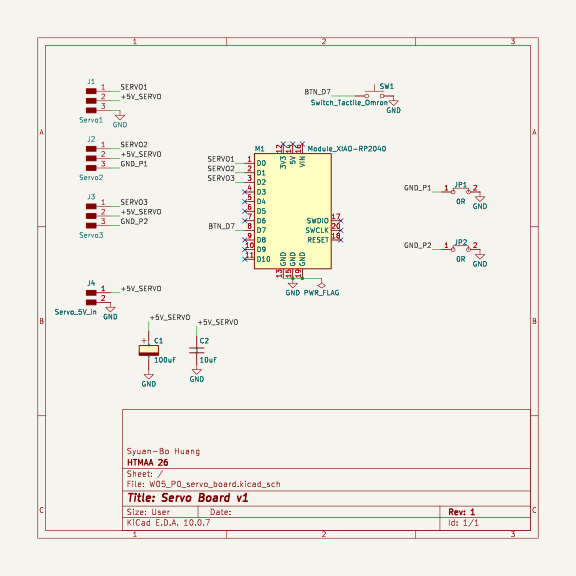
| Servo power | 2-pin header (J4) for an external 5 V supply. USB cannot feed three servos moving at once, so the servos have their own supply and share only GND with the XIAO. |
| Capacitors | C1 100 µF electrolytic and C2 10 µF ceramic across the servo supply, placed at the servo end of the 5 V line, to absorb the current spike when the servos start. |
| Button | SW1 on D7, using the internal pull-up, so there is no external resistor. It will trigger a test move. |
| Jumpers | Two 0 Ω resistors (JP1, JP2). See below. |
| Mounting | Four M3 holes (3.2 mm) in the corners, for the base. |
Symbols and footprints come from the KiCad FabLib library.
Design rule check: why two jumpers
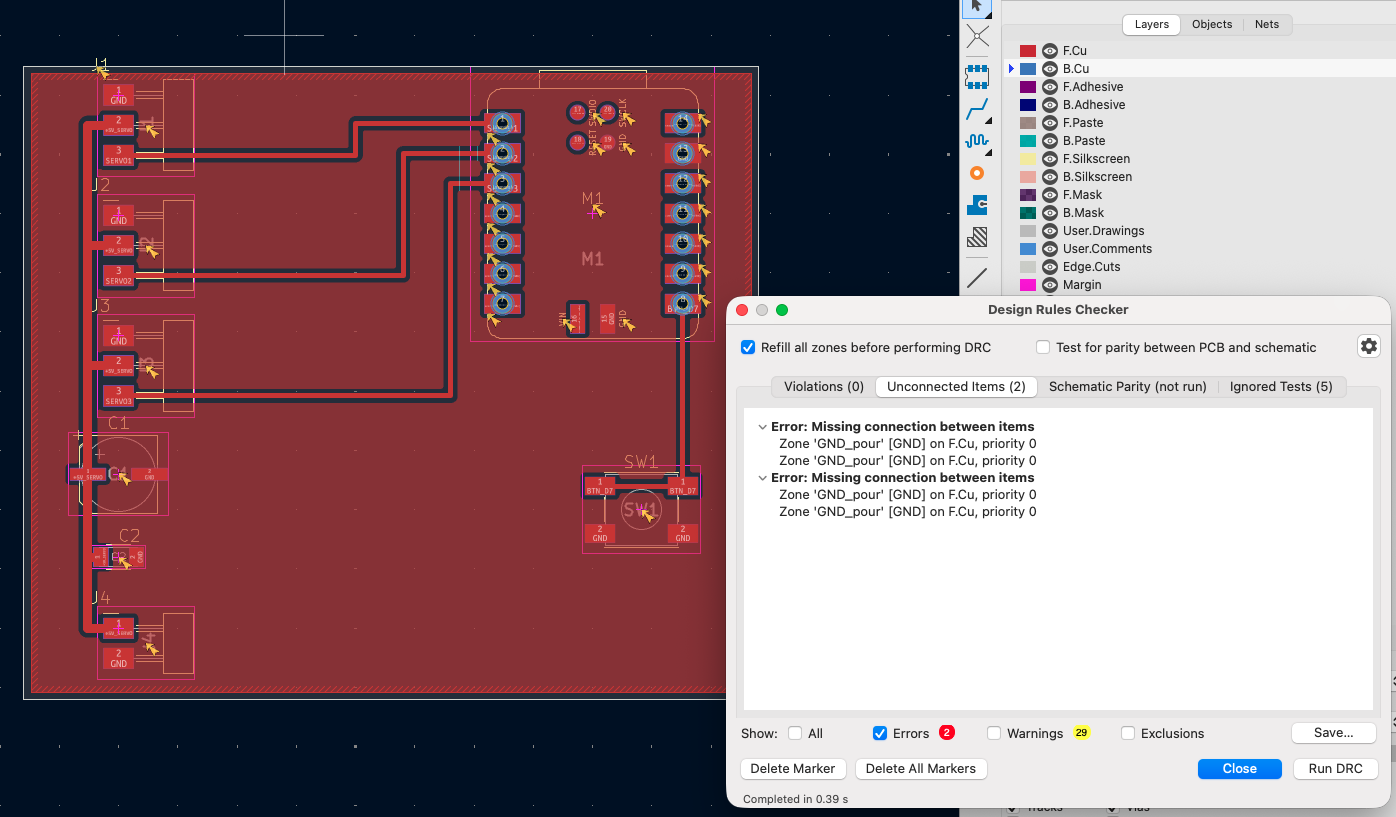
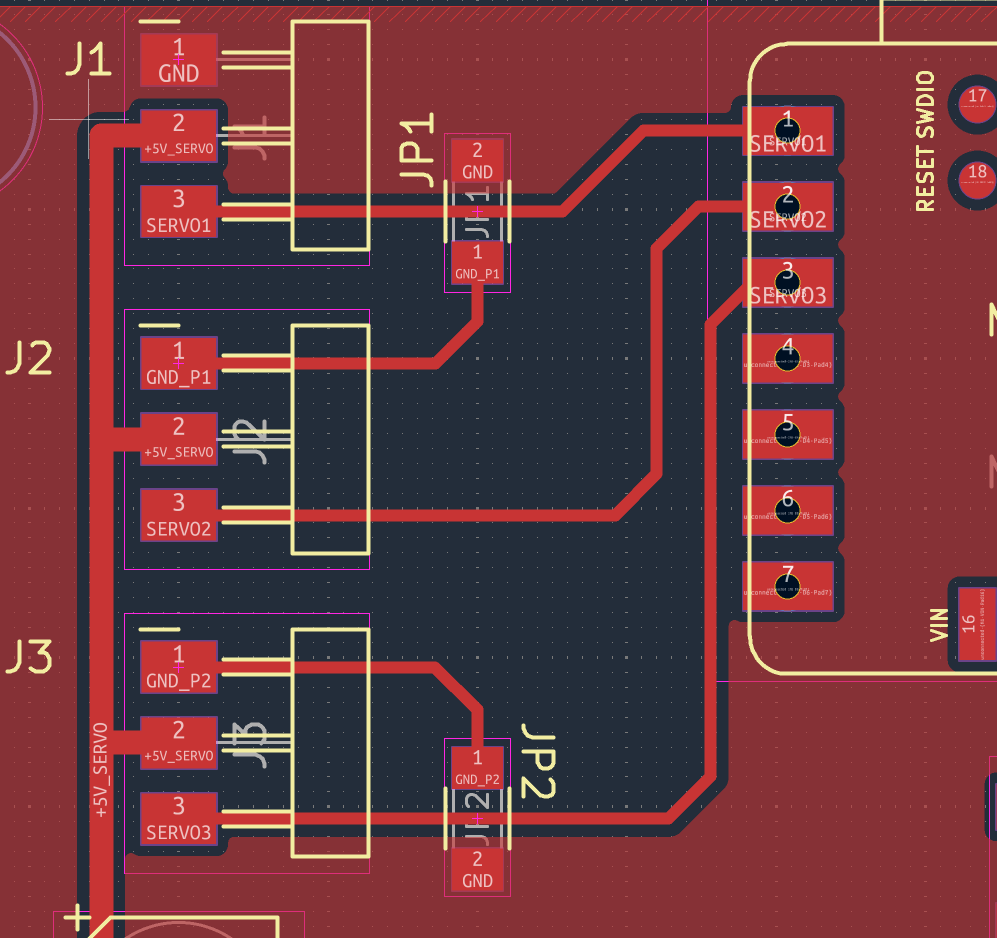
The board is single-sided, so no trace can cross another. After routing, the DRC reported two unconnected GND items: the GND pins of two servo headers (J2 and J3) were enclosed by the signal traces, which made isolated copper islands that the ground pour could not reach. I tried to find a layout without them, but moving a header to the other side of the board would have made it bigger and changed pins. I chose to add a 0 Ω resistor (JP1, JP2) that hops over the signal trace and ties each of those GND pins to the main ground. The cost is two more parts to solder. I have not decided yet if I would take the larger board instead; it depends on how reliable the hand-soldered jumpers are.
02 · Layout · Version 1
Layout for milling
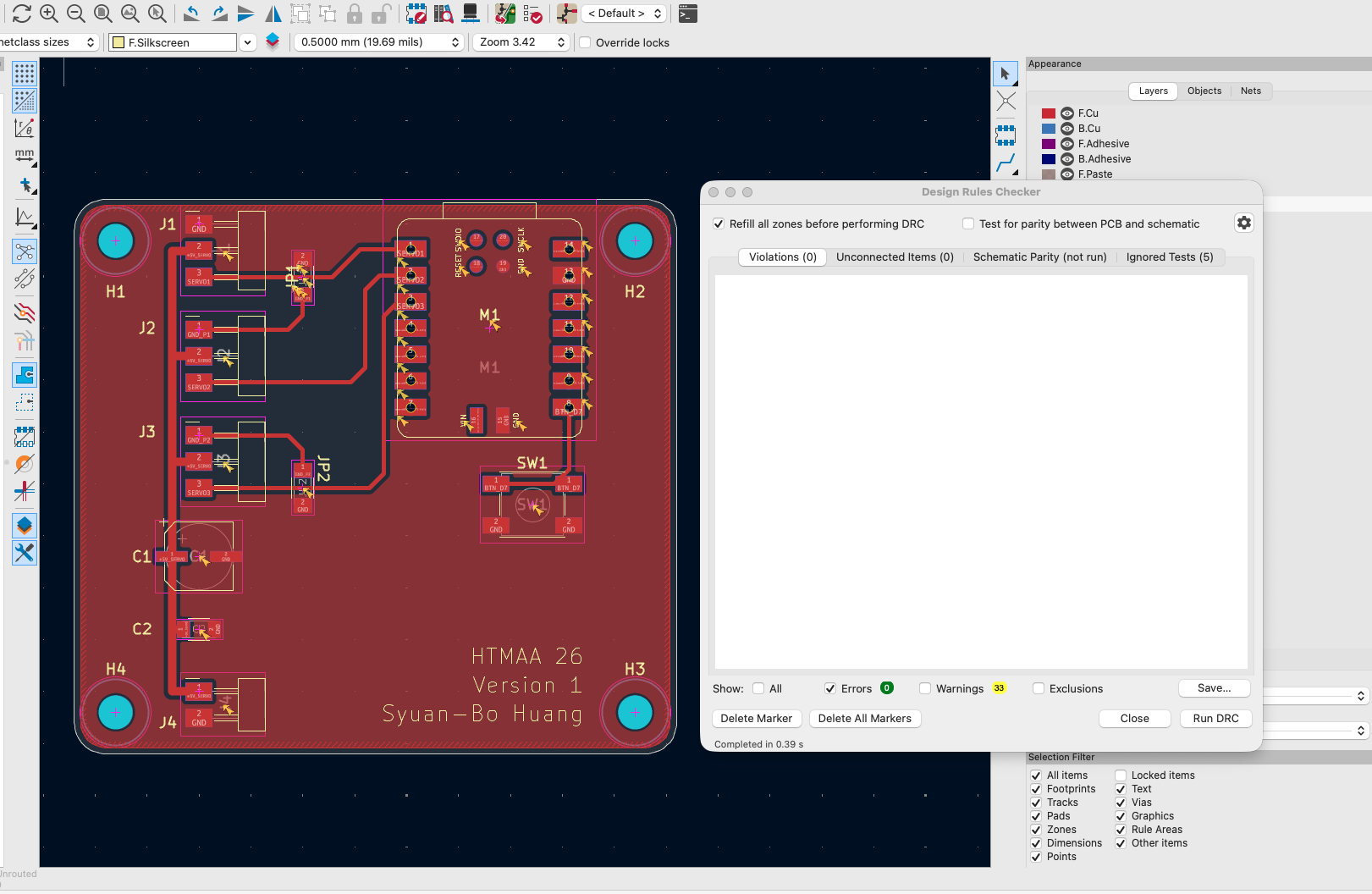
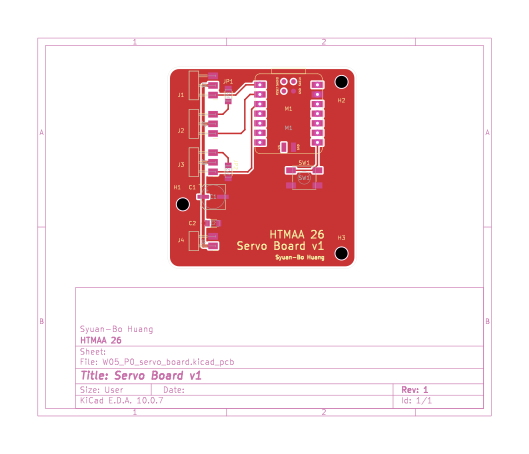
The board is 58 × 53.4 mm with R3 corners. I drew it for a milling machine, so the rules are loose.
| Layers | One copper layer (F.Cu). |
| Trace width and clearance | 0.4 mm for both, to match a 1/64″ end mill. |
| Power trace | The +5V line is 0.8 mm wide, twice the signal traces (0.4 mm). |
| Corners | 45° trace bends and rounded corners. |
| Ground | GND copper pour on F.Cu with 0.4 mm clearance and solid connection to the pads. |
A pour keeps most of the copper, so the mill only cuts along the edges of traces and the pour. The dark areas between the traces are not pour, and the mill has to clear all the copper there. I have not measured the milling time.
03 · Checks · Version 1
Design rule check
| Errors | 0 |
| Unconnected items | 0 |
| Warnings | 40. All are silkscreen over copper or text height (XIAO footprint), footprint copy differs from the library copy, missing Datasheet field, and the four mounting holes that are not in the schematic. None affects milling, because a milled board has no solder mask or silkscreen. |
The ERC on the schematic has 0 errors. At this point I thought the board was done.
04 · Version 2
A conflict I only saw in 3D
I wanted to see where the servos would sit for the base I plan to build, so I opened the 3D view. At first the headers, the XIAO and the button had no 3D model, so the view showed only pads.
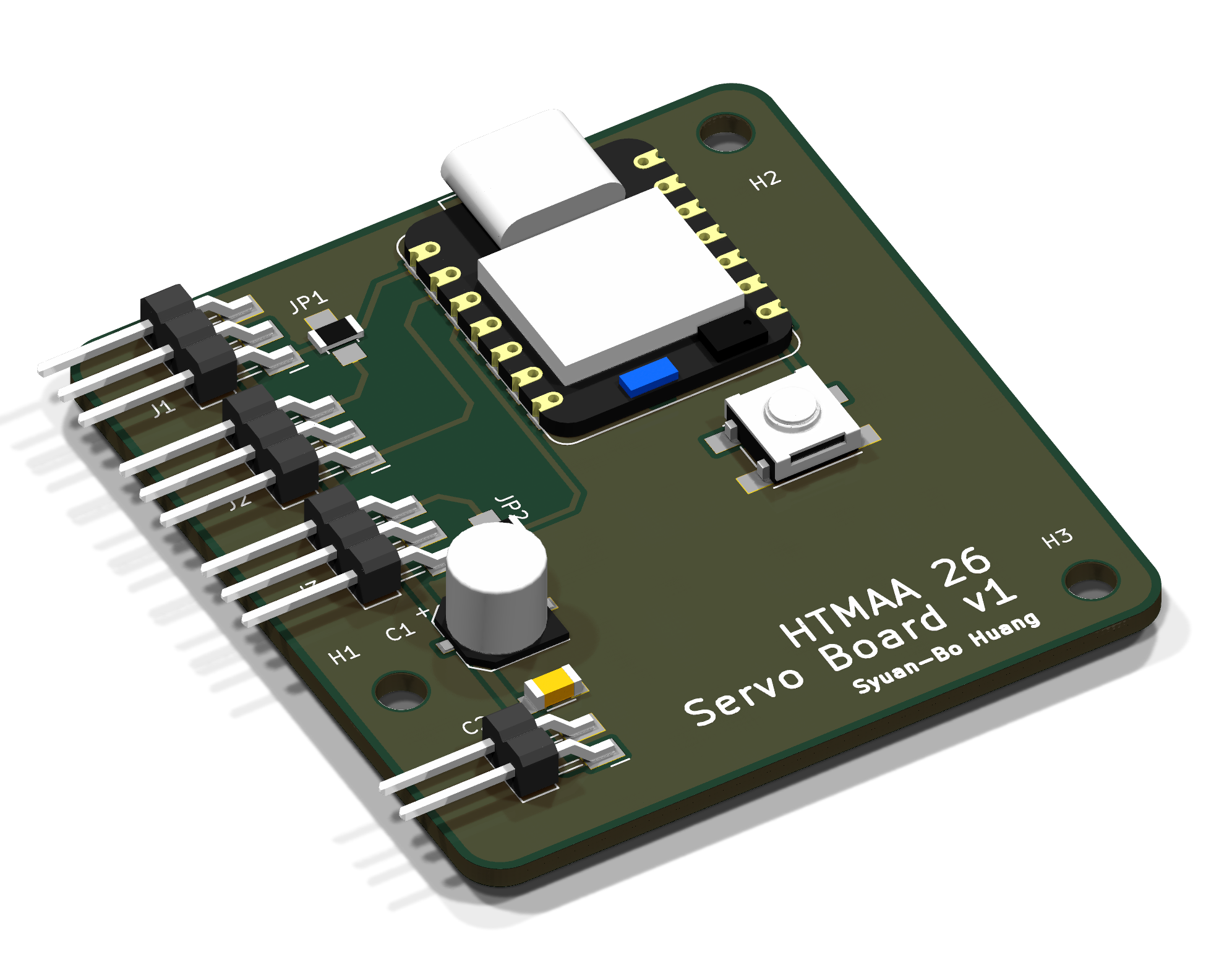
After I attached the models from the FabLib library, the headers showed up with pins about 14 mm long (measured from the STEP file) lying flat over the board. This showed two problems that the 2D layout and the DRC cannot show. The DRC did not catch them because it only checks copper and outlines, not the 3D shape of the parts:
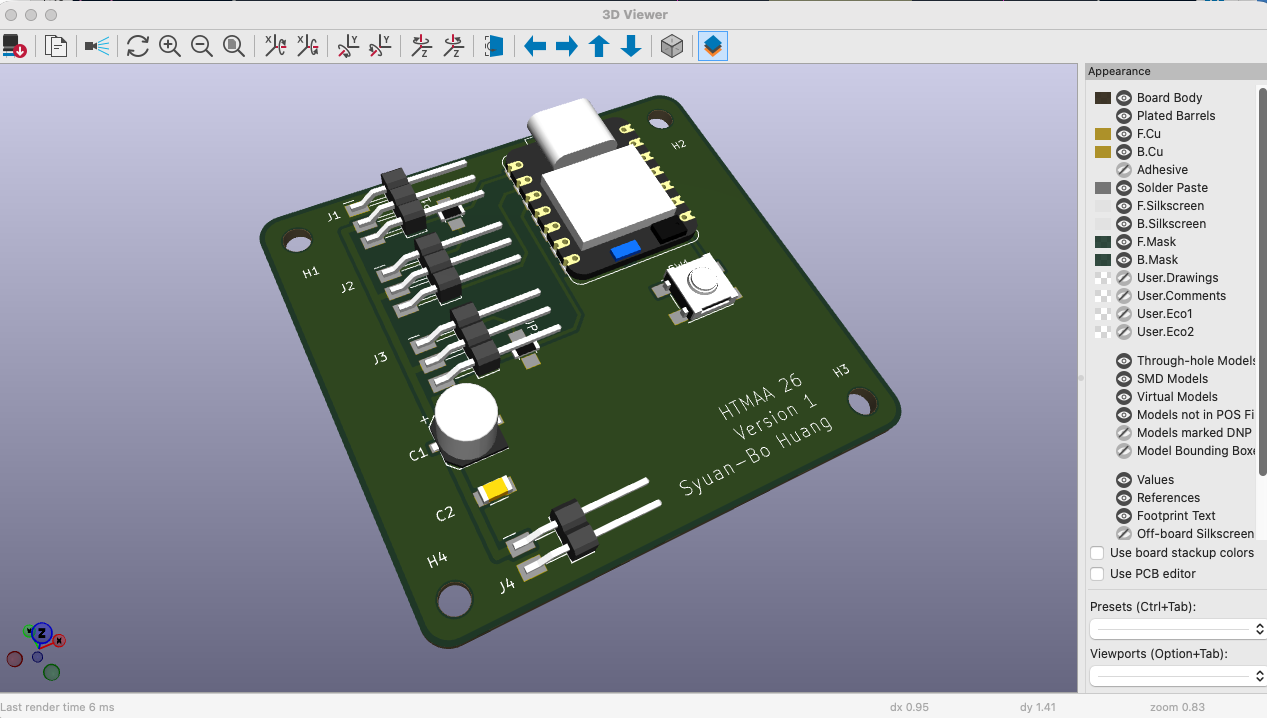
- The third pin of J1 and of J3 runs over JP1 and JP2, so a servo plug pushed onto those pins would sit on top of the jumpers.
- The pins point to the inside of the board, so every servo cable has to come in from the middle of the board instead of from its edge.
What I changed
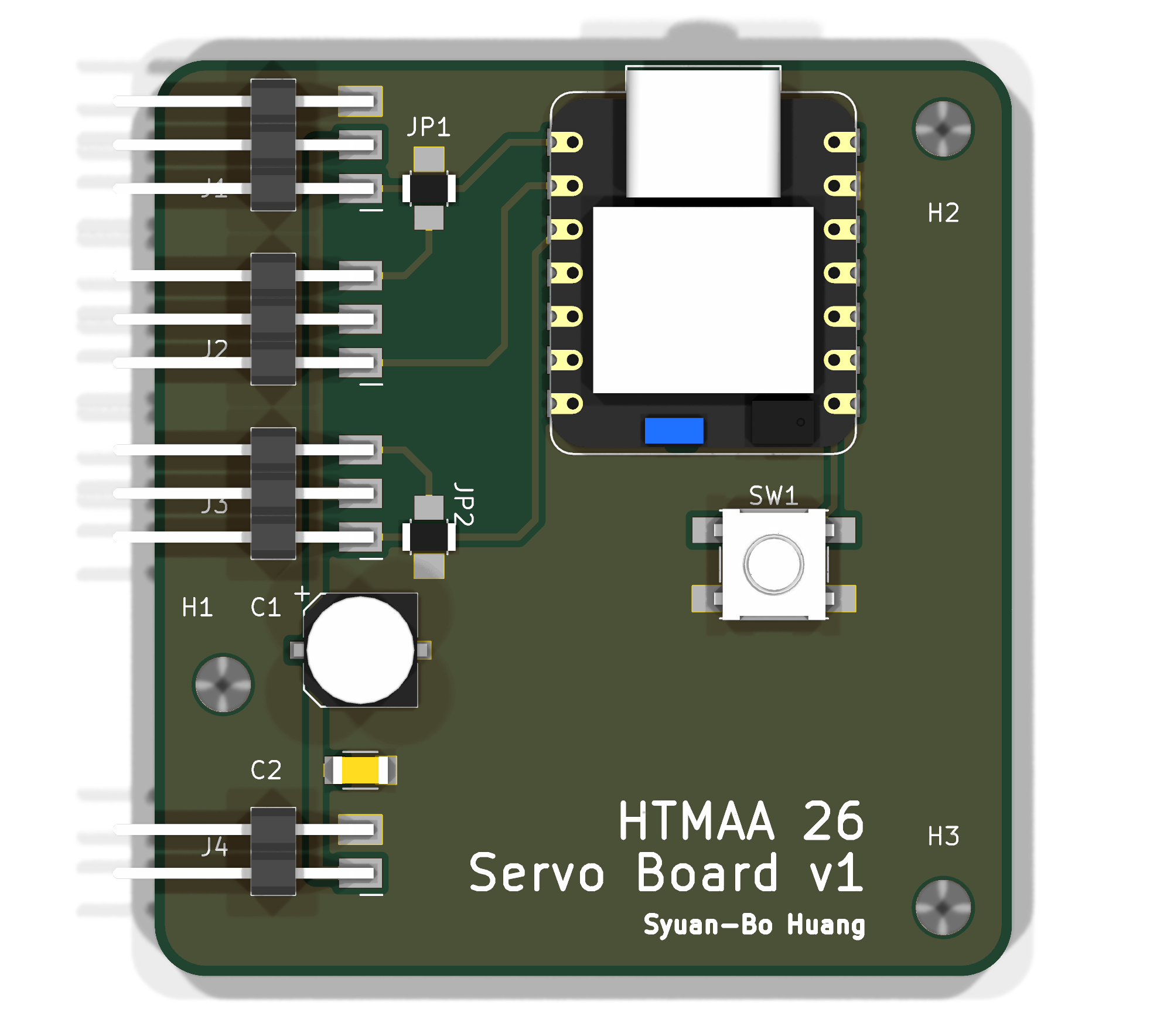
I considered two fixes. One was to swap the XIAO and the headers from left to right and route the servos to the XIAO’s right-hand pins (D8–D10). The other was to rotate J1–J4 by 180° in place, so the pins point out over the left edge of the board. I chose the rotation: it ends with the same geometry, but the XIAO, the button and the jumpers stay where they are, and the swap would mean routing the whole board again.
Rotating a header by 180° also flips its pin order, so pin 1 (GND) ended up at the bottom. To keep every pad on the same net as before, I swapped the nets of pins 1 and 3 on J1–J3 in the schematic (pin 1 is now the signal, pin 3 is GND). The sync from the schematic refuses to change a pad net while copper uses it, so I deleted the signal traces first and drew them again afterwards.
The pins are about 14 mm long, so they stick out about 2.4 mm past the left edge of the board and would cross the two left mounting holes. I kept one left hole at (22, 79), between J3 and J4, so the base has three holes. A second left hole did not fit: the courtyards of the two holes overlapped and the DRC reported an error.
With the pins pointing left, the 20 mm gap between the headers and the XIAO was no longer needed. I moved the XIAO, the button and the right-hand holes 8 mm to the left, moved the jumpers next to the headers, and redrew the signal traces. The board went from 58 to 50 mm wide.
Design rule check of version 2
| Errors | 0 |
| Unconnected items | 0 |
| Warnings | 38, of the same kinds as before; the mounting holes that are not in the schematic are now three. |
Not done yet
- Stepper axis (to move a row sideways). The board only moves three pins up and down. A StepStick driver, a 12 V input and a limit switch are not designed. I am waiting to hear if the lab has a StepStick module.
- Current. The 0 Ω jumpers are rated about 2 A. I did not check the stall current of three MG90S against that.
05 · Base (extra)
A base in Fusion
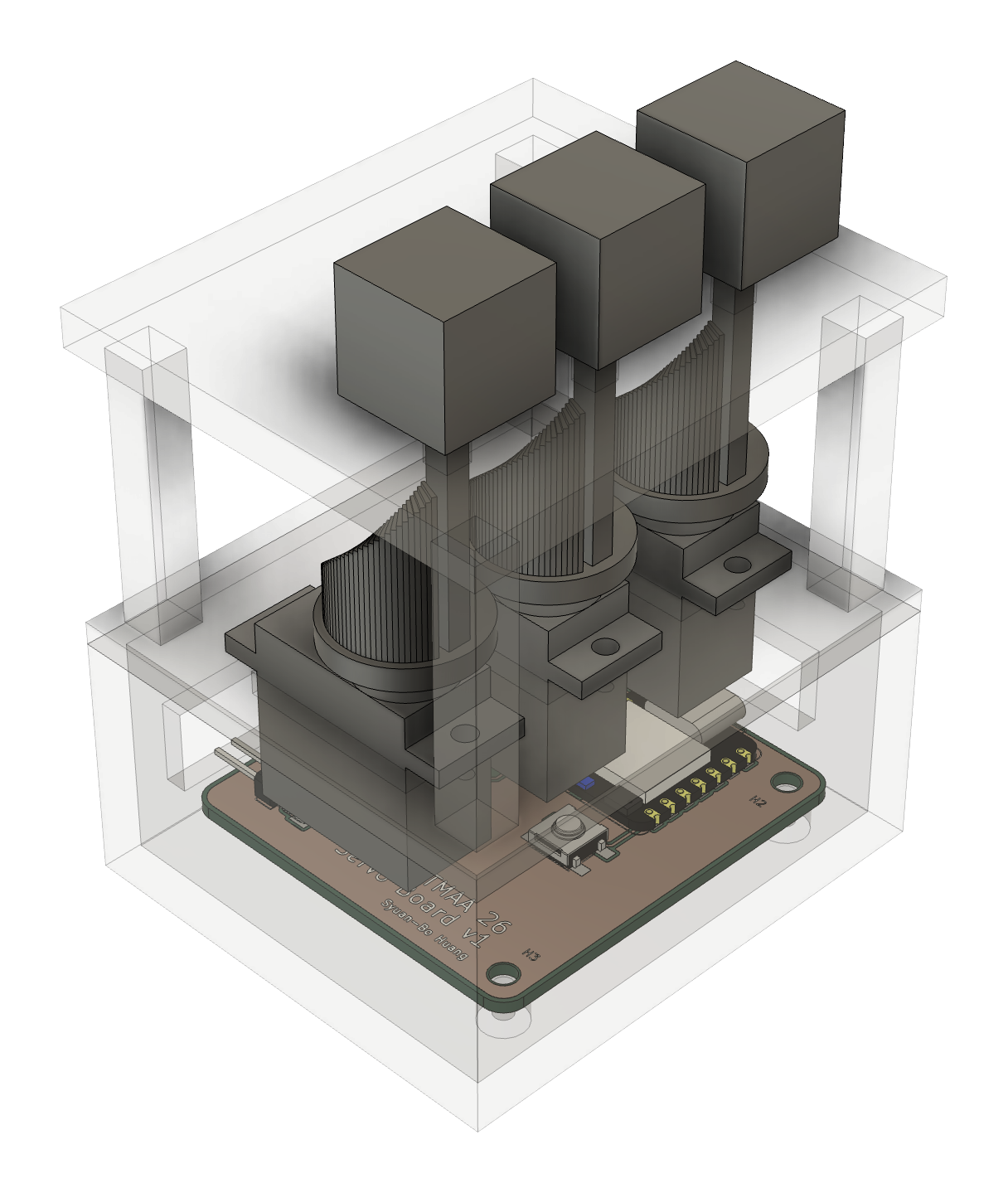
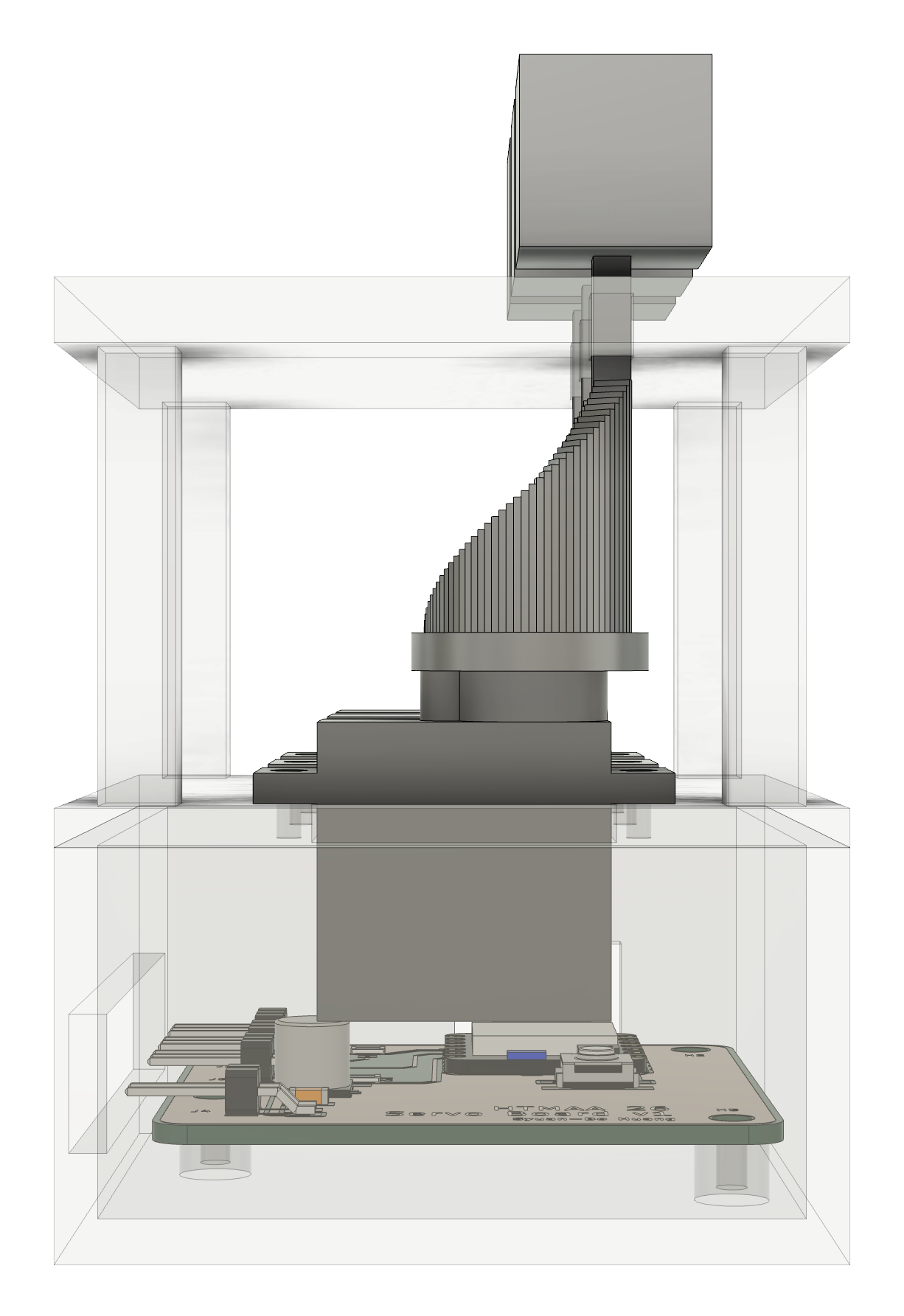
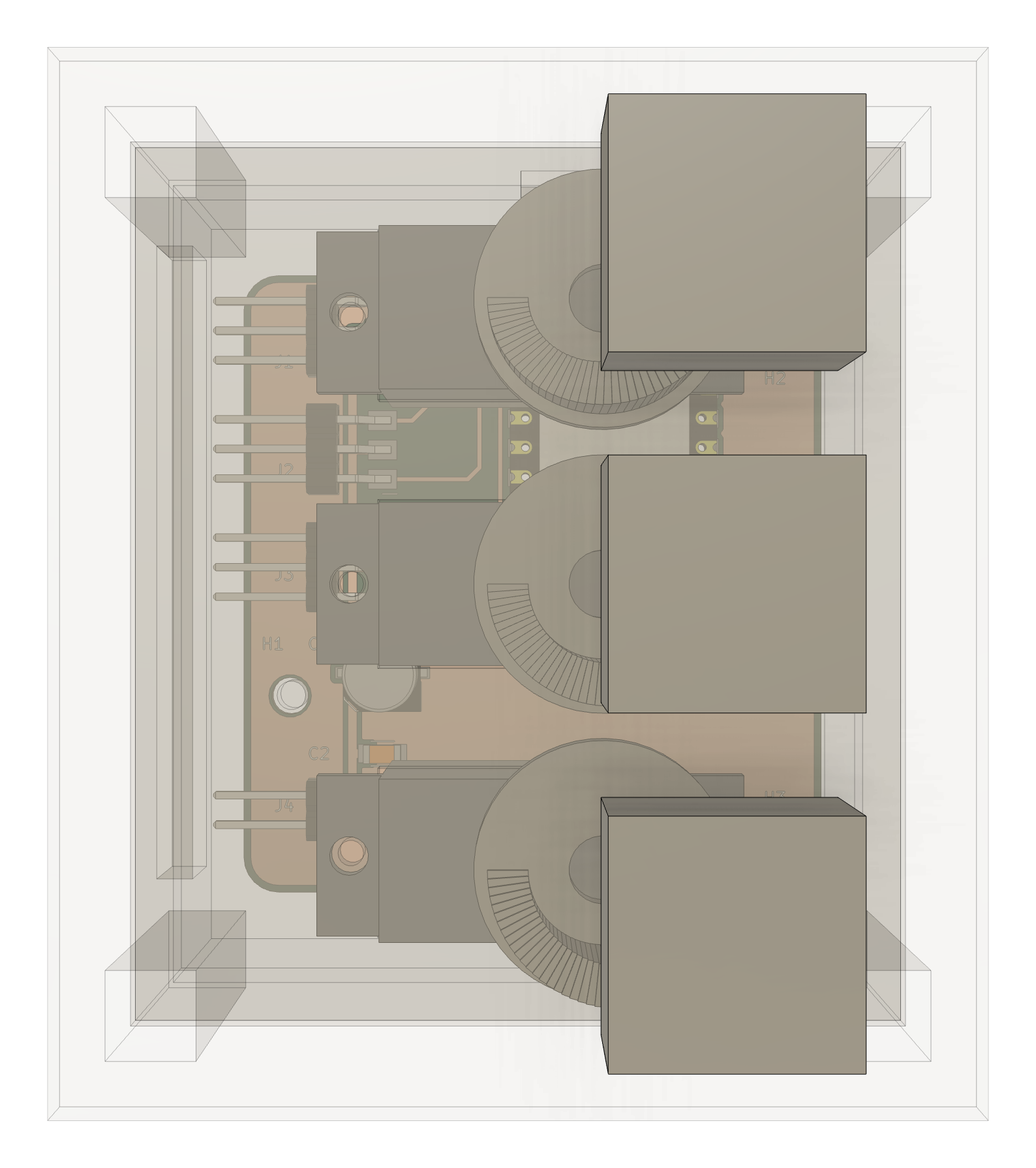
The three holes in the board are for a base that I modeled in Fusion. I exported the board from KiCad as a STEP file (with copper, pads and silkscreen) and placed it in the Fusion model, so the holes line up with the standoffs. For the servos, I downloaded a community MG90S STEP model (Micro Servo MG90S on Printables).
The base has three layers. The board sits on three M3 standoffs at the bottom, with an opening for the USB-C plug and one for the servo cables. Above it, a deck holds the three servos, which hang through it by their tabs and stand 21 mm apart. A platform on four legs sits on top. Each servo turns a stepped spiral cam, and a pin rides on the cam. The pin is a thin square stem with a 15 mm cube (a voxel) on top, so it moves up and down about 20 mm when the servo turns. The sizes are Fusion user parameters, so I can change them later.
06
AI usage
I used Claude (Claude Code) as a mentor and as a pair programmer.
- Schematic and layout: Claude placed the parts and wires in KiCad through Konnect, an MCP server that lets an AI assistant read and edit KiCad schematics and boards. I checked each step and asked it to explain what every part and net does. I made the decisions about the button, the jumpers, the board size and the corners, and I changed the pour corners and moved the board file in KiCad by hand.
- Base: I describe the direction I want, Claude builds it in Fusion through the Fusion MCP server (it runs Fusion API scripts in my open design), and then I fine-tune the result myself. I downloaded the servo STEP model myself.
- Hero video: Claude made the video at the top of this page and on the home page with scripts. It rendered the 3D board with
kicad-cliin eleven stages on a scratch copy of the board (bare board, then each part added), then composed the frames in Python: the parts drop in by shifting the new pixels down, and the labels are drawn on top. Python also draws the background and the reflection, andffmpegencodes the video. I chose the idea of building the board part by part, the labels and the background, and I rejected versions where the board was off-centre or the text sat on the board.