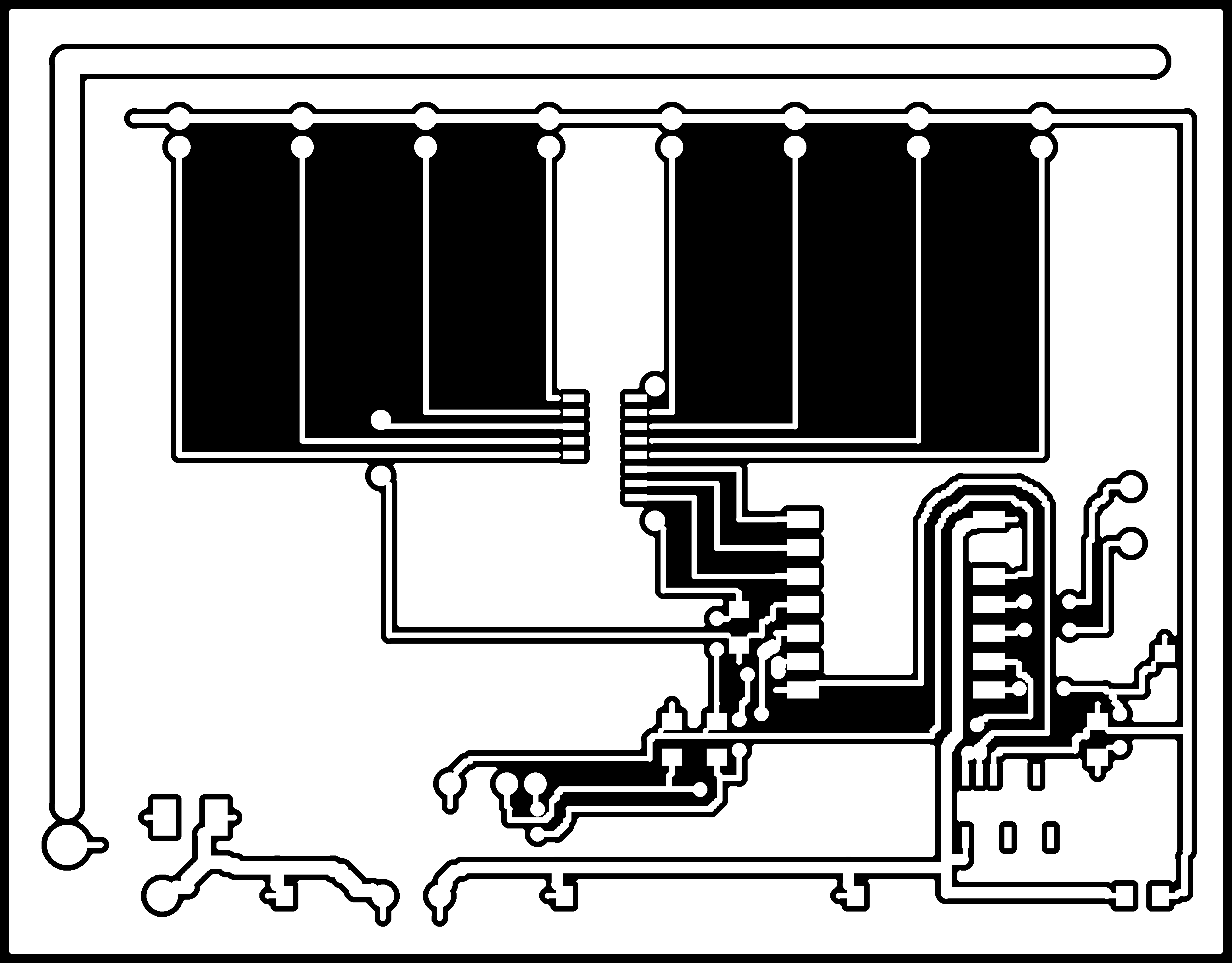
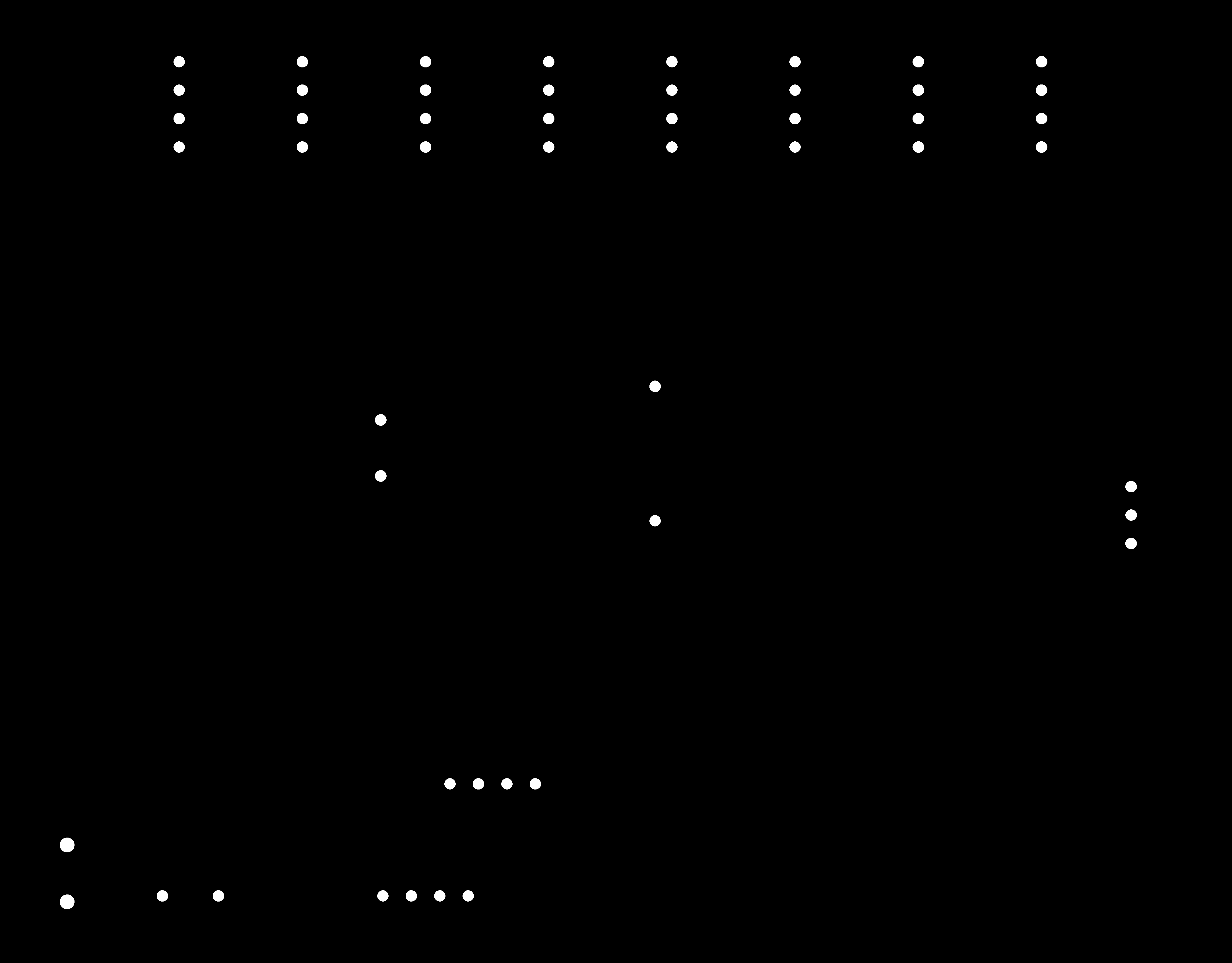
Teaching my robot which legs it has
For my final project, I want to be able to move the legs around on a robot without manually updating its model each time. My plan is to put a resistor in each leg module. The body board reads the voltage across a simple divider to identify the type of leg in each port, or whether the port is empty. An analog multiplexer lets me read all eight ports with a single ADC pin.
This week's assignment was to design a microcontroller board in an EDA tool and run the design rule checks. I used it to work on the body board for my final project. It needs to identify the connected legs, communicate with up to eighteen servos on a shared bus, read an IMU and pass information to a laptop.
I also decided to write my own small EDA tool in Python. It was fun, although the design rule check eventually told me that the board isn't ready to mill yet.
What I've checked so far
Before getting into the design, an important distinction: I haven't made or tested this board yet. The current layout fails the milling clearance check. The voltage margins and timing results below come from calculations and simulations, not measurements on hardware.
| Question | What I've done | Status |
|---|---|---|
| Can the board distinguish the four leg states? | Calculated worst-case divider voltages, including 1% resistor tolerances and mux on-resistance. The smallest margin to a threshold is 252 mV. | Calculated |
| Is the RP2040 ADC accurate enough? | Compared the margin against published RP2040 ADC measurements taken on a different board. | Estimated from third-party data |
| Can I scan all eight ports quickly enough? | Estimated the RC settling time and checked it with an ngspice transient. | Calculated and simulated |
| Can the RP2040 safely receive the 5 V servo bus at 1 Mbps? | Calculated the receive divider levels and simulated the waveform in ngspice. | Calculated and simulated |
| Can the copper carry current for six walking legs? | Used IPC-2221 to size the 12 V rail. The trace alone is too narrow, so the design needs a soldered wire. | Calculated |
| Can the board be milled with a 1/64" end mill? | Ran a clearance check on the 1000 dpi copper image. | Fails DRC |
| Does an actual leg identify correctly when plugged in? | Not tested yet. | Pending |
| Can eighteen servos communicate reliably on one bus at 50 Hz? | Not tested yet. | Pending |
| Can firmware reject unreliable readings during insertion or removal? | Designed a confirmation scheme, but haven't written or tested the firmware. | Proposed |
Once the board is built, I'll start by checking the divider voltages with a bench supply and multimeter. The more useful test will be with all eight ports connected, six legs drawing current, and the servo bus running at 1 Mbps. I want to compare the port readings with the robot idle and under load. In particular, I need to see whether the bus introduces noise into the ID lines and how much of the calculated 252 mV margin is left.
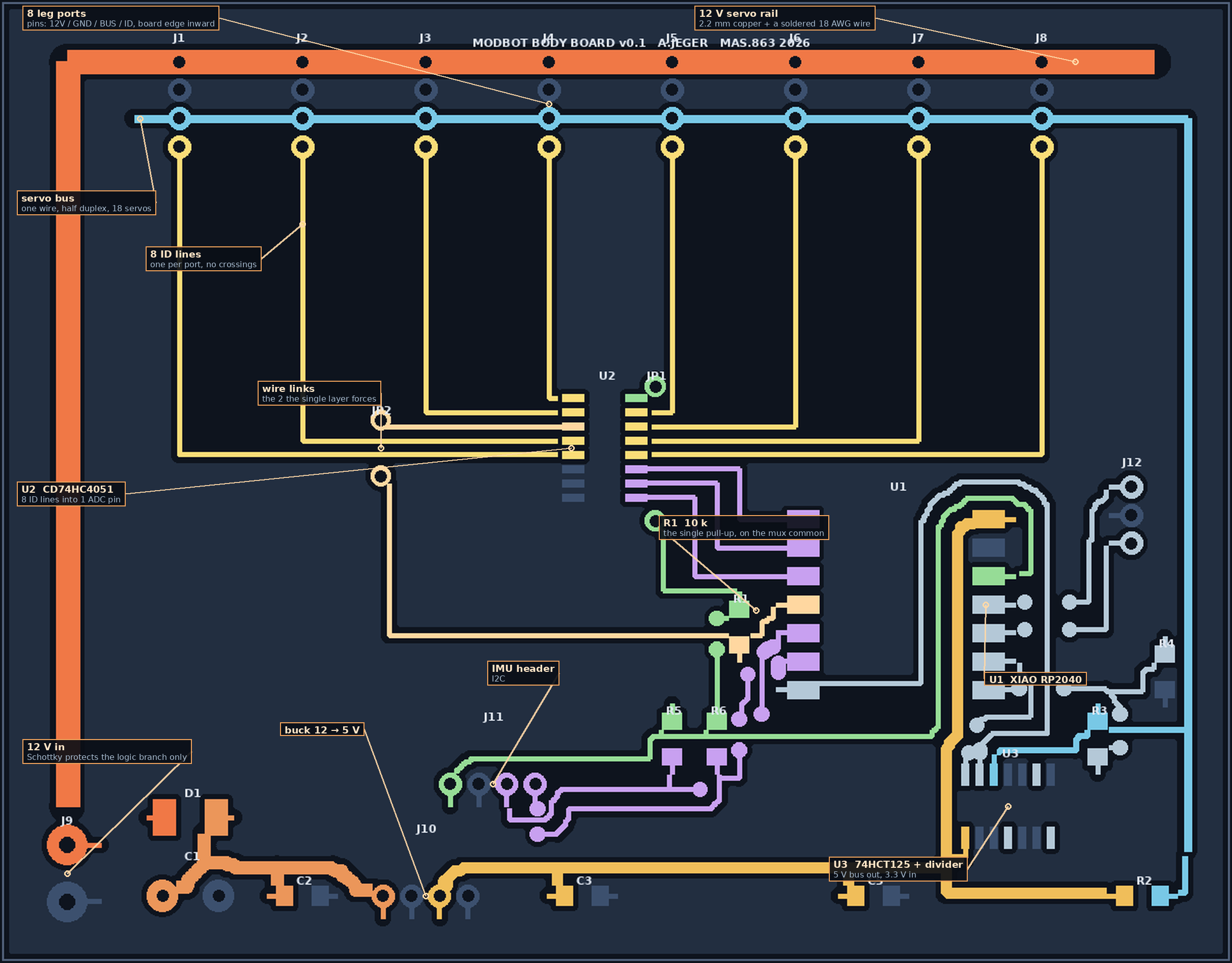
What the board needs to do
| Job | Approach |
|---|---|
| Detect which leg is in each port | A resistor in each leg and a pull-up resistor on the board form a voltage divider. |
| Read eight ports without using eight ADC pins | An 8-to-1 analog mux uses three select lines and one ADC pin. |
| Control up to eighteen servos | One daisy-chained half-duplex TTL bus. |
| Measure orientation | An I²C header for an IMU breakout. |
| Supply the servos | A 12 V rail from the bench supply to the leg ports. |
| Communicate with the laptop | XIAO RP2040 over USB. |
From a plugged-in leg to a simulation model
The idea is to turn a simple electrical measurement into a description the controller can use.
| Step | What happens |
|---|---|
| 1. The leg | Each module has a resistor between its ID pin and ground: 22 kΩ for a short shin, 10 kΩ for the default and 4.7 kΩ for a long shin. |
| 2. The board | A 10 kΩ pull-up to 3.3 V sits at the mux common output. The selected leg resistor completes the divider, and the ADC measures the voltage. An empty port stays near 3.3 V, giving me a fourth state. |
| 3. The firmware | Select a port, wait 10 µs, take the median of several ADC readings and compare it against three thresholds. Repeat for eight ports to get a list of empty, short, default or long. |
| 4. The laptop | Combine those eight values with the known port positions and feed them to the same body generator I use in simulation. It produces an MJCF model and the body description for the controller. |
What this can and can't identify
The board won't measure the robot's shape directly. It will identify which encoded leg type is plugged into each port. For my experiment, that should be enough, as long as the resistors match the physical modules.
Each port is read separately through the mux, so the result is a list of eight values rather than a single measurement. Two robots with different encoded leg arrangements should therefore produce different lists.
There are still a few limitations:
- Legs with the same resistor look identical. If I make a longer shin but forget to change its resistor, the board will report the wrong model. I need to keep the resistor assignments and part dimensions in sync.
- It identifies types, not individual modules. Swapping two identical default legs won't change the reading, which is fine for interchangeable parts.
- It doesn't tell me whether a leg works. A resistor will still read correctly if a servo is dead. I'll separately ping the servo IDs to check which actuators respond.
- It doesn't detect damage or changes in geometry. A bent link, worn joint or incorrect orientation won't show up in the voltage. The connector is keyed, so orientation is handled mechanically; the other problems need different checks.
In short, it's a way for the robot to report its modular configuration, not a general-purpose shape sensor.
Will the voltage levels be far enough apart?
I calculated the divider voltages with resistor tolerances and the mux's on-resistance included. There are three numbers worth separating (the calculations are in margins.py):
| Quantity | Value | Meaning |
|---|---|---|
| Nominal separation | 595 mV | The smallest gap between ideal voltage levels. |
| Worst-case gap | 505 mV | The gap between adjacent voltage bands with 1% resistor tolerances and 0–400 Ω mux on-resistance included. |
| Minimum margin to a threshold | 252 mV | The distance from the nearest worst-case band edge to the threshold. About 313 ADC counts. |
The useful number is the margin to the decision threshold, not the full gap between bands. I put each threshold halfway between the nearest edges of the two worst-case bands:
T_i = ( V_i,max  +  V_i+1,min ) / 2

M_i = min( T_i - V_i,max ,  V_i+1,min - T_i )

guaranteed margin = min over all boundaries of M_i
That gives the following thresholds and margins:
| Boundary | Threshold | T − Vmax | Vmin − T | Margin |
|---|---|---|---|---|
| long shin | default | 1.381 V | 252 mV | 252 mV | 252 mV |
| default | short shin | 1.977 V | 278 mV | 278 mV | 278 mV |
| short shin | no leg | 2.798 V | 502 mV | 502 mV | 502 mV |
The distances are equal on both sides because I chose the thresholds at the midpoints. I checked this explicitly rather than assuming that half the nominal gap would be the margin. Using round thresholds of 1.4, 2.0 and 2.8 V would lower the minimum margin to 234 mV, about 7% less, so I'll use the calculated values in the firmware.
My first calculation gave 564 mV, but I had treated the gap as the decision margin and left out the mux's on-resistance. With both corrected, the minimum margin is 252 mV. The ADC's nominal step size is 0.806 mV.
I also looked at the RP2040's ADC performance. A third-party characterisation reports around 1 LSB RMS noise, but considerably larger differential and integral nonlinearity (8.9 and 7.85 LSB). Averaging can reduce the random noise; it won't remove systematic conversion errors. The reported effective resolution is about 8.9 bits.
Even allowing roughly 10–12 counts for ADC error, the calculated 313-count margin looks promising. But those ADC figures came from someone else's board. I'll need to measure the four voltage bands on mine, both with the supply quiet and while the servos are drawing current, before trusting the classifier.
What happens when a leg is only partly plugged in?
A half-seated connector could give an intermediate voltage that happens to look like another leg type. I don't want the robot to interpret that as a real change in configuration.
My proposed firmware will accept a new configuration only after five consecutive, fully valid scans of all eight ports agree. If any reading is too close to a threshold, it resets the count.
Scan all eight ports. Accept the configuration only after five consecutive valid scans return the same eight-port result. If any reading falls in a guard band, start the count again.
I originally considered using both guard bands and hysteresis, but I don't need both for something that is only read at startup or when I explicitly request a rescan. Here's the simpler version:
| Mechanism | Plan |
|---|---|
| Guard bands | Reject readings within ±20% of the corresponding gap around each threshold: 1.280–1.482 V, 1.865–2.088 V and 2.597–2.999 V. |
| Confirmation | Require five consecutive matching scans at a planned 1 kHz scan rate, or about 5 ms of agreement. |
| Latching | Read the configuration at startup or on request, not continuously while walking. |
| Cross-check | Compare the number of detected legs with the servo IDs that respond on the bus. |
There are two other practical issues. The connector pins are all the same length, so I can't guarantee which contact mates first; readings during insertion or while the power rail is settling won't be reliable. Hot-plugging also causes inrush current into a leg's capacitors. For this first version, I'll power the robot down before swapping legs. Supporting hot-plugging or self-reconfiguration later would need additional hardware, not just a firmware change.
For now, this is a firmware plan. I haven't implemented it yet.
Checking the servos is a separate problem
Reading a resistor tells me the declared leg type at a port. Pinging the servos tells me which servo IDs respond. Both are useful, but because all the ports share one bus, a ping can't tell me which port an individual servo is plugged into.
One basic check is to compare counts. If the board reports three legs, I expect nine servo IDs to respond. Eight or twelve would indicate a problem, and I'd stop the experiment rather than start with a configuration I don't trust. It still wouldn't prove that each responding module is connected to the port I think it is.
To associate individual servo IDs with individual ports, I'd need to switch or gate the bus separately at each port. That would add an analog switch or buffer enable per port and more control lines (or another mux). I'm leaving that for a possible v0.2.
There's also a difference between a servo answering and a joint actually working. The STS3215 reports its position, so a future startup test could command a small motion and see whether the reported angle changes as expected. That might catch certain actuator or transmission faults, but it still wouldn't measure the actual link length.
| Check | What it would tell me | What it wouldn't tell me |
|---|---|---|
| Resistor ID | Which encoded leg type is connected to each port. | Whether the resistor still matches the leg's real geometry. |
| Servo ping | Which servo IDs respond, and whether the number matches the expected modules. | Which physical port each servo is connected to. |
| Motion self-test | Potentially whether an actuator responds to a small commanded movement. | All mechanical faults or the actual link dimensions. |
| Geometry verification | Not something this board measures. | A wrong or bent link can still produce a perfectly valid resistor reading. |
For the transfer experiments, I'll need to be careful about this. The MJCF generator trusts the resistor table, so whenever I change a physical link length, I also need to update its assigned resistor and model parameters. Otherwise the model and the hardware quietly stop matching.
Four design decisions
1. One pull-up instead of eight
I could have used a separate pull-up resistor for every port. Instead, I put one on the mux's common output. Only the selected leg is connected to it, so this saves components and, more importantly, avoids routing a 3.3 V line to all eight ports on a single-layer board.
The trade-off is that the mux's on-resistance, roughly 250 Ω, is now in series with the leg resistor. I included that in the voltage calculations:
| Leg variant | Resistor | Nominal voltage | 12-bit reading |
|---|---|---|---|
| no leg | open | 3.300 V | 4095 |
| short shin | 22 kΩ | 2.269 V | 2815 |
| default shin | 10 kΩ | 1.650 V | 2047 |
| long shin | 4.7 kΩ | 1.055 V | 1309 |
The smallest nominal difference is 595 mV. With the resistor tolerances and mux resistance included, the worst-case gap is 505 mV and the minimum threshold margin is 252 mV. That looks comfortably above the 10%-of-full-scale separation I originally aimed for between nominal bands. The full calculation is in the margin section.
2. Protecting the RP2040 from the 5 V servo bus
The Feetech servos use 5 V logic, but the RP2040 uses 3.3 V GPIO and isn't 5 V tolerant. I need to translate the signal in both directions.
Transmit: I chose a 74HCT125 buffer powered from 5 V. The HCT part matters because its input-high threshold is compatible with a 3.3 V signal. A standard HC buffer running at 5 V expects around 3.5 V for a guaranteed high, which would be too close for comfort. One GPIO enables or tri-states the driver so the bus can switch between transmitting and receiving.
Receive: A 3.3 kΩ / 6.8 kΩ resistor divider brings the bus signal back down to a safe voltage. The bus also has a 2.2 kΩ pull-up, so I included the loading from the divider in the calculations and simulated the result below.
3. Reinforcing the 12 V rail
With six legs walking, I'm planning for roughly 11 A. That's far too much to put through an ordinary narrow milled trace. I used IPC-2221 to estimate the trace widths needed for 1 oz copper and a 20 °C temperature rise:
| Current | Required trace width | Example |
|---|---|---|
| 0.5 A | 0.08 mm | logic |
| 1.8 A | 0.44 mm | one walking leg |
| 5.4 A | 2.02 mm | three legs |
| 11.0 A | 5.39 mm | six legs |
The rail is 2.2 mm wide in the layout, about the most I can fit past connectors on a 2.54 mm pitch. By that estimate it can carry around 5 A, not 11 A, so I'll solder 18 AWG wire along the rail to carry the extra current. I'll still need to verify the finished power path under load.
The SS34 Schottky protects only the logic branch against reverse polarity. It isn't rated to handle the full servo current, and a suitable series diode would also dissipate significant heat. For v0.1 I'm using a keyed screw terminal for the 12 V input instead.
4. Arranging pins to make the routing possible
The board will be milled on one side of FR1, which means no vias and no second copper layer. If two traces need to cross, I have to use a zero-ohm jumper or a wire link. I wanted to avoid having dozens of those.
The biggest improvement came from rearranging the leg connector pins. Each one goes 12 V, GND, BUS, ID from the board edge inward, and all eight connectors are on the same edge. This lets the shared power and bus lines run together while the individual ID lines head toward the mux. Ground is handled by a copper pour.
For the ID lines, I mapped nearby ports to the higher-numbered mux channels. That let me route all eight lines without crossing one another or the traces coming down from the connectors.
Checking the circuits in ngspice
I used ngspice for two questions I didn't want to answer from rough estimates alone.
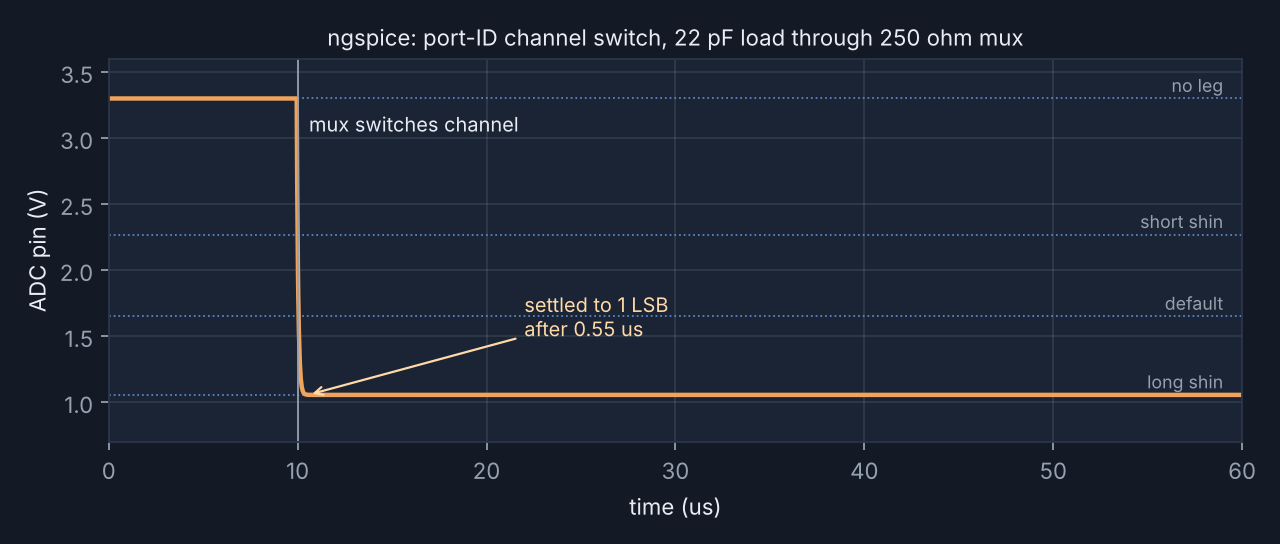
How long should the ADC wait after changing mux channels? I modelled roughly 250 Ω of mux on-resistance and 22 pF of capacitance at the ADC. The simulation switches from an empty port at 3.3 V to a long-shin port at 1.055 V and measures how quickly the voltage settles to within one ADC LSB.
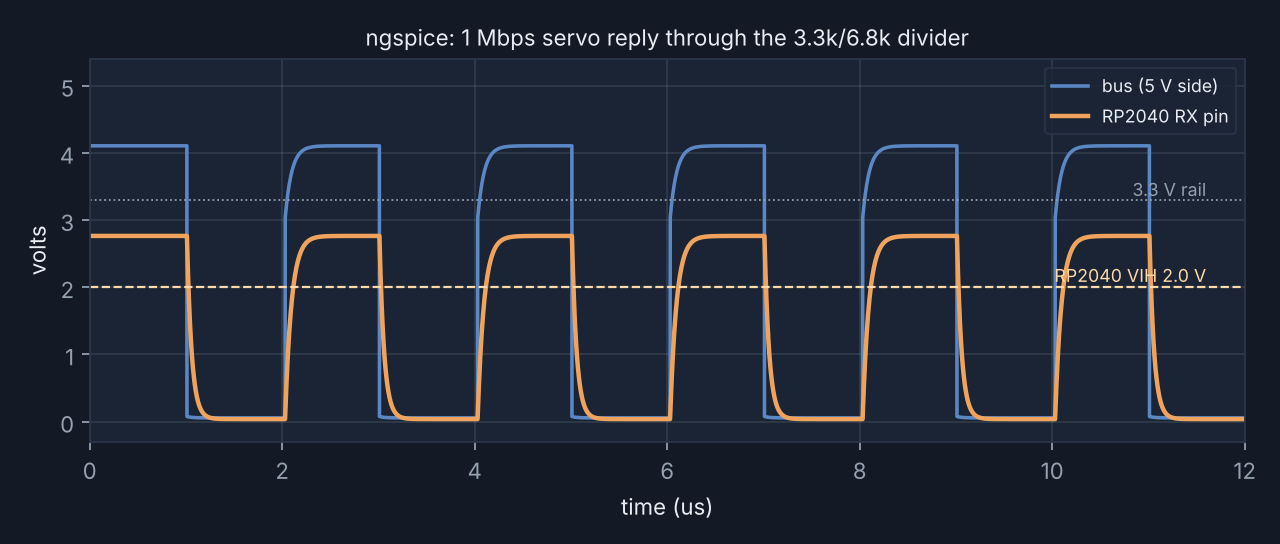
Does the receive divider still work at 1 Mbps? The 2.2 kΩ pull-up and 10.1 kΩ receive divider load each other. The calculated bus idle level is about 4.2 V, which becomes 2.76 V at the RP2040 input. That's above the 2.0 V high threshold used in my check, with around 760 mV of margin, and below 3.63 V. A low bus level gives about 38 mV at the input.
Building my own EDA tool
I made the layout in Python instead of drawing it in a GUI. I've been using parametric scripts for the other assignments, and I wanted to see whether I could do the same for a PCB, including a design rule check that looks at the actual image sent to the mill.
The code is split into two files. fab.py handles footprints, copper shapes, the ground pour, routing, DRC and exporting. bodyboard.py defines the parts and their placement, with the dimensions kept as parameters.
b = Board(110, 86, Rules(mill_d=0.4, min_trace=0.4, min_clear=0.4, edge_clear=0.8))
b.set_pour("GND")

HDR4 = header(["P1", "P2", "P3", "P4"])
for i, x in enumerate(PORT_X):
    place(f"J{i+1}", "leg port", HDR4, x, 76.7,
          dict(P1="+12V", P2="GND", P3="BUS", P4=f"ID{i}"))
Design rule checking
For a milled board, I need to know whether the cutter can fit between separate nets and whether the remaining copper features are wide enough to survive. I wrote the check to run on the 1000 dpi raster, which is also what the mill will use.
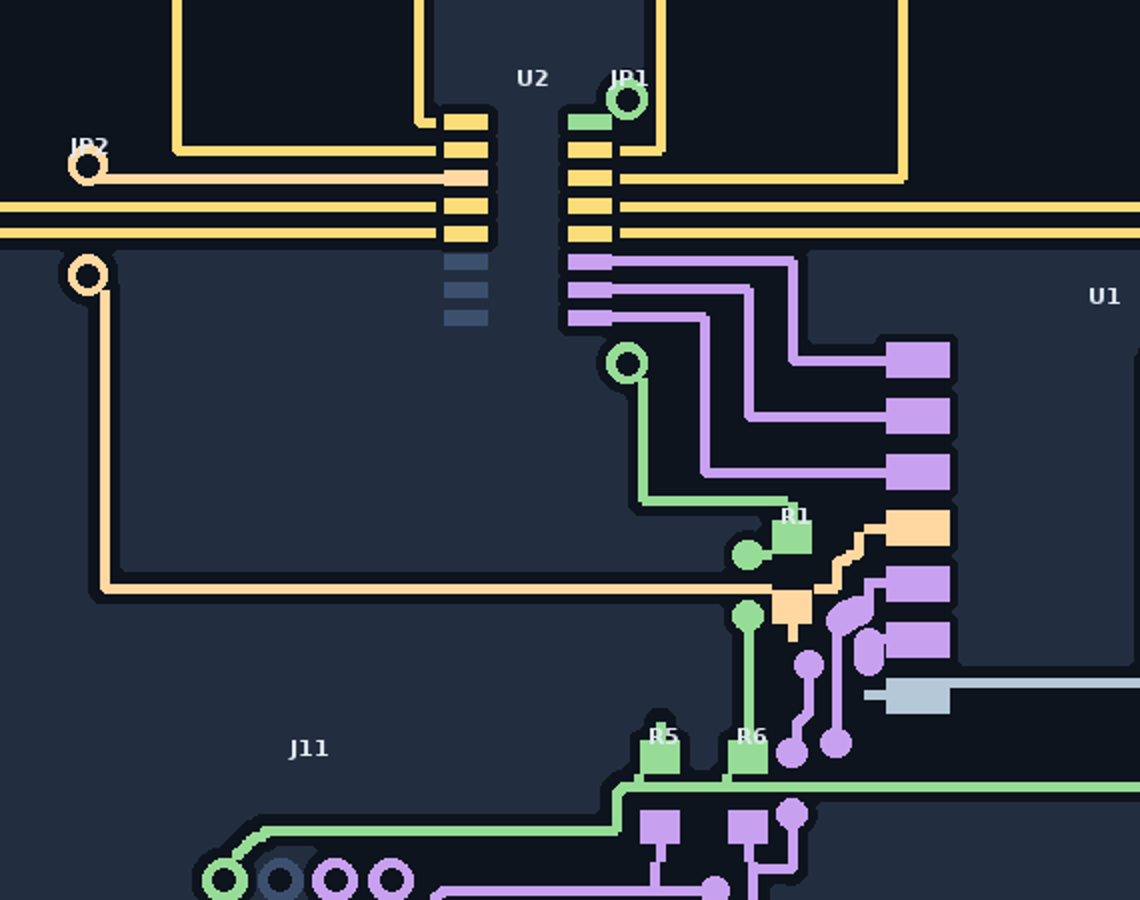
The tool renders nets separately, calculates the distance from each one to the others, and reports the smallest clearances with their locations. It also checks copper widths and the edge keepout. Here's the current result:
DRC  bodyboard v0.1  110.0x86.0 mm, 30 nets, 283 copper shapes, 51 drills
  smallest gap between different nets : 0.025 mm (need 0.4)  FAIL
  copper inside 0.8 mm edge keepout  : 0 px  PASS
   ! TX / TXEN_N   0.025 mm at (86.9, 19.3)
   ! SCL / SDA     0.102 mm at (47.9, 13.1)
   ! RXD / TXEN_N  0.127 mm at (91.6, 24.6)
   ! BUS / TX      0.330 mm at (88.5, 18.7)
   ! +3V3M / ID4   0.381 mm at (59.4, 51.6)
   ! +3V3 / IDSENSEX 0.381 mm at (63.9, 28.7)
  -> FAIL
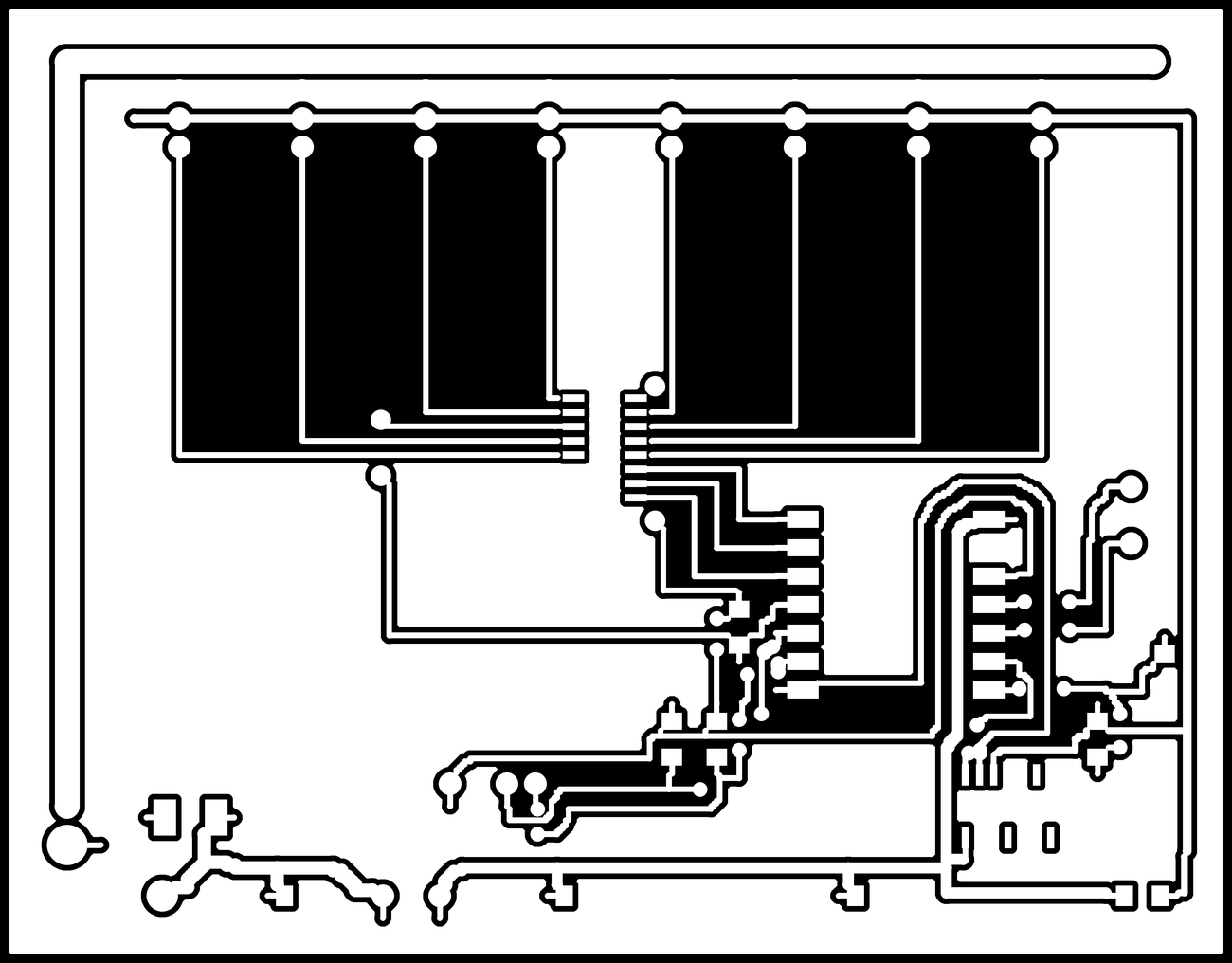
The board doesn't pass yet, so I haven't milled it. Six pairs of nets are closer together than the 0.4 mm clearance I set. The worst is TX against the buffer enable, with just 0.025 mm between them. Most of the problems are clustered around the XIAO's UART pins, the bus buffer and the receive divider.
Next I want to open up that corner by about 10 mm, move the divider farther from the buffer, and reroute TX so it doesn't share a narrow lane with the enable signal. Then I'll run the DRC again before trying to mill anything.
Routing and wire jumpers
Manually routing thirty nets on one layer got tedious, so I wrote an A* maze router on a 0.25 mm grid. It first tries to find paths that respect the milling clearances. If a net can't be routed without crossing another one, it tries again with a penalty for crossings and adds a wire link where needed.
Two bugs took a while to sort out. Fine-pitch pins need short escape traces before the main router takes over, otherwise the path can run too close to a neighbouring pin. I also had a one-pixel offset between the raster and routing grid. At 1000 dpi that's 0.025 mm, which explains why so many early DRC failures had exactly that size.
The current layout has 17 links: two I placed deliberately and fifteen added by the router. The two deliberate ones get the mux's common output and supply past neighbouring channel traces. Seventeen is more than I'd like to solder, especially since many of the additional links are near the same crowded part of the board. Hopefully fixing the component placement will reduce that number as well as the DRC errors.
Parts
| Qty | Part | Package | Purpose |
|---|---|---|---|
| 1 | XIAO RP2040 | module | Microcontroller; same one I used in Week 3 |
| 1 | CD74HC4051 | SOIC-16 | 8-to-1 analog multiplexer for the ID lines |
| 1 | 74HCT125 | SOIC-14 | 5 V servo-bus driver with 3.3 V-compatible input thresholds |
| 1 | SS34 | DO-214AA | Reverse-polarity protection for the logic branch |
| 1 | 470 µF, 25 V | radial | Bulk capacitance for servo current steps |
| 3 | 100 nF | 1206 | Decoupling |
| 6 | 10k, 2.2k, 3.3k, 6.8k, 4.7k ×2 | 1206 | ID pull-up, bus pull-up, receive divider and I²C pull-ups |
| 8 | 1×4 header | 2.54 mm | Leg ports |
| 3 | 1×4, 1×4, 1×3 header | 2.54 mm | IMU, buck module, status LED and button |
| 1 | screw terminal | 5.08 mm | 12 V input |
I'm keeping the 12 V-to-5 V buck converter and IMU as separate modules. A switching regulator needs a more careful layout than I want to attempt on a milled single-layer board, and the IMU package is also awkward to fabricate this way. I'll check the exact modules against the lab inventory before ordering.
The unused 74HCT125 inputs and enables are tied to ground so they don't float.
Reproducing the design
pip install numpy scipy pillow
sudo apt install ngspice

python3 checks.py            # resistor margins and trace-current calculations
ngspice -b id_sense.cir      # mux settling
ngspice -b bus_rx.cir        # receive divider at 1 Mbps
python3 bodyboard.py         # route, run DRC, export PNGs, netlist and BOM
python3 render.py            # annotated board render
bodyboard.py takes about four minutes on my machine, mainly because the DRC runs a distance transform for each net over a 4331 × 3386 image. It exports traces, outline and drill images at 1000 dpi for mods, as well as a KiCad-format netlist and a BOM. I'd like to import the netlist and check the layout in KiCad too, as a second check on my own tooling.
These are the milling constraints I'm currently using:
Rules(mill_d=0.4,      # 1/64" end mill
      min_trace=0.4,   # minimum copper width
      min_clear=0.4,   # room for the cutter between nets
      edge_clear=0.8,  # copper-to-board-edge clearance
      dpi=1000)
What I'd change next time
I should have spent more time arranging the components before routing anything. I put them down roughly and tried to make the traces fit afterwards, which is how I ended up squeezing the UART, buffer and divider into the same corner.
I also hadn't appreciated how much connector pin order matters on a single-layer board. Changing the pin assignments removed more crossings than trying to get clever with the routes. That's something I'll plan around from the beginning next time.
Files
| bodyboard.py | Board definition, placement and routing order |
| fab.py | Footprints, copper pour, DRC, router and exporters |
| checks.py | Voltage levels, resistor tolerances and trace-current estimates |
| margins.py | Classification margins, thresholds and guard bands |
| id_sense.cir, bus_rx.cir | ngspice simulations |
| bodyboard.net | KiCad-format netlist |
| bodyboard_bom.csv | Bill of materials, including jumper wires |
| drc_report.json | DRC output, including failures |
| traces, outline, drill | 1000 dpi fabrication images; don't mill this revision until DRC passes |
| render.py | Annotated board render |