

Week 3
EMBEDDED PROGRAMMING
Inspiration
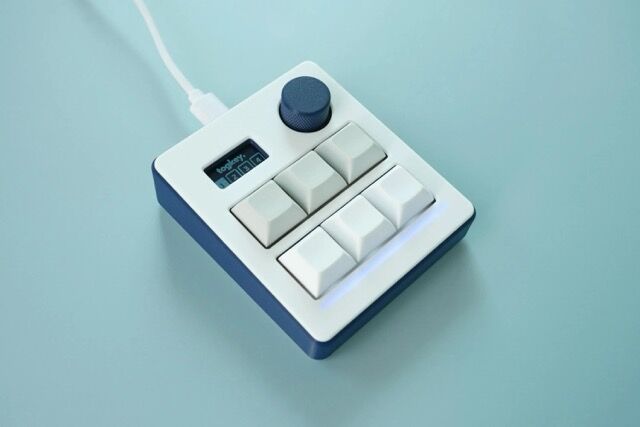
I considered coding a game, but I realized it probably has minimal use to me after the assignment. I love the concept of vim and the ability to control your computer without the use of a mouse/trackpad. I haven’t completely detached from my trackpad yet, but I’m an avid keyboard shortcut user. Thus, I decided to create my own macropad. A macropad is essentially a small keyboard with programmable keys to enable shortcuts. The purpose is to improve productivity by reducing multiple cursor clicks or multi-key shortcuts into a 1-click button. Here’s an example of a typical macropad sold online.
Layers
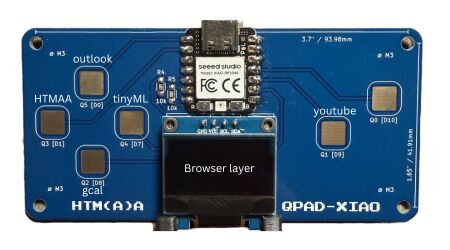
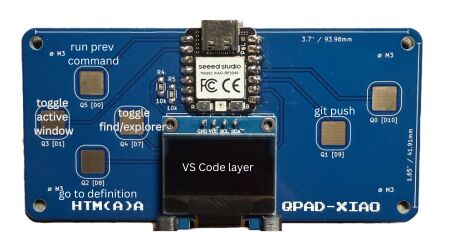
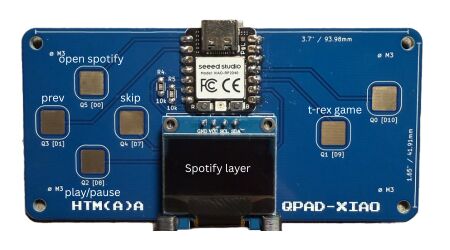
In thinking of shortcuts that I want to implement, I realized I have more than 6 so I decided to create multiple layers instead. My top 3 applications are Safari, VS Code, and Spotify. For Safari, I figured the shortcuts would be my most visited pages such as Outlook, Google Calendar, Youtube, the HTMAA website, and the TinyML site. For VS Code, I decided to automate toggling between cycling between the different active windows, toggling between finder and explorer, going to definition, running the previous terminal command again (for example, useful for npm run dev if I do not have hot reload on or ./run.sh for this project since I have to upload to the MCU everytime I edit the code), and lastly turning git push into a physical action. Yes, many of these commands already have keybindings due to VS Code’s extensive customizability for keyboard shortcuts. However, my mechanical keyboard requires a separate fn key to be pushed in order to type ‘`’, making cycling between windows extremely unintuitive. I suppose I could reassign the shortcut, but I have too many existing keybindings + it’s so easily acessible on my laptop keyboard. This is also a similar issue for Spotify. Play/pause, prev song, and skip are conveniently accessible at 1 click on my laptop keyboard, but on my mechanical keyboard, there is yet again a separate fn key that must be pressed to control my music. Thus, here are the mappings of my shortcuts.
Idle Screen
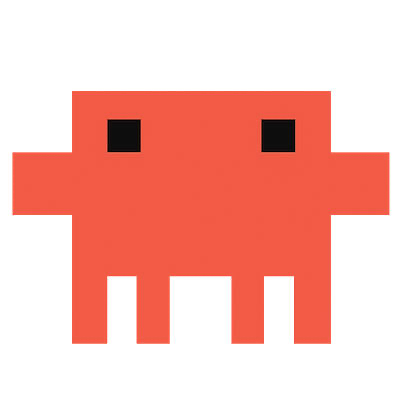
I wanted an idle screen while I’m not particularly using the QPAD. Some things I thought would be useful is the ETA of the next 2 tech shuttles to my stop (Grad Junction West). I also wanted a weather overview, but only for the data that I actually care about (high/low, feels like temps, overall weather forecast, and max UV index). Lastly, I wanted a little creature, I chose to model one after Clawd, Claude’s mascot, because it’s relatively easy to model
Implementation
In order to establish 2-way data communication, I have a python script keeping a daemon running which monitors the USB serial wire. The purpose of a daemon is to avoid taking up CPU by maintaining an asynchronous I/O loop so it basically sleeps until there is some input. For the idle screen, it wakes up every minute to poll the PassioGo API and the weather API and update the information. The most difficult part of this was figuring out the correct ID for the MIT agency system, Route ID, and Stop ID.
For the layers, the active layer is stored as a state cycling between Spotify, Safari, VS Code, and then back to Spotify. All of the shortcuts are implemented via AppleScript, which is a fairly simple and readable language used to interact with my Mac’s OSA. For example, it ‘tells’ Spotify to activate which would focus on the spotify window and bring it to the front or launch it if it’s not open. The Safari shortcuts all open a new tab in the frontmost window and navigate to the corresponding link. The VS Code extensions are all possible due to the existing keybinding support which are activated by the button press.
For rendering text/images, I utilized the u8g2 library which maintains all of the ascii details for text and iterated for drawing simpler boxes and lines. Animating Clawd, however, proved to be slightly difficult with ug82 so I utilized AI to create bitmaps of the poses and it cycles between these poses to create an animation.