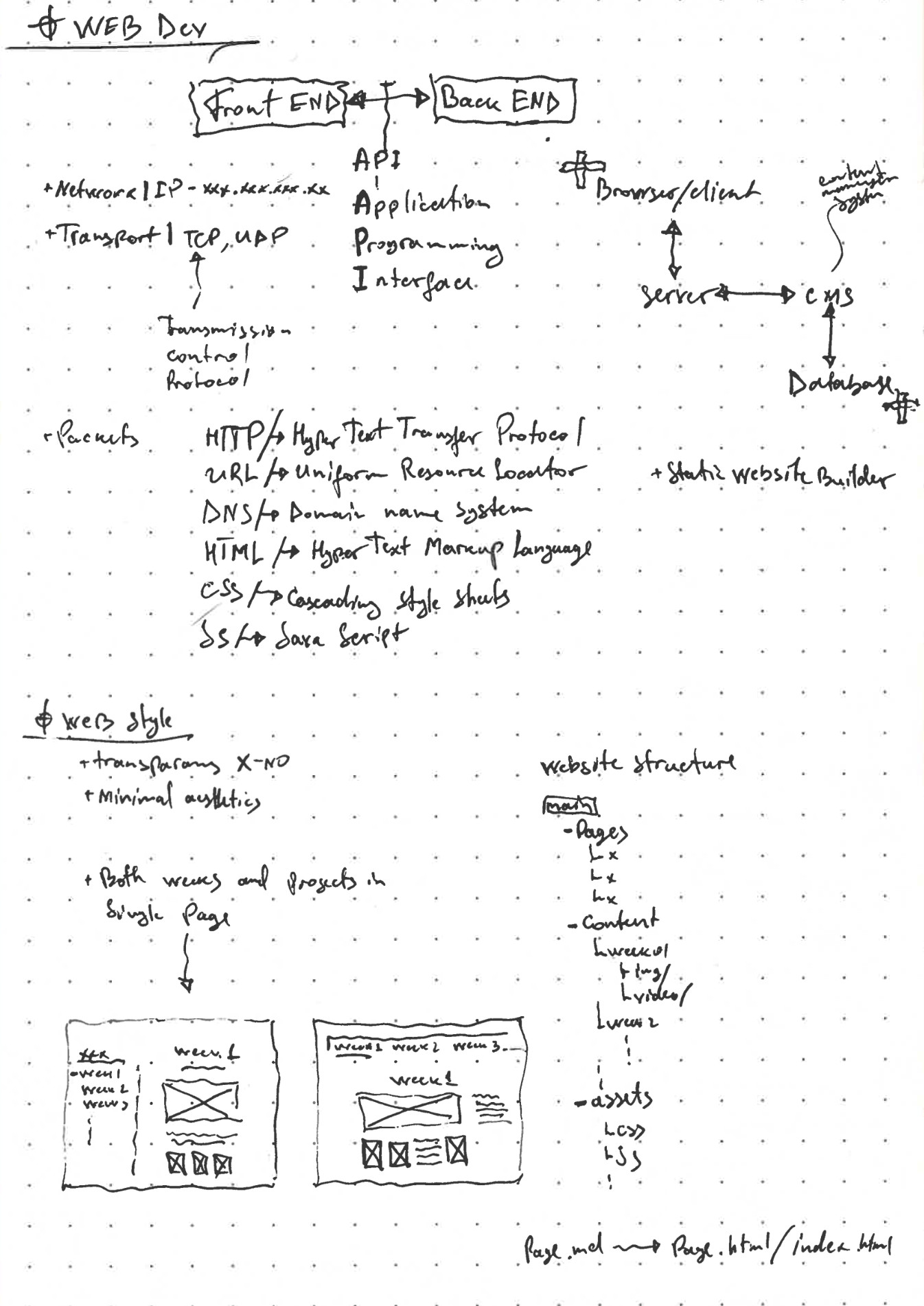
To start base of my website I started structuring my website:
- dark only, monochrome, no accent color
- monospace font (IBM Plex Mono), terminal feeling
- left sidebar with all weeks, content column in the middle
- one folder per week, one
.mdfile per page
Folder structure
index.md                  home
content/
  about/  final/
  week_00 … week_13/
    index.md  →  index.html
    img/  00_Name.jpg
    vid/  00_Name.mp4
assets/  css/  js/  img/
_dev/    build.py  serve.py  template.html
Media is numbered in the order it was made (07_KerfTestV1.jpg). Bigger weeks get a subfolder per topic (img/printing/, img/scanning/). _dev/ stays local and never goes to the repo.
Progression
09/16 · starting point
<body>
Nijat Mahamaliyev's fab class home page
</body>
Base design
Colors and font live in one place, everything else uses them.
:root {
  --bg: #0b0b0b;
  --fg: #d2d2d2;
  --fg-hi: #f4f4f4;
  --fg-dim: #8a8a8a;
  --mono: "IBM Plex Mono", "Courier New", monospace;
}
.shell { display: grid; grid-template-columns: 300px minmax(0, 1fr); }
.main  { max-width: 920px; margin: 0 auto; }
Every page starts with a front matter. draft weeks show up greyed out in the sidebar and aren't linked yet.
---
week: 03
date: 09/30
title: 3D Scanning and Printing
status: done
---
Each page gets a small terminal prompt on top.
PS1 = "root@nijat:~/MIT/HTMAA26F$"
prompt = f'<p class="prompt"><span class="ps1">{PS1}</span> cat {page["file"]}</p>'
On the home page the commands type themselves out, once per visit.
var tick = function () {
  if (j < texts[i].length) {
    cmds[i].textContent += texts[i].charAt(j++);
    setTimeout(tick, 50 + Math.random() * 70);
  } else {
    i++; j = 0;
    setTimeout(tick, 450);
  }
};
Images and layout
Images on the same line = one row, a new line = a new row. All images in a row get the same height and the row fills the column.
 

The build reads each image's ratio and the CSS does the rest.
w, h = Image.open(path).size
fig = etree.Element("figure", {"style": f"--r:{w / h:.4f}"})
.row        { display: flex; gap: 12px; }
.row figure { flex: var(--r) 1 0; }
.row img    { width: 100%; aspect-ratio: var(--r); }
The page also follows the .md layout: line breaks, extra blank lines and indents show up the same way I type them.
Videos
YouTube links become embeds.

Safari wouldn't play my videos locally because the preview server didn't answer byte-range requests.
if self.headers.get("Range", "").startswith("bytes="):
    return self.send_range(path)
Videos are compressed before they go in.
ffmpeg -i in.mov -c:v libx264 -crf 26 -preset slow -vf scale=-2:720 -an -movflags +faststart out.mp4
Stale pages + favicon
After a push, browsers kept showing old pages (the server sends no cache headers). Now every build writes an id, and each page checks it and reloads once if it's outdated.
fetch(new URL("../version.txt", script.src), { cache: "no-store" })
  .then(function (r) { return r.text(); })
  .then(function (live) { if (live.trim() !== build) location.reload(); });
The favicon is the stone-arrow from my vinyl cut.
Vimeo + arrow keys
return f"https://player.vimeo.com/video/{id}?dnt=1"
In full-screen images, ← → go to the previous/next image.
if (ev.key === "ArrowRight") show(at + 1);
if (ev.key === "ArrowLeft") show(at - 1);
md → html
_dev/build.py reads every index.md, converts it and drops it into one shared template.
meta, body = parse_front_matter(src.read_text())
md = markdown.Markdown(extensions=["toc", "fenced_code", "tables", "nl2br", MediaExtension(src.parent)])
values = {"sidebar": sidebar(page, site), "header": header(page), "content": md.convert(body)}
html = re.sub(r"\{\{(\w+)\}\}", lambda m: values[m[1]], template)
<aside class="side">{{sidebar}}</aside>
<main class="main">
  <header class="page-head">{{header}}</header>
  <article class="content">{{content}}</article>
</main>
The ## headings become the small index under the current week in the sidebar.
Live preview
python3 _dev/serve.py
It serves the site at localhost:8000, rebuilds on every save and reloads the open tab. I keep it open next to the .md in VS Code (Simple Browser).
while True:
    time.sleep(0.4)
    if snapshot() != last:
        last = snapshot()
        build.build()
        version += 1
setInterval(function () {
  fetch("/__version").then(function (r) { return r.text(); })
    .then(function (t) { if (v === null) v = t; else if (t !== v) location.reload(); });
}, 600);
AI usage
Claude Code was used to help writing and expanding the website code (build script, preview server, CSS, JS) from my sketches, decisions and screenshot feedback, and to compress media.